|
Author
|
Message
|
|
dan_422114
|
dan_422114
Posted 5 Years Ago
|
|
Group: Forum Members
Last Active: 2 Years Ago
Posts: 16,
Visits: 249
|
Contractor has delivered some models where the finger axis are wrong. 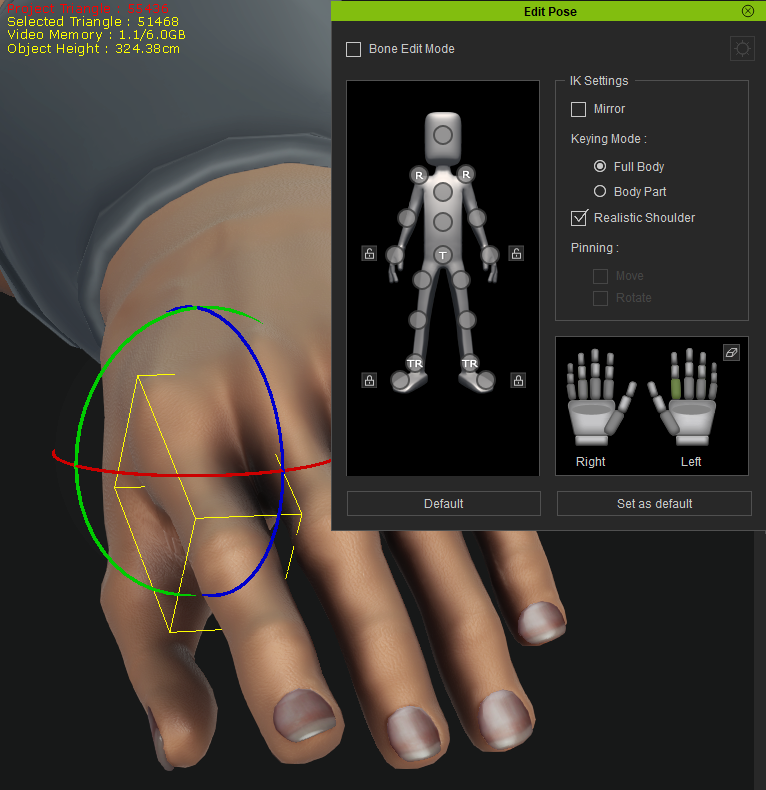 I suspect this is a result of several round trips with zbrush and the bind pose changing along the way, then CC recalculating the axis incorrectly. There is no option to adjust the bone's roll in "Adjust bones" 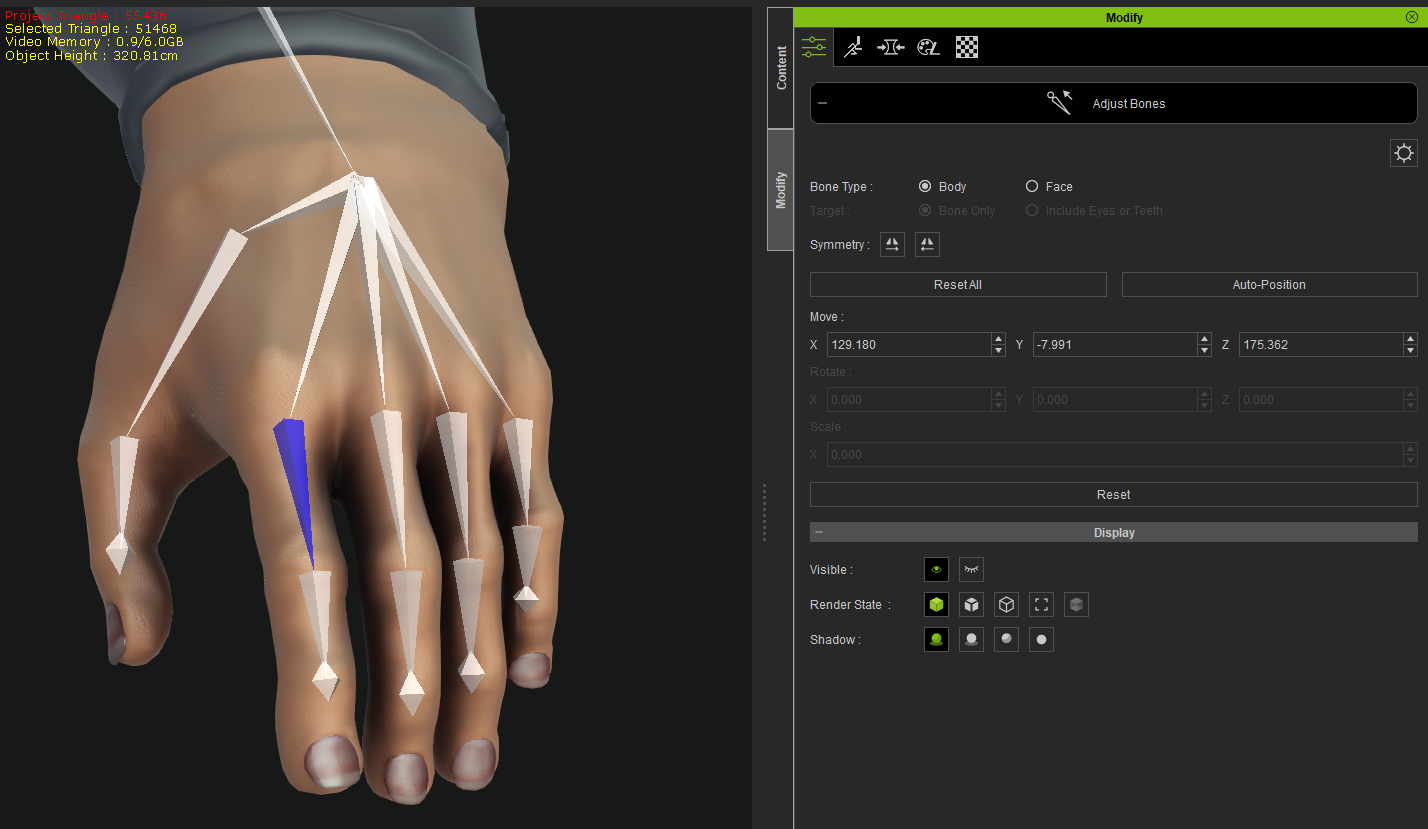 Any ideas how I can fix this? Thanks
|
|
|
|
|
4u2ges
|
4u2ges
Posted 5 Years Ago
|
|
Group: Forum Members
Last Active: 2 Weeks Ago
Posts: 5.3K,
Visits: 16.8K
|
That is correct, no need to fix it. In CC bones rotation is Local and is not relevant to Global axis direction. (that is true for any character, not only yours)
|
|
|
|
|
dan_422114
|
dan_422114
Posted 5 Years Ago
|
|
Group: Forum Members
Last Active: 2 Years Ago
Posts: 16,
Visits: 249
|
Playing the same animation on both my model and the default model gets different finger orientations (look at the finger nails): 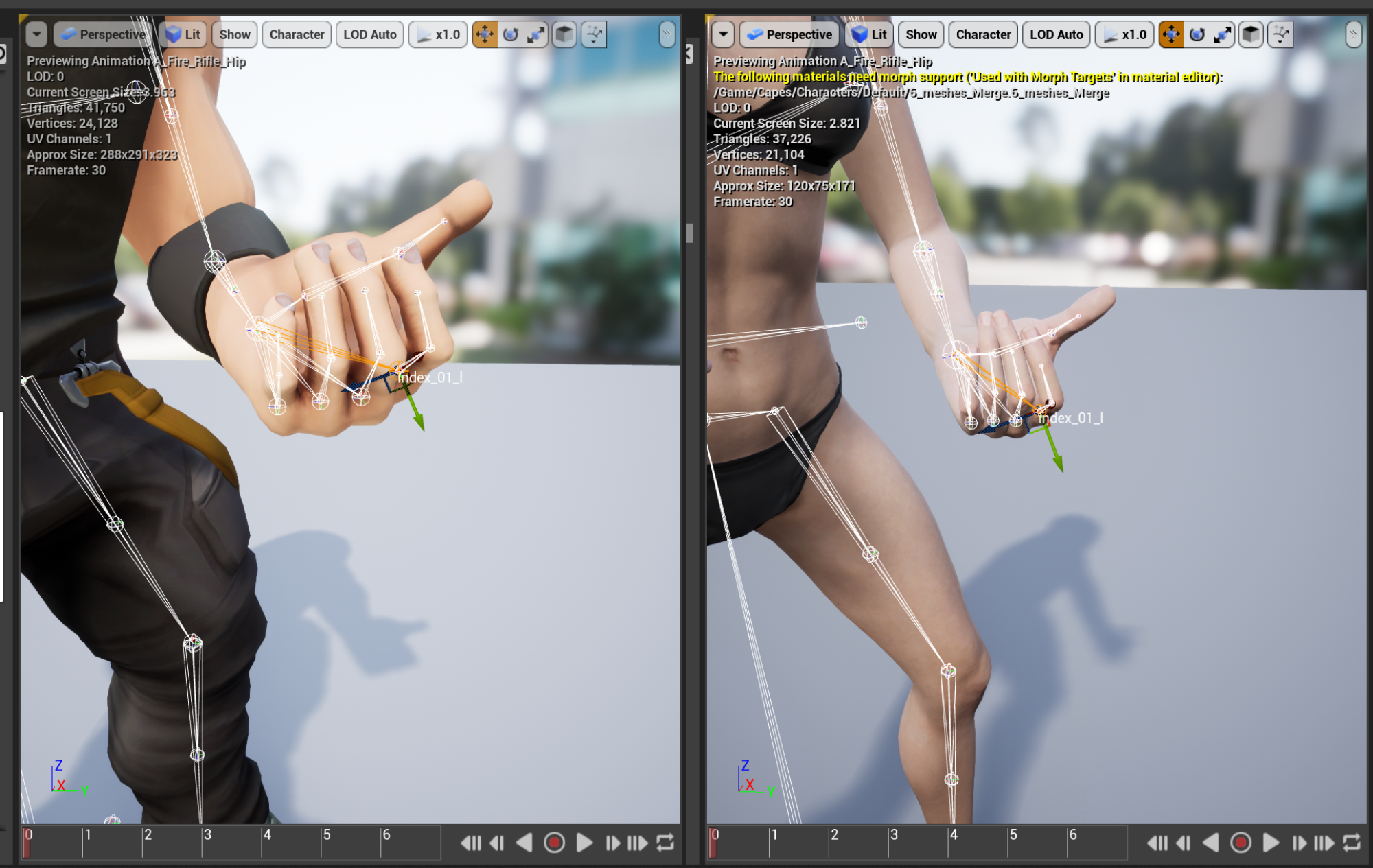 When the model hits unreal the local axis of the finger is incorrect. It should be closer to my scribble on the right based on the pose of the finger. 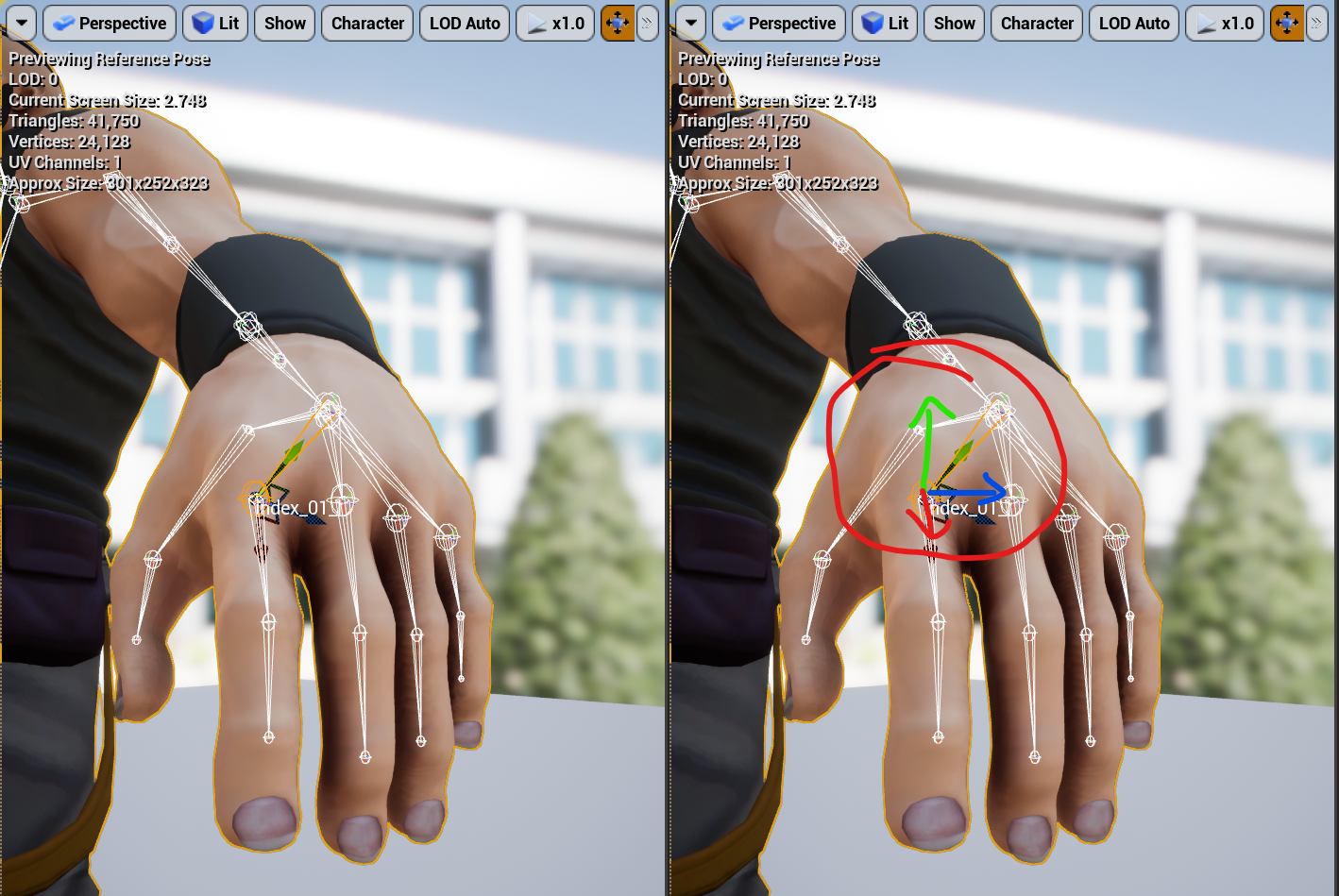 The default model has correct rotation axis in cc and in unreal 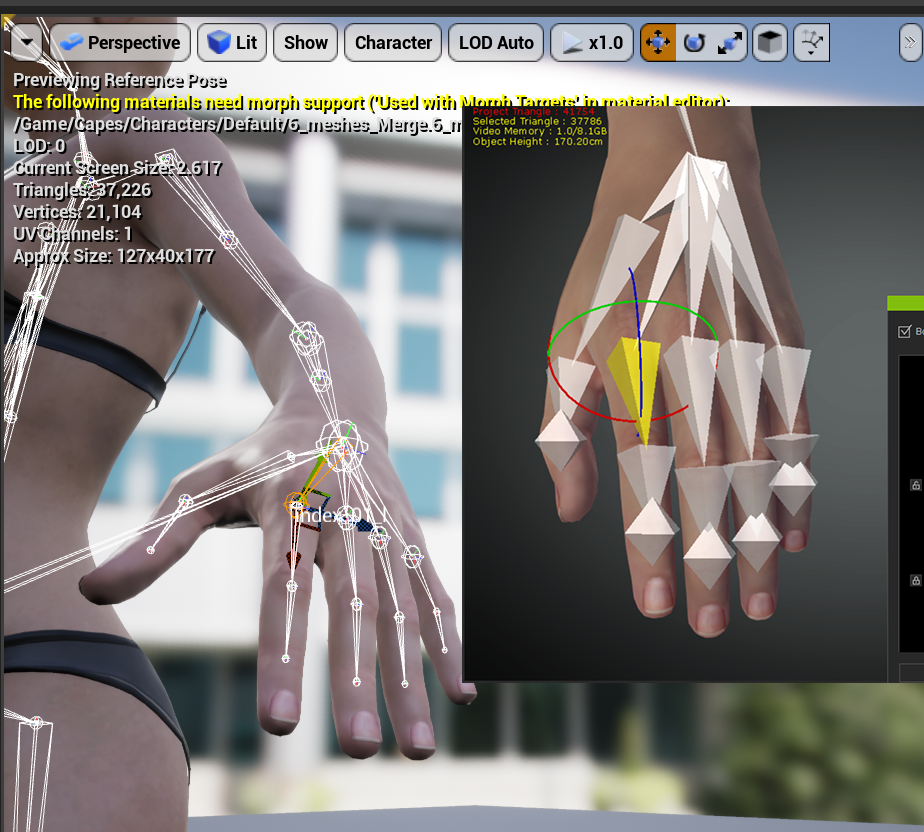
|
|
|
|
|
justaviking
|
justaviking
Posted 5 Years Ago
|
|
Group: Forum Members
Last Active: 2 Years Ago
Posts: 8.2K,
Visits: 26.5K
|
It won't provide an immediate solution, but I suggest you report this as a Bug in Feedback Tracker.
Good luck.
iClone 7... Character Creator... Substance Designer/Painter... Blender... Audacity...
Desktop (homebuilt) - Windows 10, Ryzen 9 3900x CPU, GTX 1080 GPU (8GB), 32GB RAM, Asus X570 Pro motherboard, 2TB SSD, terabytes of disk space, dual monitors.
Laptop - Windows 10, MSI GS63VR STEALTH-252, 16GB RAM, GTX 1060 (6GB), 256GB SSD and 1TB HDD
|
|
|
|
|
4u2ges
|
4u2ges
Posted 5 Years Ago
|
|
Group: Forum Members
Last Active: 2 Weeks Ago
Posts: 5.3K,
Visits: 16.8K
|
Ahh, OK. It was not clear from the first post what was the impact. You may want to try to roll bones straight in Blender. You can do one side only and then use Mirroring in CC Adjust Bones to replicate to the other side. You can also submit to FT as Justaviking suggested, but that could be a long wait with no guaranty for immediate solution. One more suggestion is to try this: https://forum.reallusion.com/FindPost469889.aspx (it would either fix it, or distort fingers even more :))
|
|
|
|
|
dan_422114
|
dan_422114
Posted 5 Years Ago
|
|
Group: Forum Members
Last Active: 2 Years Ago
Posts: 16,
Visits: 249
|
4u2ges (7/13/2021)
You may want to try to roll bones straight in Blender. You can do one side only and then use Mirroring in CC Adjust Bones to replicate to the other side.This works, but it's a tedious step! Also I haven't managed to get the results of a roll change back into CC3, I think it recalculates the roll axis on import, or it's hiding in the fbxkey and remains broken. I have a script in blender to rename the bones to allow mirroring, then rename them back :-) 4u2ges (7/13/2021)
Ahh, OK. It was not clear from the first post what was the impact.I'm glad I managed to describe the problem, thanks for understanding! justaviking (7/13/2021)
It won't provide an immediate solution, but I suggest you report this as a Bug in Feedback Tracker.
Good luck.Thanks! https://www.reallusion.com/FeedBackTracker/Issue/Bone-axis-is-incorrectI did try that, sadly it didn't work. I also tried reposing the model in blender to match the CC3 bind pose (somewhere between a T and A), then applying that as the new bind pose, then re importing to CC3 and they were still wrong, making me think it's stored in the fbxkey over being calculated in import.
|
|
|
|
|
4u2ges
|
4u2ges
Posted 5 Years Ago
|
|
Group: Forum Members
Last Active: 2 Weeks Ago
Posts: 5.3K,
Visits: 16.8K
|
Hmm, yes, hard to judge. But I got another idea. Try to get a "new" armature. Bake sliders (if any were tweaked in CC), then Export as OBJ Nude in Bind Pose, Full Body. Then load Neutral base (respective to your avatar) and apply exported OBJ as a morph slider. Try with and without Adjust Bones checked. But then again, there is an OBJ key. God only knows what it stores. BTW I got Bind pose for CC here just in case: https://forum.reallusion.com/FindPost476255.aspxGood Luck :) BTW: You can "cheat" with FBX/OBJ keys. You can export a neutral base, or any other character with "normalized" bones (which generates a key also) and then use that key to import back your character, or morphs slider.
|
|
|
|
|
4u2ges
|
4u2ges
Posted 5 Years Ago
|
|
Group: Forum Members
Last Active: 2 Weeks Ago
Posts: 5.3K,
Visits: 16.8K
|
Hopefully this would work for you. I messed up finger bones rotation for the left hand and then replaced an armature by applying a morph to neutral base with intentional key swap:
|
|
|
|
|
dan_422114
|
dan_422114
Posted 5 Years Ago
|
|
Group: Forum Members
Last Active: 2 Years Ago
Posts: 16,
Visits: 249
|
4u2ges (7/14/2021)
Hopefully this would work for you.Thank you. I tried it without fixing my bind pose and sadly it didn't work, I tried with and without the adjust bones for morph. I've attached a stripped down version of the character if you want to give it a go and prove me wrong! Thanks for the new strategy of applying as a morph though, I'm sure that'll help me out in the future. 4u2ges (7/14/2021)
I messed up finger bones rotation for the leftOut of interest, how did you mess up the rotations? I'm keen to know how they break in the first place and stay broken! Thanks for all the help so far 4u2ges
|
|
|
|
|
4u2ges
|
4u2ges
Posted 5 Years Ago
|
|
Group: Forum Members
Last Active: 2 Weeks Ago
Posts: 5.3K,
Visits: 16.8K
|
Out of interest, how did you mess up the rotations? I'm keen to know how they break in the first place and stay broken!
I took character to Blender with FBX, rolled one hand finger bones and imported it back to CC
BUT, I looked at your character. Apparently, it's not a problem with rolled bones (at least with the one you have attached). They are all straight in Blender.
There is a problem with badly deformed hands/fingers mesh and armature is just trying to adjust to that mesh. There is nothing you can do with bones here. I have no idea how that happened.
Although you said there was multiple back and forth between CC and Zbrush and then someone else was working on the character.
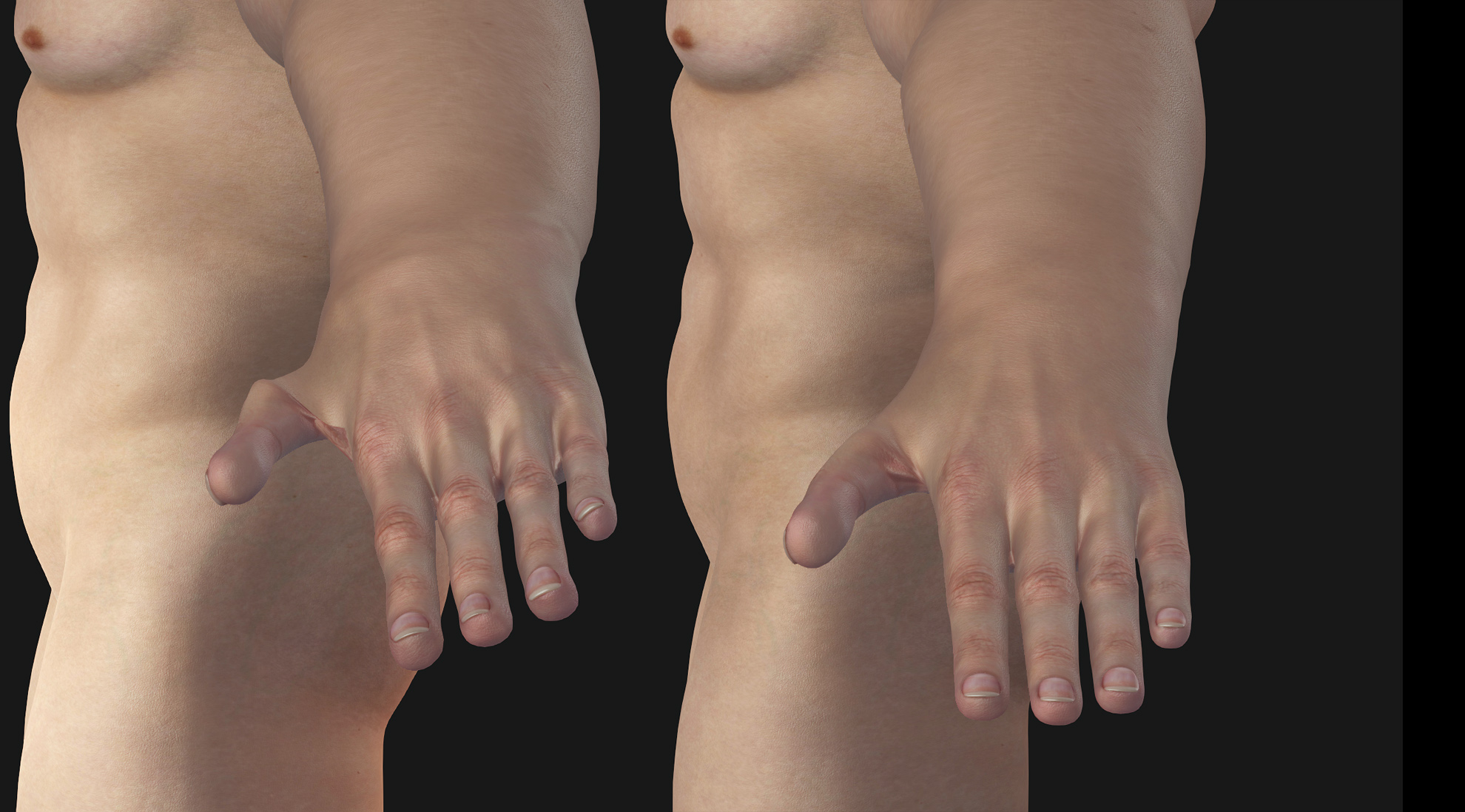
Looks like hand and 4 fingers were rolled somehow, while thumb was static.
Two ways to fix it:
One, is to morph hands/finders straight (or work between bones edit/pose mode in Blender and then bake it). That could be a tedious and quite painful job.
Two, replace hands altogether. Which is what I did. It took me half an hour this morning to do it with this routine: https://forum.reallusion.com/FindPost482754.aspx
Incidentally I was talking about swapping hands to fix deformed nails there yesterday. :)
But your case is a bit unique, because the character is very different from the base. I will post some screenshots later one with this case handling in the other thread.
Meantime you can have this fixed one as a sample, or dress it back and move to UE (forearm/hand is slightly different).
https://drive.google.com/file/d/13gkLz2MQLLaOWlMjBL8fM-pOynhSWTPi/view?usp=sharing
Before and after hands swap:
|
|
|
|