|
Author
|
Message
|
|
stormr
|
stormr
Posted 6 Years Ago
|
|
Group: Forum Members
Last Active: Last Year
Posts: 9,
Visits: 39
|
My CC3 updated again and it broke the link to Zbrush, kinda pissed off that I couldnt remember how I had fixed the link up before, but after much hard work I found the post I saw bewfore on how someone had fixed it, do I tried it and its working fine again. Hope this helps you all out
This is what worked for me:
Force reinstall GoZ from Program Files\Pixologic\ZBrush2019 (or whatever version you want to use)\Troubleshoot Help.
Manually copy over all the GoZ files from Users\Public\Pixologic\GoZApps\CharacterCreator to the character creator folder in Program Files\Reallusion\Character Creator 3\Resource\ICGoZBrush\CharacterCreator (Replace all the existing files with admin permissions. I recommend backing the files up first though, just to be safe.)
The GoZ function in CC3 should work after a restart of the app.
|
|
|
|
|
starakat
|
starakat
Posted 6 Years Ago
|
|
Group: Forum Members
Last Active: 6 Years Ago
Posts: 3,
Visits: 54
|
I can't find the original post where I read this fix, but you can try it if you want: go to C drive>Public>Pixologic>GoZApps>Character Creator and copy everything inside this folder then navigate to your Character Creator 3 folder on whatever drive it's installed on. Go to Resource>ICGoZbrush>Character Creator and copy everything into this folder. Also, you might want to check GoZ_Config.txt has import subtool set to true, not false. 
|
|
|
|
|
Brandt
|
Brandt
Posted 6 Years Ago
|
|
Group: Forum Members
Last Active: 4 Years Ago
Posts: 5,
Visits: 26
|
Oddly enough after 3 months of working perfectly... Also working in ZBrush2020 - sadly it stopped today (so I did get it to work to begin with).
I researched deleting an earlier version of ZB and everywhere I read it said as long as you have the a newer version - everything should work out OK. Zbrush2020 works perfectly - I deleted an earlier 4R7 version I still had up there taking almost 2 gig of info.
However it broke the GoZ pipeline between CC3 and ZBrush2020 (nothing to even do with 4R7 - what I deleted). It even asked me if I wanted to delete GoZ and I said NO - since that concerned me. Since then - running as Admin, Clearing cache, Force reinstalling - NOTHING is working. Starting one program first before another and vice versa - still the same. I get errors on ZBrush's side - whether I click on GoZ or ALL. Get errors on CC3's side - asking me to still confirm my ZB subscription - funny enough, if I have CC3 on when I do this... ZB acknowledges it's running and asks me to shut it down - so it recognizes, just no longer recognizes the pipeline. I've tried everything so far with no advancement - I have a ticket in with support. Why would CC3 look for GoZ in 4R7 VS ZB2020 (especially when it launches me only into ZB2020). Anyway GoZ was one of my of my main reasons to purchase the pipeline - which was a huge investment at a tricky time. I'm concerned when I hear many say - oh I just learned to import it through... and ignore GoZ - that doesn't seem like a fix.
I wonder if I uninstall ZBRUSH2020 and reload it if that would fix the problem (unless it does have an issue with CC3 - which I don't think? But...) Like a file would still be broke in the process - it would suck to have to reload so much customization back into ZB to find out that wasn't the problem - but I would still prefer that VS reloading gigs upon gigs of info back into the pipeline... Seems like such a silly glitch - and I haven't seen any black and white instruction on just how to fix - do the thing and it does a thing... (I see actual instruction for GoZ command fixes for MODO, Maya, 3dMax and even Photoshop - just not the same for CC3 (unless I have just not come across it) - Mostly just a lot of opinions and some people giving up online - Or so and so wrote me and it's fixed (with zero explanation to how it got fixed - lol.) I'm not quite pulling my hair out yet... but really frustrated... Thanks for letting me vent - lol.
|
|
|
|
|
starakat
|
starakat
Posted 6 Years Ago
|
|
Group: Forum Members
Last Active: 6 Years Ago
Posts: 3,
Visits: 54
|
Ok, well I figured it out and the fix for this is really dumb. Instead of installing the path under preferences in Zbrush, you just press GoZ and it magically works. Go figure. If you try to install it again under preferences, you get the error message again. So just press GoZ and it works again!
|
|
|
|
|
starakat
|
starakat
Posted 6 Years Ago
|
|
Group: Forum Members
Last Active: 6 Years Ago
Posts: 3,
Visits: 54
|
I just purchased Character Creator 3 Pipeline mostly for the GoZ functionality,and it won't work. Character Creator will send the model to Zbrush, but Zbrush gives me an error message when I try to install the path to CC3, so I can't send it back. I ran Zbrush as an administrator, but I get the same error. I tried uninstalling and re-insalling both Zbrush and CC3, but same issue. I really don't want to have to ask for my money back so if anyone knows the solution I would greatly appreciate it. I will email pixologic as well, in case the problem is on their end. Without GoZ, cc3 is useless to me, unfortunately. 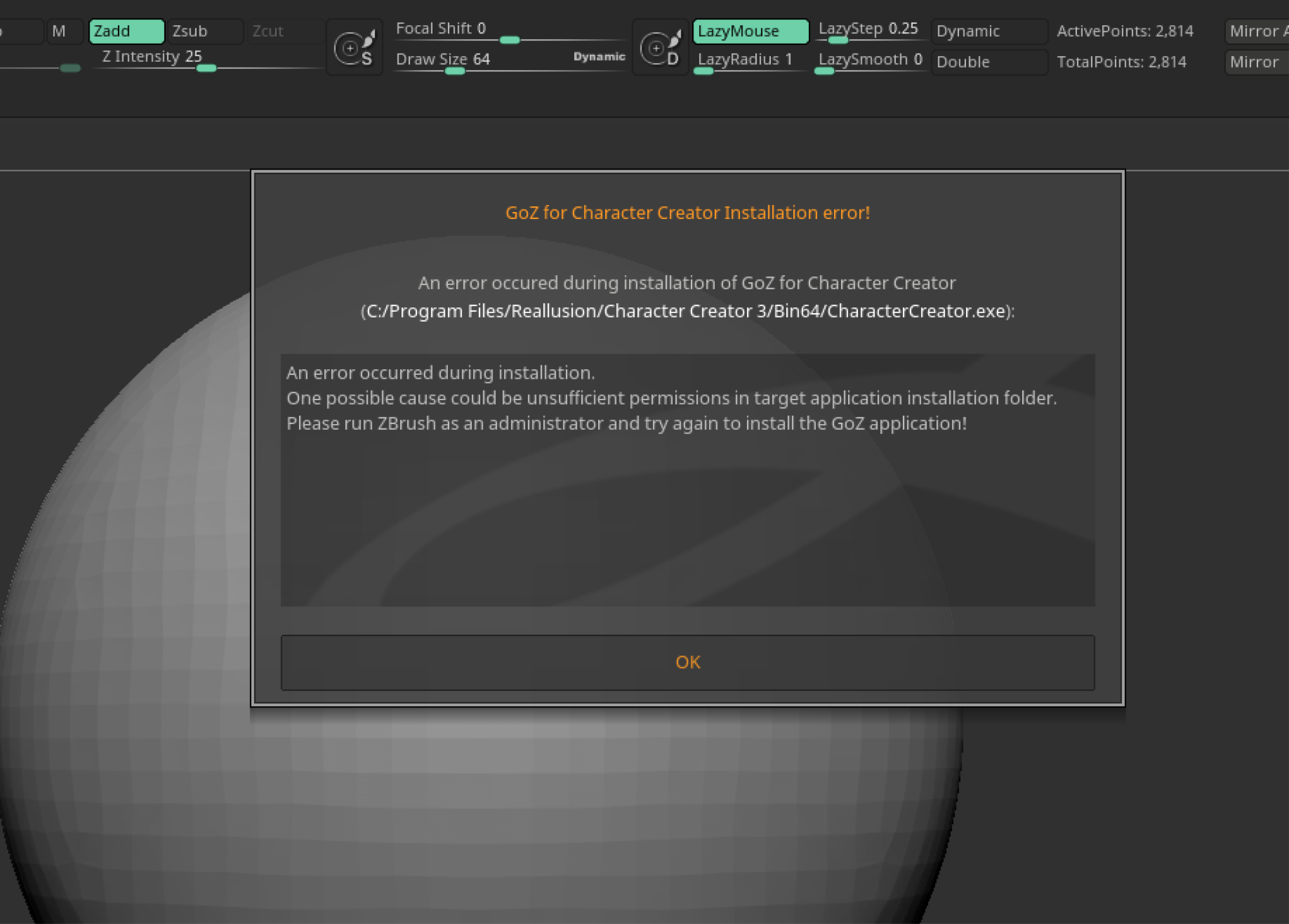
|
|
|
|
|
DavidinLA
|
DavidinLA
Posted 6 Years Ago
|
|
Group: Forum Members
Last Active: 3 Years Ago
Posts: 51,
Visits: 471
|
GoZ no longer works for me either. One computer is grayed out and Zbrush doesn't look for CC and on my other computer CC acts like it's going to work but then says can't find the path. If anyone figures out how to fix Goz then please post as will I if I figure it out. I tried a bunch of obvious stuff like opening as admin, reinstalling Goz, programs off, programs on, etc. Now I'll get on with my life without it for now I suppose.
|
|
|
|
|
art_tijerin
|
art_tijerin
Posted 6 Years Ago
|
|
Group: Forum Members
Last Active: 2 Years Ago
Posts: 66,
Visits: 277
|
Good morning. What's that video stormr? I have a similar problem. Could it be a problem with the latest version of zbrush?
|
|
|
|
|
doubblesixx
|
doubblesixx
Posted 6 Years Ago
|
|
Group: Forum Members
Last Active: Last Year
Posts: 86,
Visits: 474
|
I just did a check and running GoZ works perfectly fine here.. even when CC3 is not running.. pressins the GoZ then starts CC3 and tries to import whatever i'm sending
..but i see your path isn't complete.. it should say C:\Program Files\Reallusion\Character Creator 3\Bin64\CharacterCreator.EXE .. that's probably why it want's to reinstall.
Run CC3 before starting ZB then go into preferences-> GoZ and run the update paths and it will most surely fix the issue
This is a silent signature
|
|
|
|
|
ArchAngjel
|
ArchAngjel
Posted 6 Years Ago
|
|
Group: Forum Members
Last Active: 4 Years Ago
Posts: 31,
Visits: 408
|
I have the GoZ button grayed out If I run Zbrush as admin with CC3 not running and click on path C:\Program Files\Reallusion\Character Creator 3\Bin64\ it attempts to install but then says it hit an error and that I should run Zbrush as an admin (which I already am) not sure why its not working so any help would be appreciated.
|
|
|
|
|
stormr
|
stormr
Posted 6 Years Ago
|
|
Group: Forum Members
Last Active: Last Year
Posts: 9,
Visits: 39
|
Thanks, im not sure how I got it working, but I started following another tutorial about copy paste files between the folders and somwhow after the second try, the cc3 folder showed up in zbrush files, then it just started working lol
|
|
|
|