Profile Picture

Face3D Profile for Motion LIVE 2D Plug-in [Face3D Tracker] - Crashes macOS Catalina 10.15.4

Posted By GerryT 5 Years Ago
You don't have permission to rate!

Face3D Profile for Motion LIVE 2D Plug-in [Face3D Tracker] - Crashes...

Author
Message
GerryT
GerryT
Posted 5 Years Ago
View Quick Profile
Junior Member

Junior Member (137 reputation)Junior Member (137 reputation)Junior Member (137 reputation)Junior Member (137 reputation)Junior Member (137 reputation)Junior Member (137 reputation)Junior Member (137 reputation)Junior Member (137 reputation)Junior Member (137 reputation)

Group: Forum Members
Last Active: Last Year
Posts: 7, Visits: 195
Good Evening,
  • A new update for macOS Catalina 10.15.4 was released and it is causing the Face3D tracker not to launch.  Please see the error image below.
  • I have uninstalled through the Reallusion Hub and then reinstalled it through the Hub. Below is a video of the error in addition to the specs of my iMAC.
    • I included the error log / crash report to this post.
Please let me know of what my next steps should be.

Thank You,
Gerry

edit *I removed the log file as it is no longer needed and the resolution was posted below*


Peter (RL)
Peter (RL)
Posted 5 Years Ago
View Quick Profile
Distinguished Member

Distinguished Member (124.4K reputation)Distinguished Member (124.4K reputation)Distinguished Member (124.4K reputation)Distinguished Member (124.4K reputation)Distinguished Member (124.4K reputation)Distinguished Member (124.4K reputation)Distinguished Member (124.4K reputation)Distinguished Member (124.4K reputation)Distinguished Member (124.4K reputation)

Group: Administrators
Last Active: Last Year
Posts: 23.1K, Visits: 36.6K
Hi...

Sorry to hear you are having problems with Face3D Tracker.

Please can you contact our Technical Support department using the link below. They will be able to assist you with this issue.

https://www.reallusion.com/CustomerSupport/UserEx/QForm.html


Peter
Forum Administrator

www.reallusion.com


GerryT
GerryT
Posted 5 Years Ago
View Quick Profile
Junior Member

Junior Member (137 reputation)Junior Member (137 reputation)Junior Member (137 reputation)Junior Member (137 reputation)Junior Member (137 reputation)Junior Member (137 reputation)Junior Member (137 reputation)Junior Member (137 reputation)Junior Member (137 reputation)

Group: Forum Members
Last Active: Last Year
Posts: 7, Visits: 195
Thank you Peter (RL). 

I submitted a ticket shortly after I posted this.  I was not sure what the process would be since I have never had any technical issue with any of your products.

Thank you again!
GerryT
GerryT
Posted 5 Years Ago
View Quick Profile
Junior Member

Junior Member (137 reputation)Junior Member (137 reputation)Junior Member (137 reputation)Junior Member (137 reputation)Junior Member (137 reputation)Junior Member (137 reputation)Junior Member (137 reputation)Junior Member (137 reputation)Junior Member (137 reputation)

Group: Forum Members
Last Active: Last Year
Posts: 7, Visits: 195
Everyone, 

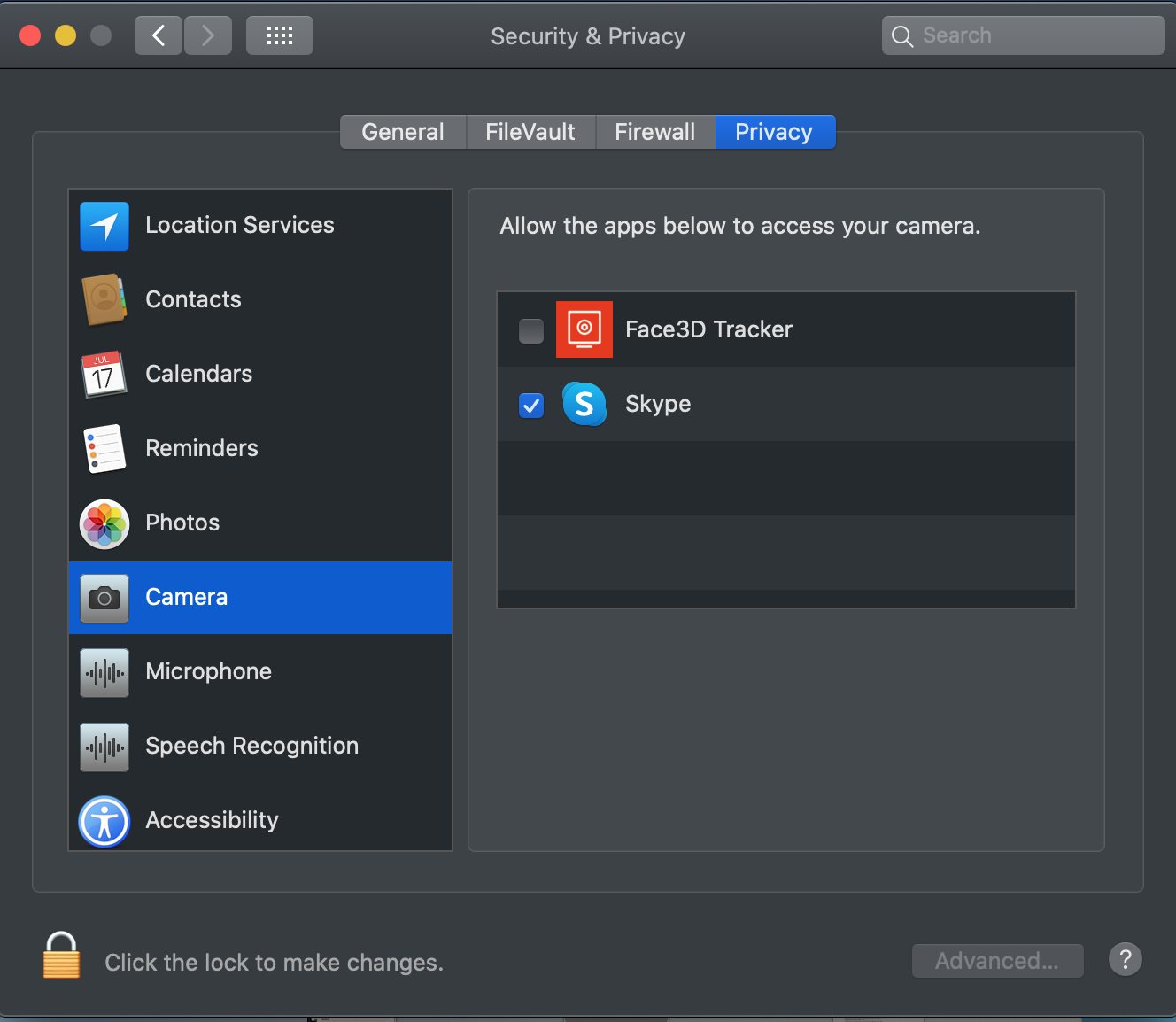
Just in case you may run in to this issue with the new version of macOS, below is what solved the issue for me.

The new macOS has a new permission option for applications to utilize different resources such as the Camera.
1. Open the Settings panel
2. Select Security & Privacy
3. On the left hand side scroll down to Camera
4. On the right hand side under Allow the apps below to access your camera, check the box next to the Face3D tracer application
5. Save your changes


Reading This Topic