|
Author
|
Message
|
|
illusionLAB
|
illusionLAB
Posted 8 Years Ago
|
|
Group: Forum Members
Last Active: 4 Years Ago
Posts: 393,
Visits: 4.8K
|
I can't resist a good test... in this case, I got the complete opposite result. iC window reduced 18 sec, iC standard 36 sec and iC full screen 86 sec (1070i GPU). The last of which produced this rather unsightly image! Clearly, there needs to be investigation as I've never experienced this inconsistency with any program that produces graphics. As for render differences, all 3 images (except the corrupt one) looked the same but had clear differences in the areas where the HDR glow is doing it's thing. As we all have the "loft scene" and it has pretty much all the bells and whistles enabled - it makes for a good "scientific control" - so if everybody rendered an HD png of frame 1 of "the loft" (without changing/adding anything!) logged the times and listed their GPU - it may reveal a pattern within the variables of "different pvw sizes" and "different GPUs". 
|
|
|
|
|
justaviking
|
justaviking
Posted 8 Years Ago
|
|
Group: Forum Members
Last Active: 2 Years Ago
Posts: 8.2K,
Visits: 26.5K
|
Hey - Thanks for the additional test. :)
I used the "Courtyard Scene" which I think came with iC6 because I had used it for some older timing tests:
Link: iClone Performance Benchmarks
Some new users may not have that scene, but that did not matter for the Issue I posted. However for future benchmarks, it's a good point.
My main points are:
1) Since the preview window obviously impacts rendering times, I'd like the option to ignore that altogether. Put ALL the rendering effort into the actual Render and don't waste any CPU/GPU cycles on the Preview Window if I don't feel the need to sit there and watch the render plod along.
2) The "Render" should take priority, and the results should always be the "best" regardless of what you do with the Preview window.
I didn't spend much time on that because I believe that has been reported (formally) already, especially with regards to DOF, but it looks like you found a new issue.
It is disturbing that your results are the opposite of mine, but in a way that only helps underscore the validity and importance of the Issue I posted. Thanks again.
P.S.
@IllusionLab - Please add your results to the Issue:
https://www.reallusion.com/FeedBackTracker/Issue/Add-option-to-DISABLE-Preview-Window-updates-while-rendering-to-improve-performance
iClone 7... Character Creator... Substance Designer/Painter... Blender... Audacity...
Desktop (homebuilt) - Windows 10, Ryzen 9 3900x CPU, GTX 1080 GPU (8GB), 32GB RAM, Asus X570 Pro motherboard, 2TB SSD, terabytes of disk space, dual monitors.
Laptop - Windows 10, MSI GS63VR STEALTH-252, 16GB RAM, GTX 1060 (6GB), 256GB SSD and 1TB HDD
|
|
|
|
|
4u2ges
|
4u2ges
Posted 8 Years Ago
|
|
Group: Forum Members
Last Active: Last Month
Posts: 5.3K,
Visits: 16.8K
|
While I am adapted to rendering with full view-port size and DSR and afraid the *fixing* would take away known advantages (DSR + anti-aliasing OFF = speedup render+best quality), the issue eventually needs to be addressed by RL.
I am also a sucker for a good test and was quite surprised by test results from IllusionLab.
That's why I decided to use a Loft scene for testing (I am pretty sure rendering Courtyard would have given similar outcome).
GPU - 1080Ti
First, the render time. No need to comment. All info is within the screenshots



The last screenshot was rendered after switching Display screen resolution to 4K. My monitor supports up to 2k, so I had to enable 4.00x DSR factor in Nvidia 3D settings to be able to switch to 4K
I used all default render settings for the given scene and I only wanted to show part where you may see how the anti-aliasing and light leaks are affected by different view-port resolution.
Note: rendering a *still* provides an inconclusive data. The best would be of course to render an animation, then compare and see the advantages and disadvantages of each particular test for different projects.
There is much more components to analyses and talk about when is comes to animating a scene under different view-port size/resolution (DOF, GI flickering, glow, opacity maps, etc...).


I rarely render 4K. And for 2K, I get the best possible render result (animation quality and render speed) with DSR 4x and super-sampling OFF. Specifically it helps a lot to overcome annoying GI flickering.
A drawback rendering with DSR however, is that objects with dense opacity maps (hair for instance) may in some cases produce horrid artifacts.
But don't take my word on it - do experiment. As you can see from IllusionLAB's test, the outcome would vary and could be exact opposite.
|
|
|
|
|
animagic
|
animagic
Posted 8 Years Ago
|
|
Group: Forum Members
Last Active: Last Month
Posts: 15.8K,
Visits: 31.4K
|
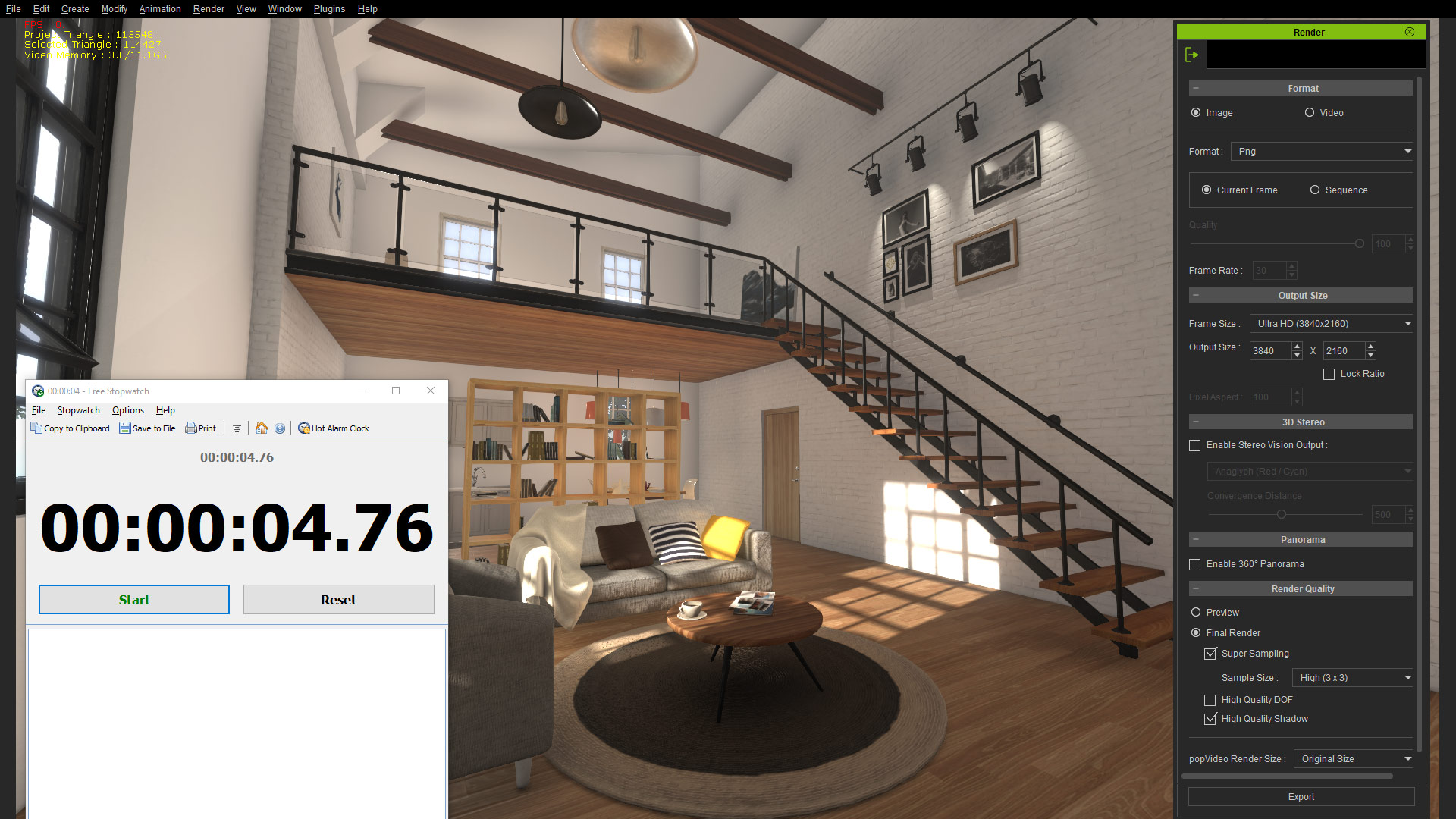
I have a GTX 1080 and a 4K monitor. I did two tests, one with preview window at maximum and one with the preview window very small. Screen captures of the results (I like the stopwatch tool!). The first screen capture shows the output settings.   As you can see, I had still nothing after 11 minutes with the small preview window, so I had to kill iClone. It's an extreme case, but this should NOT happen! It's obviously not the time it takes to render the preview. When I playback the loft scene, I get better FPS the smaller the preview window, which makes sense. So what's happening here?
|
|
|
|
|
illusionLAB
|
illusionLAB
Posted 8 Years Ago
|
|
Group: Forum Members
Last Active: 4 Years Ago
Posts: 393,
Visits: 4.8K
|
My 'reduced' size viewer renders achieved by making iC smaller on my desktop. Today, I got completely different results! I did have a look at the GPU overhead while the renders were in progress and it was frequently hitting 100% thanks to "Client Server Runtime Process" consuming 25+ % (which I don't think it should). These are the first iC renders I've done since the latest Windows 10 - but, even if that's contributing... the mere notion that you get a different render result from scaling the viewer or program is frankly disturbing. I have 'speculated' in previous posts how iC's native render is intrinsically linked to the GPU's display to explain differences in visual results... DOF/HDR bloom etc. but the "time variable" is a puzzler and absolutely needs to be addressed. notice how the app is only 10% bigger on the desktop in the second image... yet took 5 times longer! 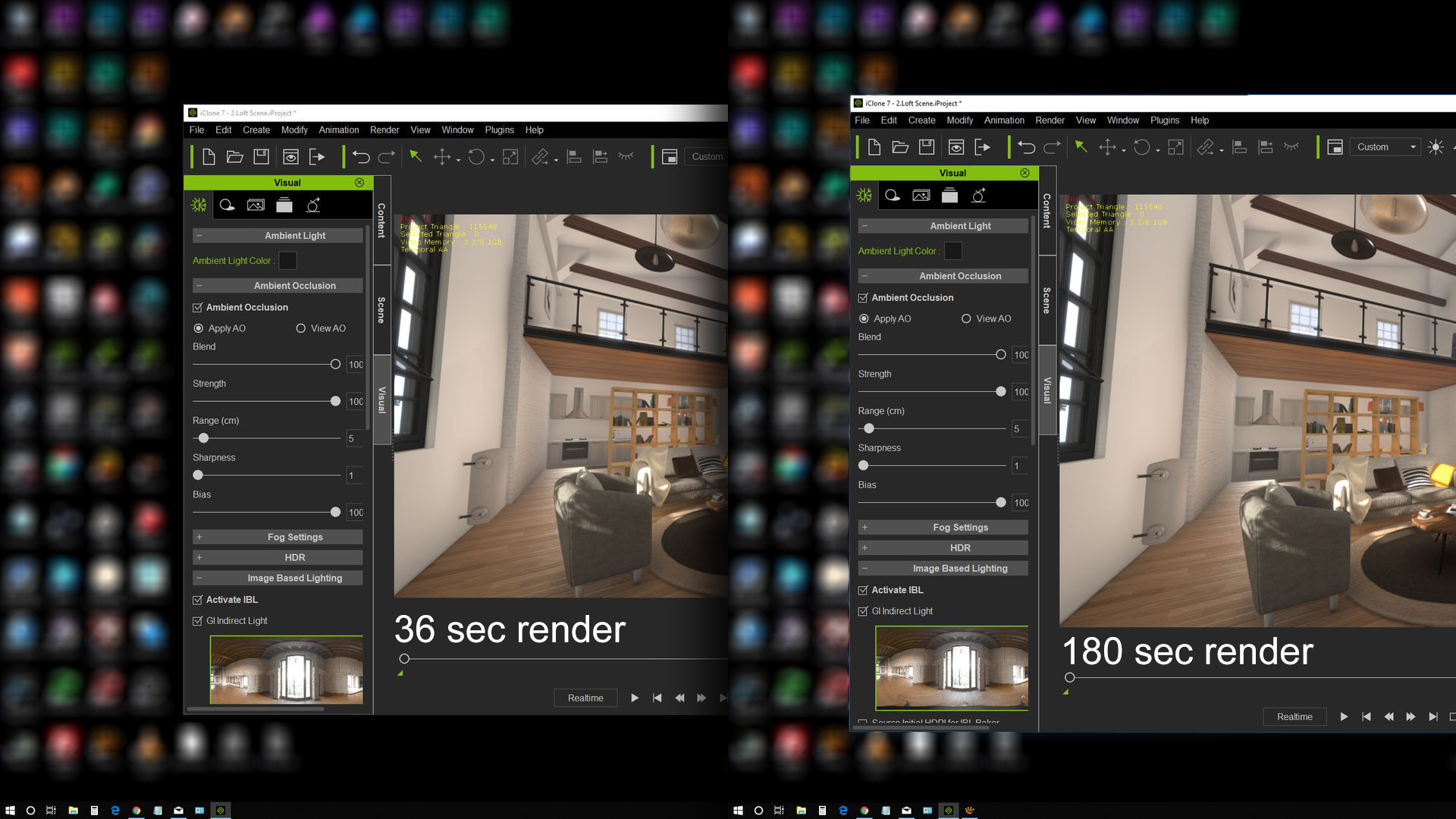
|
|
|
|
|
sonic7
|
sonic7
Posted 8 Years Ago
|
|
Group: Forum Members
Last Active: 3 Years Ago
Posts: 1.7K,
Visits: 19.4K
|
I've experienced similar results, my 'fastest' render times being achieved with F7 fullscreen. But as for the issue of consuming system resources for display purposes - when it can be better spent on the render itself - that makes a whole lot of sense. I've added my 'vote' for Dennis' suggestion to the tracker...
--------------------------------------------------------------------------------------------------------------------------------------------------------
Please be patient with me ..... I don't always 'get it' the first time 'round - not even the 2nd time! :( - yikes! ... ● MSI GT72VR Laptop, i7 7700HQ 4-Core 3.8 GHz 16GB RAM; Nvidia 1070, 8GB Vram ● iClone-7.93 ● 3DXChange Pipeline 7.81 ● CC-3 Pipeline 3.44 ● Live Face ● HeadShot ● Brekel Pro-Body ● Popcorn FX ● iRAY ● Kinect V2 ● DaVinci Resolve17 ● Mixcraft 8.1
|
|
|
|
|
justaviking
|
justaviking
Posted 8 Years Ago
|
|
Group: Forum Members
Last Active: 2 Years Ago
Posts: 8.2K,
Visits: 26.5K
|
(Oops.)
iClone 7... Character Creator... Substance Designer/Painter... Blender... Audacity...
Desktop (homebuilt) - Windows 10, Ryzen 9 3900x CPU, GTX 1080 GPU (8GB), 32GB RAM, Asus X570 Pro motherboard, 2TB SSD, terabytes of disk space, dual monitors.
Laptop - Windows 10, MSI GS63VR STEALTH-252, 16GB RAM, GTX 1060 (6GB), 256GB SSD and 1TB HDD
|
|
|
|
|
justaviking
|
justaviking
Posted 8 Years Ago
|
|
Group: Forum Members
Last Active: 2 Years Ago
Posts: 8.2K,
Visits: 26.5K
|
sonic7 (11/22/2018)
I've experienced similar results, my 'fastest' render times being achieved with F7 fullscreen.
But as for the issue of consuming system resources for display purposes - when it can be better spent on the render itself - that makes a whole lot of sense.
I've added my 'vote' for Dennis' suggestion to the tracker...
Thank you. :)
And thank you to everyone participating in this topic.
illusionLAB (11/22/2018)
My 'reduced' size viewer renders achieved by making iC smaller on my desktop. Today, I got completely different results!
<snip>
...notice how the app is only 10% bigger on the desktop in the second image... yet took 5 times longer!
That's horrifying! Some days it gets stranger and stranger. Regardless of the individual results we're getting, there is definitely room for improvement.
iClone 7... Character Creator... Substance Designer/Painter... Blender... Audacity...
Desktop (homebuilt) - Windows 10, Ryzen 9 3900x CPU, GTX 1080 GPU (8GB), 32GB RAM, Asus X570 Pro motherboard, 2TB SSD, terabytes of disk space, dual monitors.
Laptop - Windows 10, MSI GS63VR STEALTH-252, 16GB RAM, GTX 1060 (6GB), 256GB SSD and 1TB HDD
|
|
|
|
|
justaviking
|
justaviking
Posted 8 Years Ago
|
|
Group: Forum Members
Last Active: 2 Years Ago
Posts: 8.2K,
Visits: 26.5K
|
I wasn't sure where to post this, and then I realized my Corner was as good as any. I just got an email about the latest Substance Designer update. Two items in particular caught my eye: In this new release, you get: - An improved navigation within your graph, with badges, Flow Highlight, a better graph search tool and more.
- A simpler navigation between graphs with better tabs and a breadcrumb
- An awesome new PBR Render Node, for great renders
- Faster ray tracing with RTX-powered bakers
- Great freedom with the broadening scope of the Python API (now you can create and edit data!)
iClone 7... Character Creator... Substance Designer/Painter... Blender... Audacity...
Desktop (homebuilt) - Windows 10, Ryzen 9 3900x CPU, GTX 1080 GPU (8GB), 32GB RAM, Asus X570 Pro motherboard, 2TB SSD, terabytes of disk space, dual monitors.
Laptop - Windows 10, MSI GS63VR STEALTH-252, 16GB RAM, GTX 1060 (6GB), 256GB SSD and 1TB HDD
|
|
|
|
|
justaviking
|
justaviking
Posted 8 Years Ago
|
|
Group: Forum Members
Last Active: 2 Years Ago
Posts: 8.2K,
Visits: 26.5K
|
Wow! Now I KNOW that iClone really needs a good ragdoll option. :w00t: :)
I found this thanks to Andrew Price's (Blender Guru) "This Week in 3D" newsletter.
Favorite line: "What a wonderful day!"
iClone 7... Character Creator... Substance Designer/Painter... Blender... Audacity...
Desktop (homebuilt) - Windows 10, Ryzen 9 3900x CPU, GTX 1080 GPU (8GB), 32GB RAM, Asus X570 Pro motherboard, 2TB SSD, terabytes of disk space, dual monitors.
Laptop - Windows 10, MSI GS63VR STEALTH-252, 16GB RAM, GTX 1060 (6GB), 256GB SSD and 1TB HDD
|
|
|
|