Profile Picture

Turning the Lights on in the Suburban yards

Posted By Telek 16 Years Ago
You don't have permission to rate!
Author
Message
Telek
Telek
Posted 16 Years Ago
View Quick Profile
Veteran Member

Veteran Member (808 reputation)Veteran Member (808 reputation)Veteran Member (808 reputation)Veteran Member (808 reputation)Veteran Member (808 reputation)Veteran Member (808 reputation)Veteran Member (808 reputation)Veteran Member (808 reputation)Veteran Member (808 reputation)

Group: Forum Members
Last Active: Last Year
Posts: 64, Visits: 1.2K

Hi

I am trying to put togethier a long shot using a couple of the yards from the suburban pack.

To make it a bit more challenging (best way to learn I always find :) ) I thought Id make it more of a night time shot. And thats where Ive hit problems. I hadnt realised that there was a limited number of lights, but I want to "turn on" the street lights in the park so that I can have an avatar walk around the park. Passing between the pools of light.

I was hoping someone might have some hints to start me in the right direction?

Thanks
Richard
sjonesdc
sjonesdc
Posted 16 Years Ago
View Quick Profile
Distinguished Member

Distinguished Member (5.9K reputation)Distinguished Member (5.9K reputation)Distinguished Member (5.9K reputation)Distinguished Member (5.9K reputation)Distinguished Member (5.9K reputation)Distinguished Member (5.9K reputation)Distinguished Member (5.9K reputation)Distinguished Member (5.9K reputation)Distinguished Member (5.9K reputation)

Group: Forum Members
Last Active: 2 Years Ago
Posts: 1.6K, Visits: 9.6K
ric.revans (11/15/2009)

Hi

I am trying to put togethier a long shot using a couple of the yards from the suburban pack.

To make it a bit more challenging (best way to learn I always find :) ) I thought Id make it more of a night time shot. And thats where Ive hit problems. I hadnt realised that there was a limited number of lights, but I want to "turn on" the street lights in the park so that I can have an avatar walk around the park. Passing between the pools of light.

I was hoping someone might have some hints to start me in the right direction?

Thanks
Richard

Richard,

I'm a newbie too!  I don't know if this is the best way, but you can add lights,make them spotlights and position them at the top of the street lights.  Just a thought

sjonesdc :hehe:

STILL LEARNING!!!

sjonesdc :hehe:

STILL LEARNING!!!


Telek
Telek
Posted 16 Years Ago
View Quick Profile
Veteran Member

Veteran Member (808 reputation)Veteran Member (808 reputation)Veteran Member (808 reputation)Veteran Member (808 reputation)Veteran Member (808 reputation)Veteran Member (808 reputation)Veteran Member (808 reputation)Veteran Member (808 reputation)Veteran Member (808 reputation)

Group: Forum Members
Last Active: Last Year
Posts: 64, Visits: 1.2K


That was my first thought, and then I learnt a surprising thing I didnt know. iClone is limited to the number of lights you can have. Its 4 Point lights and 4 directional/spot lights which isnt quite enough for what I want to do :( which is why I was wandering if there was another way or should I rethink the original idea

Thanks though, and please let me know if Ive misread that.

Cricky
Cricky
Posted 16 Years Ago
View Quick Profile
Skype ID= learn.iclone

Skype ID= learn.iclone (14.0K reputation)Skype ID= learn.iclone (14.0K reputation)Skype ID= learn.iclone (14.0K reputation)Skype ID= learn.iclone (14.0K reputation)Skype ID= learn.iclone (14.0K reputation)Skype ID= learn.iclone (14.0K reputation)Skype ID= learn.iclone (14.0K reputation)Skype ID= learn.iclone (14.0K reputation)Skype ID= learn.iclone (14.0K reputation)

Group: Forum Members
Last Active: 3 Years Ago
Posts: 2.8K, Visits: 13.8K
ric.revans (11/15/2009)

Hi

I am trying to put togethier a long shot using a couple of the yards from the suburban pack.

To make it a bit more challenging (best way to learn I always find :) ) I thought Id make it more of a night time shot. And thats where Ive hit problems. I hadnt realised that there was a limited number of lights, but I want to "turn on" the street lights in the park so that I can have an avatar walk around the park. Passing between the pools of light.

I was hoping someone might have some hints to start me in the right direction?

Thanks
Richard


Change the Opacity of the Existing Lamps (Standard14) to Black, then Insert the Streetlamps from the Props in City Elements (Things on the Street) to the scene. These lights have AML on/off switches.


SKYPE ID: rc.650

http://city.reallusion.com/store/ModuleExpand.aspx?id=GS634545170497417354&mdid=18866

http://city.reallusion.com/ContentTag.aspx?tagname=Cricky&AuthorID=20081020688550191201#]Reallusion Store Content

" If I had Alzheimer's (Old Timers), would I know it? "
sjonesdc
sjonesdc
Posted 16 Years Ago
View Quick Profile
Distinguished Member

Distinguished Member (5.9K reputation)Distinguished Member (5.9K reputation)Distinguished Member (5.9K reputation)Distinguished Member (5.9K reputation)Distinguished Member (5.9K reputation)Distinguished Member (5.9K reputation)Distinguished Member (5.9K reputation)Distinguished Member (5.9K reputation)Distinguished Member (5.9K reputation)

Group: Forum Members
Last Active: 2 Years Ago
Posts: 1.6K, Visits: 9.6K
Cricky (11/15/2009)
ric.revans (11/15/2009)

Hi

I am trying to put togethier a long shot using a couple of the yards from the suburban pack.

To make it a bit more challenging (best way to learn I always find :) ) I thought Id make it more of a night time shot. And thats where Ive hit problems. I hadnt realised that there was a limited number of lights, but I want to "turn on" the street lights in the park so that I can have an avatar walk around the park. Passing between the pools of light.

I was hoping someone might have some hints to start me in the right direction?

Thanks
Richard


Change the Opacity of the Existing Lamps (Standard14) to Black, then Insert the Streetlamps from the Props in City Elements (Things on the Street) to the scene. These lights have AML on/off switches.


This is nice to know, since I have City Elements (Things on the Street).

Thanks Cricky!!

sjonesdc :hehe:

STILL LEARNING!!!!

sjonesdc :hehe:

STILL LEARNING!!!


stuckon3d
stuckon3d
Posted 16 Years Ago
View Quick Profile
Distinguished Member

Distinguished Member (7.3K reputation)Distinguished Member (7.3K reputation)Distinguished Member (7.3K reputation)Distinguished Member (7.3K reputation)Distinguished Member (7.3K reputation)Distinguished Member (7.3K reputation)Distinguished Member (7.3K reputation)Distinguished Member (7.3K reputation)Distinguished Member (7.3K reputation)

Group: Forum Members
Last Active: Last Month
Posts: 1.8K, Visits: 7.8K
Hello Ric and Sjonesdc,
I see Cricky already jumped in with a really good suggestion, another option is if you don't have the iprop he mentioned, is adding a "glow map" to the lamps in the park to simulate lighting, and instead of using one of iclones lights per post, you can use one light per group of lights. So that you can strategically place the four lights that actually cast shadows only on the path where your characters are going to walk by or going to be. Please be note that the light props that cricky is mentioning are not actual light sources. They are props using glow maps that turn the brightness of the glow up and down for you via AML script. Also i believe that those lights come with the city elements-Downtown metro areas and not with the city elements suburbs pack, which I believe that was the pack Ric was talking about. So how do you add a glow map, here is what you do:

Here is how you create a glow map for the lamp post:
1) select the park
2) press the y key to go to materials part of the panel, I know you both know this from the class ;)
3) click on the little eyedropper and select the lamp pots. this will show you the diffuse map for it
4) click the launch button so that it starts your favorite paint program.
5) inside the paint program, paint everything black except the bright area of the texture where the actual lamp would be. So all you see is that bright rectangle.
6) save the image with a different name. Like: Park01_06_Glow
7) go back to iclone and double click on the glow square and load the image you just saved
8) play with the strength of the glow to get the effect you are looking for.

This is how I did this image:
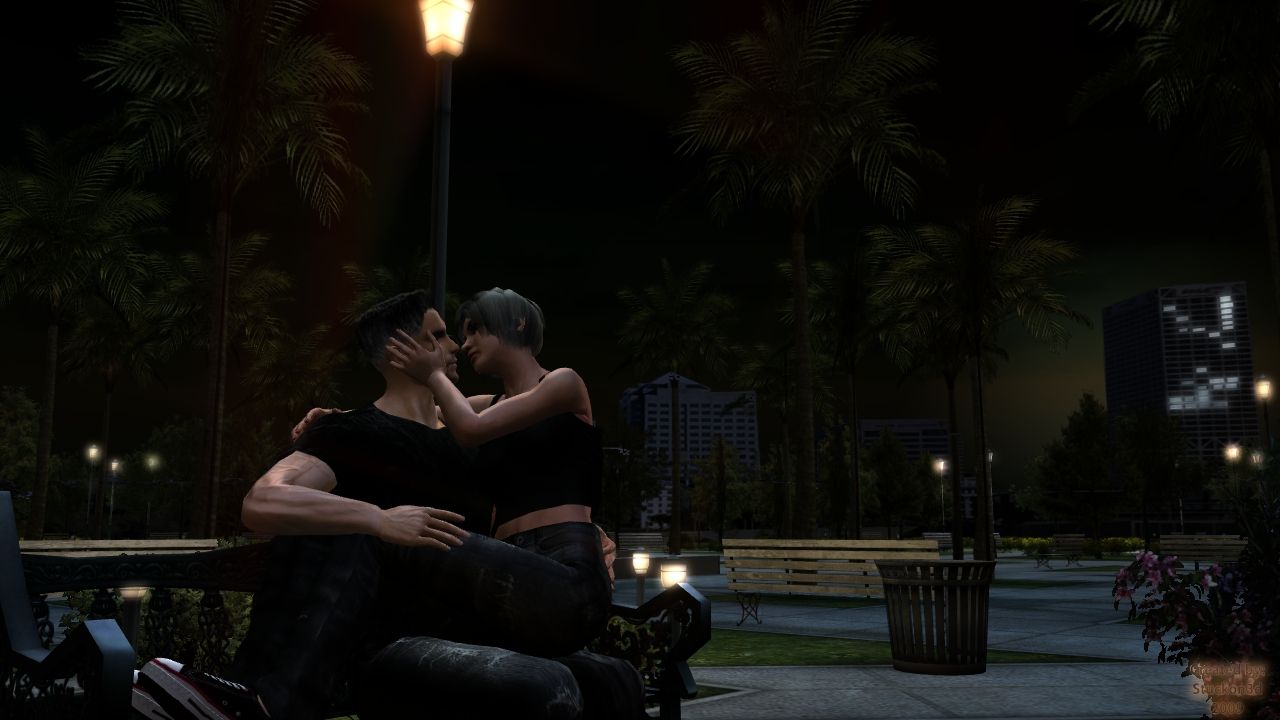


Hope this helped.

Stuckon3d



Product Specialist

My iClone 7 gallery

My IMDB

safegaard
safegaard
Posted 16 Years Ago
View Quick Profile
Veteran Member

Veteran Member (862 reputation)Veteran Member (862 reputation)Veteran Member (862 reputation)Veteran Member (862 reputation)Veteran Member (862 reputation)Veteran Member (862 reputation)Veteran Member (862 reputation)Veteran Member (862 reputation)Veteran Member (862 reputation)

Group: Forum Members
Last Active: 5 Years Ago
Posts: 360, Visits: 984
Wow. Thanks to both. This was good tips. And yes, hotkeys rock-:)

For the love of 3d http://www.safegaard.com
rgathje
rgathje
Posted 16 Years Ago
View Quick Profile
Distinguished Member

Distinguished Member (1.5K reputation)Distinguished Member (1.5K reputation)Distinguished Member (1.5K reputation)Distinguished Member (1.5K reputation)Distinguished Member (1.5K reputation)Distinguished Member (1.5K reputation)Distinguished Member (1.5K reputation)Distinguished Member (1.5K reputation)Distinguished Member (1.5K reputation)

Group: Forum Members
Last Active: 8 Years Ago
Posts: 291, Visits: 3.7K
  I was playing around with lighting too. You helped a lot. Thank you.
Telek
Telek
Posted 16 Years Ago
View Quick Profile
Veteran Member

Veteran Member (808 reputation)Veteran Member (808 reputation)Veteran Member (808 reputation)Veteran Member (808 reputation)Veteran Member (808 reputation)Veteran Member (808 reputation)Veteran Member (808 reputation)Veteran Member (808 reputation)Veteran Member (808 reputation)

Group: Forum Members
Last Active: Last Year
Posts: 64, Visits: 1.2K

Wow thanks for that guys.
Going to be long afternoon now before i get home and give that a try.
By the way Stuckon3D, the ibl method of ambient lighting and changing the shadow type made one hell of a difference :D

Thanks
R
Flybynight
Flybynight
Posted 16 Years Ago
View Quick Profile
New Member

New Member (30 reputation)New Member (30 reputation)New Member (30 reputation)New Member (30 reputation)New Member (30 reputation)New Member (30 reputation)New Member (30 reputation)New Member (30 reputation)New Member (30 reputation)

Group: Forum Members
Last Active: 11 Years Ago
Posts: 297, Visits: 490
Great tips Cricky and Stuckon3d. Will have try these :w00t:


Reading This Topic