|
Author
|
Message
|
|
NinjaMouse
|
NinjaMouse
Posted 5 Years Ago
|
|
Group: Forum Members
Last Active: Last Month
Posts: 27,
Visits: 253
|
You really earn your "distinguished" member moniker, 4u2ges. Thanks for the insight! I really appreciate all your efforts. I just don't understand how these kind of bugs are even possible. Did nobody try to simply export a model before releasing the patch? I just want to be able to model a character, convert it to game-base, and export it with blendshapes. Given the huge amount of money I've spent, I don't think that is too much to ask. It is literally what the product is supposed to do, but has never actually been able to do without crippling bugs. I don't know what to do, and I feel actual despair about the money I've lost on RL products--I even bought all the new skin-gen stuff, assuming the latest patch would produce a working product! I used to believe in Reallusion, but now I just feel sad and ripped-off. Anyway, I submitted some new bugs to the Feedback (I see you did too). Maybe RL will surprise me and win back my admiration by quickly and efficiently fixing the problems without making us wait months or years. This issue doesn't strike me as something that should be hard to fix. We will see, I suppose.
|
|
|
|
|
4u2ges
|
4u2ges
Posted 5 Years Ago
|
|
Group: Forum Members
Last Active: Last Month
Posts: 5.3K,
Visits: 16.8K
|
I've done some testing. Out all CC3+ characters only CC3_Jody from Repack for CC3+ is stable. Regardless of export settings, pose selected as a secondary, or supplying a calibration clip she is firmly standing on the ground. The rest of the characters either float up-down, down-up or slide by Y or spread feet by X. All with different amplitude. This also true for CC3 characters (though they show less pose distortion). So if you need to model use Jody as a Base. And if you want to see in advance how far the CC3+ character would be above (or below) the ground in A Bind pose after the export, switch to side orthogonal camera and select Adjust Bones. This is only to view the discrepancy. Adjust Bone does not fix it. Also do not export while Adjust Bone tool is active. It's going to Bake the pose and supplied motion clip would not be active. FT 7264: https://www.reallusion.com/FeedBackTracker/Issue/Please-make-all-CC3-characters-like-CC3-Jody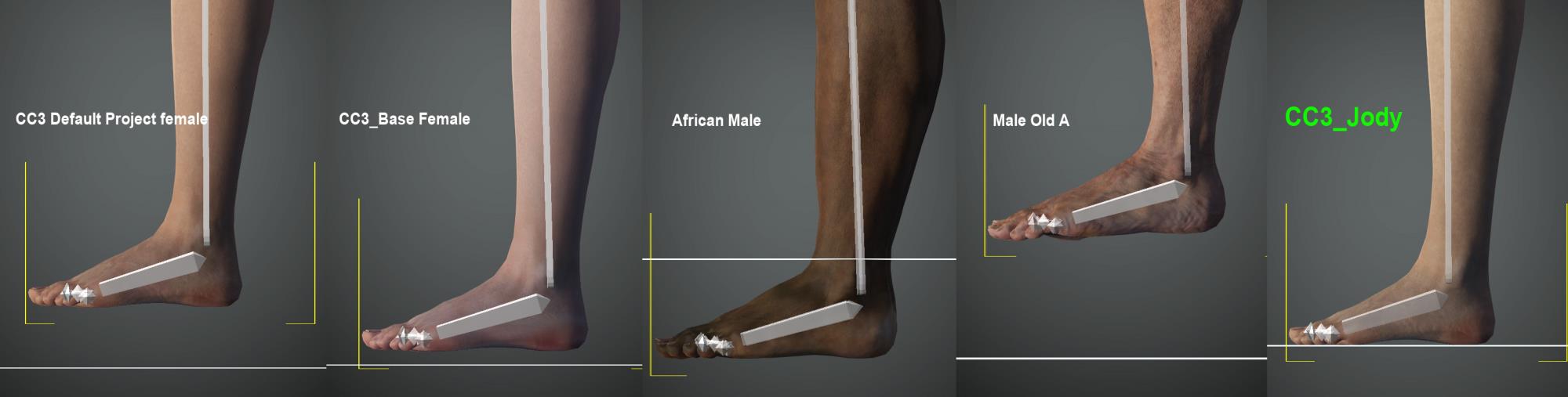
|
|
|
|
|
NinjaMouse
|
NinjaMouse
Posted 5 Years Ago
|
|
Group: Forum Members
Last Active: Last Month
Posts: 27,
Visits: 253
|
The new update did fix the bone-alignment, but now introduced a new problem where the character is floating above and behind origin point. When using the calibration animation, the character "slides" down to the correct position, the carries out the calibration animation. If not for the original erroneous offset, I think the export would be working. 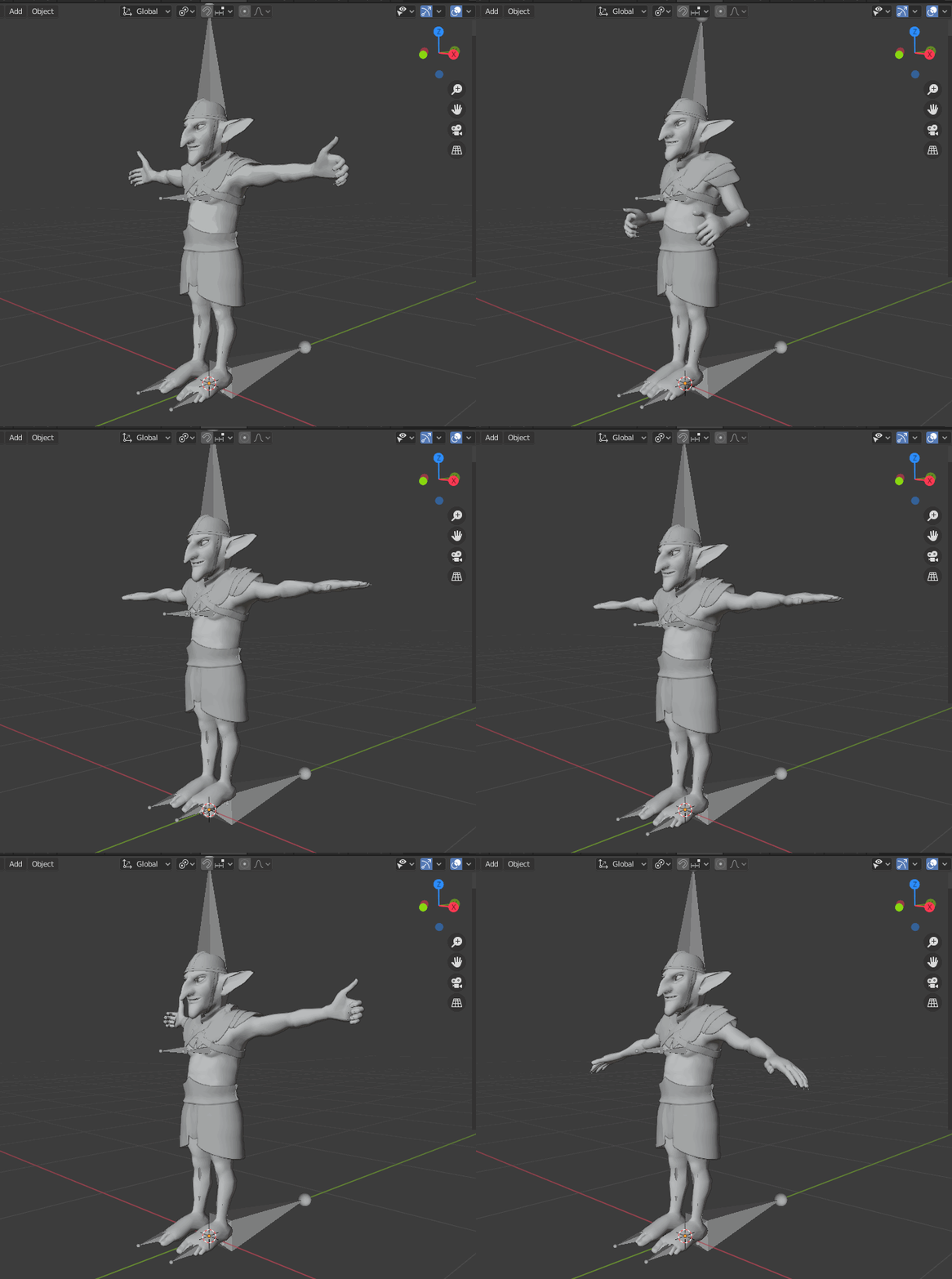
|
|
|
|
|
Peter (RL)
|
Peter (RL)
Posted 5 Years Ago
|
|
Group: Administrators
Last Active: Last Year
Posts: 23.1K,
Visits: 36.6K
|
UPDATE: This issue should be fixed in the CC 3.31 / iClone 7.81 updates. These are due mid to late August. We do apologise for the inconvenience caused by this defect.
Peter
Forum Administrator www.reallusion.com
|
|
|
|
|
hkhaneveer
|
hkhaneveer
Posted 5 Years Ago
|
|
Group: Forum Members
Last Active: 4 Years Ago
Posts: 76,
Visits: 121
|
Is there any update on this issue? It has been making me crazy, as the whole reason I got CC3 was to develop characters for rendering in Blender.
Possibly related: I have tried exporting OBJ files from CC3 and importing them into Blender, then rigging them with Rigify. Everything goes fine up to the point where I am supposed to parent the rig to the mesh with automatic weight painting. Then Rigify fails and returns a message that it cannot resolve weights for 'one or more' bones- but doesn't specify which bones. Since this happens without any CC3 rigging, it may not have anything to do with CC3, but on the other hand, OBJ meshes imported from other programs seem to pass this step no problem.
|
|
|
|
|
NinjaMouse
|
NinjaMouse
Posted 5 Years Ago
|
|
Group: Forum Members
Last Active: Last Month
Posts: 27,
Visits: 253
|
Miranda (RL) (7/19/2020)
Hi everyone,
It's been verified to be a defect. Many thanks for all of your inputs.
I am checking with the Dev Team when it will be fixed. I'm afraid that it won't be in the coming version 3.3 because it's close to launch.
Thanks again!
MirandaThanks for the update! Once you have an ETA on the fix, I'd love to know--to help my project planning. Do you happen to know if the defect will only affect conversion from the current cc3 Base, or if it also affects the new Base-Plus character coming out soon? In other words, if the new character converts with a proper Blender armature, then this will be a much less-critical issue, since I can just convert the new Base-Plus version to Game Base instead (which I plan to do).
|
|
|
|
|
4u2ges
|
4u2ges
Posted 5 Years Ago
|
|
Group: Forum Members
Last Active: Last Month
Posts: 5.3K,
Visits: 16.8K
|
|
|
|
|
|
rosuckmedia
|
rosuckmedia
Posted 5 Years Ago
|
|
Group: Forum Members
Last Active: 7 Months Ago
Posts: 3.2K,
Visits: 4.8K
|
Hallo Miranda,
Thank you for the information.
Best regards rosuckmedia:)
|
|
|
|
|
Miranda (RL)
|
Miranda (RL)
Posted 5 Years Ago
|
|
Group: Administrators
Last Active: 3 Years Ago
Posts: 1.8K,
Visits: 11.2K
|
Hi everyone,
It's been verified to be a defect. Many thanks for all of your inputs.
I am checking with the Dev Team when it will be fixed. I'm afraid that it won't be in the coming version 3.3 because it's close to launch.
Thanks again!
Miranda
|
|
|
|
|
4u2ges
|
4u2ges
Posted 5 Years Ago
|
|
Group: Forum Members
Last Active: Last Month
Posts: 5.3K,
Visits: 16.8K
|
No, I do not think it's a headshot plug-in. I have uninstalled Headshot, CC, pipeline. Reinstalled CC and pipeline (no Headshot). Export result is the same. Different info appearance, mysterious message at game base export (which not everyone is getting). There is something RL does not want to tell us :Whistling:
|
|
|
|