|
Author
|
Message
|
|
cloud.ninja
|
cloud.ninja
Posted 8 Years Ago
|
|
Group: Forum Members
Last Active: 2 Years Ago
Posts: 26,
Visits: 296
|
My new challenge is that with applying an animation, the character has it's mouth hanging open. See attached file "MouthOpenBug"
My animation works with other imported Unity characters but not Gen 3 or 8 - it leaves the mouth open. When I go to configure the CC_Base_JawRoot to another bone - after I click Done & Apply - it reverts back to the CC_Base_JawRoot?! (see image) When I go to Muscles & Settings, I can use the Open close slide bar under Muscle Group Preview and but when I try to close the mouth using Jaw Close under the Per-Muscle Setting - nothing happens?! (see image).
I've also tried closing the mouth using blendshapes but it won't close the mouth all the way.
I'm not able to script in Unity either. Any ideas to resolve?
with appreciation,
cn
|
|
|
|
|
Miranda (RL)
|
Miranda (RL)
Posted 8 Years Ago
|
|
Group: Administrators
Last Active: 4 Years Ago
Posts: 1.8K,
Visits: 11.2K
|
Hi cloud.ninja,
May I know if you turned off the "Auto-Processing" before adjusting the bone?
|
|
|
|
|
thanatopsis
|
thanatopsis
Posted 8 Years Ago
|
|
Group: Forum Members
Last Active: 7 Years Ago
Posts: 2,
Visits: 135
|
I've had that "mouth open" problem in Unity with a variety of 3D figured (DAZ, Mixamo, Reallusion) and different character rigs (Unity, Invector, Ootii 3rd-person controllers). I used to be able to fix it by editing the face bones in Unity and selecting "none" for the jaw bone. That stopped working recently for some reason, maybe in Unity 2018.2 or 2018.3. I finally got sick of it and edited all my animation files. I looked at the animations in Unity from the drop-down menu WIndow > Animation > Animation and "Animator.Jaw Close" = 0 on all my offending animations. I have to change the start and end points to equal 1. The only problem is most animations are read-only, so I have to find the correct animation (easier on a new project as there aren't 25 Idle and Run animations), select it, and copy it with control-D (command-D on Mac) then rename it to something like Jaw-Idle or Jaw-Run. Then I make Animator.Jaw Close = 1 and then drag that into the Animator motion parameters to replace the old one. On the plus side, I added an "out of breath" idle pose after a sprint with the mouth opening and closing.
I had to do that for a few dozen animations, but it works for now for my simple running/jumping game. I don't know if there is an easy way to use Layers or something to make one closed jaw state and make it overlay all the other animations. If anybody has any better ideas, let me know.
|
|
|
|
|
cloud.ninja
|
cloud.ninja
Posted 8 Years Ago
|
|
Group: Forum Members
Last Active: 2 Years Ago
Posts: 26,
Visits: 296
|
Thanatopsis - Thank you for your reply - I also couldn't set the jaw bone to "none". I will try your workflow - much appreciated.
|
|
|
|
|
cloud.ninja
|
cloud.ninja
Posted 8 Years Ago
|
|
Group: Forum Members
Last Active: 2 Years Ago
Posts: 26,
Visits: 296
|
Miranda (RL) - Thank you for your reply - where is that option?
|
|
|
|
|
Miranda (RL)
|
Miranda (RL)
Posted 7 Years Ago
|
|
Group: Administrators
Last Active: 4 Years Ago
Posts: 1.8K,
Visits: 11.2K
|
cloud.ninja (12/31/2018)
Miranda (RL) - Thank you for your reply - where is that option?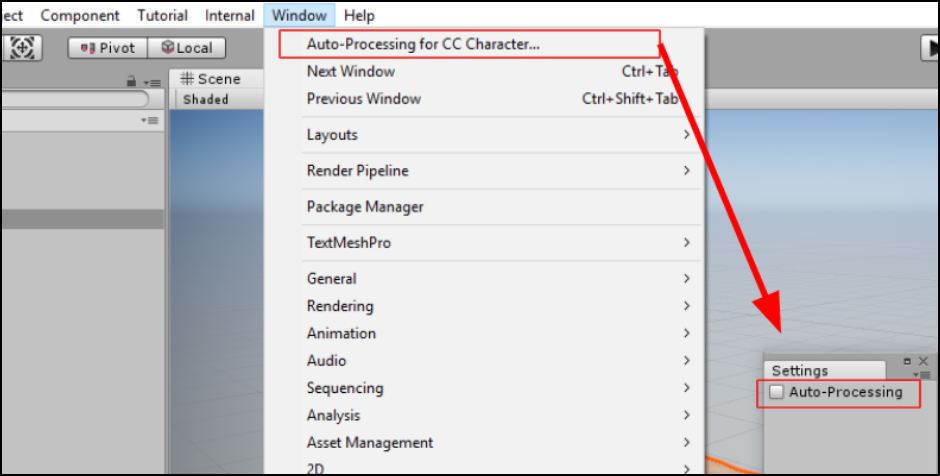
|
|
|
|
|
Ryan Hayle
|
Ryan Hayle
Posted 7 Years Ago
|
|
Group: Forum Members
Last Active: Last Month
Posts: 49,
Visits: 380
|
It's a bit of a strange one this. The default in Unity is 0 and when you look at the jaw this equals to a half open mouth. So you have to edit your read-only animations and set the Animator.Jaw Close = 1, like previously stated by thanatopsis.
>May I know if you turned off the "Auto-Processing" before adjusting the bone?
I tried this and it made no difference. I noticed that when you untick the checkbox, close the window and open the window again the checkbox is set to true again.
Is this a bug?
|
|
|
|
|
Miranda (RL)
|
Miranda (RL)
Posted 7 Years Ago
|
|
Group: Administrators
Last Active: 4 Years Ago
Posts: 1.8K,
Visits: 11.2K
|
rjhayle (2/17/2019)
It's a bit of a strange one this. The default in Unity is 0 and when you look at the jaw this equals to a half open mouth. So you have to edit your read-only animations and set the Animator.Jaw Close = 1, like previously stated by thanatopsis.
>May I know if you turned off the "Auto-Processing" before adjusting the bone?
I tried this and it made no difference. I noticed that when you untick the checkbox, close the window and open the window again the checkbox is set to true again.
Is this a bug?This is a bug as you described. We have fixed this issue, and it's under verification now. Before the updated version release, please keep the window open when do any adjustment. We also noticed that the mouth will be open when the character stays still, and will be close right when there is animation. There is no further thing the auto-setup script can do at the moment. If there is more information, we will let you know.
|
|
|
|
|
angelin.sirbu
|
angelin.sirbu
Posted 7 Years Ago
|
|
Group: Forum Members
Last Active: 3 Years Ago
Posts: 3,
Visits: 96
|
I have the exact same issue with the default CC3 settings. My character is the default male exported.
Is there any ETA on the fix?
Also, I cannot find the face blendshapes in the rigidbody.
|
|
|
|
|
Miranda (RL)
|
Miranda (RL)
Posted 7 Years Ago
|
|
Group: Administrators
Last Active: 4 Years Ago
Posts: 1.8K,
Visits: 11.2K
|
angelin.sirbu (3/13/2019)
I have the exact same issue with the default CC3 settings. My character is the default male exported.
Is there any ETA on the fix?We'd like to clarify if this is the case you encountered. 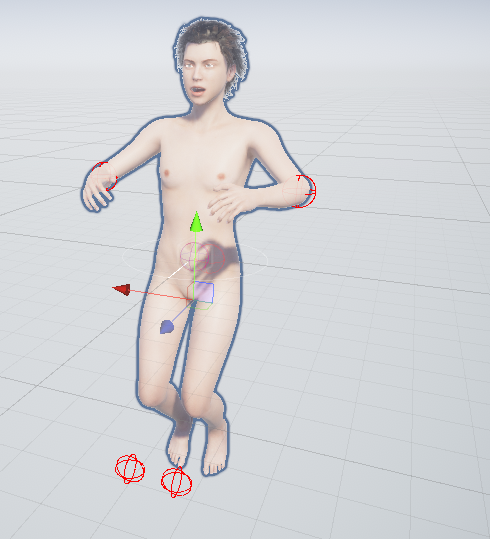 There is no motion file exported along with FBX file, which means there is no animation in the Animation Controller. When clicking play, we will see this result. If this is the case you encounter, you can manually delete the Animation Controller, or add animation. Also, I cannot find the face blendshapes in the rigidbody. he question of blendshape location has been answered by a forum user, please visit your original post for details. https://forum.reallusion.com/407209/Export-blend-shapes-for-faces-in-Unity
|
|
|
|