|
Author
|
Message
|
|
Rampa
|
|
|
Group: Forum Members
Last Active: 2 Months Ago
Posts: 8.2K,
Visits: 62.6K
|
rogwen (1/5/2018)
I cannot use 7.2 patch. Direct puppet is the tool I have used most. Now its useless. The following happens on my Laptop AND stationary PC (wich is brand new and has just Iclone installed) So this is clearly not a PC issue. When I record a clip with direct puppet the first time everythings ok. but when I try to animate other limbs on same clip with more recordings,the strangest things happens. You can see it here: https://youtu.be/TDqsNVuNRHc Are you using identical mouse movements for each arm? Moving the mouse vertically rotates one axis, and horizontally another. When I move my mouse vertically for each arm, I am getting what I expect. When I move the mouse horizontally for one arm, it looks like your video example.
|
|
|
|
|
rogwen
|
rogwen
Posted 8 Years Ago
|
|
Group: Forum Members
Last Active: 5 Years Ago
Posts: 7,
Visits: 505
|
The movement is not the issue.First two recordings work as expected. Then the problem occur. It wont show my next recording.Not before I record another one. Then maybe the previous will show. But not the new one. Sometimes it mirrored...A real mess. Does not matter If I unlock feet . This must be a bug. It did not happen in 7.0
|
|
|
|
|
mark
|
|
|
Group: Forum Members
Last Active: 2 Years Ago
Posts: 4.9K,
Visits: 16.7K
|
That's what seems to be happening to me, it was by the third recording ... P.S. and the avatar even jumps to another location...very weird

Click here to go to my YouTube Channel filled with iClone Tutes and Silly Stuff
Visit ANIMATED PROJECTIONS Powered by iCLONE
Intel Core i7 3960X @ 3300MHz Overclocked to 4999.7 MHz Sandy Bridge 24.0GB DDR3 @ 833MHz Graphic Display HP ZR30w
GeForce GTX 980Ti 6GB Microsoft Windows 7 Professional 64-bit SP1 ASUSTeK COMPUTER INC. P9X79 WS (LGA2011)
|
|
|
|
|
TonyDPrime
|
TonyDPrime
Posted 8 Years Ago
|
|
Group: Forum Members
Last Active: 2 Years Ago
Posts: 3.4K,
Visits: 12.4K
|
Here is another issue: When adding Post Effect (Visual > Post Effect), such as an LUT, the resulting key(s) created in timeline can not be deleted from timeline. Right Click is grayed-out. 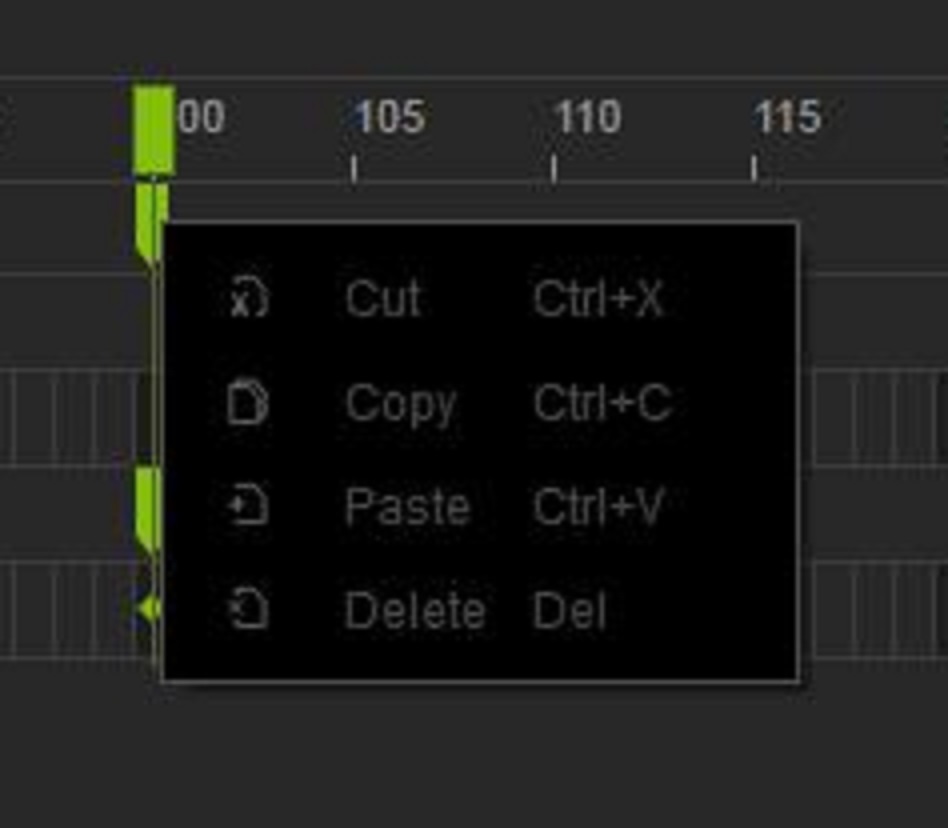
|
|
|
|
Rockoloco666
|
Rockoloco666
Posted 8 Years Ago
|
|
Group: Banned Members
Last Active: 6 Years Ago
Posts: 762,
Visits: 2.0K
|
Does it work if you hit delete on the keyboard?
|
|
|
|
|
toystorylab
|
toystorylab
Posted 8 Years Ago
|
|
Group: Forum Members
Last Active: 5 days ago
Posts: 4.6K,
Visits: 29.9K
|
TonyDPrime (1/8/2018)
Here is another issue:
When adding Post Effect (Visual > Post Effect), such as an LUT, the resulting key(s) created in timeline can not be deleted from timeline.
Right Click is grayed-out.Confirmed... And NO, you can't delete it by hitting delete on the keyboard... Only "undo" works, but that's no help if you decide not to use it after doing a lot of work.
Toystorylab on Vimeo :  Crassitudes (my "Alter Ego") on Youtube: Crassitudes (my "Alter Ego") on Youtube: 
|
|
|
|
|
Rogue Anime
|
Rogue Anime
Posted 8 Years Ago
|
|
Group: Forum Members
Last Active: 3 Years Ago
Posts: 548,
Visits: 3.4K
|
TonyDPrime (1/8/2018)
Here is another issue: When adding Post Effect (Visual > Post Effect), such as an LUT, the resulting key(s) created in timeline can not be deleted from timeline. Right Click is grayed-out.
Friends - I have not run into this YET... Although I have noticed a few iClone 7 bugs, this isn't one I have had a problem with. I was editing HDR effects on my timeline this morning. Select & delete/moving HDR animation sliders are no problem here... Hmmm not certain what the problem could be there. ~V~
Val RogueAnanda
|
|
|
|
|
yossigolan
|
yossigolan
Posted 8 Years Ago
|
|
Group: Forum Members
Last Active: 5 Years Ago
Posts: 1,
Visits: 122
|
Yet another issue:
When adding a .POPVIDEO plane that contains sound to a new empty project then:
1. the popvideo clip is working fine in iclone itself, and it is played well and you can hear the sound of the clip.
2. when trying to render the file you get a MP4 or AVI that is missing the popvideo clip sound.
Thus playing the file you can't hear the sound of the popvideo clip.
I even tried to render the audio only (WAV) but still i get a muted WAV file.
I've allready installed K-Lite package but that didn't solved it.
I have an intel i7-7700 cpu 3.6Hgz 16GB ram and nvidia 1060 with 6GB memory.
I've also tried this procedure on a different computer and have the exact same issue.
My project is based on .popvideo clips that contain sound and this issue is preventing me
from rendering my project...
Your help will be very appreciated.
|
|
|
|
|
wires
|
|
|
Group: Forum Members
Last Active: Last Month
Posts: 5.7K,
Visits: 26.5K
|
TonyDPrime (1/8/2018)
Here is another issue:
When adding Post Effect (Visual > Post Effect), such as an LUT, the resulting key(s) created in timeline can not be deleted from timeline.
Right Click is grayed-out.
Confirmed.No key frames set on the Post Effects track can be deleted/copied/cut or whatever using the right mouse button. Key frames set on any other track can be deleted as expected.
Gerry
System: Win 10 Pro (21H2), Asus X99-E WS, CPU i7-5930K -3,5 GHz, 32 GB DDR4 2666-16 RAM, NVidia GTX 1080 Ti GPU - 11 GB VRAM(Driver Studio-536.99), Samsung 850 Pro 512 GB SSD, 6 TB HD storage.
|
|
|
|
|
wires
|
|
|
Group: Forum Members
Last Active: Last Month
Posts: 5.7K,
Visits: 26.5K
|
A note on my post above. All of the post effects can be deleted simply by selecting them in the Effects list panel and then clicking on the "Delete" icon. There are 2 Delete options - Delete 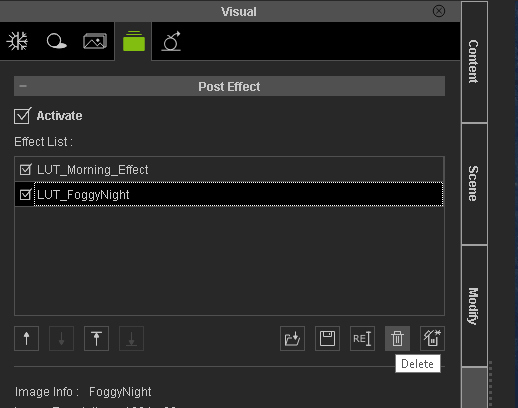 and Delete All if there are several effects in the list. 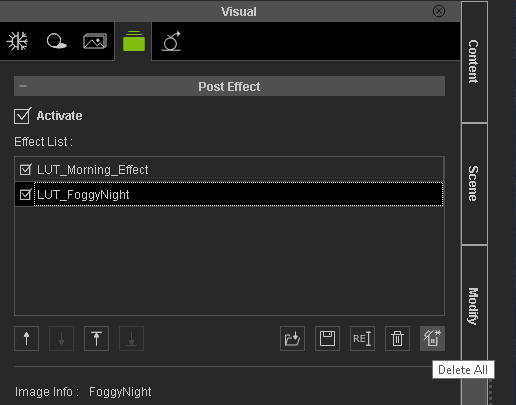 Gerry
Gerry
System: Win 10 Pro (21H2), Asus X99-E WS, CPU i7-5930K -3,5 GHz, 32 GB DDR4 2666-16 RAM, NVidia GTX 1080 Ti GPU - 11 GB VRAM(Driver Studio-536.99), Samsung 850 Pro 512 GB SSD, 6 TB HD storage.
|
|
|
|