|
Author
|
Message
|
but0fc0ursee
|
but0fc0ursee
Posted 9 Years Ago
|
|
Group: Banned Members
Last Active: 9 Years Ago
Posts: 595,
Visits: 1.7K
|
vidi (10/14/2017)
Trust Me... I Hate Skinning characters. Tedious and time consuming.
maybe the wrong tool ? Because I love it ;) Not the wrong tool, because I can skin.... and skin fast, too. Yet, it is much faster to use "Skin Utilities" One must find their "Niche".... just as you LOVE skinning.. I LOVE rigging. ...a matter of preference!
|
|
|
|
|
vidi
|
|
|
Group: Forum Members
Last Active: 2 Months Ago
Posts: 10.8K,
Visits: 40.2K
|
Trust Me... I Hate Skinning characters. Tedious and time consuming.
maybe the wrong tool ? Because I love it ;)
-------------------------------------------------------------------
liebe Grüße vidi
|
|
|
|
but0fc0ursee
|
but0fc0ursee
Posted 9 Years Ago
|
|
Group: Banned Members
Last Active: 9 Years Ago
Posts: 595,
Visits: 1.7K
|
peterblood (10/14/2017)
but0fc0urse: :)
You've been very helpful and I don't mean to be annoying in asking so many questions.Annoying??? No, this is a shocking surprise! :w00t::D
Bravo! ;)
I can visualize how the process works from your description of it. If I can figure it out in the real world it would be an awesome thing for me.
Note: You do NOT to be.... Techie.... to do this.
why???
You do a magnificent job with Reallusion Tools,....
You need to SEE what tools BigDaddy RL uses to make the EZ button.
Peek into this subject and you will SEE..... "What Reallusion does NOT tell you."....and charges you for the EZ button.
Conform: "Attaching garments together"
...the skinwrap tool has been available for years.
~ Click, Click, Click... POOF!
~ Morphs / Blendshapes
Modifier Used: "Morpher"
....this modifier does ALL of the work.... you simply load your morphs.
(Sliders) Automated BUILT-IN tool... just waiting for you to use.
yep.... Click, Click, Click... POOF!
I have a few questions tho.
Can this be done in IC6? I'm still waiting to upgrade to IC7 [Christmas is comin' ;) ]
Where do I find the 'skinwrap modifier' ? Does it open a new window in which I can set the adjust to face?
:cool: pete
RL provides awesome tools,
But...
BigDaddy RL Giveth and Taketh away.
ic 5 (face bones complete)
ic7 (face bones INCOMPLETE)
When you get tired.... of being tired... "Learn Blender" it's free.
It has all of the EZ button creation tools.
"Give IC 7 facial bones"
"Skinwrap ANY mesh to these bones."
... I DO.... you can, too! :cool:
___________________________________________________________
EDIT:
Trust Me... I Hate Skinning characters. Tedious and time consuming. :crazy::pinch:
I LOVE using the "Skinwap Tool" to Click, Click, Click... POOF! :D
BigDaddy RL gives you EVERYTHING you need.
Time to get Under-the-Hood! ;)
|
|
|
|
|
Peter Blood
|
Peter Blood
Posted 9 Years Ago
|
|
Group: Forum Members
Last Active: Last Year
Posts: 2.3K,
Visits: 9.4K
|
but0fc0urse: :)
I can visualize how the process works from your description of it. If I can figure it out in the real world it would be an awesome thing for me. I have a few questions tho.
Can this be done in IC6? I'm still waiting to upgrade to IC7 [Christmas is comin' ;) ]
Where do I find the 'skinwrap modifier' ? Does it open a new window in which I can set the adjust to face?
You've been very helpful and I don't mean to be annoying in asking so many questions.
:cool: pete

http://www.youtube.com/user/peterblood50?feature=mhee
|
|
|
|
but0fc0ursee
|
but0fc0ursee
Posted 9 Years Ago
|
|
Group: Banned Members
Last Active: 9 Years Ago
Posts: 595,
Visits: 1.7K
|
Hey Pete,
If you have time to "Add Facial Bones" to the ic7 skeleton....
~ Take mixammo mesh's and...
~ "SkiNNy WrAP" them to the ic7 skeleton.
You can do it.:Wow:
|
|
|
|
but0fc0ursee
|
but0fc0ursee
Posted 9 Years Ago
|
|
Group: Banned Members
Last Active: 9 Years Ago
Posts: 595,
Visits: 1.7K
|
Hey Pete,
I know you're not very techie, but please consider using what RL GIVES YOU..., "Free."
1. iCone 7 Skeleton (Facial Bones NOT Complete).
2. G5 Skeleton (Facial Bones Complete).
so...
Externally......
~ Give IC7 skeleton "Facial Bones"
...now ALL of your mesh's comply with the latest RL content.
Back to my initial display of bones...
~ link them
~ Freeze the rotations
"SkiNNy WrAP... the old head to the new head." ;)
...ready for 3dxchange.:Wow:
|
|
|
|
but0fc0ursee
|
but0fc0ursee
Posted 9 Years Ago
|
|
Group: Banned Members
Last Active: 9 Years Ago
Posts: 595,
Visits: 1.7K
|
peterblood (10/13/2017)
butOfcOursee :)
You are exactly correct about me not wanting to create a face rig.
...However, that being said, I'd do it if the learning curve wasn't so high that I felt I was wasting valuable animating time focusing on the details of character creation.This is where I can really "Make it EZ to understand". 1. Where to place the bone. 2. Where to link it. 3. How to zero out the face bones rotations. You CAN do all of this in 10 minutes.... 5 minutes with practice. It's quick and easy to 'sew' a talking head ( G3 or G5 with an appropriate face grafted onto it) on a highly detailed body to upgrade the avatars in my productions.
It would all be much simpler and 'cleaner' if the avatar could do it's own talking though. Pete, Here is the BEST PART.... (You don't know it, yet) Reallusion gives you EVERYTHING to make it "Super EZ" ....what???? Clarity: (You sew heads), yet stated....," It would all be much simpler and 'cleaner' if the avatar could do it's own talking though."
RL makes it simple.... your are just NOT aware "how EZ"
Example:
Using the heads that you sew....
~ They have face bones that are "SKINNED." to the mesh.
Simply "SAVE-THE-SKIN".....
"SkinWrap" those bones to CC or ANY mesh.
Sounds scary because you're not sure what to do.
1. Select the new head.
2. Add a skinwrap modifier to it.
3. Set adjust by "FACE"
4. Select the other head and... hit the button
Result: POOF!
You just (Auto) skinned one head to another.
This is how CC "Conforms" one garment to another.
You can do it. :)
|
|
|
|
|
Peter Blood
|
Peter Blood
Posted 9 Years Ago
|
|
Group: Forum Members
Last Active: Last Year
Posts: 2.3K,
Visits: 9.4K
|
Thanks to everybody that helped me out with this. Best forum ever! ;)
Now, I go to work and see what I can do with the information.
Thanks again everyone.
:cool: pete
http://www.youtube.com/user/peterblood50?feature=mhee
|
|
|
|
|
tripfreak
|
tripfreak
Posted 9 Years Ago
|
|
Group: Forum Members
Last Active: 4 Years Ago
Posts: 2.0K,
Visits: 2.8K
|
Partly, it's even easier than shown in the video ! You can directly copy the content from the "steam app" Fuse 1.3: 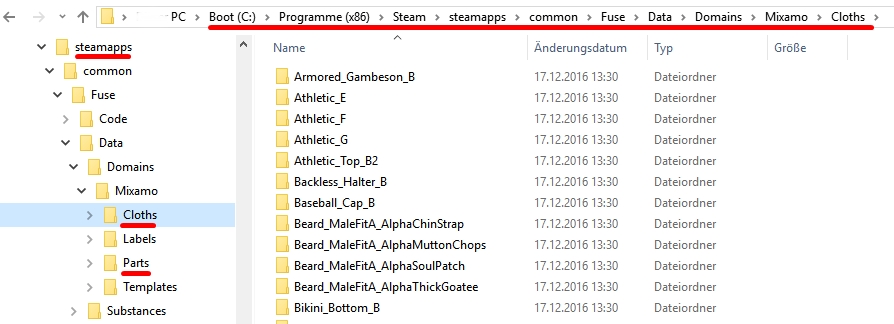 and transfer it to your local AppData where you find the Fuse CC version: 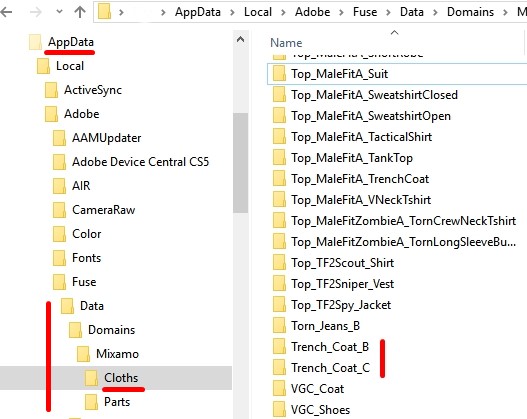 In order to do so you need to rebuild the same folder structure (see above) and simply paste it in. It doesn't work for all clothes but for the most (and also for the premade Clothes from ShareCG and from Arteria3D). The characters are to be found under "Parts" but the only one directly transferable is the "Female Elf" 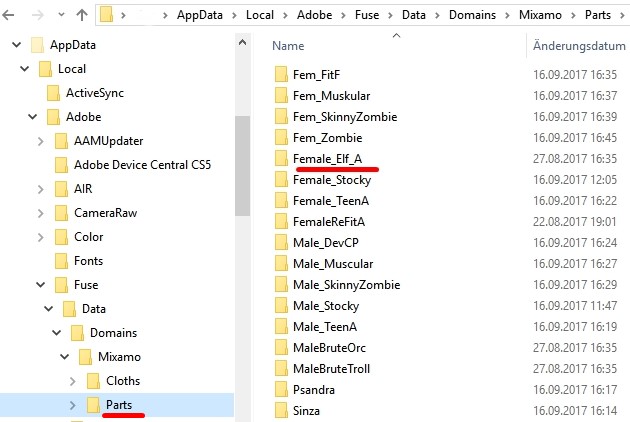 All others have to be to imported as shown in the video. 
--------------------------------------------------
|
|
|
|
|
tripfreak
|
tripfreak
Posted 9 Years Ago
|
|
Group: Forum Members
Last Active: 4 Years Ago
Posts: 2.0K,
Visits: 2.8K
|
Peter I looked in the Fuse CC 'Data' file and I see a whole lot more clothing and all the hairstyles from Fuse 1.3 but I can't find a way to access them.
Is there another way to export them so that I can import them into Mixamo from an outside source?
I think I already gave the answer to this in my posting yesterday (LINK).
Here is video showing how to do this:
[YouTube]https://www.youtube.com/watch?time_continue=2&v=883HyMmnSQI[/YouTube]
P.S. Looks like I forgot how to add a video... :blush:
Either copy the link or use the one on my last post (see above).
--------------------------------------------------
|
|
|
|