|
Author
|
Message
|
|
qacer
|
qacer
Posted 10 Years Ago
|
|
Group: Forum Members
Last Active: 10 Years Ago
Posts: 9,
Visits: 20
|
Hi all, I have CrazyTalk 8. This weekend was the first time I've tried using it. I wanted to do a 2D actor talking head synced to a 4 minute song. I created a 2D actor from a picture. Then, I followed the lip syncing tutorial and ended up with the song as the background music and my voice-over controlling the lip syncs. I was disappointed with the performance. I could not properly modify the lip syncs because each time I hit play there was a delay with the actual animation preview. Basically, I hear the audio going, but the screen is frozen and delayed for a few seconds. It made figuring out where the vocals aligned with the actual frame difficult. I'm not sure if there are any tips to optimize the performance, but I wanted to get a check whether my system specs are sufficient to be able to do a real time preview without any delays. I currently have the following:
OS Name: Microsoft Windows 10 Home
Version: 10.0.10586 Build 10586 OS Manufacturer: Microsoft Corporation System Manufacturer: Dell Inc. System Model: XPS 8500 System Type: x64-based PC Processor: Intel(R) Core(TM) i7-3770 CPU @ 3.40GHz, 3401 Mhz, 4 Core(s), 8 Logical Processor(s) Installed Physical Memory (RAM): 12.0 GB Total Physical Memory: 12.0 GB Available Physical Memory: 6.69 GB Total Virtual Memory: 13.8 GB Available Virtual Memory: 4.99 GB Hyper-V - VM Monitor Mode Extensions Yes Hyper-V - Second Level Address Translation Extensions Yes Hyper-V - Virtualization Enabled in Firmware Yes Hyper-V - Data Execution Protection Yes
Description: Local Fixed Disk
Compressed: No File System: NTFS Size: 1.82 TB (1,999,316,709,376 bytes) Free Space: 504.09 GB (541,259,653,120 bytes)
Adapter Type: AMD Radeon Graphics Processor Adapter Description: AMD Radeon HD 7700 Series Adapter RAM: (2,147,483,648) bytes
Radeon Software Version - 16.3.2 Radeon Software Edition - Crimson Graphics Chipset - AMD Radeon HD 7700 Series Memory Size - 2048 MB Memory Type - GDDR5 Core Clock - 1000 MHz Windows Version - Windows 10 (64 bit) System Memory - 12 GB CPU Type - Intel(R) Core(TM) i7-3770 CPU @ 3.40GHz
Are these specs sufficient? If they are, how do I improve the performance of CrazyTalk 8, so I can replay the animation, background music, and voice-over smoothly during preview? If these specs are not sufficient, would getting a different video card such as an Nvidia Quadro K2200 help? Thanks! |
|
|
|
|
vidi
|
|
|
Group: Forum Members
Last Active: Last Year
Posts: 10.8K,
Visits: 40.2K
|
The performance depends on the GPU and the data size of the project
-------------------------------------------------------------------
liebe Grüße vidi
|
|
|
|
|
Snarp Farkle
|
Snarp Farkle
Posted 10 Years Ago
|
|
Group: Forum Members
Last Active: 2 Years Ago
Posts: 770,
Visits: 3.6K
|
These are the Recommended System Requirements for iClone that I have which should be good to go by for all Reallusion Programs. NVIDIA AMD GeForce GTX 600 Series OK Radeon HD 8000 Series OK GeForce GTX 700 Series OK Radeon R5 M200 Series OK GeForce GTX 800 Series OK Radeon R7 M200 Series OK GeForce GTX 900 Series OK Radeon R9 M200 Series ? Recommended System Requirements: (iClone will have better performance in below recommended environment) * Intel i5 dual core CPU or higher - or AMD equivalent. * 8GB RAM or higher recommended. * 10GB free hard disk space or higher recommended. * Display Resolution: 1920 x 1080 or higher. * Graphics Card: NVidia Geforce GTX 600 Series/ AMD Radeon HD 7000 Series or higher. * Video Memory: 2GB RAM or higher recommended. * Video card compatible with Pixel Shader 3.0 recommended for optimized visual performance. So if your system falls into this category then also make sure all your drivers are up to date, if they are then submit a support ticket would be my recommendation. I also reinstall the latest updates if I'm having multiple program issues, not sure if it does anything at all but it's just something I do.
Dell XPS 8900, Intel(R) Core(TM) i7-6700 CPU @ 3.40GHz, 3408 Mhz, 4 Core(s), 8 Logical Processor(s), 16 GB RAM, - 4 GB GeForce GTX 745, NVIDIA compatible.
Acer Aspire V Nitro Laptop, 2.5GHz Intel Core i5-7300HQ processor with 6MB cache, 256GB solid state drive, 16GB Ram, 4 GB NVIDIA GeForce GTX 1050 Ti graphics.
|
|
|
|
|
Kevin.S
|
Kevin.S
Posted 10 Years Ago
|
|
Group: Forum Members
Last Active: 2 Years Ago
Posts: 1.2K,
Visits: 71.8K
|
|
|
|
|
|
animagic
|
animagic
Posted 10 Years Ago
|
|
Group: Forum Members
Last Active: 2 Months Ago
Posts: 15.8K,
Visits: 31.4K
|
The OP is talking about CrazyTalk 8, which should have much less stringent requirements than iClone 6. Minimum requirements (from the CT 8 FAQ page here): Windows
64-bit Operating System: Windows 10/Windows 8/Windows 7 SP1
CPU: Dual core CPU or higher
Memory: 2 GB RAM or higher
Video Card: Nvidia GeForce 8 Series or higher/ATI HD 3000 Series or higher
Video Memory: 512MB RAM or higher
Display Resolution: 1024 x 768 or higher
Hard Disk Space: 5 GB free hard disk space or higher
In the CT7 FAQ it said something about Hyper-V, which should be disabled when installing. This may also apply to CT8.
This is known issue for Windows 8 in which the Hyper-V windows feature is turned on. You may have Hyper-V as part of the Windows Phone SDK or Windows 8 Pro version is turned on Hyper-V by default. Anyway, if your system has Hyper-V turned on, please help to disable it before you install Reallusion program & enabled it back after you've installed Reallusion program. You may verify it as per below steps: -
1) Disable Hyper-V, steps on how to,
2) Install Reallusion program.
3) Enable Hyper-V, same link as above on how to. Other than a possible Hyper-V issue, your system should be powerful enough.
|
|
|
|
|
vidi
|
|
|
Group: Forum Members
Last Active: Last Year
Posts: 10.8K,
Visits: 40.2K
|
but what is with the Project size ? Szene + 4 min Background Music in HQ can be too much Better would be to make only the Lipsync and use a NLE for bring all thogether
-------------------------------------------------------------------
liebe Grüße vidi
|
|
|
|
|
Kevin.S
|
Kevin.S
Posted 10 Years Ago
|
|
Group: Forum Members
Last Active: 2 Years Ago
Posts: 1.2K,
Visits: 71.8K
|
|
|
|
|
|
qacer
|
qacer
Posted 10 Years Ago
|
|
Group: Forum Members
Last Active: 10 Years Ago
Posts: 9,
Visits: 20
|
Thank you all for the replies! First I will try animagic's suggestion of disabling Hyper-V and re-install the software. If that doesn't work, then I'll start shopping for a video card. I had my eye on a Quadro K2200, but it appears that this may not be the ideal solution as I also use Sony Vegas Pro 13.
|
|
|
|
|
qacer
|
qacer
Posted 10 Years Ago
|
|
Group: Forum Members
Last Active: 10 Years Ago
Posts: 9,
Visits: 20
|
It turns out that I have Windows 10 Home, so by default I do not have Hyper-V installed. I decided to try MSI Afterburner. When I played my saved CrazyTalk project, the card memory showed 1125 MB. However, this seems to be the capped and it did not go further beyond this value.If my video card has 2 GB of memory, then what would an additional memory get me if the usage only maxes out at less than the card memory? 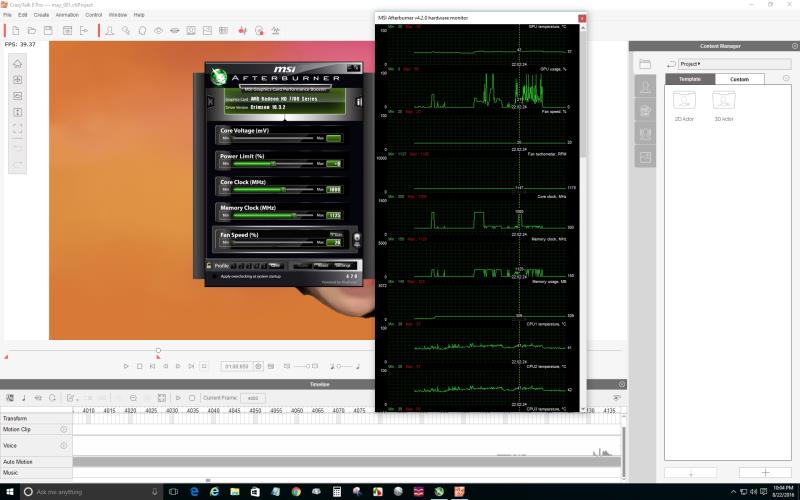
|
|
|
|
|
qacer
|
qacer
Posted 10 Years Ago
|
|
Group: Forum Members
Last Active: 10 Years Ago
Posts: 9,
Visits: 20
|
Uploading a zoomed in version of the Afterburner screenshot. 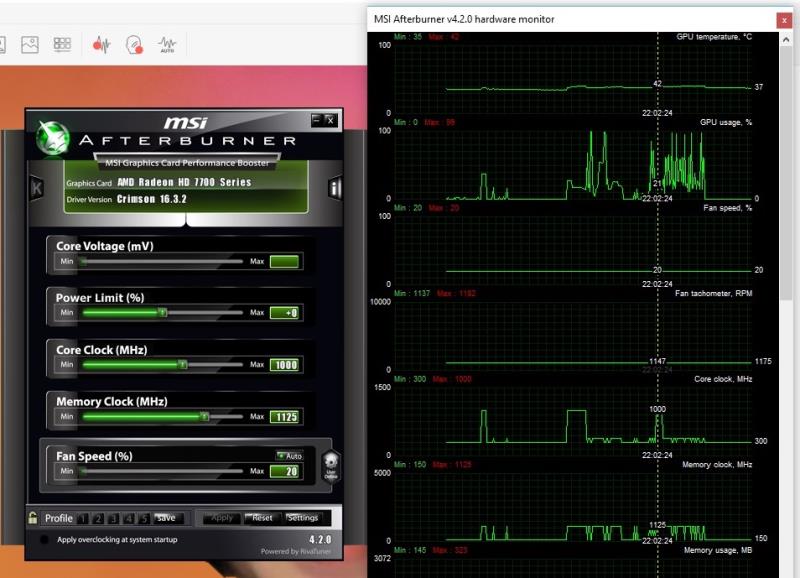
|
|
|
|