|
Author
|
Message
|
|
Fionn (RL)
|
Fionn (RL)
Posted 3 Years Ago
|
|
Group: Administrators
Last Active: 2 Years Ago
Posts: 87,
Visits: 614
|
Thanks for the many feedbacks and suggestions from our users. We think now’s a good time to elaborate on this easy workflow for the community: please follow the steps below to import your Daz3D characters into CC4 without losing data. Step 1. Before exporting characters from Daz3D1-1 Please copy the Reallusion folder to C:\Users\Public\Documents\My DAZ 3D Library\data\DAZ 3D\Genesis 8\Male\Morphs, because we need this morph data in Daz3D when we convert the facial keys. 1-2 To open Daz Studio, drag " Genesis8_Male_RL_FaceKey.duf" to the character that you want to export. It will create a facekey in DAZ, and then you can export FBX to Character Creator 4 (CC4) or 3DXchange.
Step 2. Export characters from Daz3D2-1We take the model 'Genesis 3 Male’ as an example. Before you export this model from Daz Studio, make sure you tick the Show Sub Items checkbox at the right panel.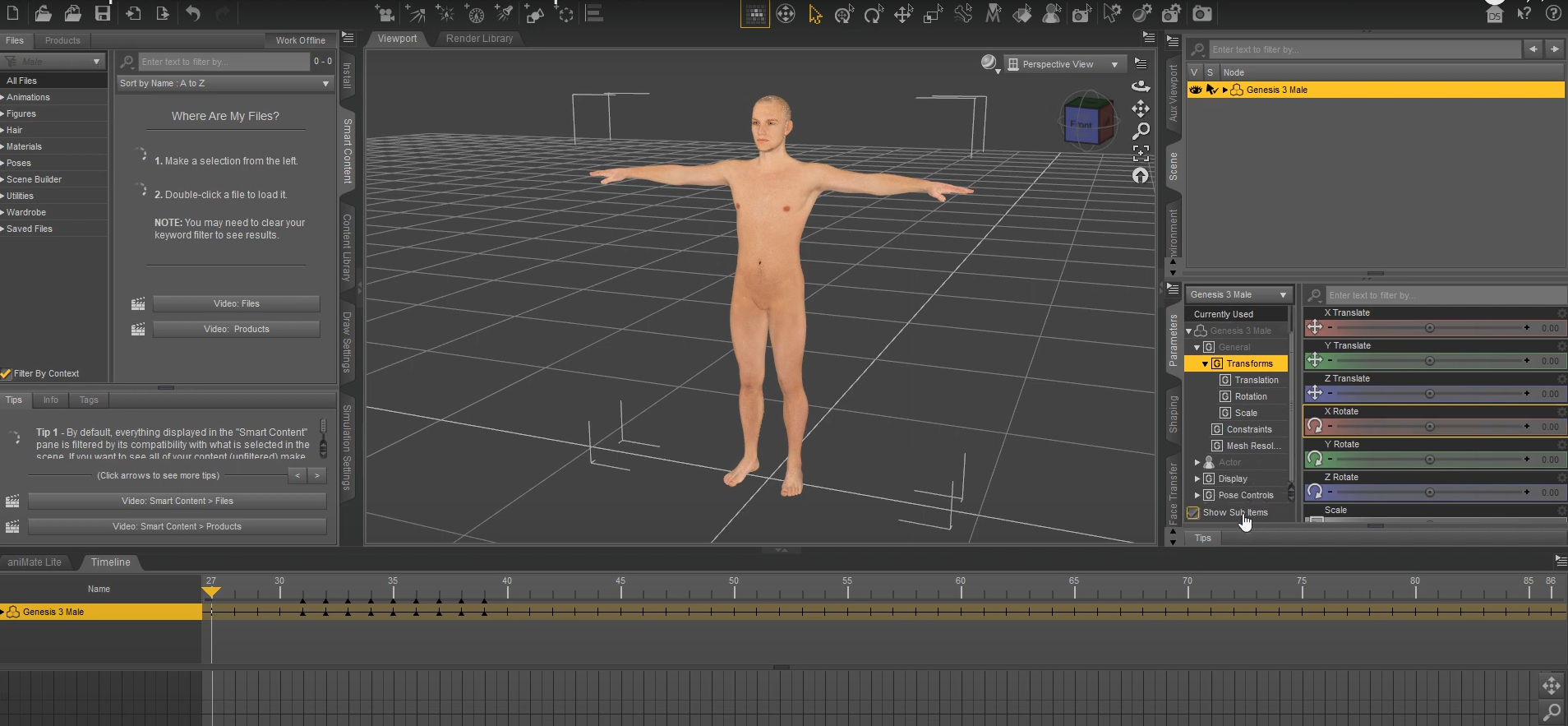 2-2 Go to the toolbar, click File > Export > DazExport, find the ‘G3Male’ folder and save this model as an FBX file. 2-2 Go to the toolbar, click File > Export > DazExport, find the ‘G3Male’ folder and save this model as an FBX file.
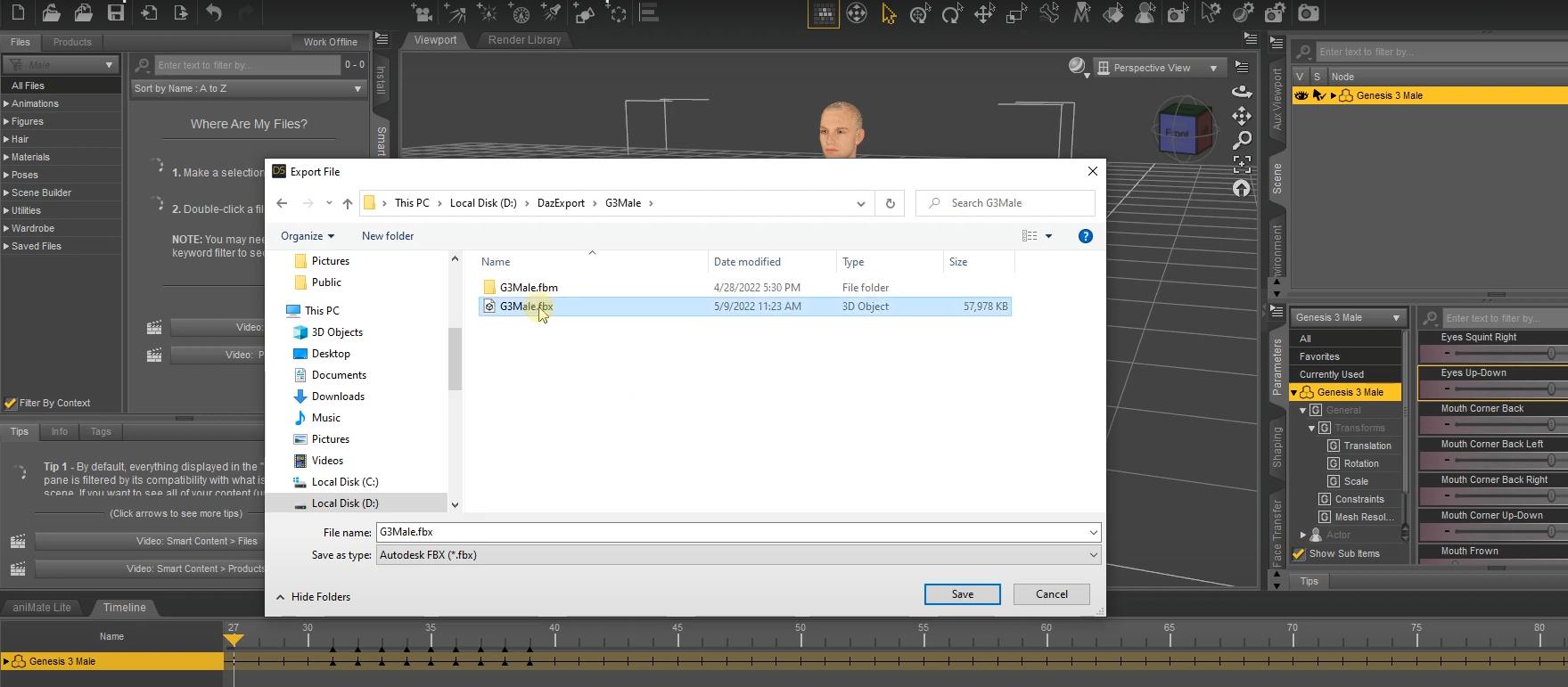
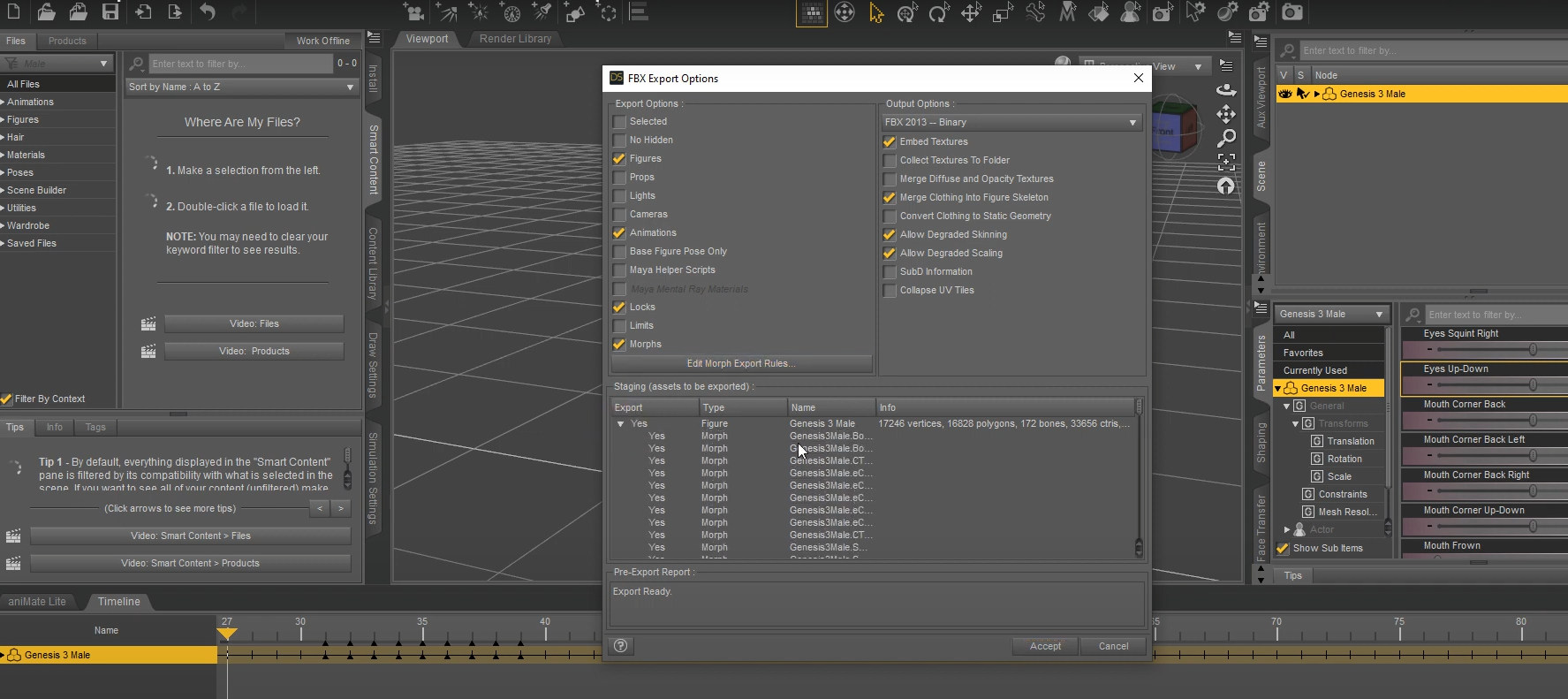
2-3 After saving the FBX file, choose the desired content on the FBX Export Options window, then click the Edit Morph Export Rules…button.
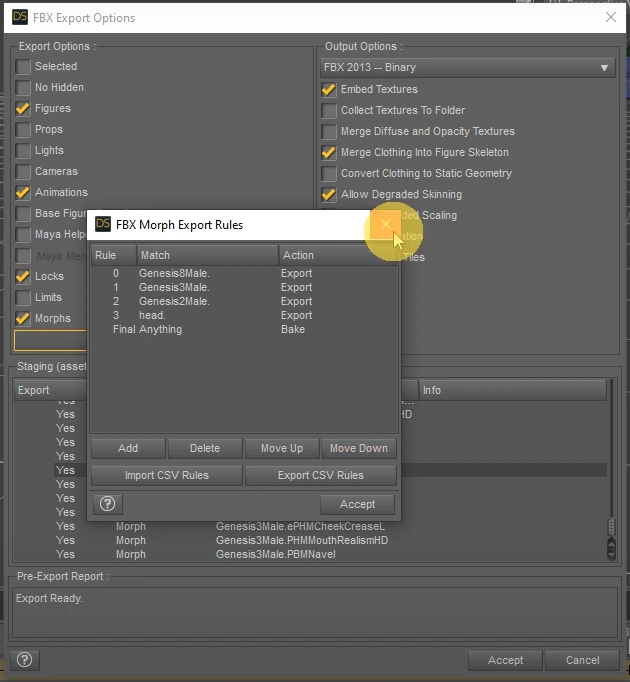
2-4 Once the Rule, Match, Action export rules are confirmed, click the Accept button.
Step 3. Import characters to Character Creator 43-1 Open Character Creator 4 and go to the toolbar, click File > Import > DazExport, find the file “G3Male.fbx” and click Open.
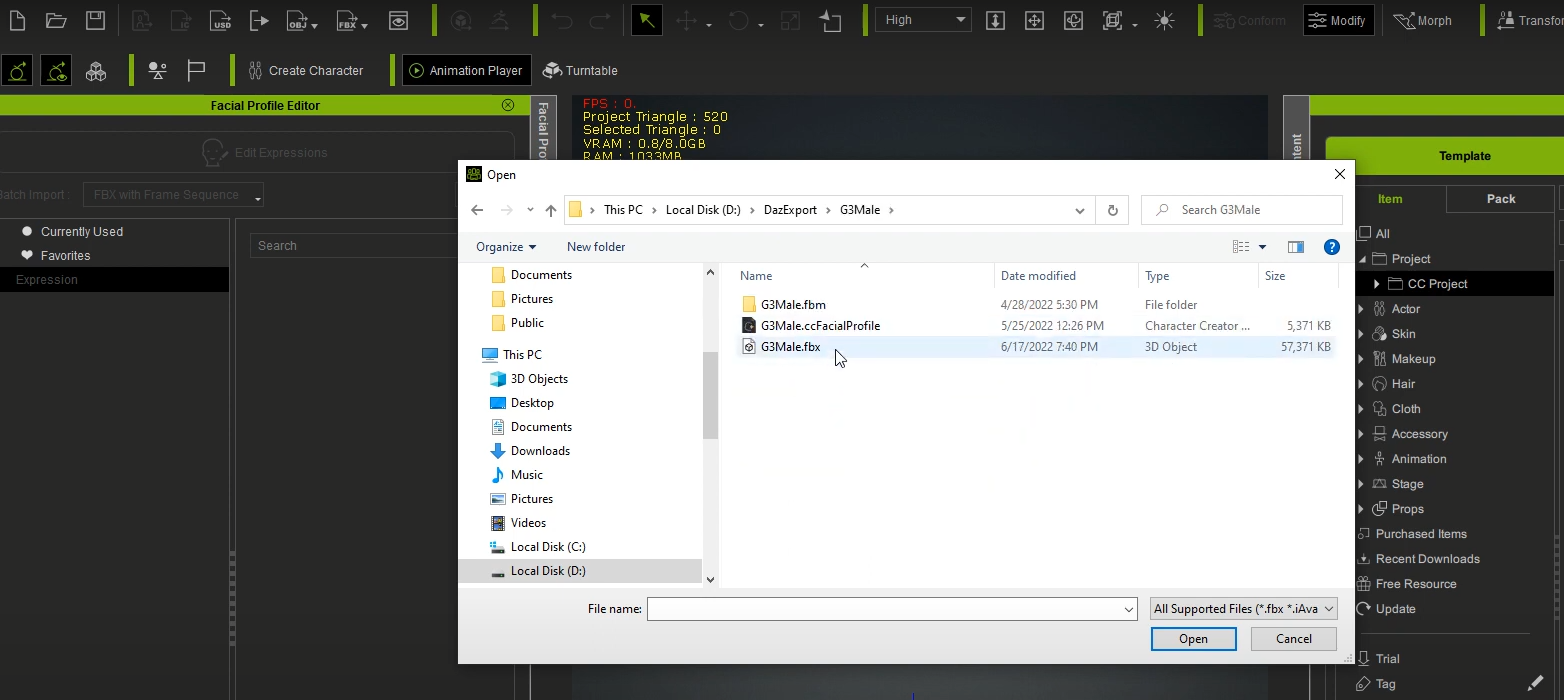
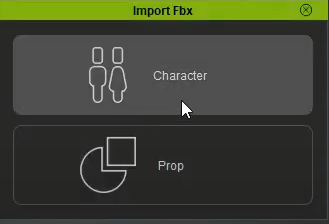
3-2 Since this model is not a prop, choose Character.
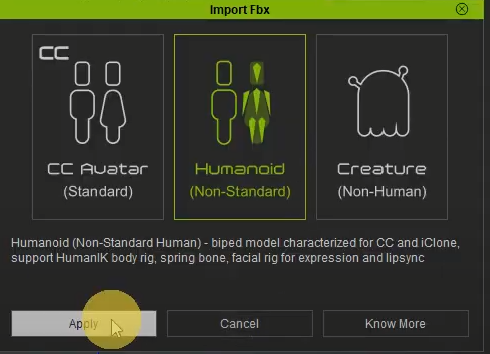
As it’s not a CC Avatar created in Character Creator, choose the Humanoid option for Non-Standard character.
3-3 As CC4 supports various character types from the industry, ranging from Maya, 3ds Max, Blender to Daz3D, CC4 will automatically detect this Daz model and convert it to Humanoid.
https://www.reallusion.com/character-creator/animate-any-character.html#feature-nav-Humanoid
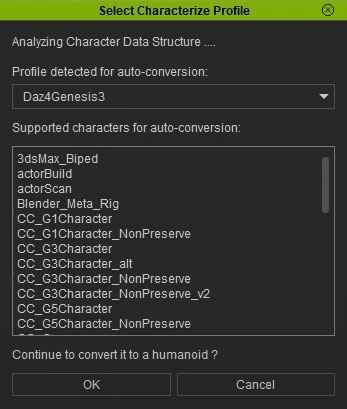
Step 4. Using Daz3D Facial keys in Character Creator 44-1 After successfully importing the Daz model into CC4, go to Local Disk( C: ) > Program Files > Reallusion > Character Creator 4 > Program > Assets 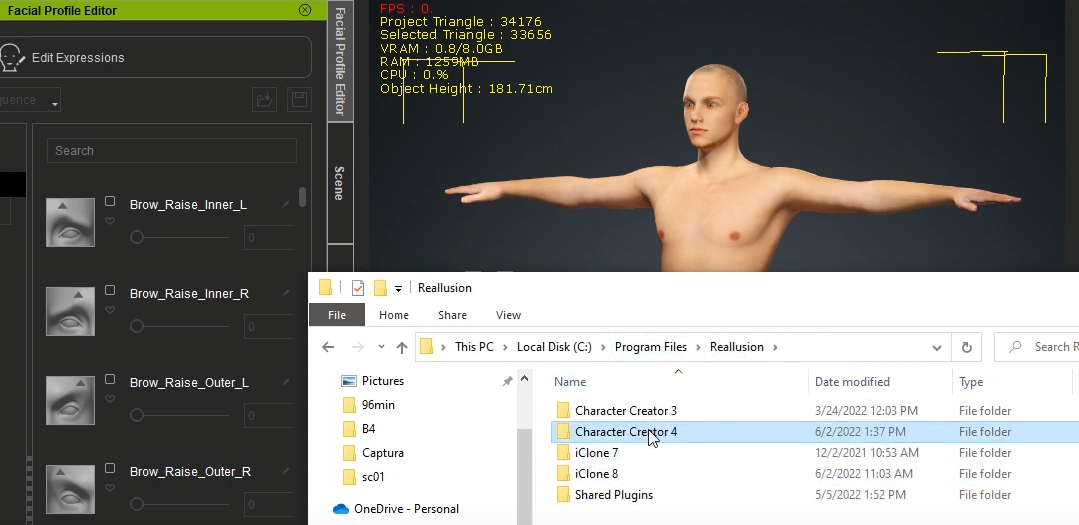
4-2 Continue the path, Assets > ExternalFiles > DazResource > FacialProfile >Genesis3_Male, and find the “Genesis3_Male.ccFacialProfile” file.
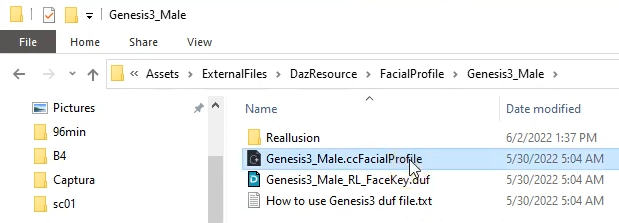
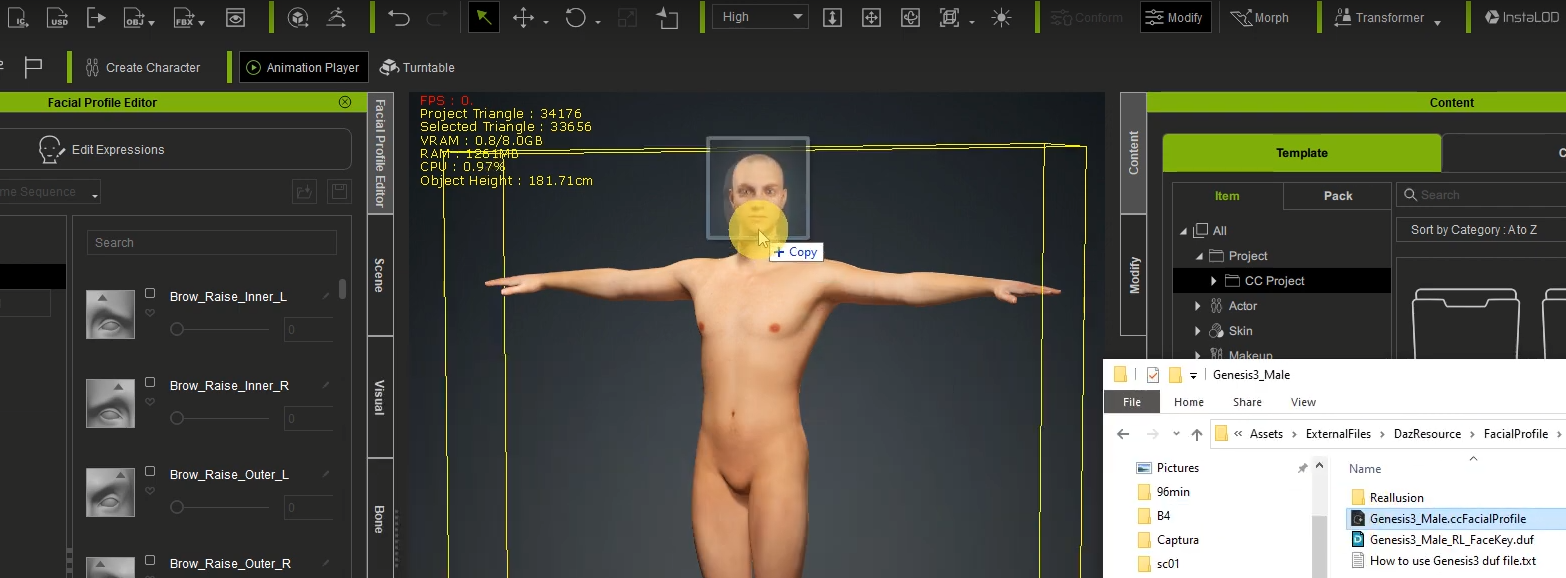
Directly drag this file to your character in the viewport.
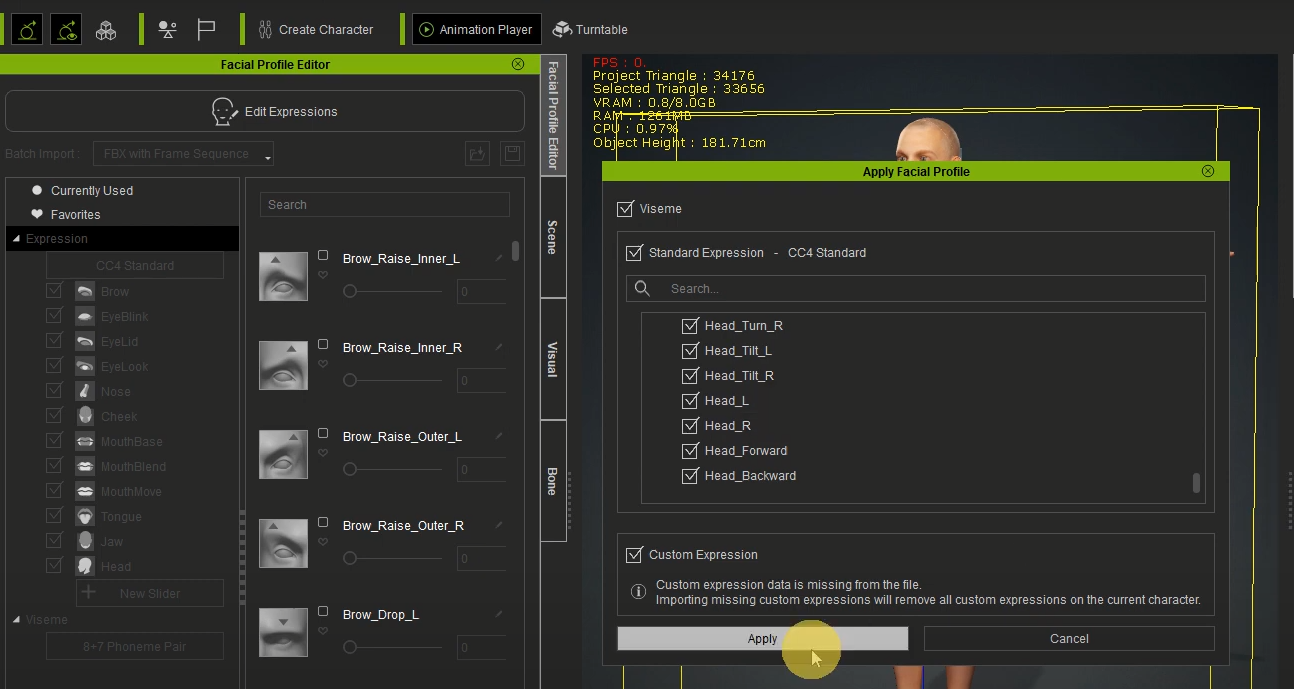
A popup window will show the Facial Profile you can apply to this Daz character; click Apply.
4-3 Click Edit Expressions in the Facial Profile Editor panel on the left side, then you can easily customise this model’s facial expressions with the Standard (60+ blendshapes) or Extended Expression Profile (140+ blendshapes) in CC4.
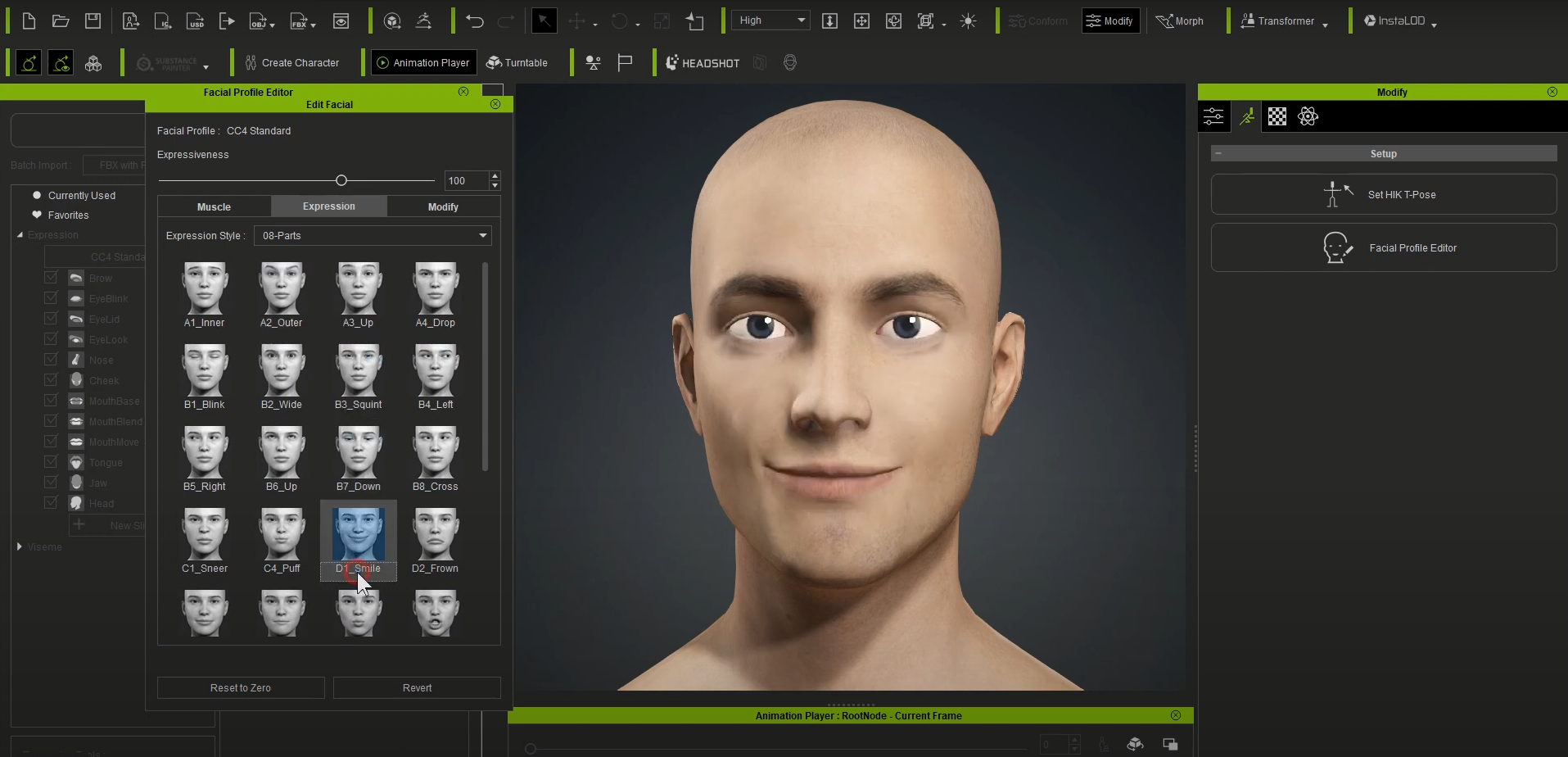
 4-4 After successfully importing your Daz character in CC4, you can use the Facial Expression Template to demo its expression data by clicking Edit Facial in the Modify panel. 4-4 After successfully importing your Daz character in CC4, you can use the Facial Expression Template to demo its expression data by clicking Edit Facial in the Modify panel.
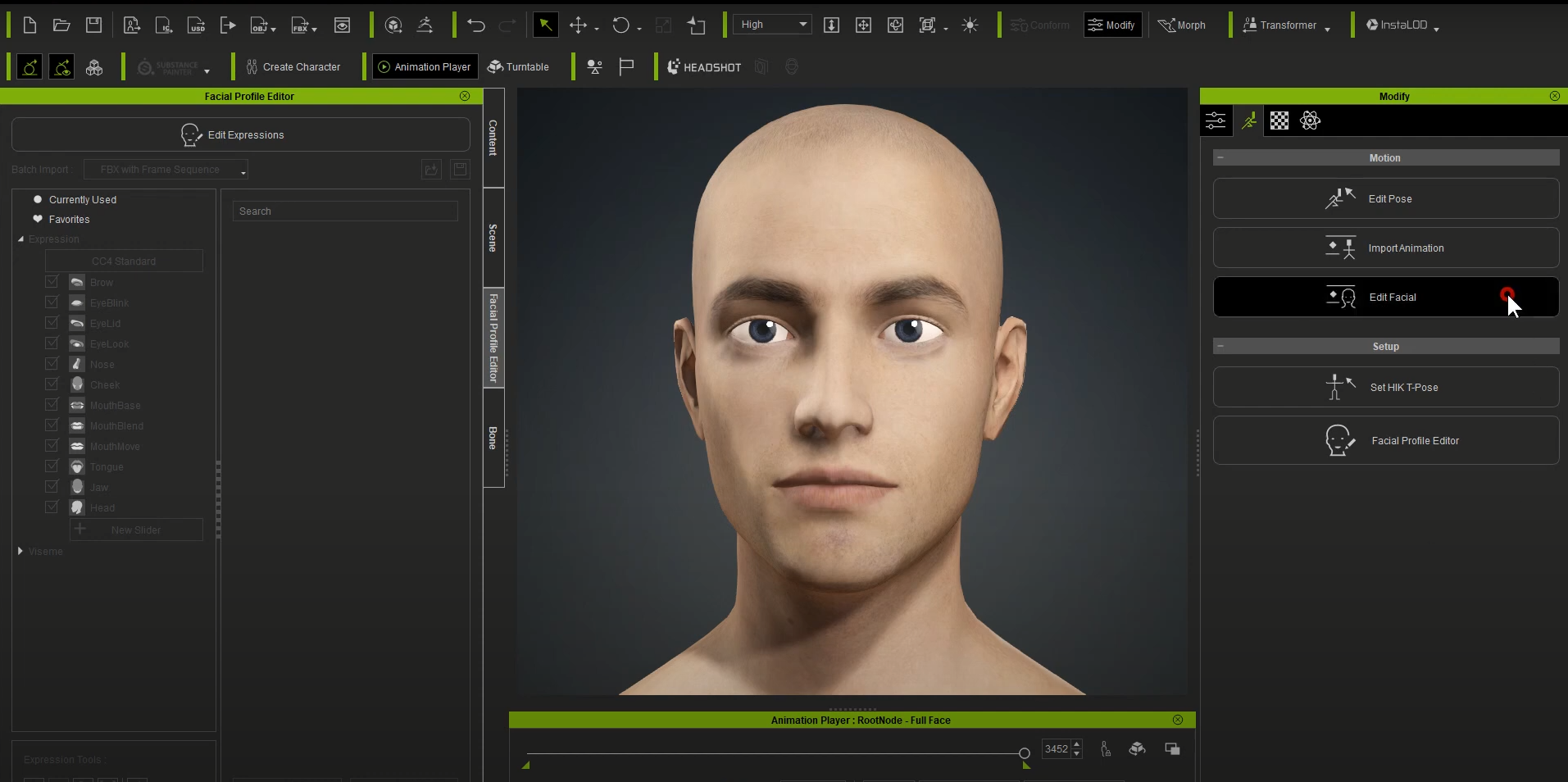
Directly drag the desired facial profiles onto your character in the viewport and see the result.
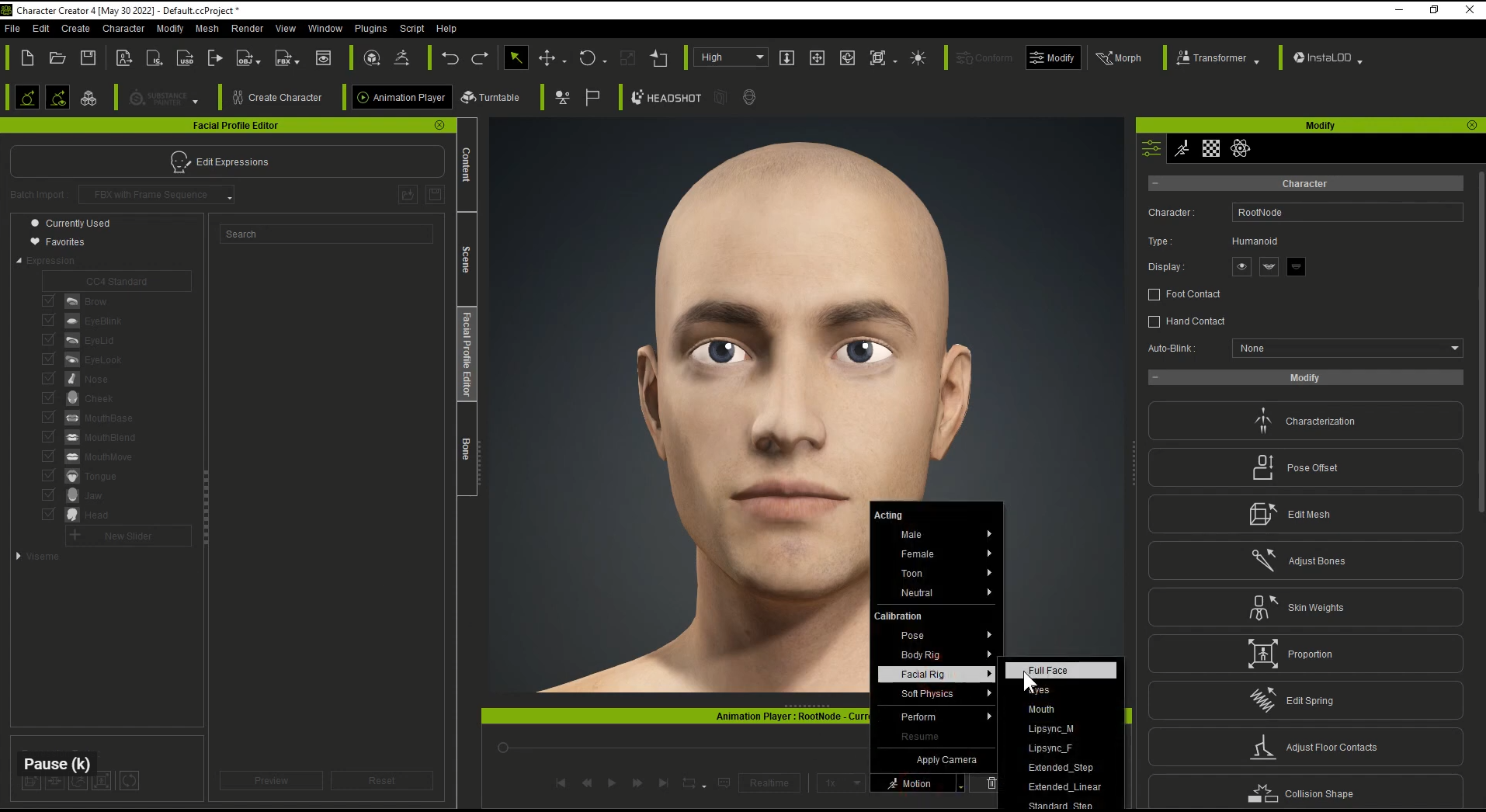
4-5 In addition, you can apply Facial Motion (Facial Rig) to the Daz characters for further calibration.
Learn more about custom facial expressions in CC4.
https://www.reallusion.com/character-creator/facial-expression.html
|
|
|
|
|
toystorylab
|
toystorylab
Posted 3 Years Ago
|
|
Group: Forum Members
Last Active: 3 Months Ago
Posts: 4.6K,
Visits: 29.9K
|
Just wanted to check this, but I fail at the first sentence: 1-1 Please copy the Reallusion folder toC:\...
WHAT folder?? :crazy:
Toystorylab on Vimeo :  Crassitudes (my "Alter Ego") on Youtube: Crassitudes (my "Alter Ego") on Youtube: 
|
|
|
|
|
wires
|
|
|
Group: Forum Members
Last Active: 4 Months Ago
Posts: 5.7K,
Visits: 26.5K
|
toystorylab (7/29/2022)
Just wanted to check this, but I fail at the first sentence:
1-1 Please copy the Reallusion folder toC:\...
WHAT folder?? :crazy:
My guess is C:\Program Files\Reallusion\Character Creator 4\Program\Assets\ExternalFiles\DazResource based mostly on the files mentioned in the post. :blink::ermm::unsure:
Gerry
System: Win 10 Pro (21H2), Asus X99-E WS, CPU i7-5930K -3,5 GHz, 32 GB DDR4 2666-16 RAM, NVidia GTX 1080 Ti GPU - 11 GB VRAM(Driver Studio-536.99), Samsung 850 Pro 512 GB SSD, 6 TB HD storage.
|
|
|
|
|
toystorylab
|
toystorylab
Posted 3 Years Ago
|
|
Group: Forum Members
Last Active: 3 Months Ago
Posts: 4.6K,
Visits: 29.9K
|
Yo, could be, thanx! Will test... :crazy:
Toystorylab on Vimeo : Crassitudes (my "Alter Ego") on Youtube:
|
|
|
|
|
wires
|
|
|
Group: Forum Members
Last Active: 4 Months Ago
Posts: 5.7K,
Visits: 26.5K
|
toystorylab (7/29/2022)
Yo, could be, thanx! Will test... :crazy: Gerry
Gerry
System: Win 10 Pro (21H2), Asus X99-E WS, CPU i7-5930K -3,5 GHz, 32 GB DDR4 2666-16 RAM, NVidia GTX 1080 Ti GPU - 11 GB VRAM(Driver Studio-536.99), Samsung 850 Pro 512 GB SSD, 6 TB HD storage.
|
|
|
|
|
animatedbeing
|
animatedbeing
Posted 3 Years Ago
|
|
Group: Forum Members
Last Active: 2 Weeks Ago
Posts: 114,
Visits: 1.8K
|
toystorylab (7/29/2022)
Just wanted to check this, but I fail at the first sentence:
1-1 Please copy the Reallusion folder toC:\...
WHAT folder?? :crazy:
Look for C:\Program Files\Reallusion\iClone 8\Program\Assets\ExternalFiles\DazResource. The instructions for copying are in the FacialProfile folder For example: C:\Program Files\Reallusion\iClone 8\Program\Assets\ExternalFiles\DazResource\FacialProfile\Genesis8_Male\How to use Genesis8 duf file.txtThis assumes you have installed CC4 in the typical C:\Program Files\Reallusion folder. ---------------------------------------- How to use Genesis8 duf file.txt ---
Step1. Please copy folder of "Reallusion" to C:\Users\Public\Documents\My DAZ 3D Library\data\DAZ 3D\Genesis 8\Male\Morphs Because we need this morph data in DAZ when we convert facial key. Step2. To open DAZ, drag "Genesis8_Male_RL_FaceKey.duf" to the character that you want to export. It will create facekey in DAZ, and then you can export FBX to 3DX/CC4.
|
|
|
|
|
toystorylab
|
toystorylab
Posted 3 Years Ago
|
|
Group: Forum Members
Last Active: 3 Months Ago
Posts: 4.6K,
Visits: 29.9K
|
Hm, first test was not very lucky... The export process takes aeons, esp "animation"... As I have lots of DAZ characters, ergo lots of morphs according "GenesisMale8. export", though "animation" is the slowest part, also pushes my 64GB RAM up to max. I remind having this problems years ago with DAZ export + morphs and when I got it right we set FPS to 1 back in those days. So I aborted and set 1 FPS, though still takes too long.
As I don't really need this I aborted and will see what others report here.
Regarding Folder I put that "DazResource" Folder in Morphs and used the "FaceKey.duf" found there.

Toystorylab on Vimeo : Crassitudes (my "Alter Ego") on Youtube:
|
|
|
|
|
toystorylab
|
toystorylab
Posted 3 Years Ago
|
|
Group: Forum Members
Last Active: 3 Months Ago
Posts: 4.6K,
Visits: 29.9K
|
@animatedbeing OK, so Folder thing was not correct, did now as you suggested, found the Reallusion Folder from 2018 :D on that place and replaced with new one. Will test... Thanx
Toystorylab on Vimeo : Crassitudes (my "Alter Ego") on Youtube:
|
|
|
|
|
animatedbeing
|
animatedbeing
Posted 3 Years Ago
|
|
Group: Forum Members
Last Active: 2 Weeks Ago
Posts: 114,
Visits: 1.8K
|
Hint for faster export from DAZ. Change the FPS to 1 
|
|
|
|
|
toystorylab
|
toystorylab
Posted 3 Years Ago
|
|
Group: Forum Members
Last Active: 3 Months Ago
Posts: 4.6K,
Visits: 29.9K
|
Export "animation" is still so slow, again aborted. No fun! Though my specs should be fine AMD Ryzen 9 5950X + RTX3090 + 64GB Ram
Toystorylab on Vimeo : Crassitudes (my "Alter Ego") on Youtube:
|
|
|
|