|
Author
|
Message
|
|
nmuta1
|
nmuta1
Posted 5 Years Ago
|
|
Group: Forum Members
Last Active: 3 Years Ago
Posts: 40,
Visits: 183
|
Hello all.
I know this should be pretty simple. I created some earrings as props in Blender and imported them into iClone. Attached them to ears in iClone ( technically they are positioned on the ear but "attached' to the head.
Either way, they move with the head fine during animation. But I need them to sway. I went to the modify panel and to Physics > Activate Physics ... but I'm not sure what the right combination of features are to get it working. I need to obviously constrain the topmost point of each earring to the corresponding "ear lobes" of the actor. . Mind you, these are earrings that I created . I did not purchase them.
Any advice would be appreciated ! Thanks.
|
|
|
|
|
4u2ges
|
4u2ges
Posted 5 Years Ago
|
|
Group: Forum Members
Last Active: Last Month
Posts: 5.3K,
Visits: 16.8K
|
Download those free earrings and see how they were made: https://marketplace.reallusion.com/physix-enabled-earrings_180296Basically nothing special. 2 parts connected with the constraint. The most challenging would probably be tweaking head collision shape as it's colliding with earrings and make them fly away.
|
|
|
|
|
nmuta1
|
nmuta1
Posted 5 Years Ago
|
|
Group: Forum Members
Last Active: 3 Years Ago
Posts: 40,
Visits: 183
|
Thanks, 4u2ges. I will try that.
|
|
|
|
|
nmuta1
|
nmuta1
Posted 5 Years Ago
|
|
Group: Forum Members
Last Active: 3 Years Ago
Posts: 40,
Visits: 183
|
I tried them, they do bind to the earlobe but they fly around fanatically ( in a frenzy ) and I can't seem to figure out how to get them to actually behave correctly. I wonder if they were made for an older version of iClone perhaps ? It's good that they're free because they're not a 'ready to go' asset, it still requires some knowledge of how to tweak them to get them working.
|
|
|
|
|
4u2ges
|
4u2ges
Posted 5 Years Ago
|
|
Group: Forum Members
Last Active: Last Month
Posts: 5.3K,
Visits: 16.8K
|
That is what I said. They collide with head collision shape and fly away. You have scale head collision shape down and set it's collision to minimum. 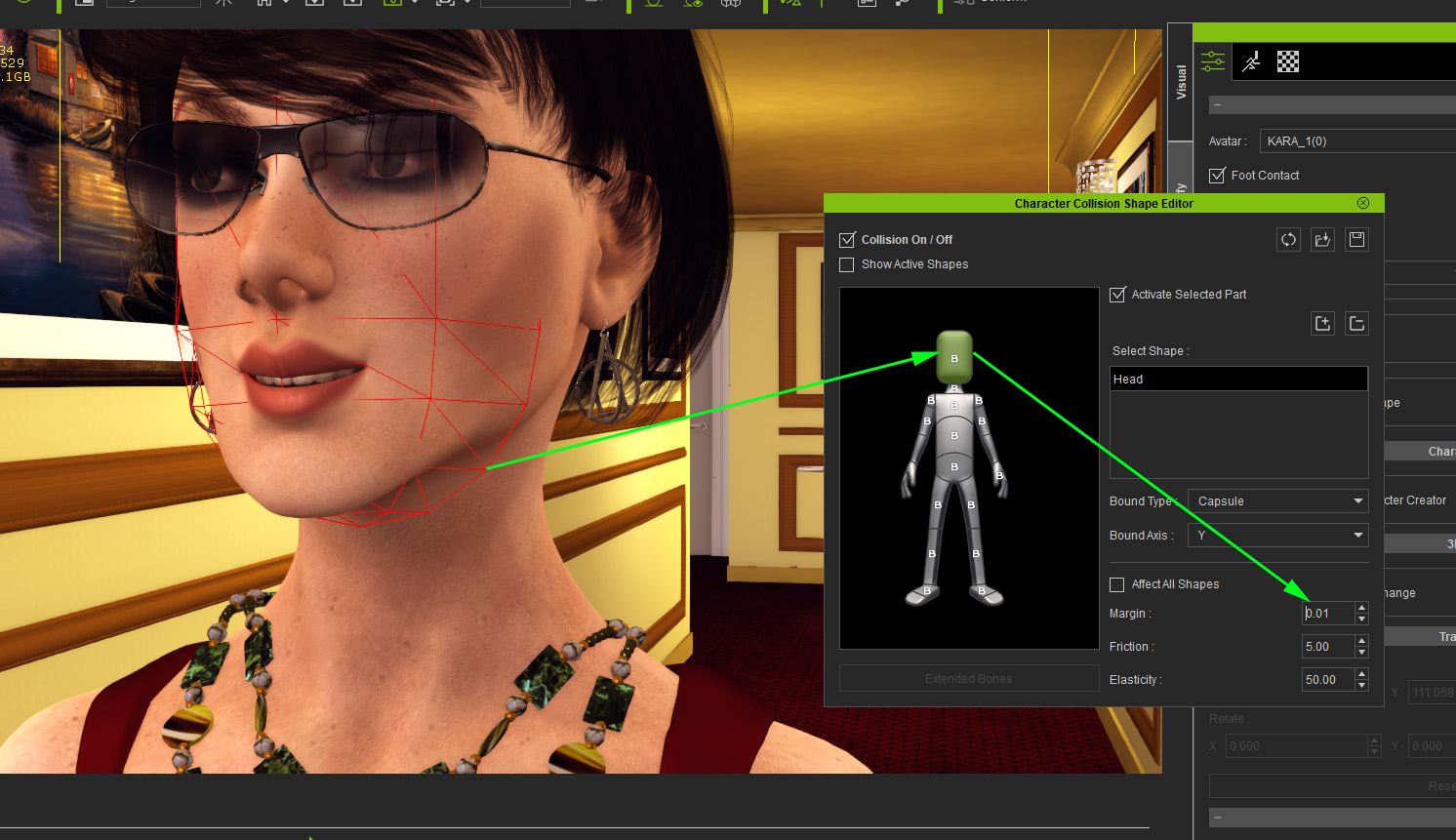
|
|
|
|
|
nmuta1
|
nmuta1
Posted 5 Years Ago
|
|
Group: Forum Members
Last Active: 3 Years Ago
Posts: 40,
Visits: 183
|
oh ok, thanks for the clarification. Appreciate the help ! 4u2ges (7/21/2021)
That is what I said. They collide with head collision shape and fly away. You have scale head collision shape down and set it's collision to minimum.
|
|
|
|
|
nmuta1
|
nmuta1
Posted 5 Years Ago
|
|
Group: Forum Members
Last Active: 3 Years Ago
Posts: 40,
Visits: 183
|
@ 4u2gesThat worked ! Thank you so much.
|
|
|
|
|
helielfilmz
|
helielfilmz
Posted 5 Years Ago
|
|
Group: Forum Members
Last Active: 2 Years Ago
Posts: 55,
Visits: 383
|
4u2ges (7/21/2021)
Download those free earrings and see how they were made: https://marketplace.reallusion.com/physix-enabled-earrings_180296Basically nothing special. 2 parts connected with the constraint. The most challenging would probably be tweaking head collision shape as it's colliding with earrings and make them fly away. Hey i am a little late to the party, but i was wanting to know how would i go about added my own earrings and making them sway like yours do?
What you know today will be obsolete tomorrow
|
|
|
|
|
4u2ges
|
4u2ges
Posted 5 Years Ago
|
|
Group: Forum Members
Last Active: Last Month
Posts: 5.3K,
Visits: 16.8K
|
Hey i am a little late to the party, but i was wanting to know how would i go about added my own earrings and making them sway like yours do?
You would need two parts earrings (earring itself and a hook) and connect those 2 parts with point-to-point constraint.
Download those earrings from above and see how those parts are attached to each other, connected with constraint and settings for the constraint unit.
You can also check a free Lantern with Pole prop (which supplied with iClone in Prop > Light Tools section of Content) to see how it should be done.
|
|
|
|
|
helielfilmz
|
helielfilmz
Posted 5 Years Ago
|
|
Group: Forum Members
Last Active: 2 Years Ago
Posts: 55,
Visits: 383
|
4u2ges (11/12/2021)
Hey i am a little late to the party, but i was wanting to know how would i go about added my own earrings and making them sway like yours do?
You would need two parts earrings (earring itself and a hook) and connect those 2 parts with point-to-point constraint.
Download those earrings from above and see how those parts are attached to each other, connected with constraint and settings for the constraint unit.
You can also check a free Lantern with Pole prop (which supplied with iClone in Prop > Light Tools section of Content) to see how it should be done.
Thanx for the reply. I will be checking this out. This is very helpful i greatly appreciated
What you know today will be obsolete tomorrow
|
|
|
|