|
By nmuta1 - 5 Years Ago
|
Hello all.
I know this should be pretty simple. I created some earrings as props in Blender and imported them into iClone. Attached them to ears in iClone ( technically they are positioned on the ear but "attached' to the head.
Either way, they move with the head fine during animation. But I need them to sway. I went to the modify panel and to Physics > Activate Physics ... but I'm not sure what the right combination of features are to get it working. I need to obviously constrain the topmost point of each earring to the corresponding "ear lobes" of the actor. . Mind you, these are earrings that I created . I did not purchase them.
Any advice would be appreciated ! Thanks.
|
|
By 4u2ges - 5 Years Ago
|
Download those free earrings and see how they were made: https://marketplace.reallusion.com/physix-enabled-earrings_180296
Basically nothing special. 2 parts connected with the constraint.
The most challenging would probably be tweaking head collision shape as it's colliding with earrings and make them fly away.
|
|
By nmuta1 - 5 Years Ago
|
|
Thanks, 4u2ges. I will try that.
|
|
By nmuta1 - 5 Years Ago
|
|
I tried them, they do bind to the earlobe but they fly around fanatically ( in a frenzy ) and I can't seem to figure out how to get them to actually behave correctly. I wonder if they were made for an older version of iClone perhaps ? It's good that they're free because they're not a 'ready to go' asset, it still requires some knowledge of how to tweak them to get them working.
|
|
By 4u2ges - 5 Years Ago
|
That is what I said. They collide with head collision shape and fly away. You have scale head collision shape down and set it's collision to minimum.
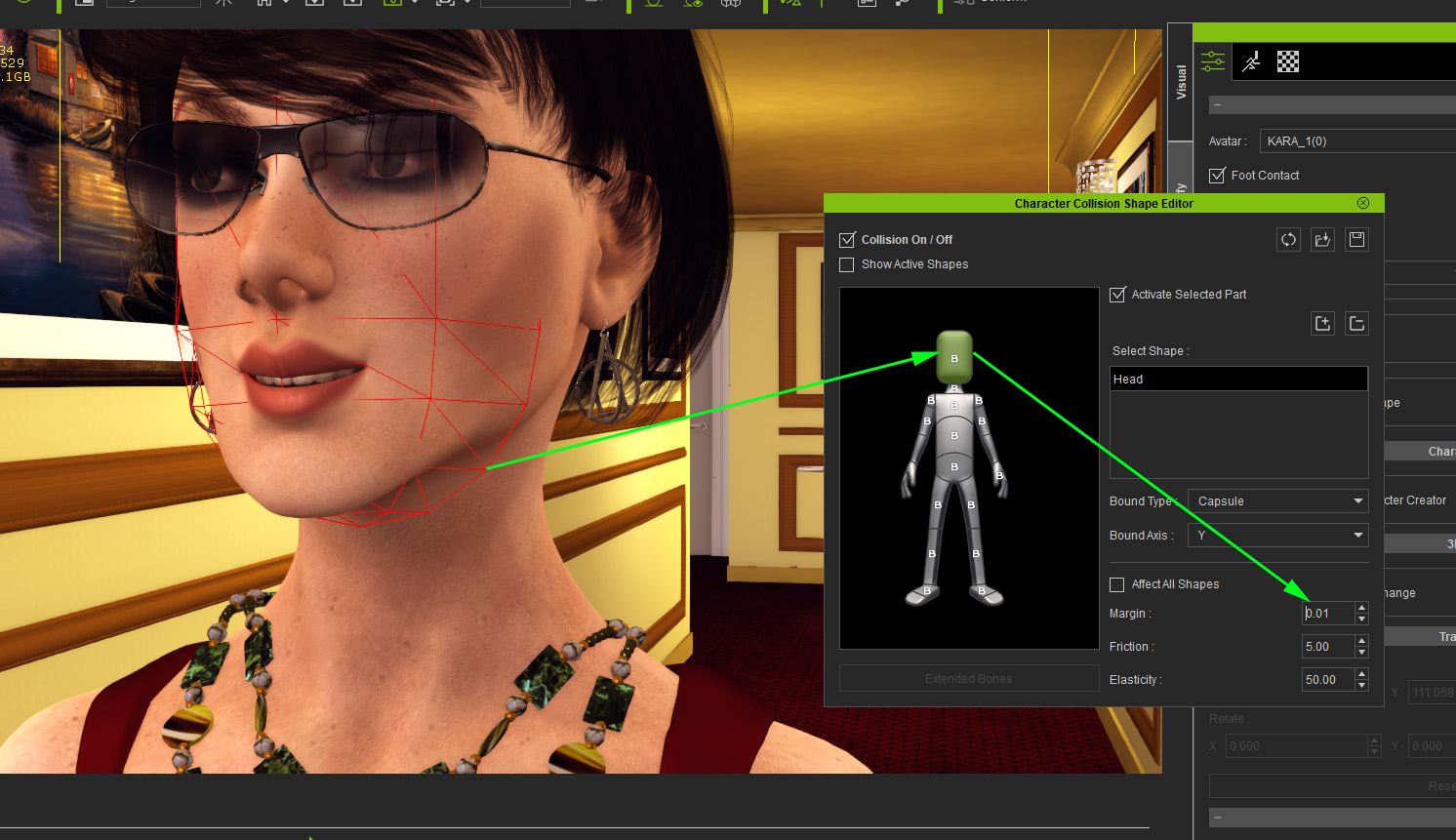
|
|
By nmuta1 - 5 Years Ago
|
oh ok, thanks for the clarification. Appreciate the help !
4u2ges (7/21/2021)
That is what I said. They collide with head collision shape and fly away. You have scale head collision shape down and set it's collision to minimum.
|
|
By nmuta1 - 5 Years Ago
|
@4u2ges
That worked ! Thank you so much.
|
|
By helielfilmz - 5 Years Ago
|
4u2ges (7/21/2021)
Download those free earrings and see how they were made: https://marketplace.reallusion.com/physix-enabled-earrings_180296Basically nothing special. 2 parts connected with the constraint. The most challenging would probably be tweaking head collision shape as it's colliding with earrings and make them fly away.
Hey i am a little late to the party, but i was wanting to know how would i go about added my own earrings and making them sway like yours do?
|
|
By 4u2ges - 5 Years Ago
|
|
Hey i am a little late to the party, but i was wanting to know how would i go about added my own earrings and making them sway like yours do?
You would need two parts earrings (earring itself and a hook) and connect those 2 parts with point-to-point constraint.
Download those earrings from above and see how those parts are attached to each other, connected with constraint and settings for the constraint unit.
You can also check a free Lantern with Pole prop (which supplied with iClone in Prop > Light Tools section of Content) to see how it should be done.
|
|
By helielfilmz - 5 Years Ago
|
4u2ges (11/12/2021)
Hey i am a little late to the party, but i was wanting to know how would i go about added my own earrings and making them sway like yours do?
You would need two parts earrings (earring itself and a hook) and connect those 2 parts with point-to-point constraint.
Download those earrings from above and see how those parts are attached to each other, connected with constraint and settings for the constraint unit.
You can also check a free Lantern with Pole prop (which supplied with iClone in Prop > Light Tools section of Content) to see how it should be done.
Thanx for the reply. I will be checking this out. This is very helpful i greatly appreciated
|
|
By helielfilmz - 4 Years Ago
|
|
I am just now writing back i have tried and saw your earring and i had done my earrings the same but the whole earring moves instead of the bottom half. How did you make the hook stay still in the ear without moving. Btw my earrings are from Daz
|
|
By 4u2ges - 4 Years Ago
|
The Rigid Physics for the bottom part should be Dynamic, but for the Top part (earrings hook) it should be Kinematic. That way it would stay in place.
|
|
By 4u2ges - 4 Years Ago
|
Just in case, a quick video:
|
|
By helielfilmz - 4 Years Ago
|
|
4u2ges (5/8/2022)
Just in case, a quick video:
Thanx man for responding i am going to look at your video while doing this right now
|
|
By helielfilmz - 4 Years Ago
|
|
4u2ges (5/8/2022)
Just in case, a quick video:
I did everything you shown in this video. As i stated before my earrings "Floats like a butterfly" away from the hook/hinge in mid air. I have the SV Trendsetter Big Hoops earrings from Daz could you make a video from beginning to end using these earring? This is a very frustrating matter that i am trying to resolve and move on to finishing so that i could add to a scene 
|
|
By 4u2ges - 4 Years Ago
|
Point-to-Point connects 2 props, but you have a chain of 3 and all 3 are physics enabled.
Earring is pretty simply and you probably do not need all 3 pieces.
You can always merge Hinge and Hook into a single prop.
|
|
By helielfilmz - 4 Years Ago
|
helielfilmz (5/9/2022)
4u2ges (5/8/2022)
Just in case, a quick video:
I did everything you shown in this video. As i stated before my earrings "Floats like a butterfly" away from the hook/hinge in mid air. I have the SV Trendsetter Big Hoops earrings from Daz could you make a video from beginning to end using these earring? This is a very frustrating matter that i am trying to resolve and move on to finishing so that i could add to a scene
This is what i'm talking about
https://www.youtube.com/watch?v=hmPnCXumWI0
|
|
By 4u2ges - 4 Years Ago
|
Check the reply above. In other word, an extra piece not used in P2P connector is acting like a collision shape and breaking the chain apart.
|
|
By helielfilmz - 4 Years Ago
|
|
4u2ges (5/9/2022)
Check the reply above. In other word, an extra piece not used in P2P connector is acting like a collision shape and breaking the chain apart.
How do i merge the two together?
|
|
By helielfilmz - 4 Years Ago
|
|
4u2ges (5/9/2022)
Check the reply above. In other word, an extra piece not used in P2P connector is acting like a collision shape and breaking the chain apart.
Thank you it worked! Now one more thing how do i save the earrings to be on my models ears like yours without having to manually align them each time i select them?
|
|
By 4u2ges - 4 Years Ago
|
Glad it worked out.
You have to save it as an avatar Accessory in iClone or Character Creator (in iClone just make sure to select the root of the earrings - very top layer before saving).
Then, when you apply it to another character, earring would stay close to respective ear. Minor tweaking of the root position might require for different characters.
|
|
By helielfilmz - 4 Years Ago
|
|
4u2ges (5/10/2022)
Glad it worked out.
You have to save it as an avatar Accessory in iClone or Character Creator (in iClone just make sure to select the root of the earrings - very top layer before saving).
Then, when you apply it to another character, earring would stay close to respective ear. Minor tweaking of the root position might require for different characters.
I tried saving it as a accessory, but it always go to the props folder instead for some reason i don't know why that is. What is the root i have no idea as for the earrings 
|
|
By helielfilmz - 4 Years Ago
|
|
Nevermind i got it to work. I saved both earrings and they went to the accessory folder, i selected them for another character and they both are in the same place on the ear. Thanks for your help
|