|
Author
|
Message
|
|
luchorunner2049
|
 luchorunner2049
Posted 6 Years Ago
luchorunner2049
Posted 6 Years Ago
|
|
Group: Forum Members
Last Active: 6 Years Ago
Posts: 8,
Visits: 69
|
SO I cant click export since as you can see here the button wont show and I dont seem to be able to resize the window 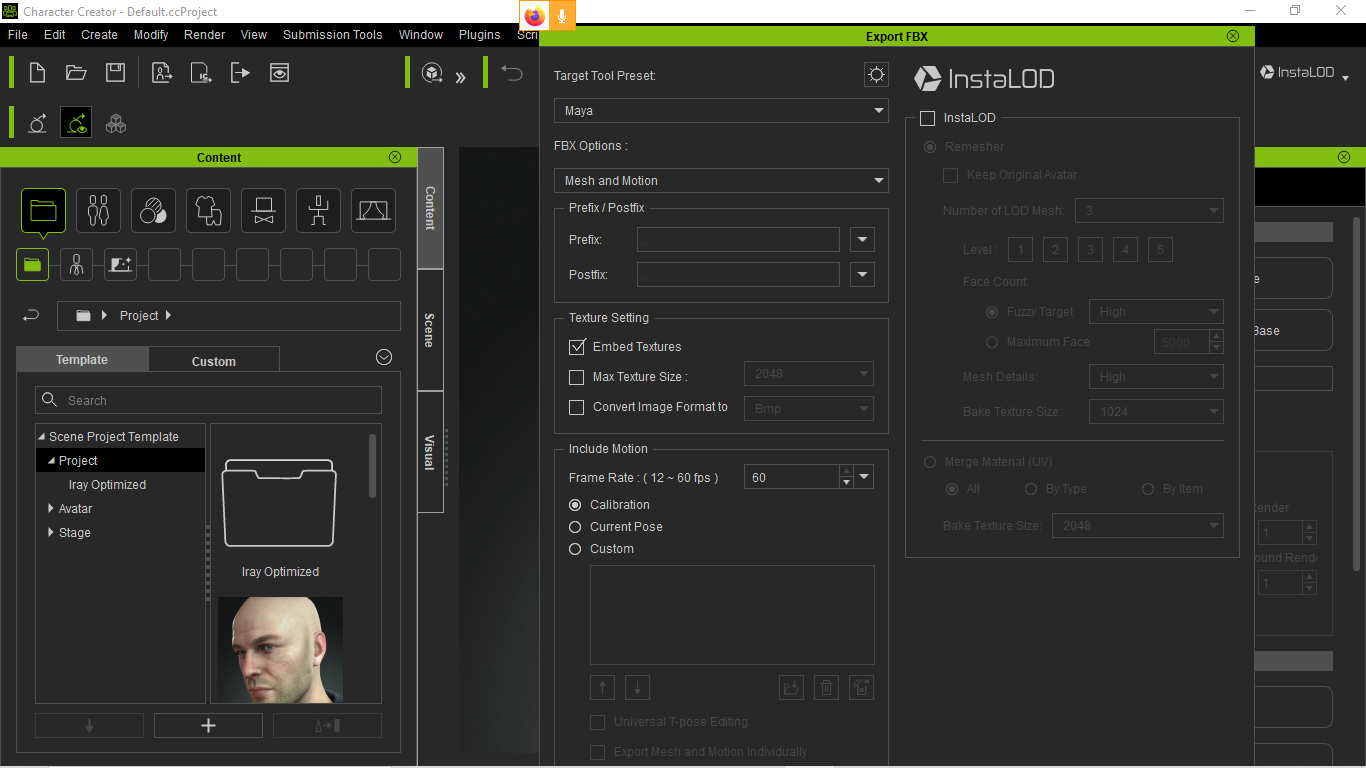
|
|
|
|
|
Peter (RL)
|
Peter (RL)
Posted 6 Years Ago
|
|
Group: Administrators
Last Active: 2 Years Ago
Posts: 23.1K,
Visits: 36.6K
|
Hi... It's not so much the export panel is too big, it appears you are running at quite a low resolution. Ideally you should be using a resolution of 1920 x 1080 or higher. If you set your display to this, the export panel should display correctly.
Peter
Forum Administrator www.reallusion.com
|
|
|
|
|
luchorunner2049
|
luchorunner2049
Posted 6 Years Ago
|
|
Group: Forum Members
Last Active: 6 Years Ago
Posts: 8,
Visits: 69
|
Hi so my Display is at 1366x720 since I work mostly on my laptop, I dont know how to set it up so it chances to that Size or will I need to get a bigger monitor then?
|
|
|
|
|
theschemer
|
theschemer
Posted 6 Years Ago
|
|
Group: Forum Members
Last Active: 3 Years Ago
Posts: 1.4K,
Visits: 2.9K
|
Right Click on a blank area of your desktop and choose Display Settings to see what your options are.
|
|
|
|
|
luchorunner2049
|
luchorunner2049
Posted 6 Years Ago
|
|
Group: Forum Members
Last Active: 6 Years Ago
Posts: 8,
Visits: 69
|
I cant go higher than 1366*720 since again this is a laptop I use,so its needed for me to get a bigger monitor and plug it as a Display?
|
|
|
|
|
theschemer
|
theschemer
Posted 6 Years Ago
|
|
Group: Forum Members
Last Active: 3 Years Ago
Posts: 1.4K,
Visits: 2.9K
|
That may or may not work depending on you GPU. If your GPU supports 1920x1080 it will work. What brand/model is your laptop? There is a "mirror" mode and an "extend" mode on some laptops and the mirror mode will be the same resolution as your current display. The extend mode can display a better resolution "if" your GPU (graphics adapter) is capable.
|
|
|
|
|
luchorunner2049
|
luchorunner2049
Posted 6 Years Ago
|
|
Group: Forum Members
Last Active: 6 Years Ago
Posts: 8,
Visits: 69
|
Its an Asus Vivobook S, Comes with a 980MX if I remember correctly, But my real question is if there is another way for me to show the full export window, cause I dont have another monitor
|
|
|
|
|
theschemer
|
theschemer
Posted 6 Years Ago
|
|
Group: Forum Members
Last Active: 3 Years Ago
Posts: 1.4K,
Visits: 2.9K
|
I am afraid you will have to buy an external monitor. Your GPU(if it is in fact a 980MX) will handle a bunch of resolutions including and even higher than 1080p. Monitors are pretty inexpensive and depending where you are located you could likely pick one up at you local WalMart or electronics big box store. Just make sure the output on you laptop for an external monitor matches the available input on the monitor or you will be looking for adapters right away. https://www.techpowerup.com/gpu-specs/geforce-gtx-980mx.c2808
|
|
|
|
|
luchorunner2049
|
luchorunner2049
Posted 6 Years Ago
|
|
Group: Forum Members
Last Active: 6 Years Ago
Posts: 8,
Visits: 69
|
So there isnt really other way?, Right now I only want to be able to export the characters and so on,Before I remember I was able to do so but I dunno why not it Just wont work
|
|
|
|
|
theschemer
|
theschemer
Posted 6 Years Ago
|
|
Group: Forum Members
Last Active: 3 Years Ago
Posts: 1.4K,
Visits: 2.9K
|
Maybe try setting your display resolution to 1024 x 768 and see what happens. Otherwise I don't know but maybe someone else knows of a keyboard command or something. edit: Oops, I see the GPU can't do 1024x768 but you try the next lower one and see what happens. Won't hurt to try. Otherwise the minimum specs for CC3 are 1024x768 so the aspect ratio is what is causing your issue. edit 2 Try reading this and see if relates to your laptop: https://www.techlicious.com/how-to/how-to-fix-nvidia-resolution-problems/
|
|
|
|