Profile Picture

Poly count for detailed CC3 characters

Posted By shadybearbklyn 5 Years Ago
You don't have permission to rate!
1
2

Author
Message
shadybearbklyn
shadybearbklyn
Posted 5 Years Ago
View Quick Profile
Distinguished Member

Distinguished Member (2.7K reputation)Distinguished Member (2.7K reputation)Distinguished Member (2.7K reputation)Distinguished Member (2.7K reputation)Distinguished Member (2.7K reputation)Distinguished Member (2.7K reputation)Distinguished Member (2.7K reputation)Distinguished Member (2.7K reputation)Distinguished Member (2.7K reputation)

Group: Forum Members
Last Active: Last Year
Posts: 337, Visits: 2.8K
I’ve created a number of characters in CC3 with high poly counts. Due to high poly hair, such as the Swam hair, and some clothing items I’ve got some characters that have over 200,000 project triangles. As I bring a few of these characters into an IClone project the response gets slower and slower. What should I be shooting for in regards to poly count of each character? I have a 1080ti card and the video memory with six characters and a detailed scene is only hitting 3.3 GB, but the project triangle is almost 5,000,000. I’m in quick mode but it’s so slow it’s impossible to work. Am I pushing it past its limit. The characters look great and I know I can reduce the poly count of some clothing items, but what is the best way to proceed? The scene is 3,765,898 project traingles and is extremely detailed. When I delete it and some of the characters it runs smoothly at about 30 FPS. With the scene and all of the characters it drops down to about 8.
thebiz.movies
thebiz.movies
Posted 5 Years Ago
View Quick Profile
Distinguished Member

Distinguished Member (14.4K reputation)Distinguished Member (14.4K reputation)Distinguished Member (14.4K reputation)Distinguished Member (14.4K reputation)Distinguished Member (14.4K reputation)Distinguished Member (14.4K reputation)Distinguished Member (14.4K reputation)Distinguished Member (14.4K reputation)Distinguished Member (14.4K reputation)

Group: Forum Members
Last Active: Last Week
Posts: 2.1K, Visits: 42.3K
As Dirty Harry Callahan was known to say, "An Icloner's got to know his limitations".  My own machine bogs down around the 2million poly count and as a result it affects the way I design scenes and my general expectations.  I rarely use main characters over 50K and I try to keep background characters under 30K.  I tend to design my sets myself with an eye on poly counts and texture sizes.  Some folks use tricks like rendering in phases which is effective but requires a good bit of planning.  Other folks here have more resources and have higher expectations.  

Heres a pretty solid tutorial on creating multiple resolution characters for different uses: https://www.youtube.com/watch?v=PKcu04Fx9JE

https://forum.reallusion.com/uploads/images/c02c75f8-9ae1-4091-b8e9-2175.gifhttps://forum.reallusion.com/uploads/images/4c56836b-f19d-4836-8a16-6370.gif

shadybearbklyn
shadybearbklyn
Posted 5 Years Ago
View Quick Profile
Distinguished Member

Distinguished Member (2.7K reputation)Distinguished Member (2.7K reputation)Distinguished Member (2.7K reputation)Distinguished Member (2.7K reputation)Distinguished Member (2.7K reputation)Distinguished Member (2.7K reputation)Distinguished Member (2.7K reputation)Distinguished Member (2.7K reputation)Distinguished Member (2.7K reputation)

Group: Forum Members
Last Active: Last Year
Posts: 337, Visits: 2.8K
Thanks. I was hoping to push it more once I upgraded my video card, but it looks like I’m going to have to work on reducing the polygons of both the scene and my characters.
animagic
animagic
Posted 5 Years Ago
View Quick Profile
Distinguished Member

Distinguished Member (33.4K reputation)Distinguished Member (33.4K reputation)Distinguished Member (33.4K reputation)Distinguished Member (33.4K reputation)Distinguished Member (33.4K reputation)Distinguished Member (33.4K reputation)Distinguished Member (33.4K reputation)Distinguished Member (33.4K reputation)Distinguished Member (33.4K reputation)

Group: Forum Members
Last Active: Last Month
Posts: 15.8K, Visits: 31.4K
shadybearbklyn (5/6/2020)
Thanks. I was hoping to push it more once I upgraded my video card, but it looks like I’m going to have to work on reducing the polygons of both the scene and my characters.

Since characters can be exchanged you could do your animation with lower poly characters of the same proportions and once done swap them out when you are ready to render.

I believe the use of proxies (same size low-poly characters and objects) is common in professional 3D animation development. 


https://forum.reallusion.com/uploads/images/436b0ffd-1242-44d6-a876-d631.jpg

shadybearbklyn
shadybearbklyn
Posted 5 Years Ago
View Quick Profile
Distinguished Member

Distinguished Member (2.7K reputation)Distinguished Member (2.7K reputation)Distinguished Member (2.7K reputation)Distinguished Member (2.7K reputation)Distinguished Member (2.7K reputation)Distinguished Member (2.7K reputation)Distinguished Member (2.7K reputation)Distinguished Member (2.7K reputation)Distinguished Member (2.7K reputation)

Group: Forum Members
Last Active: Last Year
Posts: 337, Visits: 2.8K
Thanks Animagic. I think that’s what I’m going to do. How do you recommend decimating a prop that’s extremely complex? Is Blender a good option or is there a way to reduce poly count for objects like you can do with Characters in CC3?
animagic
animagic
Posted 5 Years Ago
View Quick Profile
Distinguished Member

Distinguished Member (33.4K reputation)Distinguished Member (33.4K reputation)Distinguished Member (33.4K reputation)Distinguished Member (33.4K reputation)Distinguished Member (33.4K reputation)Distinguished Member (33.4K reputation)Distinguished Member (33.4K reputation)Distinguished Member (33.4K reputation)Distinguished Member (33.4K reputation)

Group: Forum Members
Last Active: Last Month
Posts: 15.8K, Visits: 31.4K
shadybearbklyn (5/6/2020)
Thanks Animagic. I think that’s what I’m going to do. How do you recommend decimating a prop that’s extremely complex? Is Blender a good option or is there a way to reduce poly count for objects like you can do with Characters in CC3?

Maybe someone else can chime in regarding decimating. I have never been very successful with that.


https://forum.reallusion.com/uploads/images/436b0ffd-1242-44d6-a876-d631.jpg

Mythcons
Mythcons
Posted 5 Years Ago
View Quick Profile
Distinguished Member

Distinguished Member (7.3K reputation)Distinguished Member (7.3K reputation)Distinguished Member (7.3K reputation)Distinguished Member (7.3K reputation)Distinguished Member (7.3K reputation)Distinguished Member (7.3K reputation)Distinguished Member (7.3K reputation)Distinguished Member (7.3K reputation)Distinguished Member (7.3K reputation)

Group: Forum Members
Last Active: Last Year
Posts: 455, Visits: 3.2K
Are you trying to get the items to retain their UVs and textures? Generally I'd just create lower poly versions of the item and transfer the details using normal maps and textures. I guess it depends on what you're trying to achieve.
shadybearbklyn
shadybearbklyn
Posted 5 Years Ago
View Quick Profile
Distinguished Member

Distinguished Member (2.7K reputation)Distinguished Member (2.7K reputation)Distinguished Member (2.7K reputation)Distinguished Member (2.7K reputation)Distinguished Member (2.7K reputation)Distinguished Member (2.7K reputation)Distinguished Member (2.7K reputation)Distinguished Member (2.7K reputation)Distinguished Member (2.7K reputation)

Group: Forum Members
Last Active: Last Year
Posts: 337, Visits: 2.8K
It’s a large model of the Capitol with over 3.5 million triangles. I’m hoping to create a lightweight version to use while animating and then replace it with the more detailed one before rendering.
james_muia
james_muia
Posted 5 Years Ago
View Quick Profile
Distinguished Member

Distinguished Member (2.0K reputation)Distinguished Member (2.0K reputation)Distinguished Member (2.0K reputation)Distinguished Member (2.0K reputation)Distinguished Member (2.0K reputation)Distinguished Member (2.0K reputation)Distinguished Member (2.0K reputation)Distinguished Member (2.0K reputation)Distinguished Member (2.0K reputation)

Group: Forum Members
Last Active: 3 Years Ago
Posts: 253, Visits: 1.3K
Reallusion really needs to make progress in this area. The engine itself is the main thing keeping a lot of creators from creating highly detailed scenes. As such, you have to use a lot of tricks, and reduce the poly count as well as keeping an eye on your RAM usage.
Thankfully they added the polygon reduction tool in Character Creator, so you can create decent looking characters with various polygon counts and texture quality.

For a main character, try to keep them in the 40-60k Polygon range. Background characters, you can go 25k, or even less. Some of the characters in the film I'm working on are 6K polygons but if you use 'smoothing', you can't tell how low poly they are as long as the camera is some distance away.

Here's a brief overview of what you can expect ram usage wise. This may vary depending on your scene/characters.

4K Character @ 60k Polygons = 3.2GB RAM Usage
2K Character @ 60K Polygons = 3.0GB RAM Usage
1K Character @ 60K Polygons = 1.5GB RAM Usage
512K Character @ 60K Polygons = 1.1GB RAM Usage

4K Character @ 45k Polygons (Converted to GameBase Character) = 2.8GB RAM Usage
2K Character @ 45K Polygons (Converted to GameBase Character) = 2.4GB RAM Usage

Lowest Quality Character using Character Creator Polygon Reduction (Low Quality) - 0.4GB

Not only does high poly count slow down IClone, but going over your RAM usage will prevent you from actually rendering scenes. I've had the program crash on render for going over my graphic card max so it's important to watch both.


IMDB: James Muia
Aviticus Dragon on YouTube


Computer Specs:
Intel® Core™ i7-7820X Processor (8x 4.30GHz/11MB L3 Cache)
Corsair Hydro Series H115i 280mm
Liquid CPU CoolerASUS ROG STRIX X299-E Gaming Motherboard
32 GB DDR4-3200 GSKILL Ripjaws V Memory
NVIDIA GeForce GTX 1080 Ti - 11GB - EVGA FTW3

3DChick
3DChick
Posted 5 Years Ago
View Quick Profile
Distinguished Member

Distinguished Member (2.3K reputation)Distinguished Member (2.3K reputation)Distinguished Member (2.3K reputation)Distinguished Member (2.3K reputation)Distinguished Member (2.3K reputation)Distinguished Member (2.3K reputation)Distinguished Member (2.3K reputation)Distinguished Member (2.3K reputation)Distinguished Member (2.3K reputation)

Group: Forum Members
Last Active: Last Month
Posts: 411, Visits: 1.9K
On CC3 Characters coming in from Daz: I used Kelleytoons' directions bringing the characters in through Tranformer, and using the INI file to make sure I got the normal maps, where most of the details I wanted lived (wrinkles etc). I was used to the high def mesh and morphs in Daz, so it took some playing with to get them right, but I eventually did. They all ended up around 100k-600k polys, naked and bald. Then I saved the morphs and the skin in CC3, reloaded the stock CC3 character, applied the morphs and the skin, tweaked again, and got something very close to what I originally had in Daz. I found I could use the Reduce Object function to get the Daz hair (often starting at 300k polys or more!) down to something like 30k and still looking good. Eventually I got fairly high-def looking characters in--dressed with hair--at around 100k each--they all use 4k textures for skin and hair, but lower for clothes. My rig still (8g 1070) bogs down with more than three of them in a scene, but they render nicely.

For sets: I recently caved in and bought a super high poly model on CGTrader, which I had to use Blender to decimate to even get it into iClone. It took some watching of tutorials because I'd never used Blender--I couldn't even navigate--but I got it to work. Set looks pretty good--not quite as good as I wanted (I took it down to about 300k total, and I plan to play with it more to see how high I can go and still render, but mostly worked. If you're not as new at Blender as I was, you could get pretty decent results. 

Here's the high poly model promo pic (rendered in Blender, I think) and my set after decimating, etc. I used different consoles and a different chair, and added the ship hologram, etc. The main guy is about 100k, but the bridge crew aren't even 100k all together. 
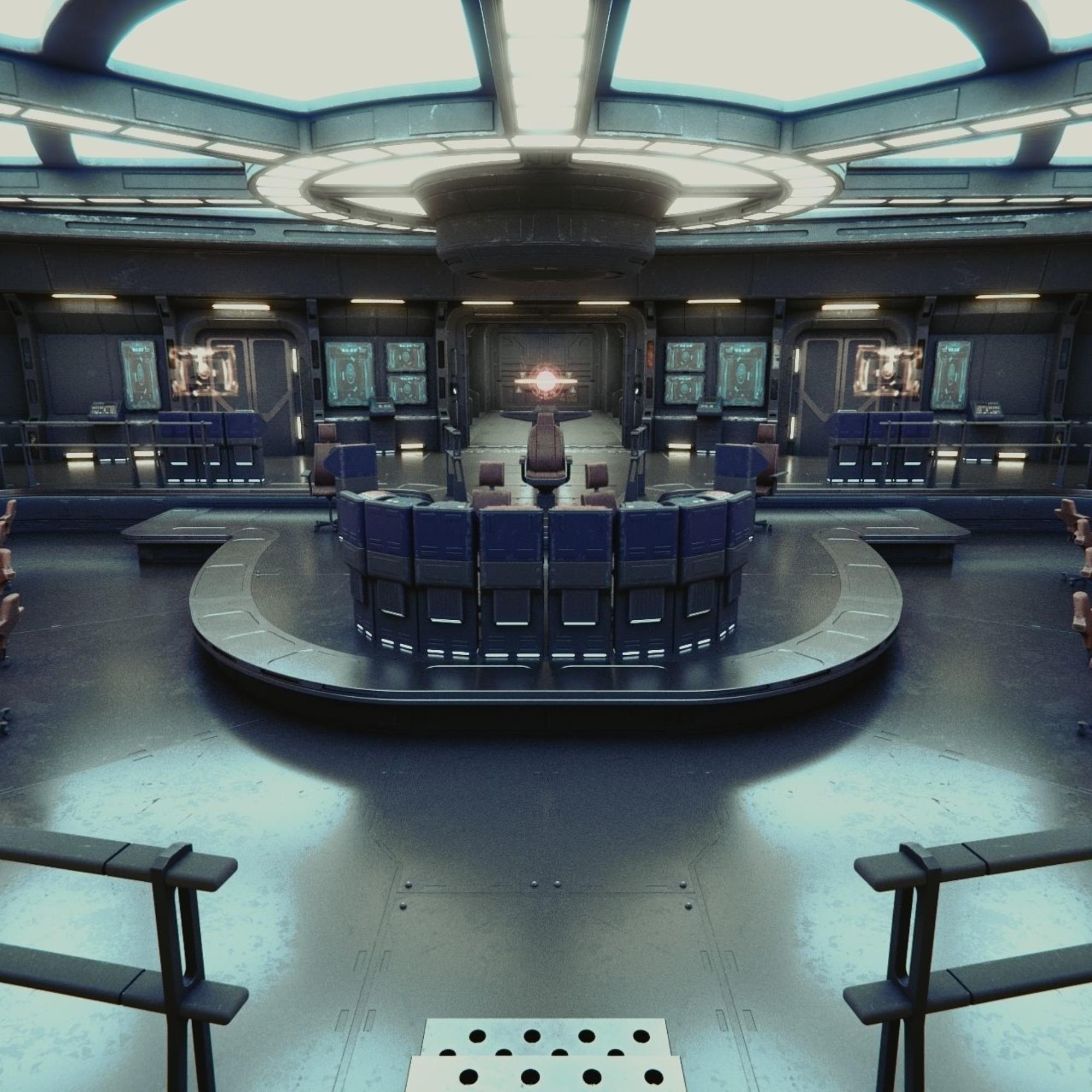
https://forum.reallusion.com/uploads/images/bc789164-238b-48ac-8f70-fe89.jpg

https://forum.reallusion.com/uploads/images/e55606ae-800d-4009-b1d4-1af2.jpg

Whenever possible, I haul higher poly props into CC3 attached to a character and reduce them that way. Particularly if they're just incidental, I can take them waaaay down without any noticeable change (at least I can't see any difference). So that's one way to rather harmlessly get the overall count down. 

So, yeah, it's worth trying to decimate your huge set in Blender, and see what you can come up with. 

____________________________________________
Life-long learner and having waaaay too much fun with iClone! Youtube Channel: 3DChick
Book Covers: www.significantcover.com Largely Unfinished Fiction: www.nemontgomery.com

1
2


Reading This Topic