|
Author
|
Message
|
|
new-own
|
new-own
Posted 6 Years Ago
|
|
Group: Forum Members
Last Active: 3 Years Ago
Posts: 86,
Visits: 353
|
Yeah.. I am sad that all G8 characters shoulder are stretched and not accurate especially when posed or animated with MoCap.
I wish there will be a future update to fix this issue. Hopefully with the new CC3+ Base.
|
|
|
|
|
Scyra
|
|
|
Group: Forum Members
Last Active: 6 Years Ago
Posts: 220,
Visits: 2.5K
|
Ok, I just looked at my Transformed characters and it is the G8 ones that have the drooping problem. The G3 ones are consistent with the CC Base model.
CC3 & Daz Tricks | CC3 to Unity workflow
|
|
|
|
|
Scyra
|
|
|
Group: Forum Members
Last Active: 6 Years Ago
Posts: 220,
Visits: 2.5K
|
Yes, in fact I was surprised that the last 2 characters I made (Genesis 3 Females) did not have this problem. So it appears to be a Genesis 8 problem. Good job on identifying that. I will do some tests later to confirm, but you are probably right...
CC3 & Daz Tricks | CC3 to Unity workflow
|
|
|
|
|
Peter (RL)
|
Peter (RL)
Posted 7 Years Ago
|
|
Group: Administrators
Last Active: 2 Years Ago
Posts: 23.1K,
Visits: 36.6K
|
Hi Scyra Can you confirm which generation of Daz characters has this problem? From our testing we can see an issue with G8 characters but G3 characters seem fine. Is this your experience too? 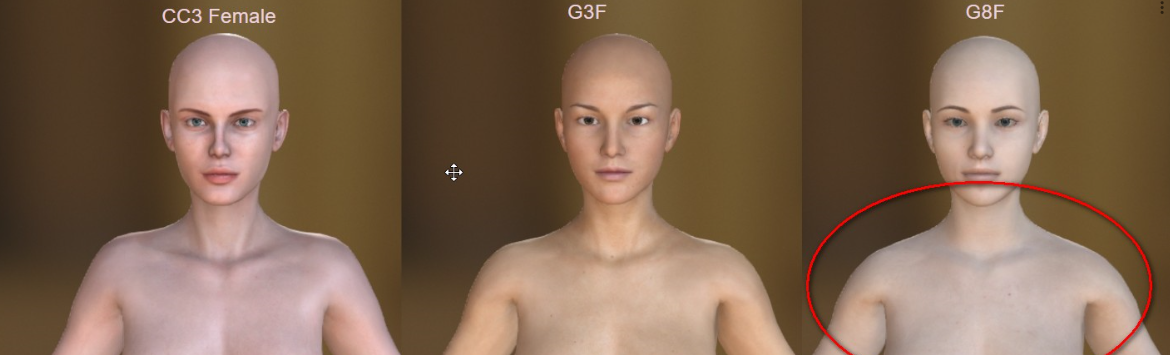
Peter
Forum Administrator www.reallusion.com
|
|
|
|
|
Scyra
|
|
|
Group: Forum Members
Last Active: 6 Years Ago
Posts: 220,
Visits: 2.5K
|
This subject is also being discussed in another thread, and there are promising work-arounds suggested there.
CC3 & Daz Tricks | CC3 to Unity workflow
|
|
|
|
|
Scyra
|
|
|
Group: Forum Members
Last Active: 6 Years Ago
Posts: 220,
Visits: 2.5K
|
Rampa (10/13/2019)
Is that just an optical illusion because of the round off of the shoulders when you narrow them?Hi, Rampa. I assure you it's no illusion. I do appreciate that it may be difficult to notice or a non-issue for the average person, but things like this I will always notice immediately. When you see it in motion, however, anyone can notice the difference. It is very easy to send a Transformer'd female over to iClone and put her up against her twin from 3DXChange with some pre-capped motions, and you will see the difference becomes obvious. Also, it is not that the shoulder is flat, rather to me it looks like the shoulder joint is scaled down by 50% (and maybe rotated slightly backwards by the looks of it in motion).
CC3 & Daz Tricks | CC3 to Unity workflow
|
|
|
|
|
Scyra
|
|
|
Group: Forum Members
Last Active: 6 Years Ago
Posts: 220,
Visits: 2.5K
|
Thanks for the update. To my eyes this problem really stands out with females in the Idle and A-Pose. It affects all of them. Average-sized males look ok, really big guys end up with some problems. I mentioned this being especially noticeable when doing mocap, and how I am compensating for it during mocap performance; the image below communicates the idea: The _Idle Pose looks incorrect, but the _Stand F is an improvement. 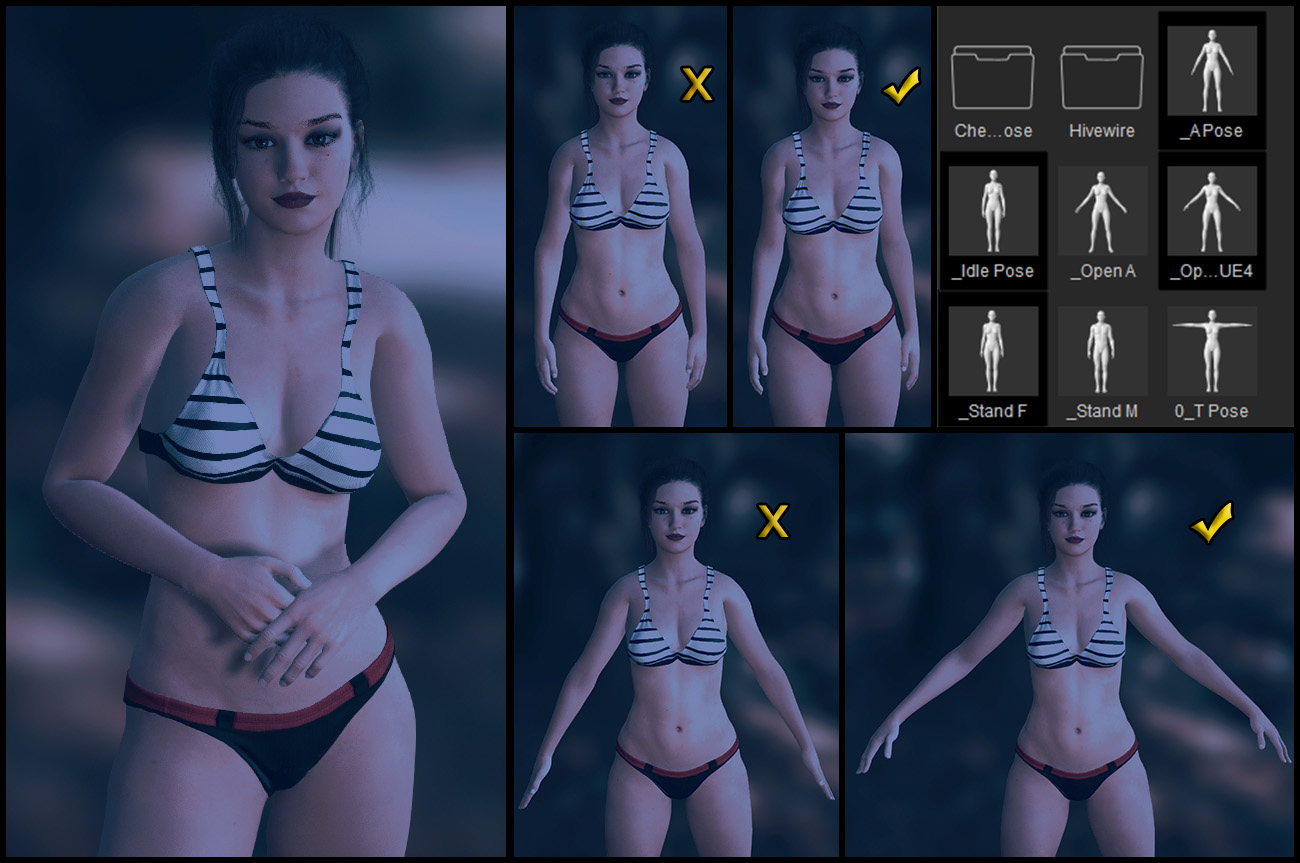 So far, I've had success with Perception Neuron by altering the pre-performance calibration poses for that system, essentially accomplishing what I hope to be able to do with the Curve Editor later—that is, copy & pasting some offset parameters to fix this kind of problem in moments. Currently, any mocap I do for CC3 characters is only good for CC3 characters due to these offsets.
CC3 & Daz Tricks | CC3 to Unity workflow
|
|
|
|
|
Rampa
|
|
|
Group: Forum Members
Last Active: Last Month
Posts: 8.2K,
Visits: 62.6K
|
Is that just an optical illusion because of the round off of the shoulders when you narrow them? Draw a line across all three images to check. But there is a "Pose Offset" tool to permanently change a character's bone rotation starting points. Look in the Modify panel. You can adjust multiple bones at one, so select both shoulders with a Cntrl-click, and rotate them a bit. Then bring the arms back down. 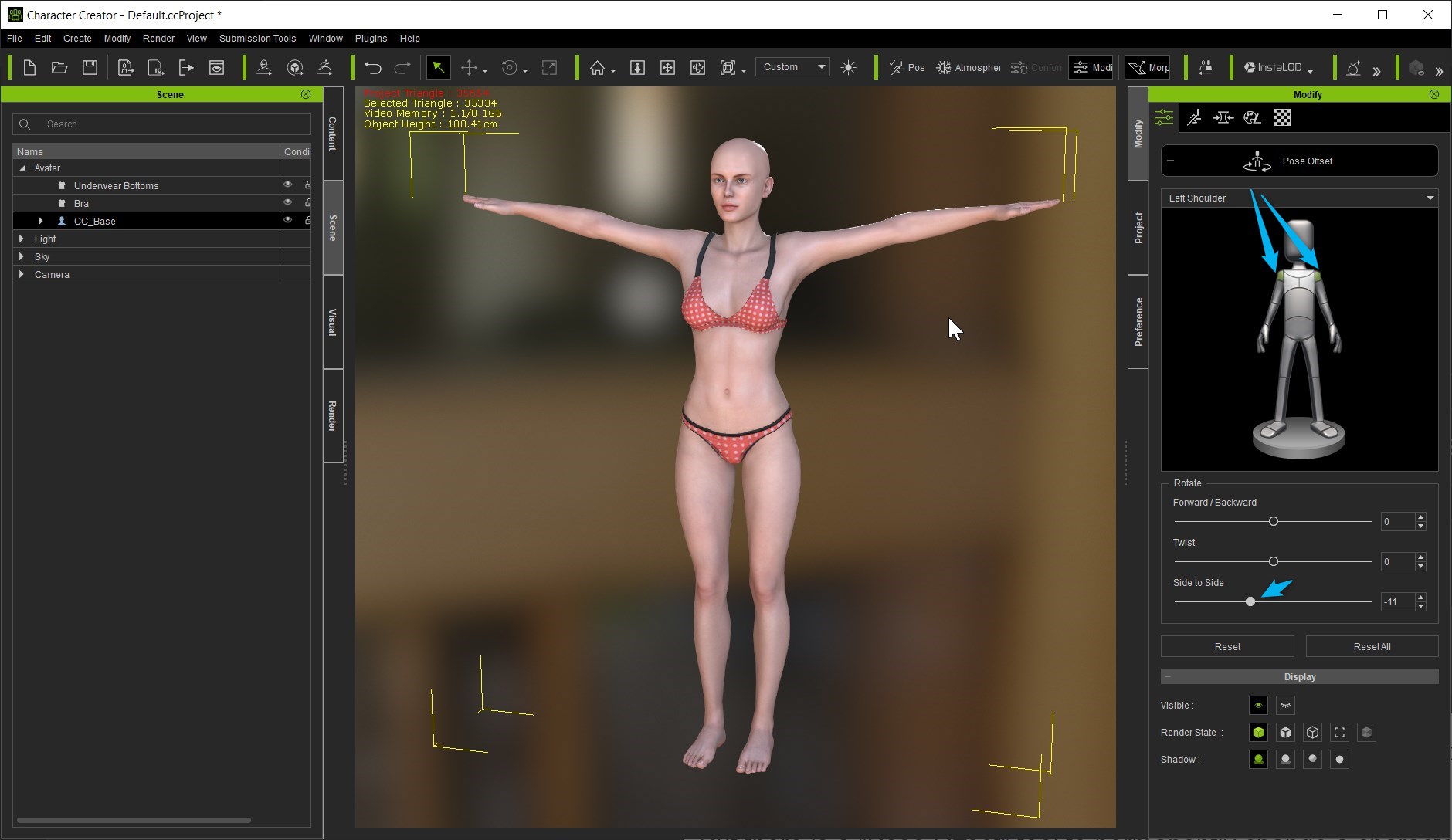
|
|
|
|
|
Kelleytoons
|
Kelleytoons
Posted 7 Years Ago
|
|
Group: Forum Members
Last Active: 2 Years Ago
Posts: 9.2K,
Visits: 22.1K
|
If it is, it will not be solved. The dev has informed me it's a very complicated problem and we are unlikely to see CC3 address this. But the answer is pretty simple then -- don't transfer over Daz morphs that have this shoulder transformation. IOW, if it's only a Daz morph applied to the CC3 figure that causes it, you can easily construct a Daz morph without the shoulder changing and always use that (it's a bit convoluted to explain, but if I get the time in the next two or three weeks I'll see if I can make a video about it -- I'm really busy right now with other projects until the end of October).
Alienware Aurora R16, Win 11, i9-149000KF, 3.20GHz CPU, 64GB RAM, RTX 4090 (24GB), Samsung 870 Pro 8TB, Gen3 MVNe M-2 SSD, 4TBx2, 39" Alienware Widescreen Monitor
Mike "ex-genius" Kelley
|
|
|
|
|
Scyra
|
|
|
Group: Forum Members
Last Active: 6 Years Ago
Posts: 220,
Visits: 2.5K
|
Here are the results... 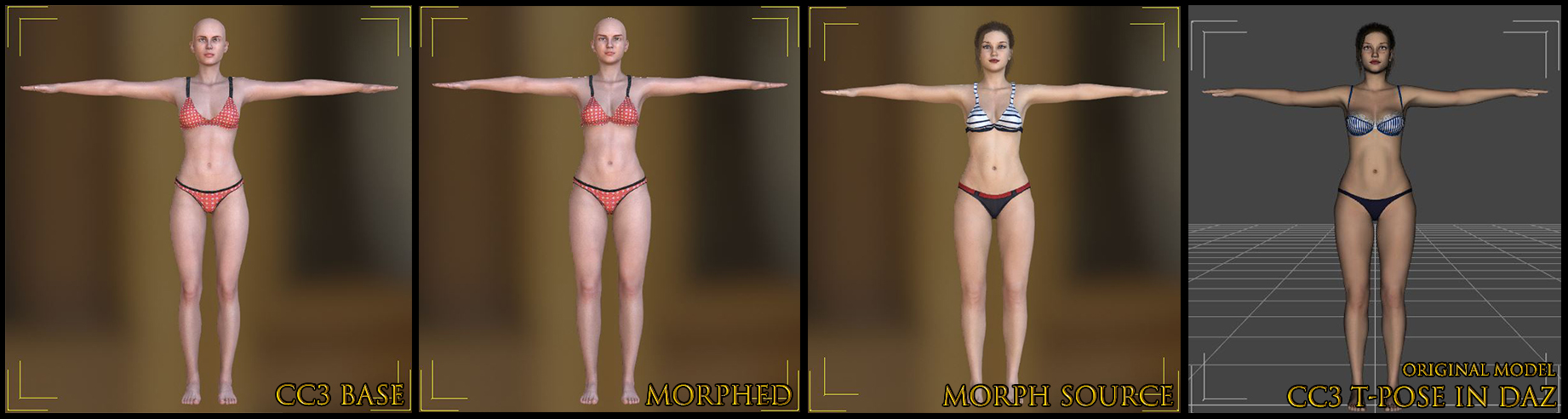 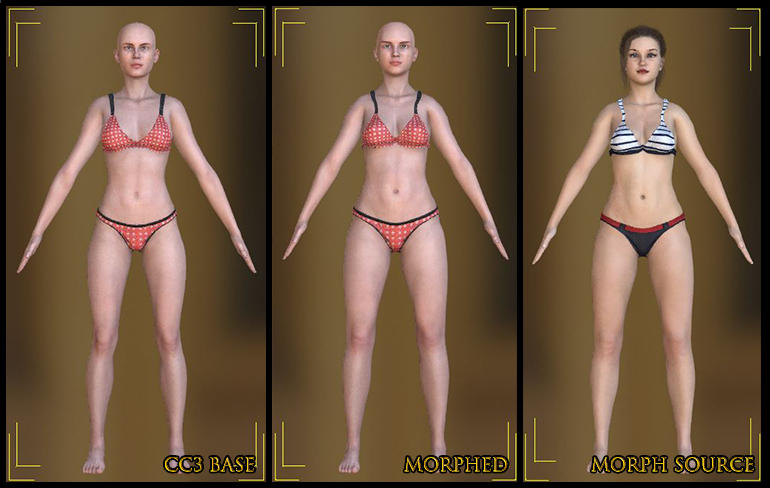 It turns out the shoulders sink with the morph. Mike, a couple months ago you posted Issue 6146: Transformer not correctly mapping vertices for many characters with larger necksI made a comment there explaining this issue. I think it is related, or even the same problem.
CC3 & Daz Tricks | CC3 to Unity workflow
|
|
|
|