|
Author
|
Message
|
|
3dtester
|
3dtester
Posted 7 Years Ago
|
|
Group: Forum Members
Last Active: Last Year
Posts: 999,
Visits: 2.2K
|
Hi, i have created another character, this time using an RLHead created with CT8. As you know, RLHead is only compatible with CC1 base figures. But you can convert to CC3 base after applying the head. However, it seems that there's a problem that also exists with DAZ characters that are converted throught CC3 transformer: - The shoulders droop. This happens with almost any motions i apply on those avatars. 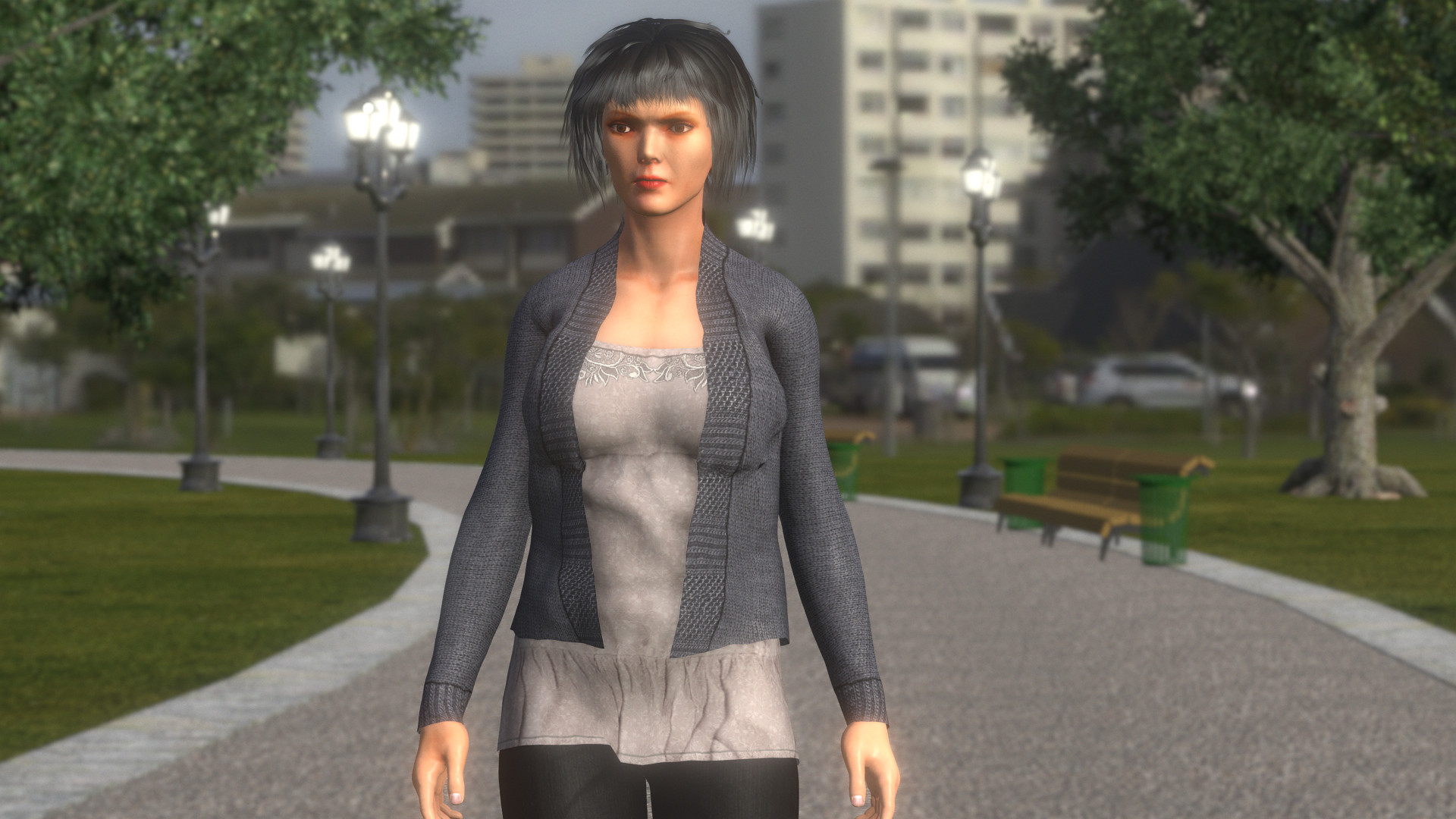 So, basically, all my characters have that problem. This is very frustrating.
|
|
|
|
|
4u2ges
|
4u2ges
Posted 7 Years Ago
|
|
Group: Forum Members
Last Active: Last Month
Posts: 5.3K,
Visits: 16.8K
|
It was worse than that at the beginning, but they fixed some of the problems. Shoulder problems remain though. I've just leaned to compensate that with shoulder morphs until it more or less close to original. 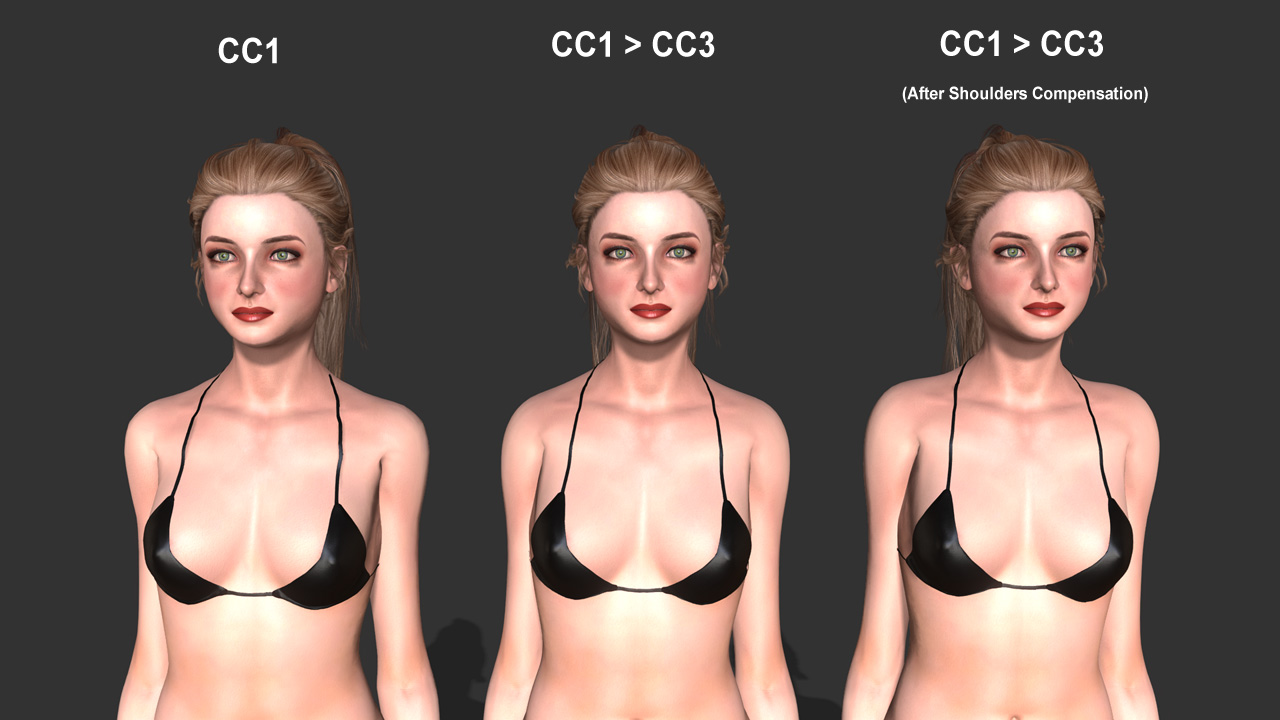 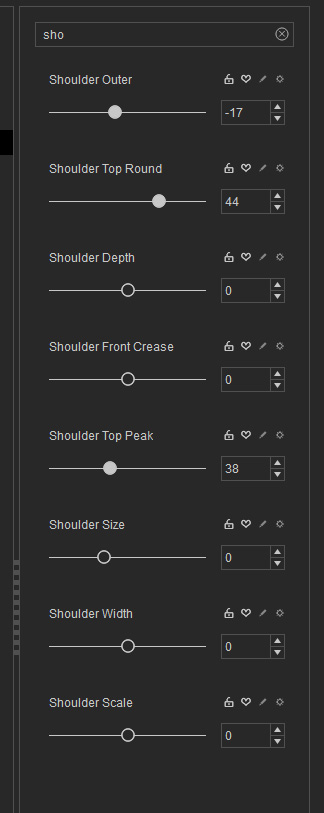
|
|
|
|
|
3dtester
|
3dtester
Posted 7 Years Ago
|
|
Group: Forum Members
Last Active: Last Year
Posts: 999,
Visits: 2.2K
|
Thanks 4u2ges.
Seems that fix saves me from a lot of headache! :)
|
|
|
|
|
Kelleytoons
|
Kelleytoons
Posted 7 Years Ago
|
|
Group: Forum Members
Last Active: 2 Years Ago
Posts: 9.2K,
Visits: 22.1K
|
Same shoulder morphs with each character Mr. G? If so, maybe best to create a single "fix shoulders" morph.
Alienware Aurora R16, Win 11, i9-149000KF, 3.20GHz CPU, 64GB RAM, RTX 4090 (24GB), Samsung 870 Pro 8TB, Gen3 MVNe M-2 SSD, 4TBx2, 39" Alienware Widescreen Monitor
Mike "ex-genius" Kelley
|
|
|
|
|
4u2ges
|
4u2ges
Posted 7 Years Ago
|
|
Group: Forum Members
Last Active: Last Month
Posts: 5.3K,
Visits: 16.8K
|
Thanks 4u2ges.
Seems that fix saves me from a lot of headache!
No problem :)
Same shoulder morphs with each character Mr. G? If so, maybe best to create a single "fix shoulders" morph.
Well, actually no Mike. It would be different for each character depending on morphs difference from a base.
Plus, this is sort of a cheat. Visually, there almost no difference between CC1 and its CC3 counterpart while in T-pose.
It only becomes obvious when arms are dropped.
Whereas morphed shoulder fix clearly looks raised in T-pose, but natural when arms are dropped.
So we have to choose here what is more important: correct T-pose (or otherwise when arms are up), or when arms are down. I choose latter.
Here is what I mean about T-pose (the order of the characters is the same as in my first screenshot)
First 2 look the same (although there is a difference in other aspects only noticeable when they both are at 0,0,0), while third clearly has shoulders raised (after the fix).
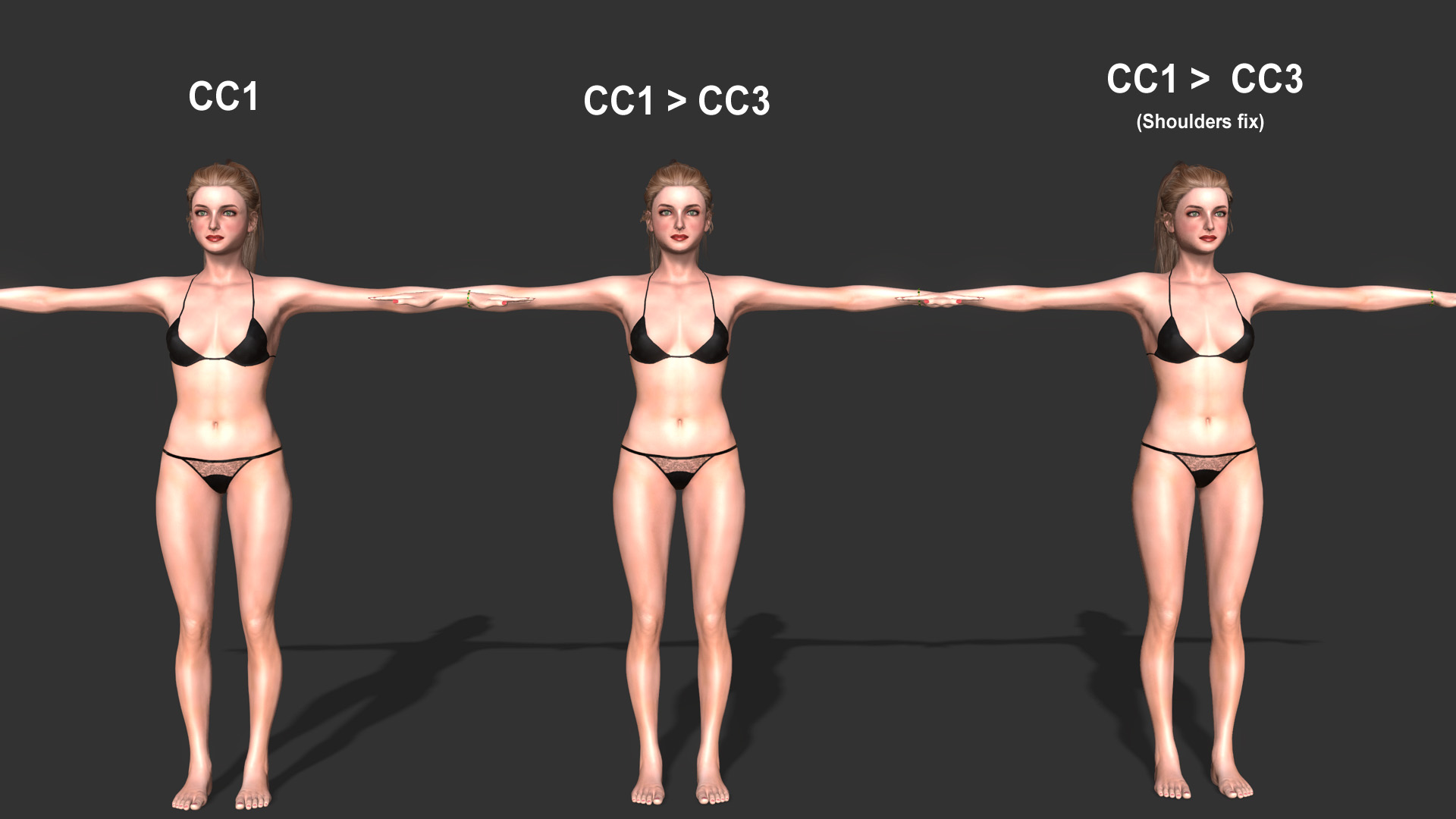
Of course it would be nice if RL fixes shoulders problem with CC1 > CC3 conversions.
But to me it is more important for them to fix texture conversion, which I keep talking about https://www.reallusion.com/FeedBackTracker/Issue/Converting-CC2-to-CC3-problems-suggestions
|
|
|
|
|
Scyra
|
|
|
Group: Forum Members
Last Active: 6 Years Ago
Posts: 220,
Visits: 2.5K
|
Perhaps a small Pose Offset / Adjust Bones modification could also be added to get motion to match ~99%. And also with the morphs, while the needed values might not be exactly the same for all characters, I expect that (per Mike's suggestion) a general "ballpark" value "fix shoulders" morph (for average-sized characters) could be used to get you 90% of the way there, requiring only very minor adjustments thereafter.
CC3 & Daz Tricks | CC3 to Unity workflow
|
|
|
|
|
4u2ges
|
4u2ges
Posted 7 Years Ago
|
|
Group: Forum Members
Last Active: Last Month
Posts: 5.3K,
Visits: 16.8K
|
Scyra (10/14/2019)
Perhaps a small Pose Offset / Adjust Bones modification could also be added to get motion to match ~99%. And also with the morphs, while the needed values might not be exactly the same for all characters, I expect that (per Mike's suggestion) a general "ballpark" value "fix shoulders" morph (for average-sized characters) could be used to get you 90% of the way there, requiring only very minor adjustments thereafter.
That might be good solution overall. But I hope it is temporary until RL comes up with permanent fix. Time to be picky about something else now. :hehe: I should've probably created another thread but anyway...
This keeps bugging for a long time! Cloth/Shoes Confirm. With all the bells and whistles new "Confirm" has to offer in CC3, I do not like it a bit. The core is not working as I expect it to work. Here is an example off the top of my head about shoes. This is a Low Heel Sandals form Essential pack. 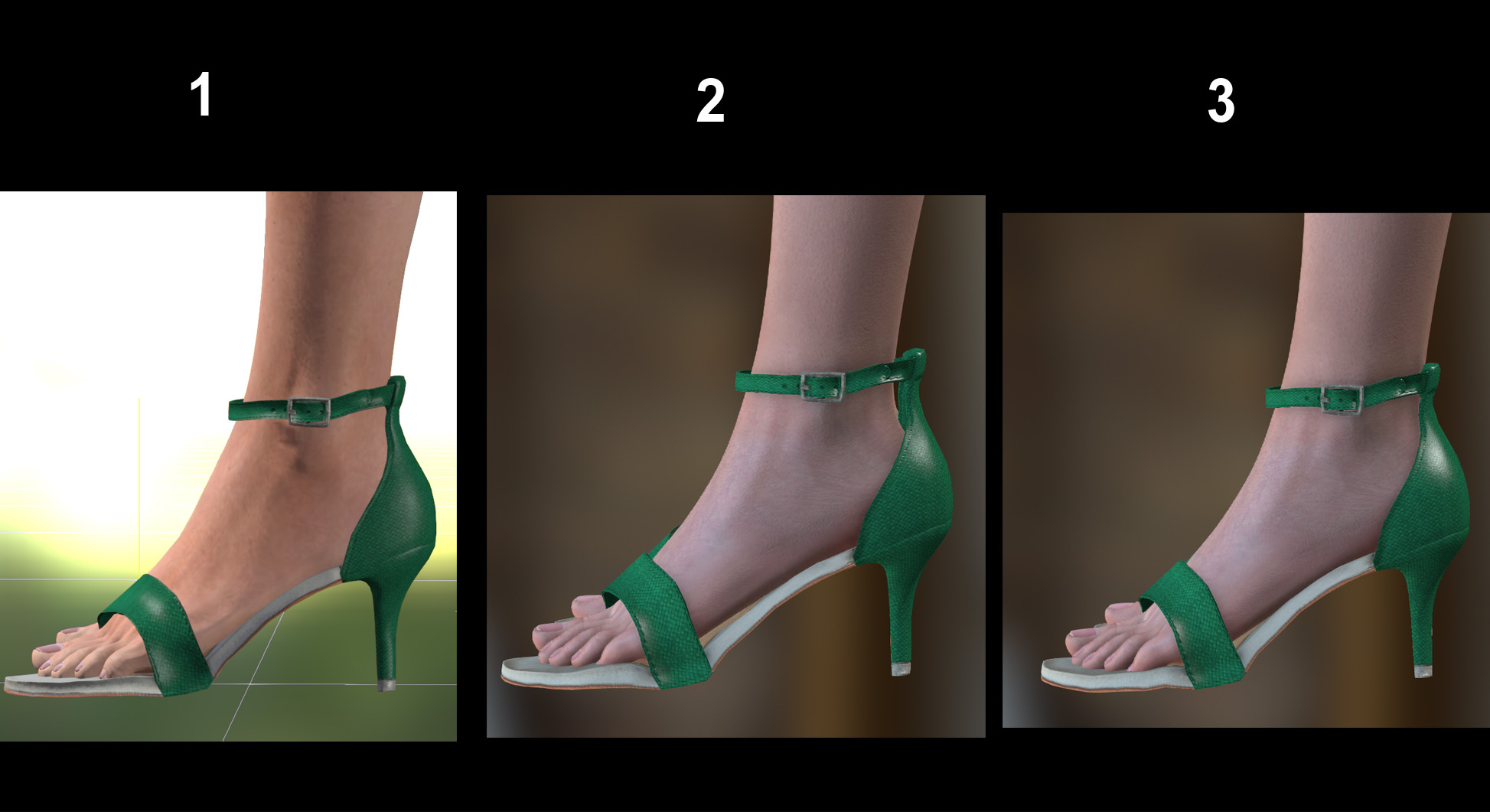 1. In CC 2 applied to the base model. Tight and neat fit. 2. In CC3 applied to the base model. There is not much difference in the feet shape between CC1 and CC3 base. Why are they loose? Nothing I can do here to make them tight. 3. Brought CC1 base to iClone (from CC2), sent it to CC3, Opened "Confirm" and disabled it. Saved the shoes. Opened default project and loaded saved shoes. This is the only way I can have those shoes fit tight in CC3. Is that normal? On top of all, if I enable Confirm now and save them, next time I apply those shoes they would be loose again. Shoes would also get loose if I just move "Increase Size" slider a notch up and back to 0.
I think the minimum value for "Increase Size" slider is messed up and needs fixing!
|
|
|
|
|
Kelleytoons
|
Kelleytoons
Posted 7 Years Ago
|
|
Group: Forum Members
Last Active: 2 Years Ago
Posts: 9.2K,
Visits: 22.1K
|
Conform on shoes is definitely wonky -- I'm not as picky as you are, but I've noticed a ton of times it's just better to hide the feet rather than run conform or they will poke through (not like the heels you're showing, but even on just normal shoes). And, as you noted, it doesn't "hold" -- not only under the circumstances you mention, but even if I send the figure to iClone and then reopen it back up to edit (the conform then seems to turn off... but only on shoes). I'm guessing something changed with either the mesh or the rig or both of feet in CC3 and conform hasn't been corrected to account for it. I don't notice those kinds of issues with other clothing.
Alienware Aurora R16, Win 11, i9-149000KF, 3.20GHz CPU, 64GB RAM, RTX 4090 (24GB), Samsung 870 Pro 8TB, Gen3 MVNe M-2 SSD, 4TBx2, 39" Alienware Widescreen Monitor
Mike "ex-genius" Kelley
|
|
|
|
|
3dtester
|
3dtester
Posted 7 Years Ago
|
|
Group: Forum Members
Last Active: Last Year
Posts: 999,
Visits: 2.2K
|
Summary of what has been stated in this thread:
- CC1 to CC3 rigging conversion broken (shoulders)
- CC2 to CC3 texture conversion broken
- Shoes are not conforming correctly, inconsistent behaviour
RL, why don't you make the RLHead feature compatible with CC3 / iClone 7 (Crazy Talk being another product that seems to die).
I bought CT8 for the head creation feature and it is broken because you didn't find it necessary to update your software as you promise.
So i am stuck with the broken CC1 to CC3 conversion, which caused me many hours and a lot of frustration until i found out the reason.
|
|
|
|
|
4u2ges
|
4u2ges
Posted 7 Years Ago
|
|
Group: Forum Members
Last Active: Last Month
Posts: 5.3K,
Visits: 16.8K
|
I can give a final tip on confirming shoes for CC1 > CC3 converts. It is bizarre. Shoes applied to freshly converted CC1 > CC3 (wonder where those were imported from? :w00t:) 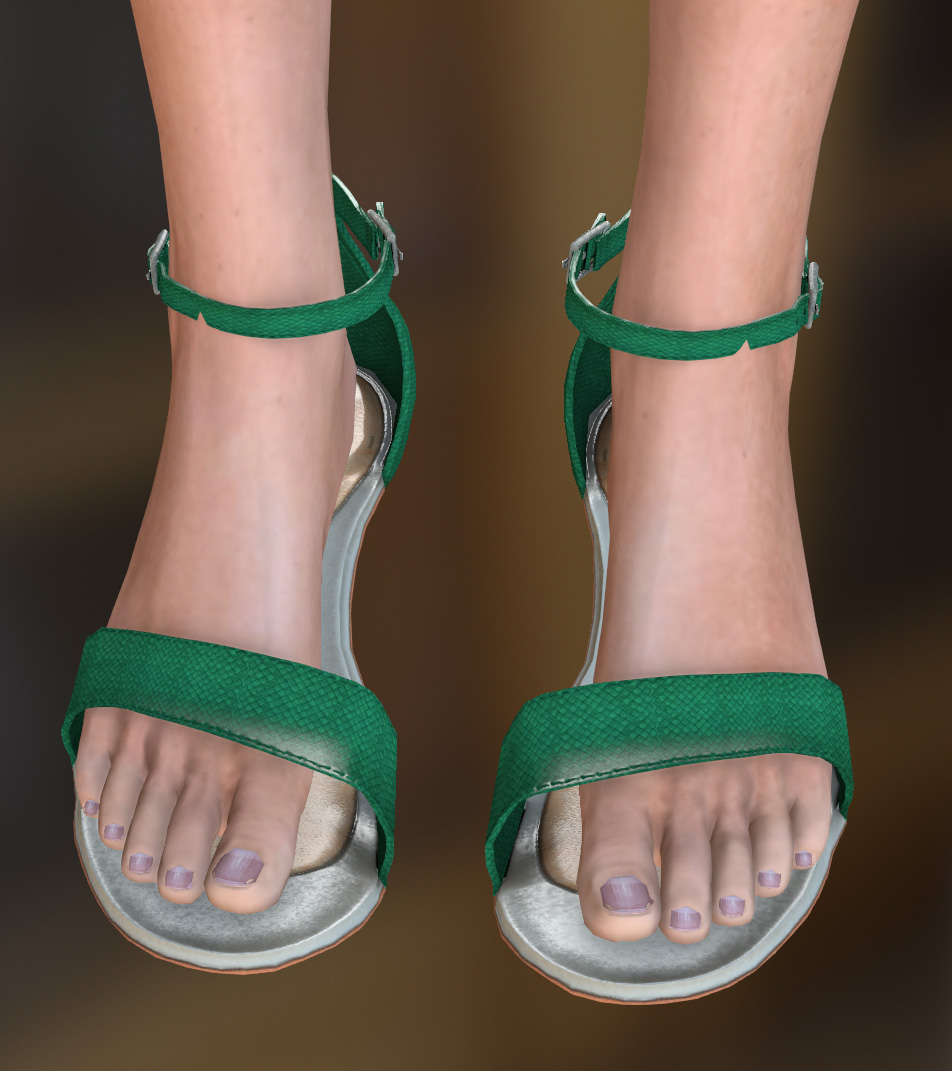 Calculate Collision does very little here and I am not even bother to run it. Instead, change ANY body/head slider a notch and back. Shoes are now almost perfectly confirmed. Note: you have to do it every time you apply a new shoes to the character converted from CC1 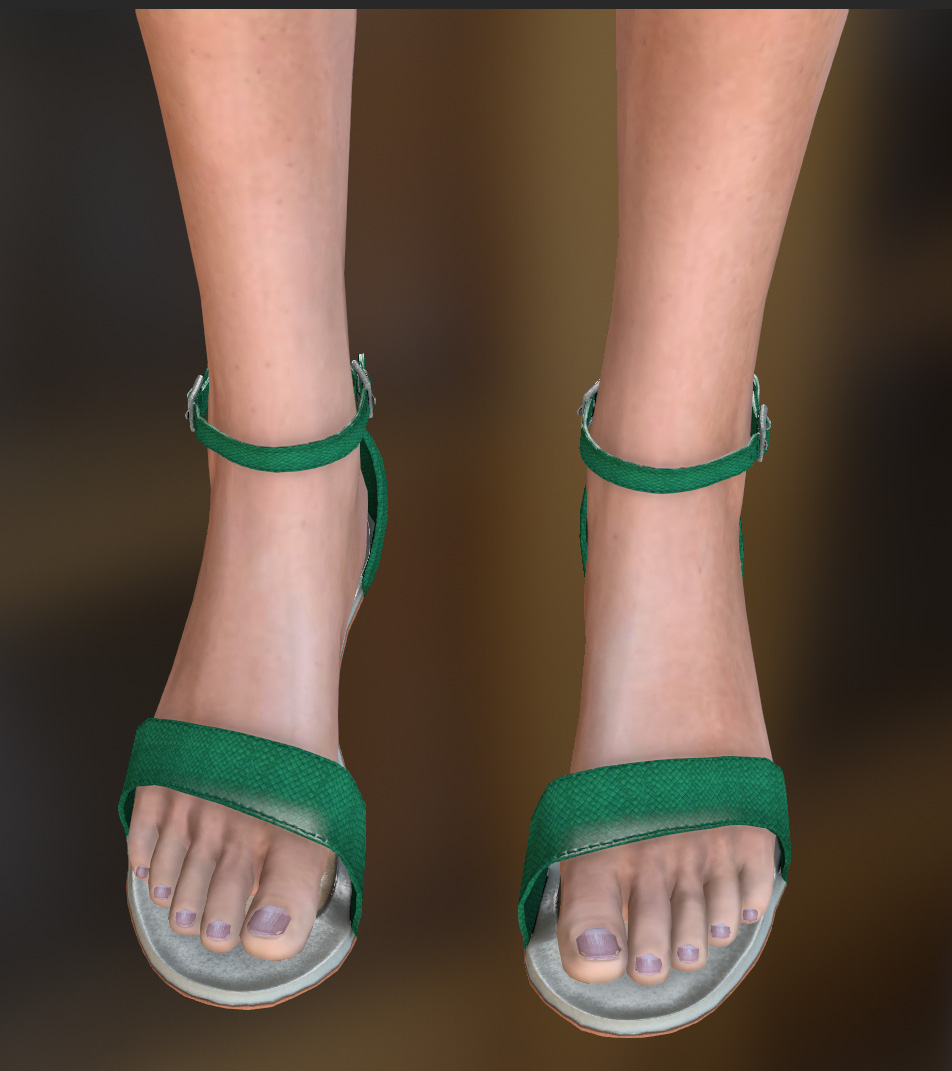
|
|
|
|