|
Author
|
Message
|
|
agastyamedia2018
|
agastyamedia2018
Posted 7 Years Ago
|
|
Group: Forum Members
Last Active: 7 Years Ago
Posts: 1,
Visits: 14
|
Crazy Talk Animator 3.3.3007.1 ver we used dummy G2 Character.
we are also problem in g2 270 sprite replacemrnt
|
|
|
|
|
gvraju.666
|
gvraju.666
Posted 7 Years Ago
|
|
Group: Forum Members
Last Active: 7 Years Ago
Posts: 16,
Visits: 65
|
hello sir we had a problem in 270 gs sprite replacement ....pls give video tutorial...are any in steps to over come that 270 g2 sprite replacement
|
|
|
|
|
gvraju.666
|
gvraju.666
Posted 7 Years Ago
|
|
Group: Forum Members
Last Active: 7 Years Ago
Posts: 16,
Visits: 65
|
hello sir we request u sir pls give us a video tutorial for rigging 270 angle in crazytalk animator with using flash in CTAstepbystep we r not getting any rigging tutorial so pls give us url link YouTube link to us
|
|
|
|
|
jlittle
|
jlittle
Posted 8 Years Ago
|
|
Group: Forum Members
Last Active: 2 Years Ago
Posts: 1.9K,
Visits: 17.3K
|
Ok, here is the issue: To use the Mirror function in Composer Mode you MUST have ALL the sprites for ALL angles loaded before executing the Mirror Function. If you load a sprite for each angle for a body part then it will work. Loading just angle 270 and trying to use the mirror function Will Not Work. Jeff
Get my Plugin Manager and TaskNotes plugins for iClone.
Check out EZColors and Other products for CTA/CA. EZColors: the easy way to change Render Styled (RS) colors!
See my CTA Tutorials on the YouTube channel CTAStepByStep
|
|
|
|
|
gvraju.666
|
gvraju.666
Posted 8 Years Ago
|
|
Group: Forum Members
Last Active: 7 Years Ago
Posts: 16,
Visits: 65
|
hello sir thank for replay ..sir we r using only vectors sir ..we or attaching the vectors to u pls give us a reliable answer ... we r not getting how to rig in 270 angle sir
|
|
|
|
|
jlittle
|
jlittle
Posted 8 Years Ago
|
|
Group: Forum Members
Last Active: 2 Years Ago
Posts: 1.9K,
Visits: 17.3K
|
Ok, I see the problem now! You are trying to mirror the right side to the left in the 270 angle. I believe the Mirror function only works on Vector sprites and not Image sprites. If you are using images then it will not work. If you are using vector sprites then it will work. Jeff
Get my Plugin Manager and TaskNotes plugins for iClone.
Check out EZColors and Other products for CTA/CA. EZColors: the easy way to change Render Styled (RS) colors!
See my CTA Tutorials on the YouTube channel CTAStepByStep
|
|
|
|
|
gvraju.666
|
gvraju.666
Posted 8 Years Ago
|
|
Group: Forum Members
Last Active: 7 Years Ago
Posts: 16,
Visits: 65
|
Hello sir the the problem in 270 angle mirror issue is not mirroring   sir pls send us a reliable answer ..with video tutorial ...pls we requesting u ...pls solve our problem this attached file
|
|
|
|
|
jlittle
|
jlittle
Posted 8 Years Ago
|
|
Group: Forum Members
Last Active: 2 Years Ago
Posts: 1.9K,
Visits: 17.3K
|
Go to your profile page. On the left at the bottom there is a section called "Options"  Click on the "Edit Attachments". Select and Delete attachments until you have room. Jeff
Get my Plugin Manager and TaskNotes plugins for iClone.
Check out EZColors and Other products for CTA/CA. EZColors: the easy way to change Render Styled (RS) colors!
See my CTA Tutorials on the YouTube channel CTAStepByStep
|
|
|
|
|
gvraju.666
|
gvraju.666
Posted 8 Years Ago
|
|
Group: Forum Members
Last Active: 7 Years Ago
Posts: 16,
Visits: 65
|
sir the the problem in 270 angle mirror issue
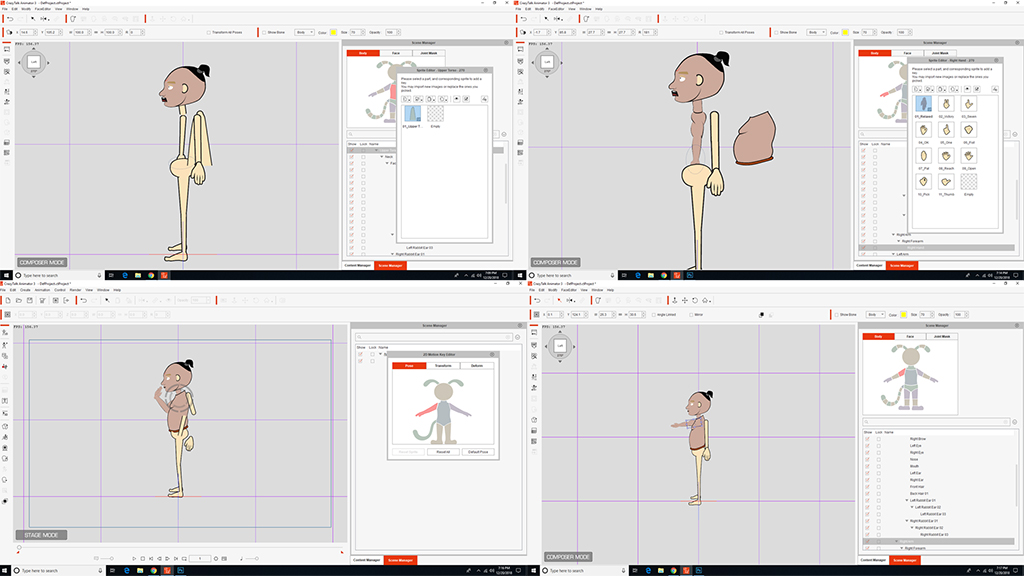 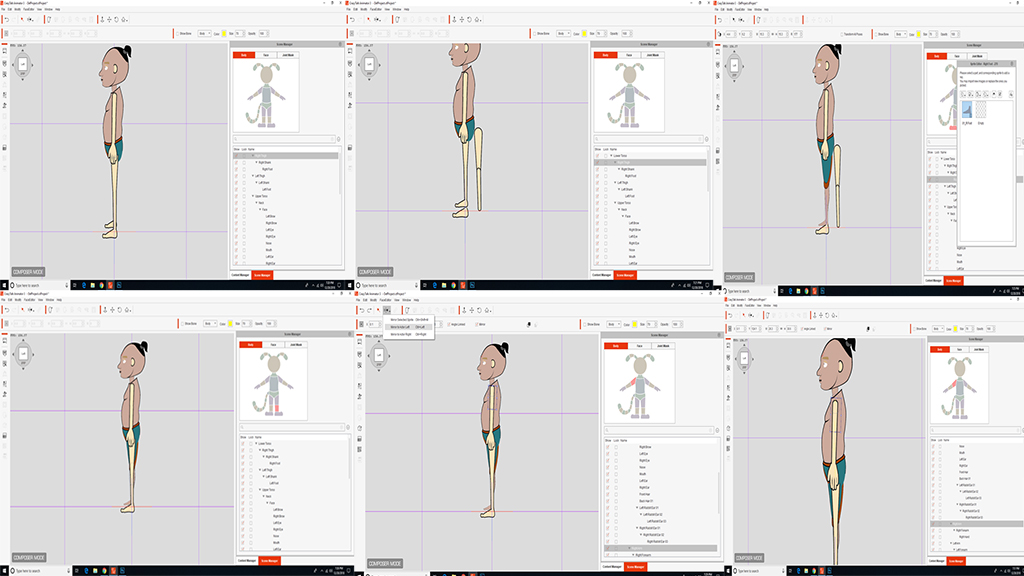 it is not mirroring sir pls send us a reliable answer ..with video tutorial ...pls we requesting u ...pls solve our problem attached file sir we r trying to attached file file...but file is not uploading in this reallusion forum ..tell that space problem how to recover it and how to send the file
|
|
|
|
|
jlittle
|
jlittle
Posted 8 Years Ago
|
|
Group: Forum Members
Last Active: 2 Years Ago
Posts: 1.9K,
Visits: 17.3K
|
Attach the character with the issue here and I will look at it. Jeff
Get my Plugin Manager and TaskNotes plugins for iClone.
Check out EZColors and Other products for CTA/CA. EZColors: the easy way to change Render Styled (RS) colors!
See my CTA Tutorials on the YouTube channel CTAStepByStep
|
|
|
|