|
Author
|
Message
|
|
sonic7
|
sonic7
Posted 8 Years Ago
|
|
Group: Forum Members
Last Active: 3 Years Ago
Posts: 1.7K,
Visits: 19.4K
|
OK - So from where I stand (at the moment at least), numbers 1, 2 and (possibly) 4 are OUT. Then with 5 and 6 - because they rely on keying with 'color' I have certain reservations about the cleaness of the key.
That leaves me with number 3, which, given what Mike has 'suggested', AND what Mark has 'warned about', then a 'manual' proxy creation would involve a similar amount of work/steps to #3.
Yeah --- I'd say #3 but with 'manual' proxy creation in place of a 'lossless' format creation ...... need to do some tests ....
--------------------------------------------------------------------------------------------------------------------------------------------------------
Please be patient with me ..... I don't always 'get it' the first time 'round - not even the 2nd time! :( - yikes! ... ● MSI GT72VR Laptop, i7 7700HQ 4-Core 3.8 GHz 16GB RAM; Nvidia 1070, 8GB Vram ● iClone-7.93 ● 3DXChange Pipeline 7.81 ● CC-3 Pipeline 3.44 ● Live Face ● HeadShot ● Brekel Pro-Body ● Popcorn FX ● iRAY ● Kinect V2 ● DaVinci Resolve17 ● Mixcraft 8.1
|
|
|
|
|
sonic7
|
sonic7
Posted 8 Years Ago
|
|
Group: Forum Members
Last Active: 3 Years Ago
Posts: 1.7K,
Visits: 19.4K
|
Mark >>>>> ....Most NLEs rely on converting "image sequence" files into proxies by creating highly compressed MP4 or even WMV - neither of which support an alpha.<<<<
that's good to know ..... so I won't go down that rabbit hole then .... thnx :)
--------------------------------------------------------------------------------------------------------------------------------------------------------
Please be patient with me ..... I don't always 'get it' the first time 'round - not even the 2nd time! :( - yikes! ... ● MSI GT72VR Laptop, i7 7700HQ 4-Core 3.8 GHz 16GB RAM; Nvidia 1070, 8GB Vram ● iClone-7.93 ● 3DXChange Pipeline 7.81 ● CC-3 Pipeline 3.44 ● Live Face ● HeadShot ● Brekel Pro-Body ● Popcorn FX ● iRAY ● Kinect V2 ● DaVinci Resolve17 ● Mixcraft 8.1
|
|
|
|
|
illusionLAB
|
illusionLAB
Posted 8 Years Ago
|
|
Group: Forum Members
Last Active: 4 Years Ago
Posts: 393,
Visits: 4.8K
|
Most NLEs rely on converting "image sequence" files into proxies by creating highly compressed MP4 or even WMV - neither of which support an alpha. There are a few AVI and QT codecs that allow an alpha, but in my experience they tend to be optimized for the "Pro" market so they are either uncompressed or use less compression - and therefore they are more about convenience than performance.
|
|
|
|
|
sonic7
|
sonic7
Posted 8 Years Ago
|
|
Group: Forum Members
Last Active: 3 Years Ago
Posts: 1.7K,
Visits: 19.4K
|
@Mike .... Interesting .... all the references I've been making to 'proxy' files were those that are created in the NLE 'automatically' when selected. What you're suggesting is a 'manual' proxy approach...
--------------------------------------------------------------------------------------------------------------------------------------------------------
Please be patient with me ..... I don't always 'get it' the first time 'round - not even the 2nd time! :( - yikes! ... ● MSI GT72VR Laptop, i7 7700HQ 4-Core 3.8 GHz 16GB RAM; Nvidia 1070, 8GB Vram ● iClone-7.93 ● 3DXChange Pipeline 7.81 ● CC-3 Pipeline 3.44 ● Live Face ● HeadShot ● Brekel Pro-Body ● Popcorn FX ● iRAY ● Kinect V2 ● DaVinci Resolve17 ● Mixcraft 8.1
|
|
|
|
|
Kelleytoons
|
Kelleytoons
Posted 8 Years Ago
|
|
Group: Forum Members
Last Active: 2 Years Ago
Posts: 9.2K,
Visits: 22.1K
|
Sometimes we have to work with what we can work with -- back in the day, when our PCs weren't powerful enough for true NLE, we used workarounds that might serve you well with your underpowered setup. What I think I'd do, if I were you, is not render to my final output size. Clearly your editor can't handle that, and it's no good if you can't get it setup the way you want. So render to, say, 320x240 PNG (or as large as your PC *can* handle). The nice thing about this is your video editor shouldn't care when you finally DO render to the final output -- it will update the sequence automagically the next time it loads. But in the meantime you can work with all the layers, get them working the way you want, and THEN re-render to your final size (overriding exactly the same files, with the same names), load up your editor for JUST the output, and output it. It's called working with proxies, although in this case it's not *strictly* the case (I'm not sure what you'd call it, exactly) and what we used to do all the time, back in the day. Should be plenty workable enough for you without jumping through hoops.
Alienware Aurora R16, Win 11, i9-149000KF, 3.20GHz CPU, 64GB RAM, RTX 4090 (24GB), Samsung 870 Pro 8TB, Gen3 MVNe M-2 SSD, 4TBx2, 39" Alienware Widescreen Monitor
Mike "ex-genius" Kelley
|
|
|
|
|
sonic7
|
sonic7
Posted 8 Years Ago
|
|
Group: Forum Members
Last Active: 3 Years Ago
Posts: 1.7K,
Visits: 19.4K
|
Thanks very much Gerry .... I exported an 'Alpha video' via that setting, and played around a bit with it in Movie Studio.
It seemed like a lot of jigging around - I mean I couldn't even get it to work - so sort of gave up ....
I can see there's lots of possible 'methods' of getting your action/foreground composited 'over' the top of your background (in a NLE).
Am I understanding correctly?
Seems to me they are:
1. The Ideal >>>> ● Export alpha PNG - done! IF your PC is powerful enough to manipulate them. if not;
2. Next best >>>> ● Export alpha PNG - turn them into 'Proxy Files' IF your NLE 'ALLOWS' proxy creation from PNG. if not;
3. Next best >>>> ● Export alpha PNG - and transcode into another 'lossless format' that will work 'as is' or if still sluggish, use proxy NOW.
4. Otherwise >>>> ● Export an 'uncompressed' video AS WELL AS an alpha video - and use 'masking' in the NLE. (still might have to use a 'proxy' if sluggish).
ALTERNATIVELY:
5. Another way >>>> ● Export as 'uncompressed' video against a color (but not a color that's in the scene) then 'chroma key' - done! IF your PC is powerful enough to manipulate them. IF NOT;
6. Next best >>>>>> ● Export as 'uncompressed' video against a color (but not a color that's in the scene) - use your NLE to create a proxy file then 'chroma key'.
In my case, BOTH 1 and 2 are simply not possible ... and 4. seems too involved and protracted ....
And if I'm not mistaken it's BOTH Movie Studio AND Hitfilm Express that won't allow Proxy creation from PNG's
--------------------------------------------------------------------------------------------------------------------------------------------------------
Please be patient with me ..... I don't always 'get it' the first time 'round - not even the 2nd time! :( - yikes! ... ● MSI GT72VR Laptop, i7 7700HQ 4-Core 3.8 GHz 16GB RAM; Nvidia 1070, 8GB Vram ● iClone-7.93 ● 3DXChange Pipeline 7.81 ● CC-3 Pipeline 3.44 ● Live Face ● HeadShot ● Brekel Pro-Body ● Popcorn FX ● iRAY ● Kinect V2 ● DaVinci Resolve17 ● Mixcraft 8.1
|
|
|
|
|
justaviking
|
justaviking
Posted 8 Years Ago
|
|
Group: Forum Members
Last Active: 2 Years Ago
Posts: 8.2K,
Visits: 26.5K
|
@Steve
Yes, I am speaking heresy. I sometimes render to WMV (Windows Media) format. I cannot really defend it.
I have found the WMV files send to be surprisingly compact and, to my eyes, visually acceptable.
I probably do that more when rendering in my NLE (as the final step) than for intermediate files. I originally assumed .mp4 file formats would be better, but it doesn't seem that way to me; the WMV files are noticeably smaller, and seem to look at least as good*. I don't know, maybe I'm stuck with some wonky CODECs on my computer.
It depends on what I'm working on, of course, but let's be honest, any "compression" of my video is the least of my problems. :ermm: If I'm doing "serious" work, then I will be sure to avoid "lossy" intermediate file format.
SUMMARY:
1) I will usually render iClone to AVI if I'm going to do additional editing in my NLE
2) Will render to sequence of PNG if I'm doing "serious" work
3) Typically use WMV for work-in-progress checks, and often use it as my final output
*Hmm... I might be thinking about "mpeg" format that was always significantly bigger than wmv. The .mp4 is probably not like that. I need to double-check a couple of files when I get home. Sorry for the confusion.
iClone 7... Character Creator... Substance Designer/Painter... Blender... Audacity...
Desktop (homebuilt) - Windows 10, Ryzen 9 3900x CPU, GTX 1080 GPU (8GB), 32GB RAM, Asus X570 Pro motherboard, 2TB SSD, terabytes of disk space, dual monitors.
Laptop - Windows 10, MSI GS63VR STEALTH-252, 16GB RAM, GTX 1060 (6GB), 256GB SSD and 1TB HDD
|
|
|
|
|
wires
|
|
|
Group: Forum Members
Last Active: Last Month
Posts: 5.7K,
Visits: 26.5K
|
Steve, There is an option in the render panel to just render an Alpha video. Just select "Export alpha video only" 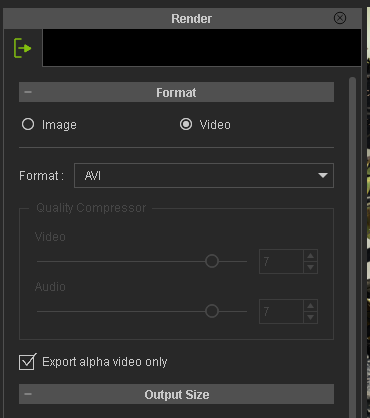 This does require 2 renders, one with and one without Alpha.
Gerry
System: Win 10 Pro (21H2), Asus X99-E WS, CPU i7-5930K -3,5 GHz, 32 GB DDR4 2666-16 RAM, NVidia GTX 1080 Ti GPU - 11 GB VRAM(Driver Studio-536.99), Samsung 850 Pro 512 GB SSD, 6 TB HD storage.
|
|
|
|
|
sonic7
|
sonic7
Posted 8 Years Ago
|
|
Group: Forum Members
Last Active: 3 Years Ago
Posts: 1.7K,
Visits: 19.4K
|
Thanks Rampa :) - yes I just did a 'test' (exporting out an 'uncompressed' file) - and noticed exactly what you're talking about - the extra options ...
I saw:
● DV Video Encoder
● Full Frames (Uncompressed)
● Grass Valley HQ Encoder (this is one I'd installed on my PC for a past video project that was edited in a different NLE)
● MJPEG Compressor
OK, so upon importing the 'uncompressed' AVI into Vegas MS, it became evident that it doesn't 'include' the alpha component.
Meaning that when attempting to 'overlay' it (using the next video track 'above'), it totally excludes the video track 'below'.
So now I'm wondering whether uncompressed can even hold 'alpha' information at all.
And if it can't - I'm thinking that's where this 'masking' business I've heard of - might come into play ....
--------------------------------------------------------------------------------------------------------------------------------------------------------
Please be patient with me ..... I don't always 'get it' the first time 'round - not even the 2nd time! :( - yikes! ... ● MSI GT72VR Laptop, i7 7700HQ 4-Core 3.8 GHz 16GB RAM; Nvidia 1070, 8GB Vram ● iClone-7.93 ● 3DXChange Pipeline 7.81 ● CC-3 Pipeline 3.44 ● Live Face ● HeadShot ● Brekel Pro-Body ● Popcorn FX ● iRAY ● Kinect V2 ● DaVinci Resolve17 ● Mixcraft 8.1
|
|
|
|
|
Rampa
|
|
|
Group: Forum Members
Last Active: 2 Months Ago
Posts: 8.2K,
Visits: 62.6K
|
When exporting as AVI, the settings box pops up after you save your file. It gives you uncompressed, DV, and MJPEG options.
|
|
|
|