|
Author
|
Message
|
|
Delerna
|
Delerna
Posted 8 Years Ago
|
|
Group: Forum Members
Last Active: 4 Years Ago
Posts: 1.5K,
Visits: 14.8K
|
Posted all of this into feedback tracker now.
I have also logged out, logged back in and unticked remember me.
I then logged out again and logged back in and ticked the remember me button.
Finally I closed my browser down without logging out and then reopened the forum and went to feedback tracker to test if it was still going to open with wanting me to login and still refusing me.
But now it works. Have tried closing without logging out and reopening a few times and it is all working fine now.
Looks like something wrong on my computer so don't expect the developers will be able to replicate the problem. As a developer I know it is next to impossible to answer or correct an issue in that case.
so pthhhhhhhh. forget my comments on this. Just the other one with iClone not recognising folder shortcuts anymore after updating to 7.21. As said it used to work with 7.2 so I don't think that is related to something with my computer? At least I hope not.
i7-3770 3.4GHz CPU 16 GB Ram
GeForce GTX1080 TI 11GB
Windows 10 Pro 64bit
|
|
|
|
|
Alien Maniac
|
Alien Maniac
Posted 8 Years Ago
|
|
Group: Forum Members
Last Active: 5 Years Ago
Posts: 693,
Visits: 2.1K
|
I am so busy working on a project and have no time for all these darn bugs....wo so many, too many to list. 1 example is that a video back shows through all models and characters, How in the heck is that even possible? Anyway, I need back my IC 7.2 now (it worked fine) so I can get this work done...I am on a deadline. How can I do this? quickly....I am waiting.
MSI GE66 Raider, Intel 10th Gen, I7, SC Turbo to 5.3 GHZ, 240HZ, 64GB 3300 Ram, 2x 1TB M2 SSD Drives, NVIDIA GPU RTX 2070/8GB, 55" Sony 4K Monitor External data drives total 7 TB. and an AUDIO Studio Recording system.
|
|
|
|
|
wires
|
|
|
Group: Forum Members
Last Active: Last Month
Posts: 5.7K,
Visits: 26.5K
|
Space Rider (4/15/2018)
I am so busy working on a project and have no time for all these darn bugs....wo so many, too many to list. 1 example is that a video back shows through all models and characters, How in the heck is that even possible? Anyway, I need back my IC 7.2 now (it worked fine) so I can get this work done...I am on a deadline. How can I do this? quickly....I am waiting.
The only way to roll back is to remove 7.21 from your system and then run the 7.2 installer that you have hopefully saved on an external drive.
Gerry
System: Win 10 Pro (21H2), Asus X99-E WS, CPU i7-5930K -3,5 GHz, 32 GB DDR4 2666-16 RAM, NVidia GTX 1080 Ti GPU - 11 GB VRAM(Driver Studio-536.99), Samsung 850 Pro 512 GB SSD, 6 TB HD storage.
|
|
|
|
|
Alien Maniac
|
Alien Maniac
Posted 8 Years Ago
|
|
Group: Forum Members
Last Active: 5 Years Ago
Posts: 693,
Visits: 2.1K
|
Great idea, THANKS Gerry.....
MSI GE66 Raider, Intel 10th Gen, I7, SC Turbo to 5.3 GHZ, 240HZ, 64GB 3300 Ram, 2x 1TB M2 SSD Drives, NVIDIA GPU RTX 2070/8GB, 55" Sony 4K Monitor External data drives total 7 TB. and an AUDIO Studio Recording system.
|
|
|
|
|
TonyDPrime
|
TonyDPrime
Posted 8 Years Ago
|
|
Group: Forum Members
Last Active: 2 Years Ago
Posts: 3.4K,
Visits: 12.4K
|
I'll put this in the Feedback Tracker, but here is a video showing effects of viewport size on overlapping opacity textures, in this case the Daz hair.
The vids are not identical, I used a different lighting for the one I got working.
And you would say, "Well, then just make it mini...", right? But, when you do, lighting you will experience a loss of lighting fidelity (becomes pixelated with artifacts).
Using a regular-sized viewport
Using a mini-sized viewport
Anyway, thx to 4U2Ges for past suggestion, and enjoy!
|
|
|
|
|
TheOldBuffer
|
TheOldBuffer
Posted 8 Years Ago
|
|
Group: Forum Members
Last Active: 2 Years Ago
Posts: 429,
Visits: 6.4K
|
I've found another issue with 7.21 and reported on feedback tracker. In the timeline there is supposed to be a morph track available for props that have morphs created in the morph editor. There isnt an option to select such a track.
Homebuilt computer - Windoze 10, INTEL i9 9900 k @ 5.1 GHz, EVGA RTX 2080 TI XC ULTRA, 16GB 3100 MHz RAM, Asus Maximus Hero XI motherboard, Sound blaster Z series. iClone6 & 7 Pipeline, Crazytalk 8, Crazytalk Animator 2, Facefilter, Pop video 3, Hitfilm 4Pro, Cubase 8.5 Pro,
|
|
|
|
|
justaviking
|
justaviking
Posted 8 Years Ago
|
|
Group: Forum Members
Last Active: 2 Years Ago
Posts: 8.2K,
Visits: 26.5K
|
TonyDPrime (4/22/2018)
I'll put this in the Feedback Tracker, but here is a video showing effects of viewport size on overlapping opacity textures, in this case the Daz hair.
The vids are not identical, I used a different lighting for the one I got working.
And you would say, "Well, then just make it mini...", right? But, when you do, lighting you will experience a loss of lighting fidelity (becomes pixelated with artifacts).
Gaaaahhh!!!! It angers and offends me that the preview window has any effect on the render results!!!! If I was the product manager, I'd lock all the develoopers in the building until it gets fixed. I'd buy Mt. Dew, Monster drinks, and pizza, but nobody goes home until something that dumb is solved. Gaaaahhhh!!!!!! :angry: :crazy:
iClone 7... Character Creator... Substance Designer/Painter... Blender... Audacity...
Desktop (homebuilt) - Windows 10, Ryzen 9 3900x CPU, GTX 1080 GPU (8GB), 32GB RAM, Asus X570 Pro motherboard, 2TB SSD, terabytes of disk space, dual monitors.
Laptop - Windows 10, MSI GS63VR STEALTH-252, 16GB RAM, GTX 1060 (6GB), 256GB SSD and 1TB HDD
|
|
|
|
|
wires
|
|
|
Group: Forum Members
Last Active: Last Month
Posts: 5.7K,
Visits: 26.5K
|
TheOldBuffer (4/23/2018)
I've found another issue with 7.21 and reported on feedback tracker. In the timeline there is supposed to be a morph track available for props that have morphs created in the morph editor. There isnt an option to select such a track. The option is available as shown in the screen shots below. Prop Morph: 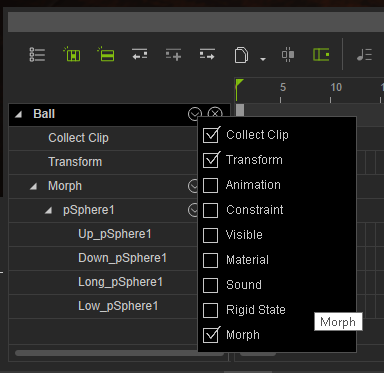 Character Morph: 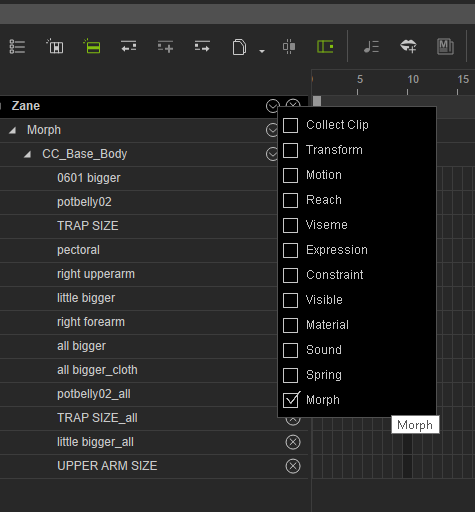 Gerry
Gerry
System: Win 10 Pro (21H2), Asus X99-E WS, CPU i7-5930K -3,5 GHz, 32 GB DDR4 2666-16 RAM, NVidia GTX 1080 Ti GPU - 11 GB VRAM(Driver Studio-536.99), Samsung 850 Pro 512 GB SSD, 6 TB HD storage.
|
|
|
|
|
TheOldBuffer
|
TheOldBuffer
Posted 8 Years Ago
|
|
Group: Forum Members
Last Active: 2 Years Ago
Posts: 429,
Visits: 6.4K
|
I know where it should be but it's not there........ wires (4/23/2018)
TheOldBuffer (4/23/2018)
I've found another issue with 7.21 and reported on feedback tracker. In the timeline there is supposed to be a morph track available for props that have morphs created in the morph editor. There isnt an option to select such a track. The option is available as shown in the screen shots below. Prop Morph: Character Morph:
Homebuilt computer - Windoze 10, INTEL i9 9900 k @ 5.1 GHz, EVGA RTX 2080 TI XC ULTRA, 16GB 3100 MHz RAM, Asus Maximus Hero XI motherboard, Sound blaster Z series. iClone6 & 7 Pipeline, Crazytalk 8, Crazytalk Animator 2, Facefilter, Pop video 3, Hitfilm 4Pro, Cubase 8.5 Pro,
|
|
|
|
|
wires
|
|
|
Group: Forum Members
Last Active: Last Month
Posts: 5.7K,
Visits: 26.5K
|
My screen shots were taken just before I made my post, and are from 7.21. I can't add any more information as to why your system isn't showing the tracks correctly. It would be interesting to know if other users are having this issue or not, unfortunately there are only a few users who take time to reply to such posts.
Gerry
System: Win 10 Pro (21H2), Asus X99-E WS, CPU i7-5930K -3,5 GHz, 32 GB DDR4 2666-16 RAM, NVidia GTX 1080 Ti GPU - 11 GB VRAM(Driver Studio-536.99), Samsung 850 Pro 512 GB SSD, 6 TB HD storage.
|
|
|
|