|
Author
|
Message
|
|
Dr. Nemesis
|
Dr. Nemesis
Posted 7 Years Ago
|
|
Group: Forum Members
Last Active: 8 days ago
Posts: 258,
Visits: 5.4K
|
Just so that I understand... Is this happening with the Iclone update or just the latest update of 3dXchange?
Not being able to import Daz characters would be a huge problem for me.
|
|
|
|
|
green.damion
|
green.damion
Posted 7 Years Ago
|
|
Group: Forum Members
Last Active: 5 Years Ago
Posts: 21,
Visits: 79
|
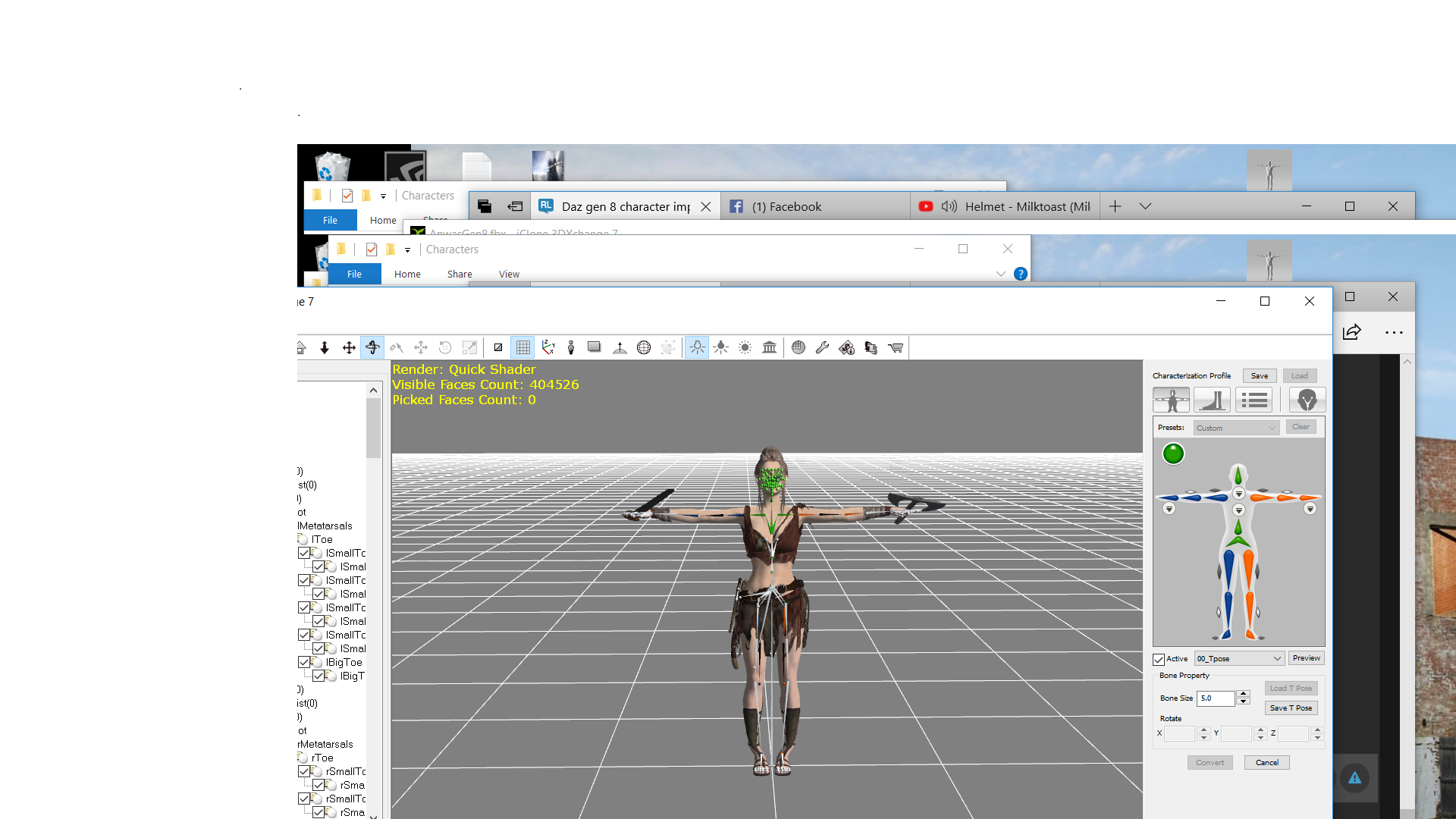 Ive done as you suggested and it caused the problem with the ankles.several times...same issue.....somehow I managed to get something in that didn't make her totally look melted, but her ankles are still jacked up and when I apply motion to her, she just melts...still totally fckued....the Gen 3 runs perfectly, just the models face looks like a mannequin.. 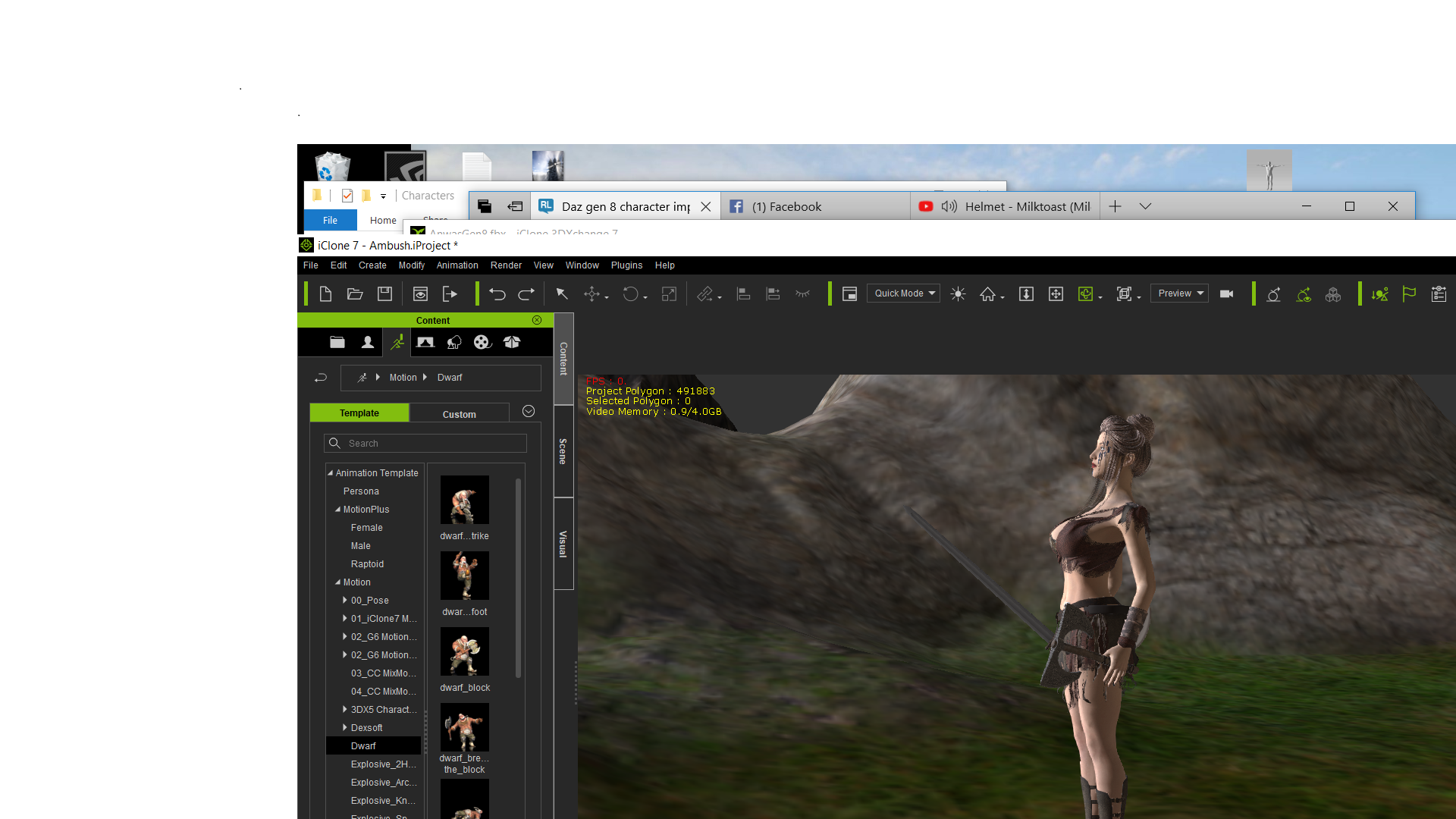
|
|
|
|
|
rollasoc
|
rollasoc
Posted 7 Years Ago
|
|
Group: Forum Members
Last Active: 5 Months Ago
Posts: 188,
Visits: 3.1K
|
slavoisard (1/9/2018)
Hi Peter !
We all have problems since latest update... All Genesis (1, 2, 3 and 8) are no more mapping eyes correctly, everything needs to be done manually.... May be this problem is linked to the global thing no more working as before ?Have a Daz model (G8) that used to convert fine. Had an issue with poke through when animating in iClone, so went back and fixed in Daz. Can't get it into iClone at all. Bones no longer mapped correctly. the boots move when walking, the feet stay static. Have tried the Daz Gen 8 T-pose. Tried a genesis 3 that I have imported many times. That no longer works either. Same issue. Update: Somewhere along the line, "merge clothing with figure" was unchecked, so when imported into 3D Exchange, some of the figure is mapped and some of the clothing (boots and gloves etc) were mapped which was causing my issue.
Home built PC:- i9 9900K 32GB RAM, Zotac 1080TI mini.
Band Music:- https://thehairthieves.bandcamp.com/
Solo Instrumentals:- https://sineglidermusic.bandcamp.com/
|
|
|
|
|
Snarp Farkle
|
Snarp Farkle
Posted 7 Years Ago
|
|
Group: Forum Members
Last Active: Last Year
Posts: 770,
Visits: 3.6K
|
I don't know if this has anything to do with these issues or not, just thought it worth mentioning that on 12/5/2017 DAZ did update it's .fbx plugins in the latest update also, I just can't remember if I was having these issues before that or not.
Dell XPS 8900, Intel(R) Core(TM) i7-6700 CPU @ 3.40GHz, 3408 Mhz, 4 Core(s), 8 Logical Processor(s), 16 GB RAM, - 4 GB GeForce GTX 745, NVIDIA compatible.
Acer Aspire V Nitro Laptop, 2.5GHz Intel Core i5-7300HQ processor with 6MB cache, 256GB solid state drive, 16GB Ram, 4 GB NVIDIA GeForce GTX 1050 Ti graphics.
|
|
|
|
|
Kelleytoons
|
Kelleytoons
Posted 7 Years Ago
|
|
Group: Forum Members
Last Active: Last Year
Posts: 9.2K,
Visits: 22.1K
|
Rampa (1/10/2018)
I thought I was up-to-date. It shows 7.2.12 something. Little redundancy doesn't hurt. I guess. ;)Those two Daz profiles (new) I have are dated 12/7 -- they are for 8.3 and 2.3 Daz Genesis characters. As I said, *I* didn't put them there, but I did reinstall everything on that date on this machine when I changed to my new solid state drive (2TB so I can *finally* have all my stuff on one drive and not my teeny bootup drive I used to use). I'm guessing that perhaps just "updating" didn't do it then (but no way for me to know exactly what thing did it -- perhaps all you have to do is uninstall the Genesis pack and then reinstall).
Alienware Aurora R16, Win 11, i9-149000KF, 3.20GHz CPU, 64GB RAM, RTX 4090 (24GB), Samsung 870 Pro 8TB, Gen3 MVNe M-2 SSD, 4TBx2, 39" Alienware Widescreen Monitor
Mike "ex-genius" Kelley
|
|
|
|
|
Snarp Farkle
|
Snarp Farkle
Posted 7 Years Ago
|
|
Group: Forum Members
Last Active: Last Year
Posts: 770,
Visits: 3.6K
|
Thanks Rampa, I didn't have the Profile's saved yet. :)After using them though I noticed that you didn't have the eyes and jaw set up in them so I did that and re-saved them so I won't have to do it manually anymore. I have been using the G8 T-pose that came with the 3Dx upgrade but so far I'm not so impressed with the G8 characters, then again I haven't done much with them yet either, time will tell!
Dell XPS 8900, Intel(R) Core(TM) i7-6700 CPU @ 3.40GHz, 3408 Mhz, 4 Core(s), 8 Logical Processor(s), 16 GB RAM, - 4 GB GeForce GTX 745, NVIDIA compatible.
Acer Aspire V Nitro Laptop, 2.5GHz Intel Core i5-7300HQ processor with 6MB cache, 256GB solid state drive, 16GB Ram, 4 GB NVIDIA GeForce GTX 1050 Ti graphics.
|
|
|
|
|
Rampa
|
|
|
Group: Forum Members
Last Active: 2 days ago
Posts: 8.2K,
Visits: 62.6K
|
I thought I was up-to-date. It shows 7.2.12 something. Little redundancy doesn't hurt. I guess. ;)
|
|
|
|
|
Kelleytoons
|
Kelleytoons
Posted 7 Years Ago
|
|
Group: Forum Members
Last Active: Last Year
Posts: 9.2K,
Visits: 22.1K
|
Rampa, I have a Daz Genesis 8 3DX T-Pose when I open up XChange 7, so it's definitely provided somehow (the only thing I know for sure is *I* didn't create it or even want it -- it showed up there one day when my XChange updated).
Alienware Aurora R16, Win 11, i9-149000KF, 3.20GHz CPU, 64GB RAM, RTX 4090 (24GB), Samsung 870 Pro 8TB, Gen3 MVNe M-2 SSD, 4TBx2, 39" Alienware Widescreen Monitor
Mike "ex-genius" Kelley
|
|
|
|
|
Rampa
|
|
|
Group: Forum Members
Last Active: 2 days ago
Posts: 8.2K,
Visits: 62.6K
|
That's the facekey DUF file. There is the autoconvert 3DXProfile in the 3DX folder, but it doesn't change the arms into a Tpose. It may have gotten left out. It's certainly easy enough to fix. In any case, here is a proper G8 Tpose for both male and female you can download. Uncheck the active box if it's checked, and then click on the "Load" button up top to load a profile. 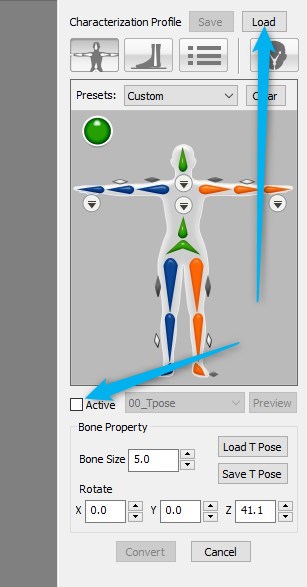
|
|
|
|
|
Snarp Farkle
|
Snarp Farkle
Posted 7 Years Ago
|
|
Group: Forum Members
Last Active: Last Year
Posts: 770,
Visits: 3.6K
|
You'll find it when downloading the iClone_Daz_Genesis_Extension version 3 from your Members area Registration area.  Dell XPS 8900, Intel(R) Core(TM) i7-6700 CPU @ 3.40GHz, 3408 Mhz, 4 Core(s), 8 Logical Processor(s), 16 GB RAM, - 4 GB GeForce GTX 745, NVIDIA compatible.
Acer Aspire V Nitro Laptop, 2.5GHz Intel Core i5-7300HQ processor with 6MB cache, 256GB solid state drive, 16GB Ram, 4 GB NVIDIA GeForce GTX 1050 Ti graphics.
|
|
|
|