|
Author
|
Message
|
|
Eric (RL)
|
 Eric (RL)
Posted 11 Years Ago
Eric (RL)
Posted 11 Years Ago
|
|
Group: Administrators
Last Active: 10 Years Ago
Posts: 99,
Visits: 1.0K
|
Note: *Make sure you have updated all the iClone family programs to the latest version (iClone v6.3, 3DXchange v6.3, Character Creator v1.3) before you launch iClone 6*
Check out the video below to see all the new changes in action.
iClone v6.3 Changelog
*New* CrazyTalk 8 and iClone Related:
Added: Enable launch CrazyTalk 8 for Head Creation
If you have purchase CrazyTalk 8 Pipeline version, you can now launch the head creation directly from iClone 6. Just select a character, head to Modify panel, and click on Generate from Photo button
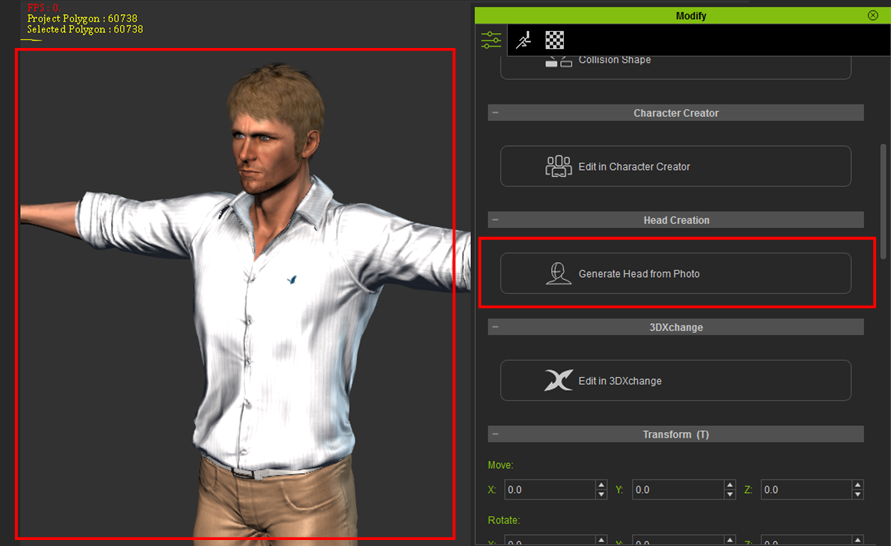
Added: Save head imported from CrazyTalk 8 and apply them to any CC character
You can now save head imported from CrazyTalk 8, or the heads of any CC characters and re-apply them to a different CC character.
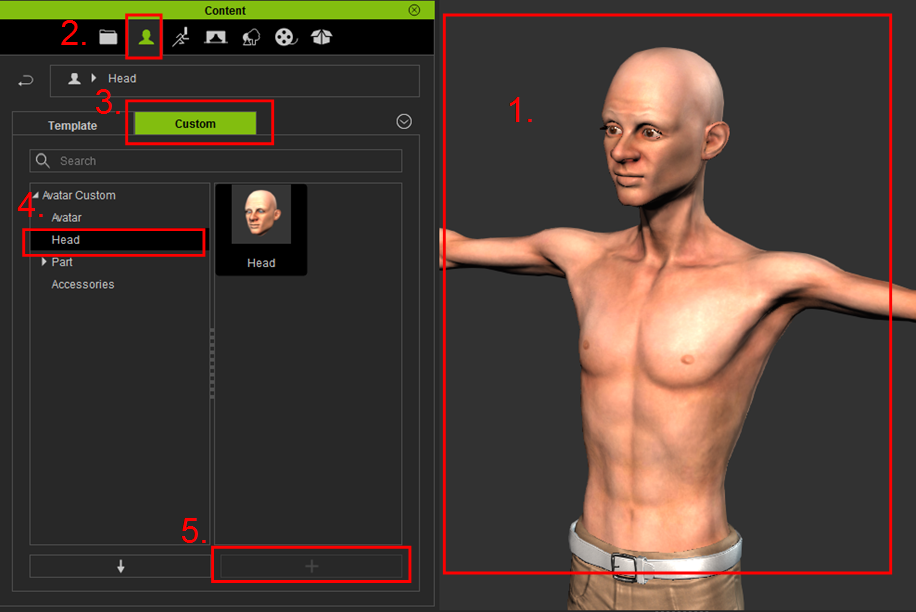
To save head
1. Select your character
2. In the Content Manager, select Actor tab
3. Select Custom tab
4. Select Head
5. Click on "+" icon to save the head in ".iface" format
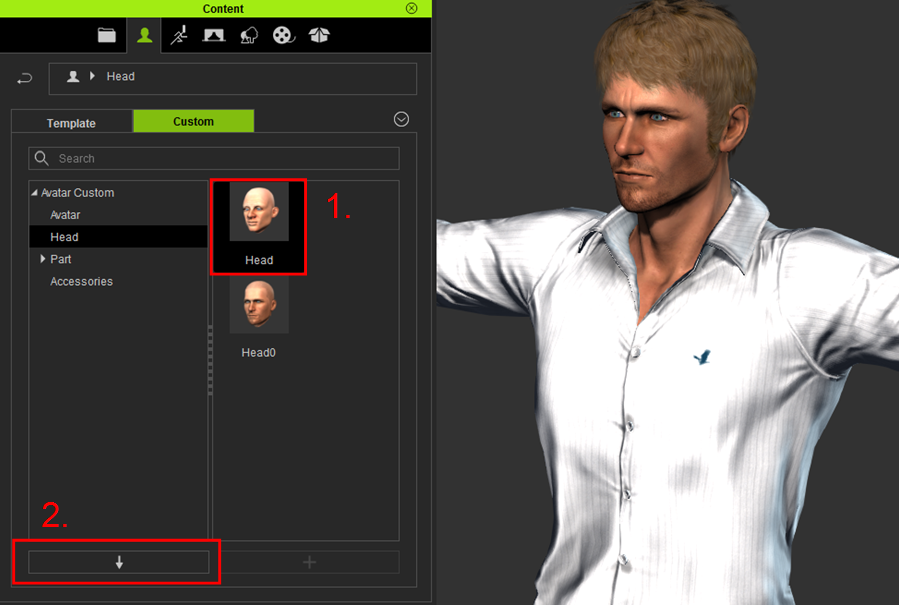
To apply head
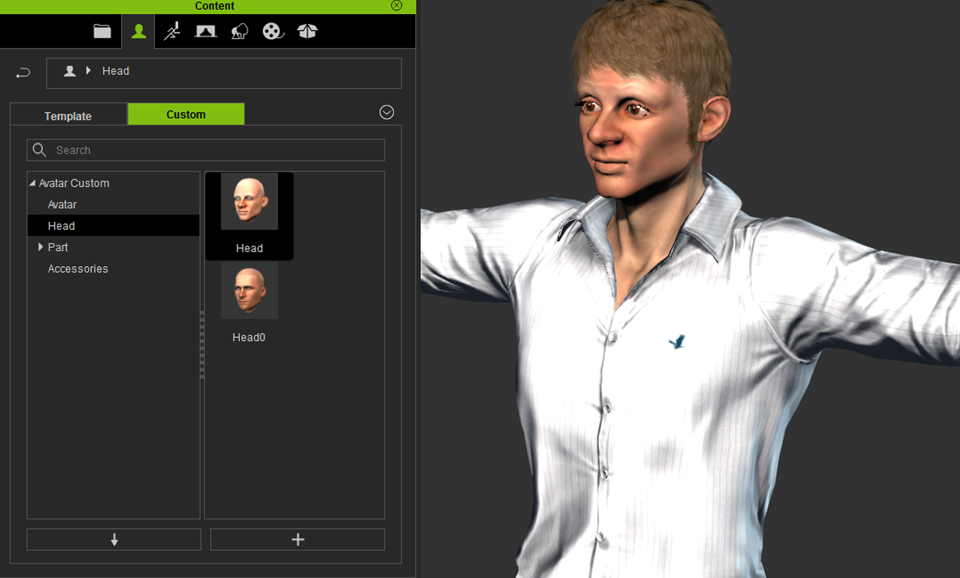
1. Select desired character, and click on the head you wish to apply
2. Click the "Apply" button
Added: Allow load rlHead on iClone and CC
iClone and CC now can load .rlHead file made from CrazyTalk 8
To export a head from CrazyTalk 8, simply click File -> Export -> RLhead (or use hotkey Cltr+H)
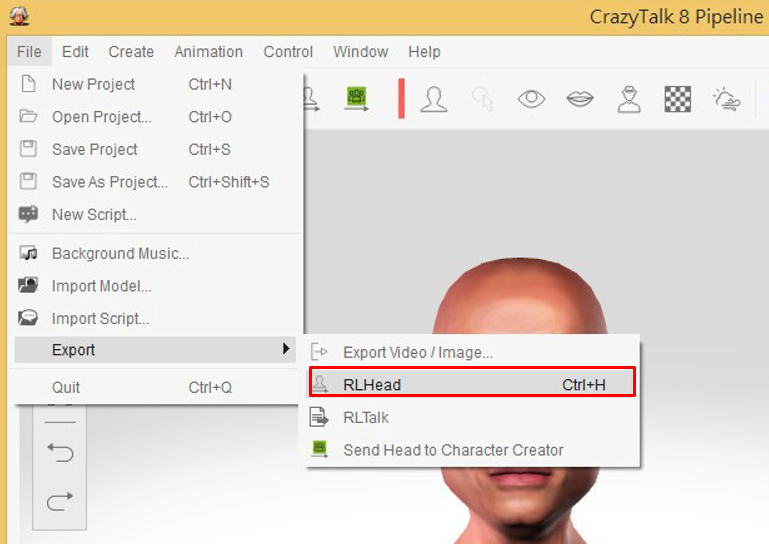
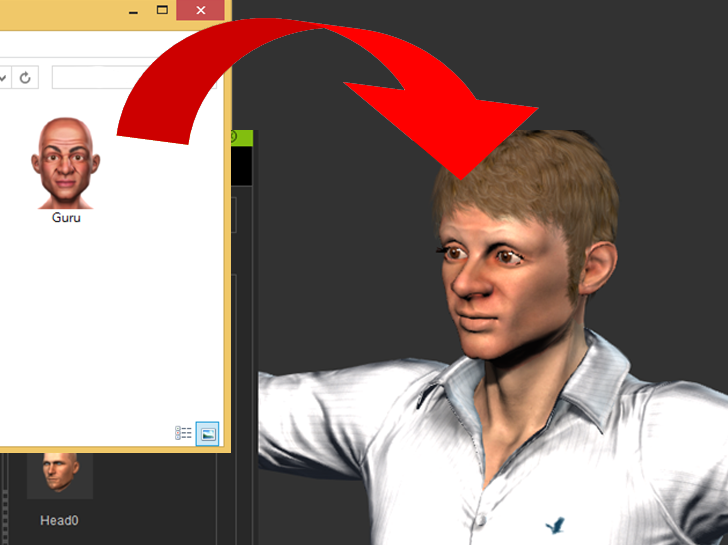
To quickly change head, simply click and drag the .rlHead file from File Explorer to the target CC character in iClone or Character Creator.
Added: Import auto-motion from CrazyTalk 8
iClone and CC can now import auto-motion from CrazyTalk 8.
To export a script from CrazyTalk 8, simply click File -> Export -> RLtalk (or use hotkey Cltr+H)
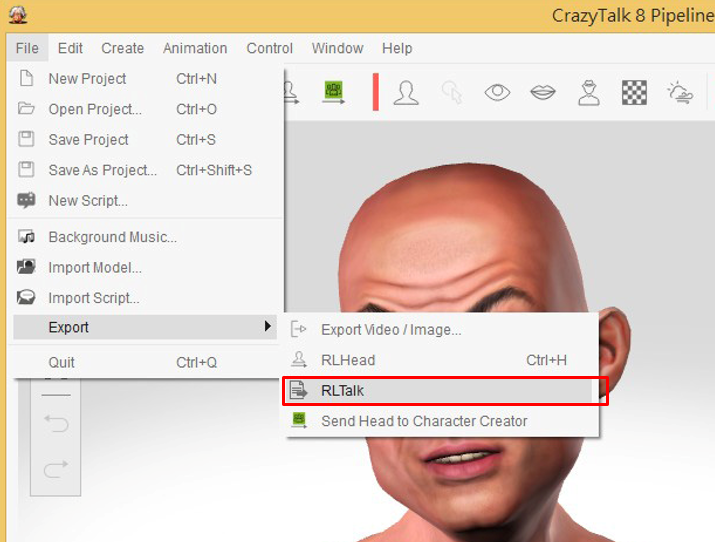
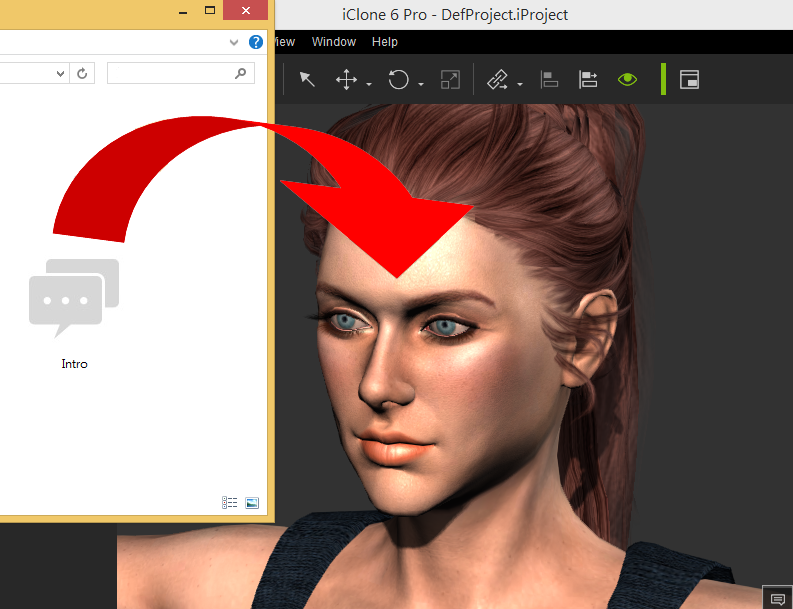
Simply click and drag the .rlTalk file from File Explorer to the target CC character in iClone or Character Creator.
Added: Import facial editing results from CrazyTalk 8
iClone can now import facial editing results from CrazyTalk 8
iClone v6.3: New Features
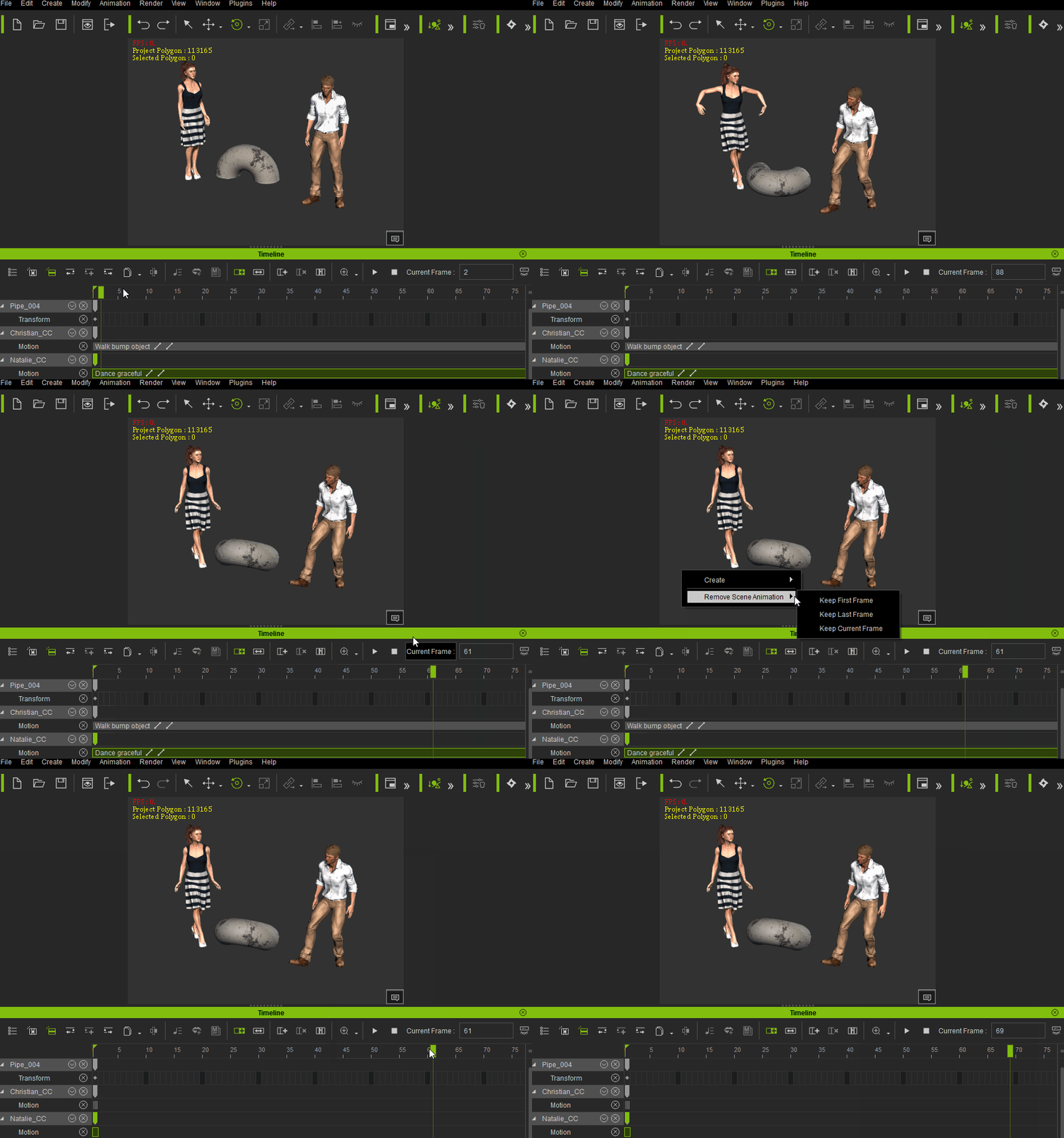
Added: "Remove Scene Animation" command with the following options: "Keep First Frame", "Keep Last Frame", and "Keep Current Frame".
This will allow you to delete all the scene animations and keep one frame as the base for the new project. Access this by right clicking on the empty spaces in the scene without any objects selected. This is helpful when you want to break a long project into several smaller, more manageable projects. Important thing to note is that all the Links will be flattened, and will need to be re-linked. Constraints will also be removed.
Example: Keep Current Frame
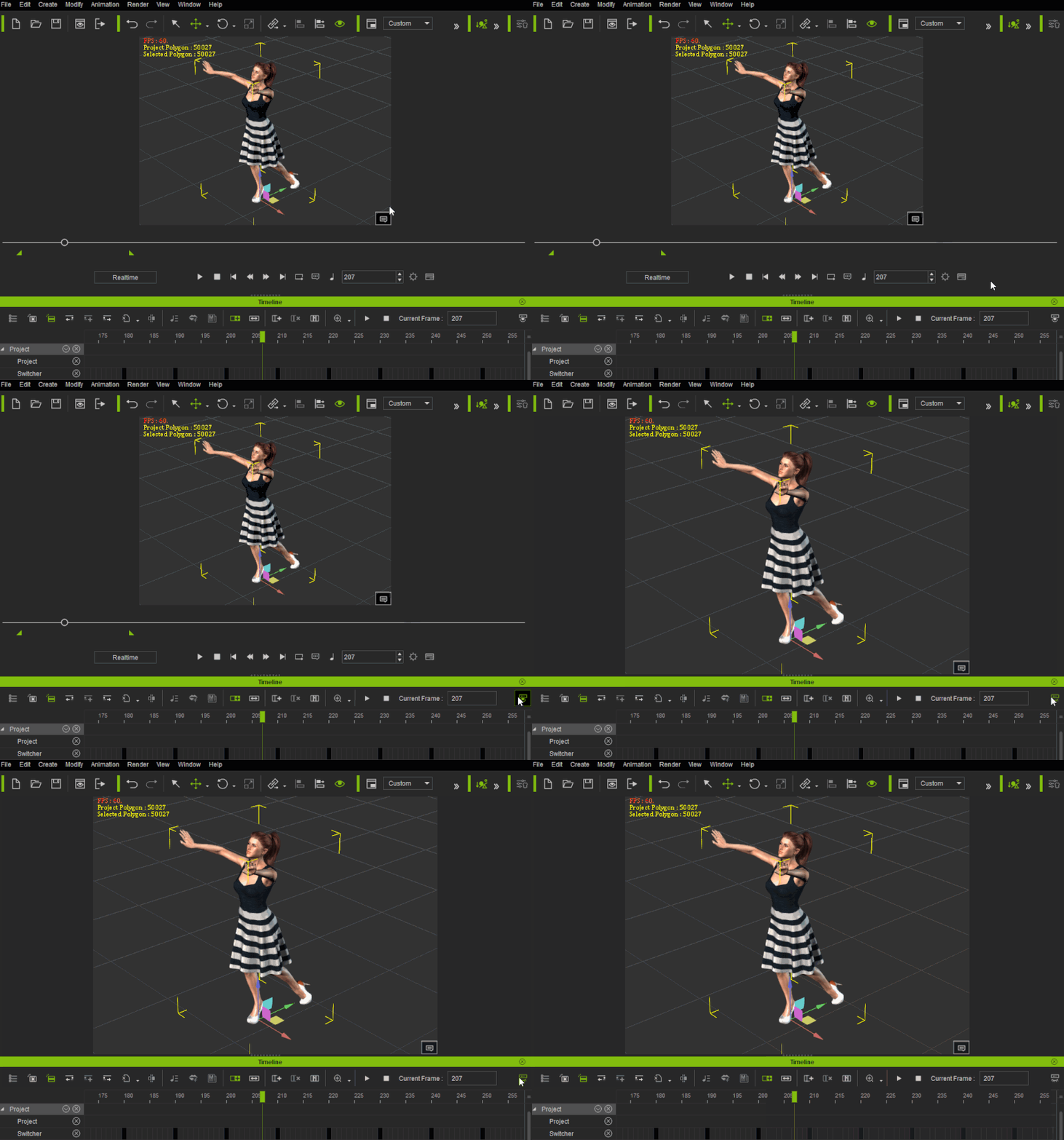
Added: Added Show/Hide Play Bar button in timeline toolbar
Added: F9 hotkey to show/hide Play Bar
The new button is located at the upper right hand corner of the Timeline window. Use the hot-key in full-screen or edit mode to quickly toggle the Play Bar display.
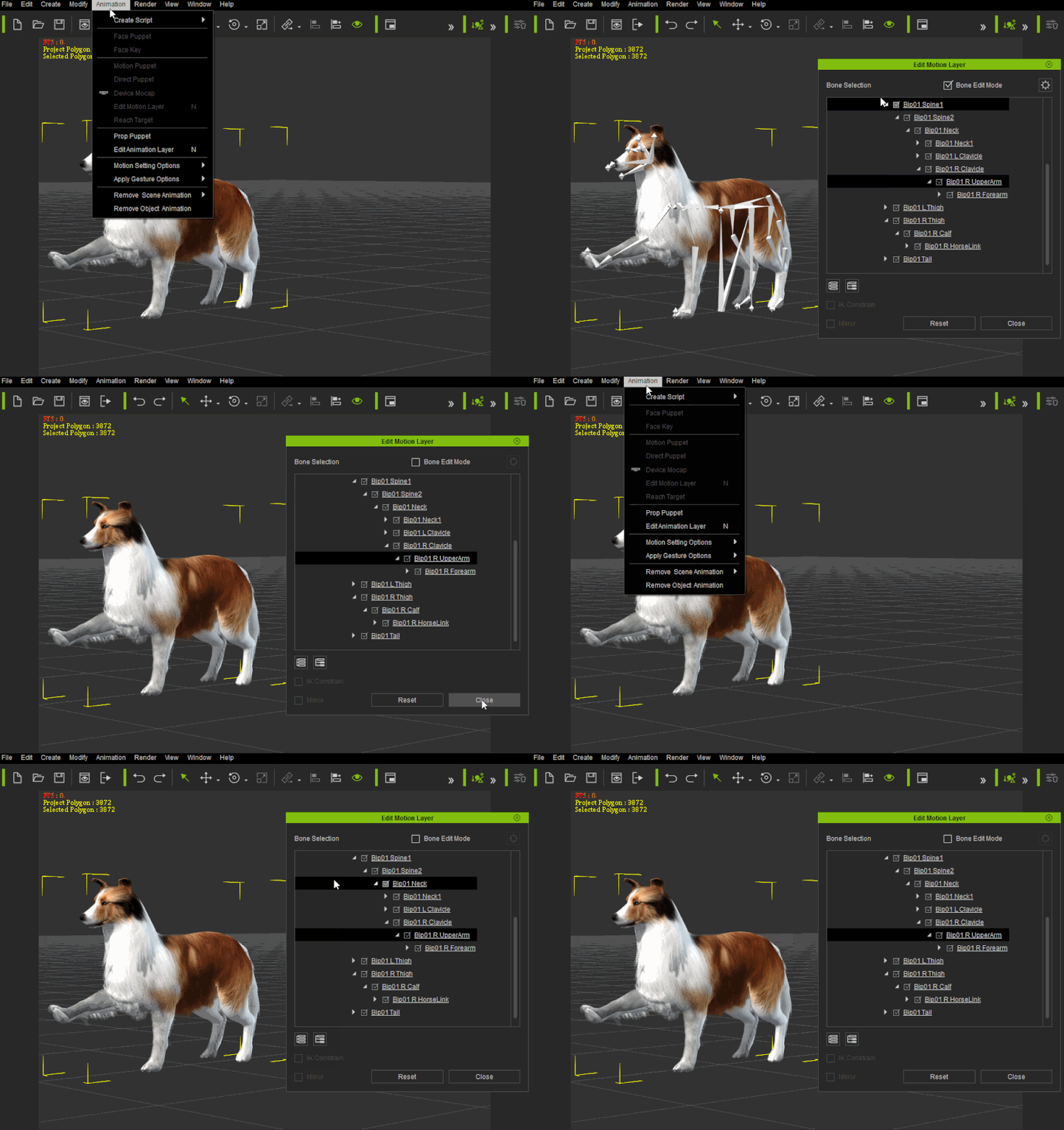
Enhanced: Always keep the last value of Bone Mode settings
iClone will now remember if you have Bone Edit Mode enabled when you close and re-open the Edit Animation Layer window; works for prop (bone-rigged) and human.
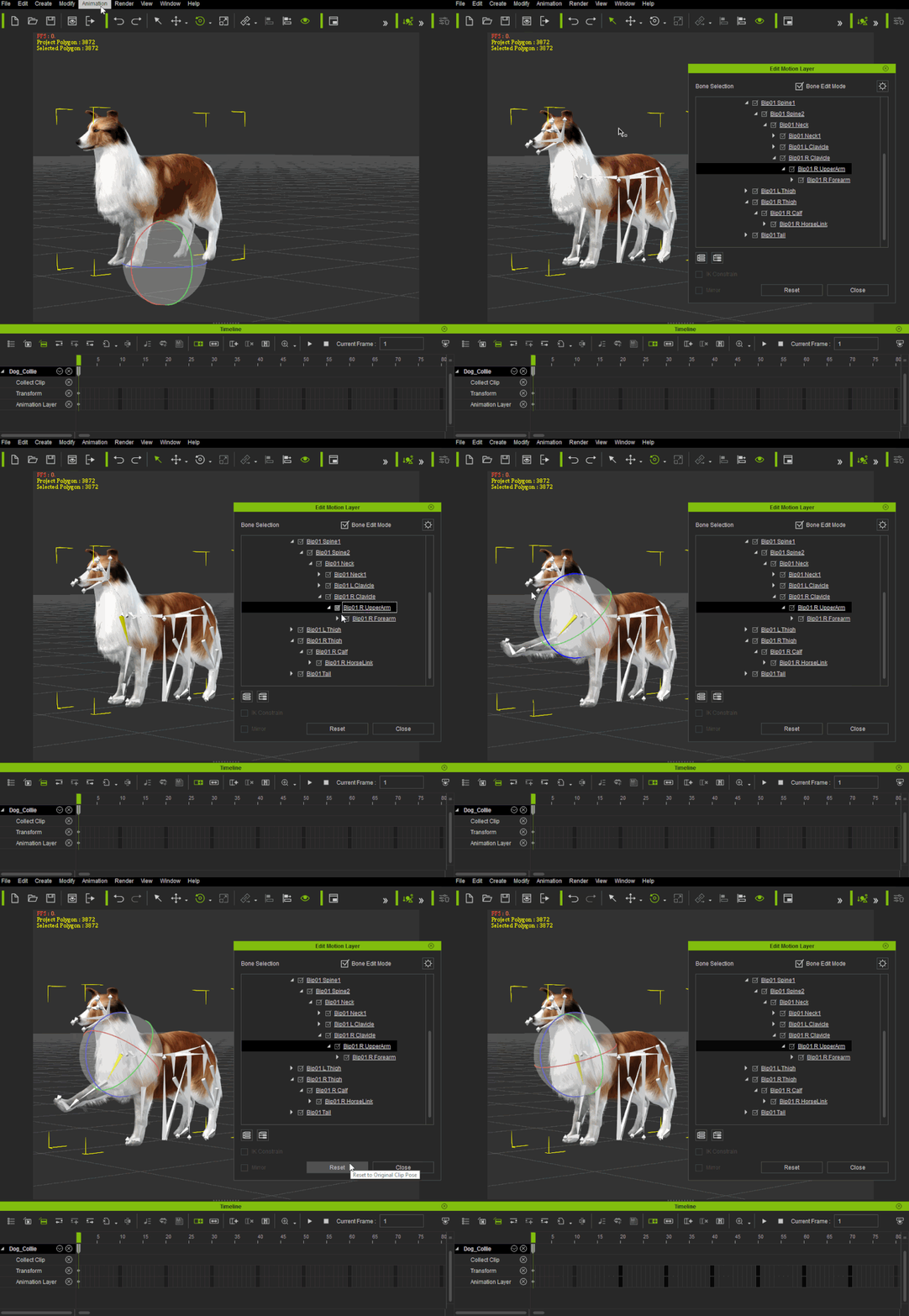
Added: Add "Reset" to Reset Motion for Prop & Non-human animation layer
You can now add Reset key for Prop (Bone-Rigged) & Non-human under Edit Animation Layer window.
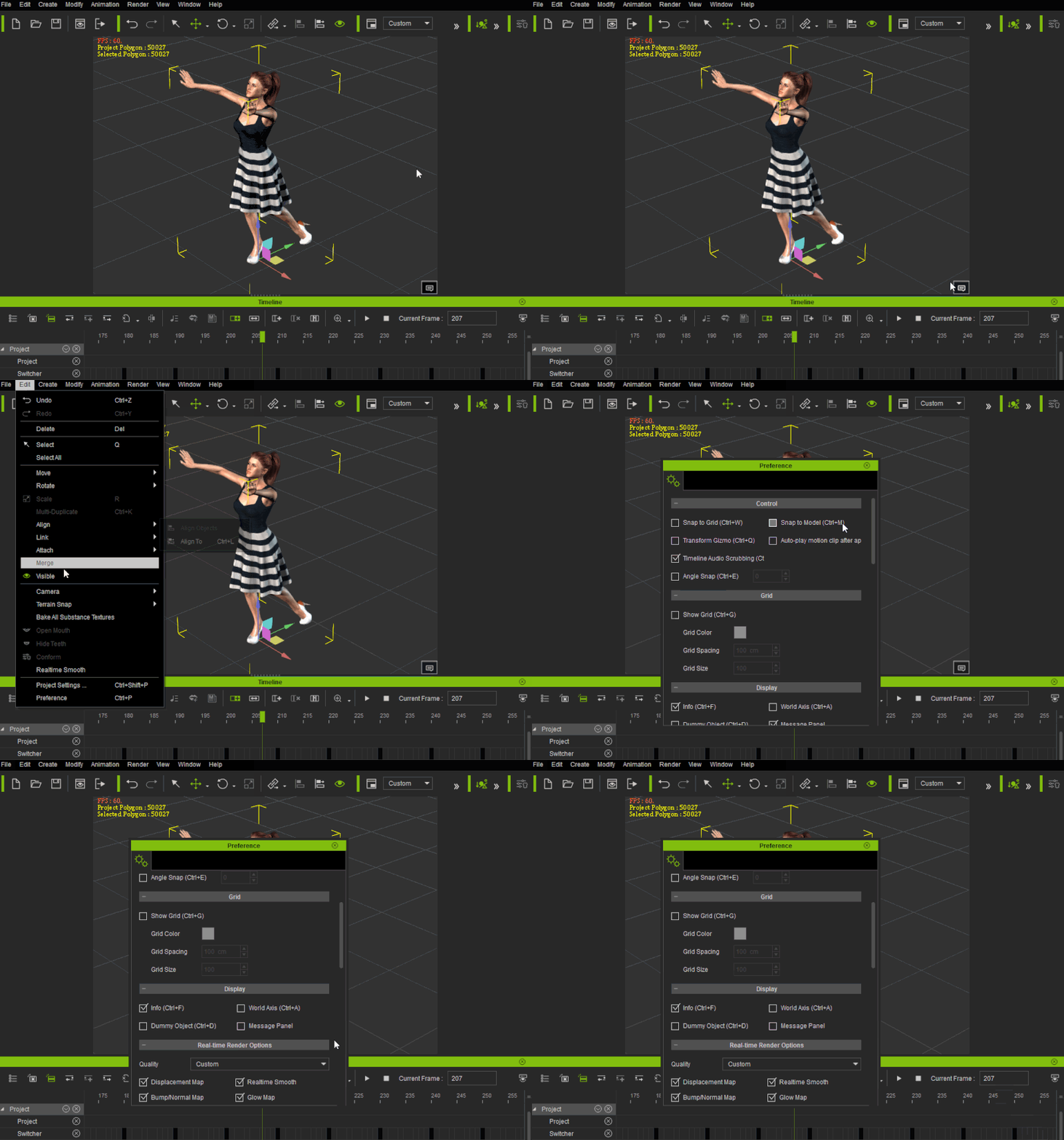
Added: Option to hide iClone 3D view message panel. Access this under Edit / Preference / Display
No more pop-ups from the message panel when you hide it with this option, so you can concentrate on your work!
Added: Global arrow key for frame stepping forward/backward
You no longer need to click and switch focus to Timeline window when you want to use the arrow keys to jump between frames. The arrow key is now set to global, meaning that you can switch frame even when you are working in the 3D viewport.
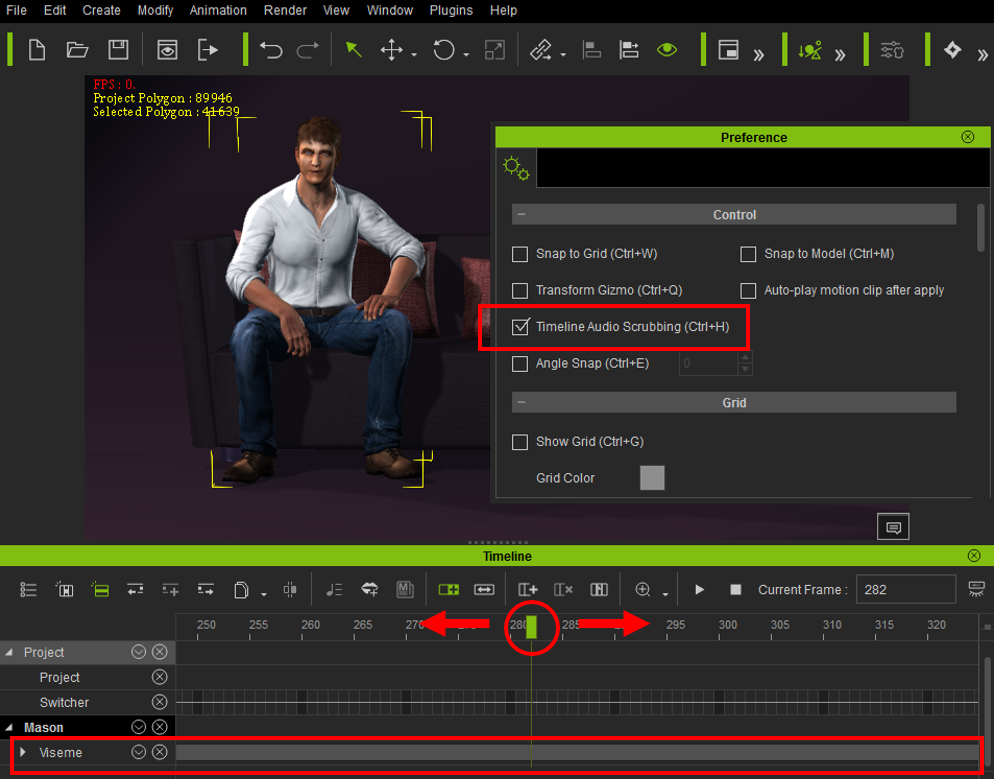
Added: Audio Scrubbing in timeline.
Useful when editing lip-sync. Go to Preference / Control to toggle this option, or use the "Ctrl-H" hot-key
iClone 6.3: Bug Fixes:
- Fixed: Character position change when not on world root and a pose is applied.
- Fixed: Chest distortion for Mason when exporting and reloading MotionPlus.
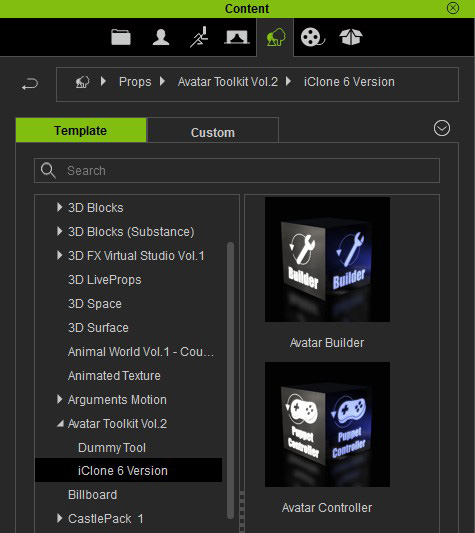
- Fixed: Avatar Toolkit Builder/Controller cannot be used on CC Characters, the new avatar controller can be found under Avatar Toolkit -> iClone 6 version. To get the new Puppet controller, visit the order history page and re-download the "Install.RLD" version of Puppet controller.
- Fixed: Remove Motion command on Hand does not remove wrist bone animation in the timeline.
- Fixed: Particle objects do not show as an item in the Scene Manager.
- Fixed: Double-clicking on on .iProject shows an error when the file name has non-English characters.
- Fixed: Spectral Cross HDR Glare Type incorrect for certain video card drivers.
- Fixed: Some perform commands for props do not work properly with CC Characters.
- Fixed: Motion Align function does not work with CC Characters.
- Fixed: Soft cloth distortion for G5 characters when scene is paused and playback head is dragged through the timeline.
- Fixed: Force is lost when Kinematic physics state is switched to Dynamic with the PhysX engine.
- Fixed: Facial jumps when editing with the Facial Key Editor and other keyframes are in the same track.
- Fixed: Applying a new motion causes clothing to become detached from the player when pause is pressed while playing another pose or motion.
- Fixed: CC character clothing distortion appears when loading a terrain in which the ground level is higher and the foot contact option is activated.
- Fixed: Merge Motion Plus function disabled when loading a CC character.
- Fixed: Timeline keys not removed when resetting the entire scene.
Character Creator v1.3 Changelog
Character Creator v1.3: New Features:
Added: Provide DirectX9 graphics mode selection for Character Creator. However, real-time smoothing is not supported.
Character Creator v1.3: Bug Fixes:
- Fixed: iClone initiation failed when launched from Character Creator if the computer user name includes non-English characters.
- Fixed: Wireframe button status not updated under certain conditions.
- Fixed: Minimized iClone window does not revert when iClone is launched from Character Creator.
- Fixed: Light gizmo remains in 3D view when using the "/" key and when morph items are modified.
- Fixed: Foot morph data lost when high heel shoes are removed.
- Fixed: High Dynamic Texture doesn't import to iClone correctly when the Appearance Editor is not unloaded in Character Creator.
3DXchange v6.3 Changelog
3DXchange v6.3: Bug Fixes:- Fixed: Certain FBX files are not supported and cause a crash of 3DX.
- Fixed: Modify section hotkey not working correctly.
- Fixed: CC character teeth and eye mesh not replaced when this option is selected.
Eric (RL)
Forum Moderator
Reallusion, Inc.
https://forum.reallusion.com
"Simplicity is the ultimate sophistication." - Leonardo da Vinci
|
|
|
|
|
vidi
|
|
|
Group: Forum Members
Last Active: 2 Months Ago
Posts: 10.8K,
Visits: 40.2K
|
Added: Add "Reset"
Added: Audio Scrubbing in timeline
2 Wishes from my wishlist, yippie :D
-------------------------------------------------------------------
liebe Grüße vidi
|
|
|
|
|
justaviking
|
justaviking
Posted 11 Years Ago
|
|
Group: Forum Members
Last Active: 2 Years Ago
Posts: 8.2K,
Visits: 26.5K
|
Audio scrubbing? :w00t: Yay! :w00t:
HDR "Spectral Cross" fixed? That will make numerous people happy.
Launch CrazyTalk "Head Creator" directly from iClone? Cool.
Looks like a nice set of enhancements and fixes. Looking forward to playing with it this weekend. Thanks, Reallusion.
iClone 7... Character Creator... Substance Designer/Painter... Blender... Audacity...
Desktop (homebuilt) - Windows 10, Ryzen 9 3900x CPU, GTX 1080 GPU (8GB), 32GB RAM, Asus X570 Pro motherboard, 2TB SSD, terabytes of disk space, dual monitors.
Laptop - Windows 10, MSI GS63VR STEALTH-252, 16GB RAM, GTX 1060 (6GB), 256GB SSD and 1TB HDD
|
|
|
|
|
mtakerkart
|
mtakerkart
Posted 11 Years Ago
|
|
Group: Forum Members
Last Active: 2 Months Ago
Posts: 3.2K,
Visits: 29.2K
|
Thank you Eric. Audio Scrubbing !!! wow! New project from image!!!!!!!!!! So wonderfull for Teampipeline!! It's like creating new sequence in editor app.
|
|
|
|
|
alemar
|
alemar
Posted 11 Years Ago
|
|
Group: Forum Members
Last Active: Last Year
Posts: 712,
Visits: 10.1K
|
Audio scrubbing is a fantastic and old requested feature !thanks RL. the iProp reset is nice.the CT8 bridge sounds really rocks...

ALEMAR GAMES MARKETPLACE STORE
|
|
|
|
|
Kelleytoons
|
Kelleytoons
Posted 11 Years Ago
|
|
Group: Forum Members
Last Active: 2 Years Ago
Posts: 9.2K,
Visits: 22.1K
|
Ah but the big question... WHEN we will have CT8/Pipeline!?! (Not that I'm anxious or anything :>).
Alienware Aurora R16, Win 11, i9-149000KF, 3.20GHz CPU, 64GB RAM, RTX 4090 (24GB), Samsung 870 Pro 8TB, Gen3 MVNe M-2 SSD, 4TBx2, 39" Alienware Widescreen Monitor
Mike "ex-genius" Kelley
|
|
|
|
|
jarretttowe
|
jarretttowe
Posted 11 Years Ago
|
|
Group: Forum Members
Last Active: 4 Years Ago
Posts: 560,
Visits: 3.0K
|
This looks awesome! Truly amazing!
|
|
|
|
|
jarretttowe
|
jarretttowe
Posted 11 Years Ago
|
|
Group: Forum Members
Last Active: 4 Years Ago
Posts: 560,
Visits: 3.0K
|
Especially loving the head presets available directly inside iclone.
|
|
|
|
|
jgrant
|
jgrant
Posted 11 Years Ago
|
|
Group: Forum Members
Last Active: 2 Years Ago
Posts: 170,
Visits: 2.1K
|
Thank you for the audio scrubbing. A much needed resource and one that I look forward to taking use of. Many thanks.
|
|
|
|
|
duchess110
|
duchess110
Posted 11 Years Ago
|
|
Group: Forum Members
Last Active: 6 Years Ago
Posts: 2.0K,
Visits: 15.5K
|
Audio scrubbing thank you so much for this it will make it so much easier. Just did my 3 updates and first thing I checked out was the audio scrubbing on a project I have only just put a video up Make Someone Happy in showcase yourself. I did say in the post that key framing was tiring but this will make it so much easier.
Duchess Designs Store
|
|
|
|