|
Group: Forum Members
Last Active: 2 Years Ago
Posts: 131,
Visits: 479
|
Hi! I've recently gotten the chance to start using iClone 7 even if I've bought it years ago. I've replaced my PC with a new one that has the specifications listed below to try and match or even exceed the recommended specifications for iClone 7 as indicated here in the online manual: - Intel Core i9-10850K Processor
- Asus TUF Gaming GeForce RTX 3070 Ti 8GB GDDR6X GPU
- Crucial Ballistix 32GB DDR4 3600Mhz Memory RAM
- Samsung 980 NVMe M.2 1TB SSD (Operating System)
- Samsung 860 EVO 1TB SSD (Production Software Files)
- Samsung 850 EVO 500GB SSD (Data Files)
- Microsoft Windows 10 Pro 64-bit Operating System
- HP 27-inch 1440p Monitor w/ Freesync & Gsync support
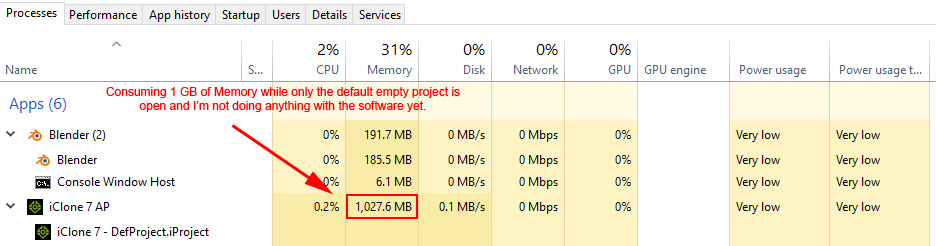
Anyhow, when I open iClone 7 with it's default empty project file, I noticed it's already consuming 1GB+ of Memory RAM. Is this normal? Blender with it's default project open only uses about 200MB. See below pic:
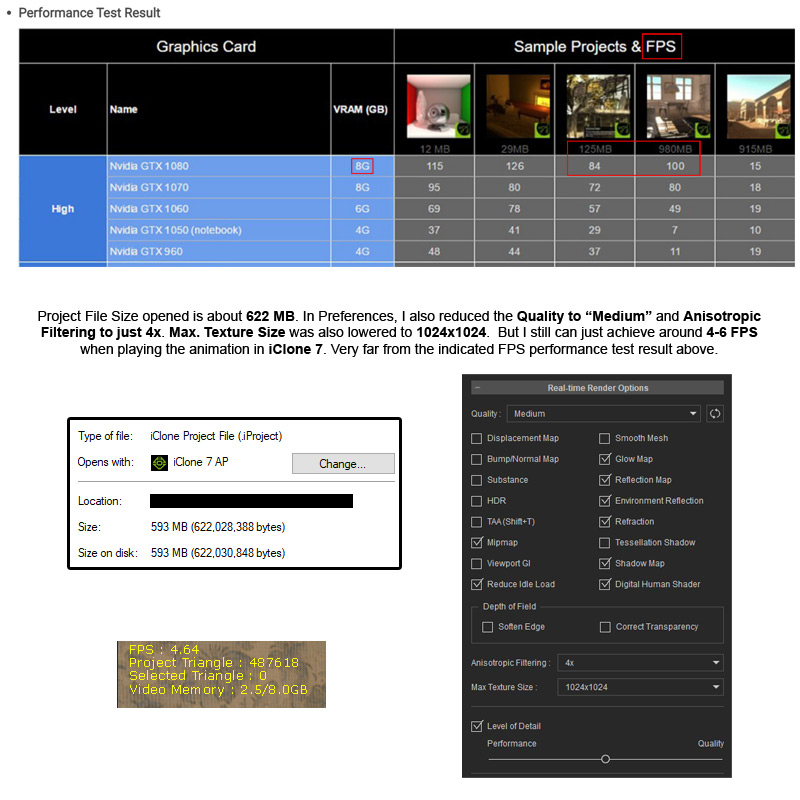
I then opened an iClone 7 project file I have which has a file size of about 622MB and I just got around 4-6 FPS even with some quality settings turned down/reduced (see pic below). I compared this with the Performance Test Result of iClone 7 made by Reallusion and my result was very far and quite low.
Is there any way I can increase my FPS in iClone 7 and closely match what was specified? Do I have a wrong configuration or other oddities I've done? Would appreciate any suggestions to fix this. Thanks in advance!
|