|
Author
|
Message
|
|
Wilby
|
|
|
Group: Forum Members
Last Active: 2 Years Ago
Posts: 131,
Visits: 479
|
Hi! I've recently gotten the chance to start using iClone 7 even if I've bought it years ago. I've replaced my PC with a new one that has the specifications listed below to try and match or even exceed the recommended specifications for iClone 7 as indicated here in the online manual: - Intel Core i9-10850K Processor
- Asus TUF Gaming GeForce RTX 3070 Ti 8GB GDDR6X GPU
- Crucial Ballistix 32GB DDR4 3600Mhz Memory RAM
- Samsung 980 NVMe M.2 1TB SSD (Operating System)
- Samsung 860 EVO 1TB SSD (Production Software Files)
- Samsung 850 EVO 500GB SSD (Data Files)
- Microsoft Windows 10 Pro 64-bit Operating System
- HP 27-inch 1440p Monitor w/ Freesync & Gsync support
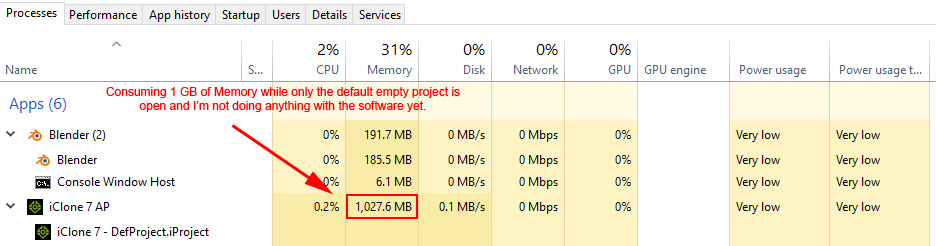
Anyhow, when I open iClone 7 with it's default empty project file, I noticed it's already consuming 1GB+ of Memory RAM. Is this normal? Blender with it's default project open only uses about 200MB. See below pic:
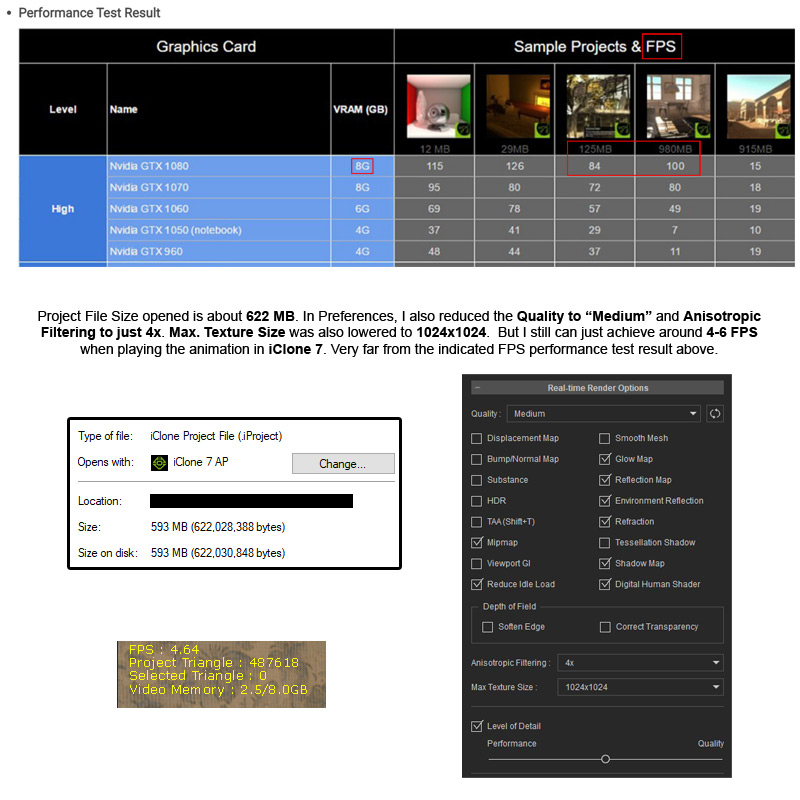
I then opened an iClone 7 project file I have which has a file size of about 622MB and I just got around 4-6 FPS even with some quality settings turned down/reduced (see pic below). I compared this with the Performance Test Result of iClone 7 made by Reallusion and my result was very far and quite low.
Is there any way I can increase my FPS in iClone 7 and closely match what was specified? Do I have a wrong configuration or other oddities I've done? Would appreciate any suggestions to fix this. Thanks in advance!
|
|
|
|
|
animagic
|
animagic
Posted 2 Years Ago
|
|
Group: Forum Members
Last Active: Yesterday
Posts: 15.8K,
Visits: 31.4K
|
The 1 GB is normal. I just opened IC7 and it use 1.4 GB for an empty project. Your system specs by itself are fine. As to why things are slow, there could be many reasons. One is that iClone doesn't like a large number of objects, such as props. Another source is the number of characters you have. Use of reflection also has a huge impact. So without more information about your project it is hard to tell. What you could try to get a baseline is loading one of the demo programs and compare your FPS with the one in the table. BTW, as far as I know, in iClone 7, the displayed FPS is limited to 60, so I don't know where RL's numbers come from. But your 3070 ti should give better performance than a 1080.
|
|
|
|
|
Wilby
|
|
|
Group: Forum Members
Last Active: 2 Years Ago
Posts: 131,
Visits: 479
|
animagic (1/6/2023)
The 1 GB is normal. I just opened IC7 and it use 1.4 GB for an empty project. Your system specs by itself are fine.
As to why things are slow, there could be many reasons. One is that iClone doesn't like a large number of objects, such as props. Another source is the number of characters you have. Use of reflection also has a huge impact. So without more information about your project it is hard to tell.
What you could try to get a baseline is loading one of the demo programs and compare your FPS with the one in the table.
BTW, as far as I know, in iClone 7, the displayed FPS is limited to 60, so I don't know where RL's numbers come from. But your 3070 ti should give better performance than a 1080.
Thanks for the reply Animagic! :) I'm glad to know my iClone 7 Memory RAM usage is normal. Another reason why I posted this question was because I previously experienced random hangs and resets of my PC when using iClone 7. I had to edit my Windows Registry and added some stuff related to TDR and then reconfigured my Nvidia Control Panel to maximize it's resource use when running the program. Doing this, I think, may have fixed the hangs and resets as I didn't encounter them any longer... so far. My GPU heats up more though like it was "mining" but temperature is still tolerable. I initially had suspicion that some of the Reallusion installers may have been tampered with as they have Unverified Certificates (Yellow colored window prompt when installing. See pic below.). This window popped-up using the Reallusion Hub.  Anyhow, my project only uses a few objects and is set in a three-walled room with a few furniture, 1 camera, 2 characters, and a looping video sky background. There is also 1 music background sound and 2 audio files for voices. There is a total of 5,650 frames. I did some more testing by removing stuff in the project... I deleted 1 of the characters that uses Tokomotion's Hair Studio Vol. 1 and my FPS increased to 15 - 16. Value is still low but the increase was significant. I am now wondering whether the looping video sky background is the culprit. So I removed that and nothing much changed with the FPS. I hope there is a simple way to determine what is consuming the resources. Could the Total Project Triangles provide a clue? In your experience, how much is usually the ideal range to still have a decent FPS?
|
|
|
|
|
Kelleytoons
|
Kelleytoons
Posted 2 Years Ago
|
|
Group: Forum Members
Last Active: Last Year
Posts: 9.2K,
Visits: 22.1K
|
Polys ain't an issue - I have scenes with millions of them that work just fine (even on my older graphics card). It's odd if you have so few objects that's still an issue - it's nearly ALWAYS objects that causes the problem. Even 20 simple spheres can bring a system down to its knees (the workaround is to combine them into one). You can always post your scene for others to look at, but your troubleshooting process should also reveal it. Are your characters wearing multiple items of clothing? That could be an issue as well (again - objects). Somewhere on this forum there are some benchmarks for the default loft scene (the one with the staircase). You can always try loading that one in and seeing what your FPS and/or rendering times are - that would give you a big clue as to whether it's your system or not (my bet is not).
Alienware Aurora R16, Win 11, i9-149000KF, 3.20GHz CPU, 64GB RAM, RTX 4090 (24GB), Samsung 870 Pro 8TB, Gen3 MVNe M-2 SSD, 4TBx2, 39" Alienware Widescreen Monitor
Mike "ex-genius" Kelley
|
|
|
|
|
toystorylab
|
toystorylab
Posted 2 Years Ago
|
|
Group: Forum Members
Last Active: 3 Months Ago
Posts: 4.6K,
Visits: 29.9K
|
Wilby (1/9/2023)
I deleted 1 of the characters that uses Tokomotion's Hair Studio Vol. 1 and my FPS increased to 15 - 16. Value is still low but the increase was significant.Yes, I also noticed that this hair pack is quite heavy on resources... Some soft cloth simulations could also drop FPS, so be sure to let them run in "by frame" mode once and after that disable soft cloth.
Toystorylab on Vimeo :  Crassitudes (my "Alter Ego") on Youtube: Crassitudes (my "Alter Ego") on Youtube: 
|
|
|
|
|
Wilby
|
|
|
Group: Forum Members
Last Active: 2 Years Ago
Posts: 131,
Visits: 479
|
Kelleytoons (1/9/2023)
Polys ain't an issue - I have scenes with millions of them that work just fine (even on my older graphics card).
It's odd if you have so few objects that's still an issue - it's nearly ALWAYS objects that causes the problem. Even 20 simple spheres can bring a system down to its knees (the workaround is to combine them into one). You can always post your scene for others to look at, but your troubleshooting process should also reveal it. Are your characters wearing multiple items of clothing? That could be an issue as well (again - objects).
Somewhere on this forum there are some benchmarks for the default loft scene (the one with the staircase). You can always try loading that one in and seeing what your FPS and/or rendering times are - that would give you a big clue as to whether it's your system or not (my bet is not).Hey there Kelleytoons! I've loaded and played the " 2.Loft Scene.iProject" as you suggested and the FPS I got ranged from 50 to 60 FPS. Since I've noticed there are no moving characters in the project and only the camera is moving, I also removed both characters in my own project. I hit play, and I got 60 FPS! :D That means the characters are the primary source of the slow down. But I need moving characters in the scene :P I only have 3 Clothes layers for 1 character (dress, shoes, & underwear) and 1 clothes layer for the other. The female is wearing 5 small jewelries (earrings pair, bracelet, ring, & necklace). But my suspicion is the hair objects are the real cause of the lag because each character has more or less 5-6 layers of hair components on their head. I'm using Reallusion's Hair Builder and Tokomotion's Hair Studio Vol. 1. So as a test, I temporarily deleted all the hair layers from both characters head and when I pressed play (Realtime), I was able to achieve 20 to 30 FPS. The lag time was significantly reduced when moving my mouse inside the scene so with that, I can already continue working in iClone 7. But my problem now is, my characters are both bald. :laugh:
I checked the Internet on how to merge objects in iClone 7 and I can only find out how to do it with props (attach & merge sub-props). Would you know of a way how to merge hair layers into one or how to optimize character's hair while they can still retain physics/dynamic effects?
|
|
|
|
|
Wilby
|
|
|
Group: Forum Members
Last Active: 2 Years Ago
Posts: 131,
Visits: 479
|
toystorylab (1/9/2023)
[quote]Wilby (1/9/2023)Yes, I also noticed that this hair pack is quite heavy on resources... Some soft cloth simulations could also drop FPS, so be sure to let them run in "by frame" mode once and after that disable soft cloth.Followed your suggestion and it helped!!! :) I was able to get 14 to 20 FPS with unmodified hair on both characters in the scene. I didn't know I can do that and still have Soft Cloth work even if it is disabled. :D I will most probably just convert the short hair layers on my male character to Accessories and merge them all in Character Creator 3 then reimport back to iClone 7. That may further increase my FPS. But I will have to retain the female hair as they are longer and does not look good when they're unmoving as an Accessory. Many thanks again for your valuable assistance! :D
|
|
|
|
|
Peter (RL)
|
Peter (RL)
Posted 2 Years Ago
|
|
Group: Administrators
Last Active: Last Year
Posts: 23.1K,
Visits: 36.6K
|
Wilby (1/9/2023)
I had to edit my Windows Registry and added some stuff related to TDR and then reconfigured my Nvidia Control Panel to maximize it's resource use when running the program. Doing this, I think, may have fixed the hangs and resets as I didn't encounter them any longer... so far.If you have customised your settings in the Nvidia Control Panel then this could be causing the performance problems. iClone gives best performance when it is set to the default "Application Controlled" setting. If you take that control away from iClone by changing your settings then that will normally cause a hit in performance. I would try making sure that you either set your global 3D Settings in the Nvidia Control Panel to the default,or create a separate profile for iClone 7 and have that set to default. Then see if performance improves (restart your computer first before checking).
Peter
Forum Administrator www.reallusion.com
|
|
|
|
|
Kelleytoons
|
Kelleytoons
Posted 2 Years Ago
|
|
Group: Forum Members
Last Active: Last Year
Posts: 9.2K,
Visits: 22.1K
|
Wilby (1/10/2023)
[quote]Kelleytoons (1/9/2023)
Polys ain't an issue - I have scenes with millions of them that work just fine (even on my older graphics card).
The female is wearing 5 small jewelries (earrings pair, bracelet, ring, & necklace). But my suspicion is the hair objects are the real cause of the lag because each character has more or less 5-6 layers of hair components on their head. I'm using Reallusion's Hair Builder and Tokomotion's Hair Studio Vol. 1. So as a test, I temporarily deleted all the hair layers from both characters head and when I pressed play (Realtime), I was able to achieve 20 to 30 FPS. The lag time was significantly reduced when moving my mouse inside the scene so with that, I can already continue working in iClone 7. But my problem now is, my characters are both bald. :laugh:
I checked the Internet on how to merge objects in iClone 7 and I can only find out how to do it with props (attach & merge sub-props). Would you know of a way how to merge hair layers into one or how to optimize character's hair while they can still retain physics/dynamic effects?
It still wouldn't hurt for you to merge those props into one (those jewelry pieces). Even with two characters in a scene you ought to be able to get more than 30fps (when you remove the hair). As always, you want to understand ALL the processes involved in iClone. (And while I hate to knock any private developer (and I like Tokomotion, particularly his avatars), hair should NOT have that many components to it - not if it's designed to be animated. There really isn't any need for it - there are some tremendous hairs out there that do it with only a layer or two. Someone who needs more probably doesn't understand how to create poly hair for animation).
Alienware Aurora R16, Win 11, i9-149000KF, 3.20GHz CPU, 64GB RAM, RTX 4090 (24GB), Samsung 870 Pro 8TB, Gen3 MVNe M-2 SSD, 4TBx2, 39" Alienware Widescreen Monitor
Mike "ex-genius" Kelley
|
|
|
|
|
Wilby
|
|
|
Group: Forum Members
Last Active: 2 Years Ago
Posts: 131,
Visits: 479
|
Peter (RL) (1/10/2023)
If you have customised your settings in the Nvidia Control Panel then this could be causing the performance problems. iClone gives best performance when it is set to the default "Application Controlled" setting. If you take that control away from iClone by changing your settings then that will normally cause a hit in performance.
I would try making sure that you either set your global 3D Settings in the Nvidia Control Panel to the default,or create a separate profile for iClone 7 and have that set to default. Then see if performance improves (restart your computer first before checking).That's strange. I haven't customized my settings before the Nvidia GPU issue happened. It's only when I customized them for iClone 7 with separate profile in Nvidia Control Panel and some settings maximized that I haven't experienced any hangs or reboots when using the program so far. I am reaching 20 FPS now with one character's hair merged as a single accessory. I think I've determined the hair are the main cause for the slow down as when I remove them, my FPS jumps up significantly. But will try to merge more props & accessories to hopefully gain additional FPS.
|
|
|
|