|
Author
|
Message
|
|
dgaban
|
dgaban
Posted 3 Years Ago
|
|
Group: Forum Members
Last Active: 2 Years Ago
Posts: 13,
Visits: 71
|
My biggest issue, which I already reported on the feedback tracker, is that the project file I'm working on will randomly get deleted. This did not happen to me in CC3. I've lost countless projects to this bug because I wasn't paying attention when it happened.
|
|
|
|
|
Amper Sand
|
Amper Sand
Posted 3 Years Ago
|
|
Group: Forum Members
Last Active: 2 Years Ago
Posts: 731,
Visits: 5.2K
|
Seems they didn't fix it yet :D
https://forum.reallusion.com/FindPost457963.aspx
______________________________________________________________________________
Software developer. iClone hobbyist since January 11, 2020. Best work so far: Robots among us: The Lab and The sad end of a legend
In progress: Black Mamba
AMD Ryzen 3950X 16C/32T 4.2 GHz, 64GB RAM, RTX2080 11GB, 2TB Samsung 970 Pro SSD, 8TB Seagate BarraCuda HDD, Win11 64-bit, iClone 8.12
|
|
|
|
|
Jfrog
|
|
|
Group: Forum Members
Last Active: Last Year
Posts: 702,
Visits: 4.7K
|
I am not sure if this has been discussed before But CC4 has huge problem. Everytime I work for a few minutes,and make a change to a character(skin morph for example) it work for a while (until 14% complete) then it stucks forever on "please wait"... Than I have to force shut down my computer. because even the task manager can not quit the application. Edit: I have find the problem on this one , there is a message appearing in my second monitor to ckeck some fields. it was hiding behing another window.... So now I can use the tools without restarting or rebooting. This was my fault.  Ryzen R9 5950x, RTX 3090, 128Gb Ram ,2 x 2 TB Samsung 980 Pro M.2 SSD
Horror Stories in VR
Immersive Sound VR
Immersive Sound VR on Oculus TV
|
|
|
|
|
4u2ges
|
4u2ges
Posted 3 Years Ago
|
|
Group: Forum Members
Last Active: Last Month
Posts: 5.3K,
Visits: 16.8K
|
So basically none of the face bones are mapped correctly when applying CC_G3Standard profile for the character imported as Humanoid. It was working fine in 3Dxchange. To replicate: 1. Load CC3+ Neutral base in CC4 2. Export to FBX (I use Blender profile) 3. Import back as non-standard, select CC _G3Standard profile 4. Try to open mouth or move eyeballs in Edit Facial - DOES NOT WORK!5. Import the same FBX to 3DXchange7. CC_G3Standard profile is automatically loaded. Go to Expression Editor and Drop Jaw - WORKS FINE!
 I wonder what else I must do to make facial bones active in CC4... Anyone has an idea? Otherwise I will open an FT ticket. BTW I can import all face morphs from the same FBX and they are working just fine on re-imported Neutral base as non-standard. Only facial bones are not active! FT: https://www.reallusion.com/FeedBackTracker/Issue/Facial-bones-on-imported-non-standard-characters-with-HIK-profiles-are-not-activated
|
|
|
|
|
lau.ho.tin
|
lau.ho.tin
Posted 3 Years Ago
|
|
Group: Forum Members
Last Active: 2 Years Ago
Posts: 1,
Visits: 128
|
Issue 8527Cannot apply check pose after drag the pose to character Steps:
1. Import new clothes and apply skin weight
2. Select the check pose and drag to the character
Actual Result:
Character pose did not change to the selected check pose
Expected Result:
Character should changed to the selected pose for skin weight checking
|
|
|
|
|
Edward (RL)
|
Edward (RL)
Posted 3 Years Ago
|
|
Group: Forum Members
Last Active: 2 Months Ago
Posts: 301,
Visits: 4.9K
|
Thanks Paro,I figured it out. I had moved the content from the c drive to my e drive to gain more space on my c drive with CC3. So I had to move the files from the e drive to the c drive so the CC4 could find it and change the path in setup to the c drive. Now everything is showing up as it should. May want to move files back to my e drive for space issue later but for now it's time to play with the new software. So impressed with Reallusion''s software!
Hello,You may try to right-click the pack you want to move and then choose "Move Location" in the menu

|
|
|
|
|
4u2ges
|
4u2ges
Posted 3 Years Ago
|
|
Group: Forum Members
Last Active: Last Month
Posts: 5.3K,
Visits: 16.8K
|
Every time you try to open CC1 base characters in newly started CC4, it takes nearly 3 min to open. It's getting stuck on "Update Morph Data" event. 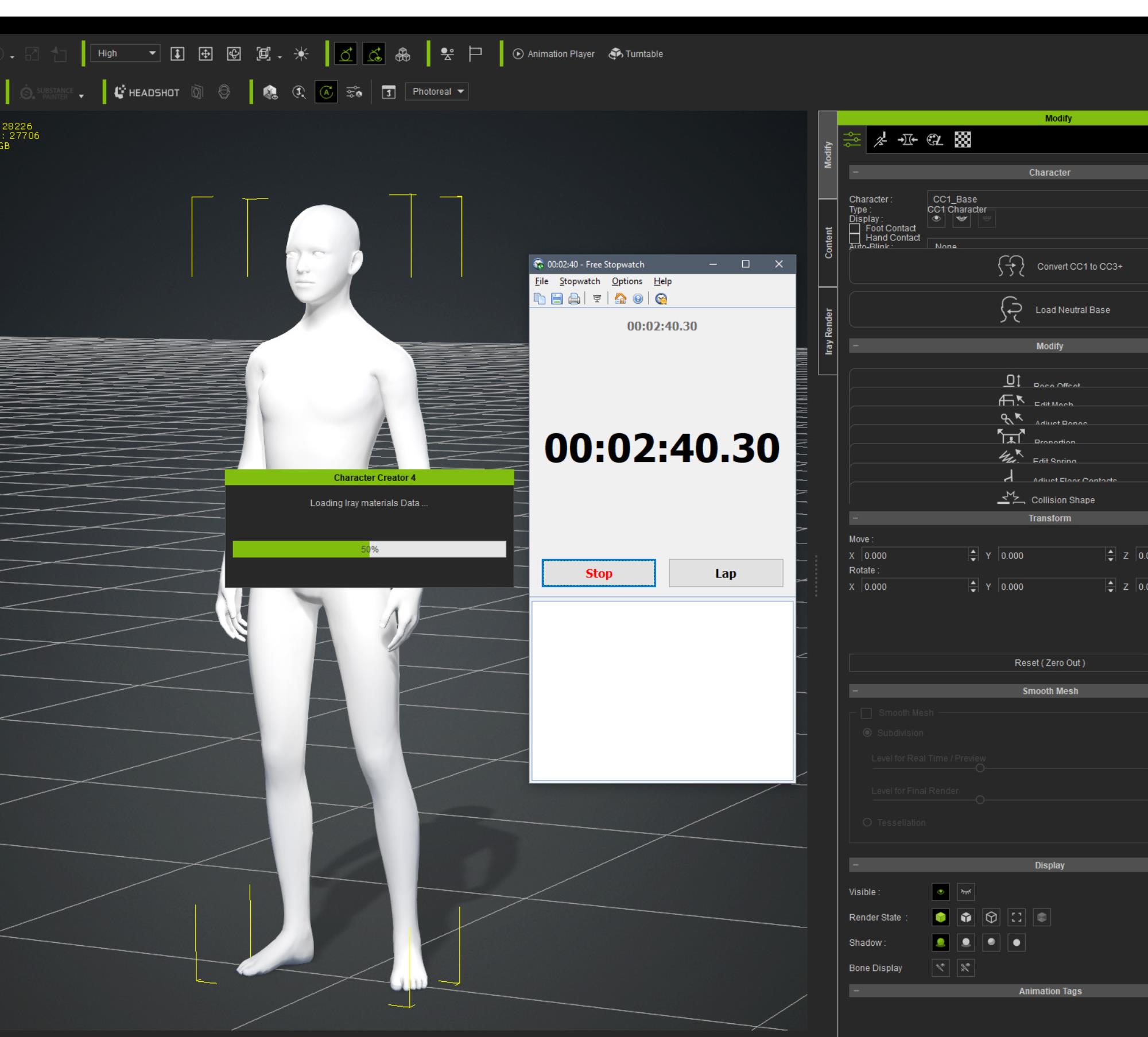 Each consecutive attempt however only takes 10-15 seconds. There was no such a problem in CC3. FT: https://www.reallusion.com/FeedBackTracker/Issue/It-takes-nearly-3-min-to-load-CC1-base-characters-in-newly-opened-CC4And then this: 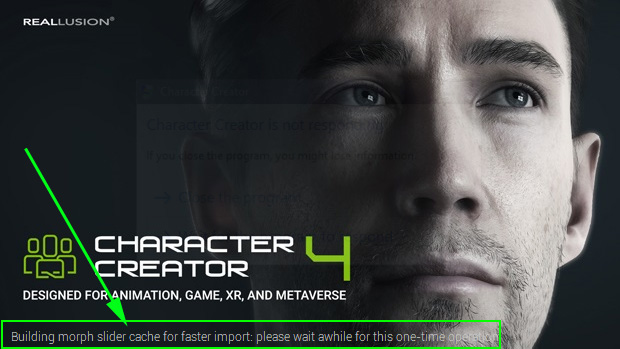 I am not sure what to make of it. Is this "one time" operation should run every time CC4 starts?
|
|
|
|
|
SyrDoN
|
SyrDoN
Posted 3 Years Ago
|
|
Group: Forum Members
Last Active: Last Year
Posts: 6,
Visits: 29
|
I get this error also. But, I only get this problem with one scene so far. The rest are all fine.
|
|
|
|
|
SyrDoN
|
SyrDoN
Posted 3 Years Ago
|
|
Group: Forum Members
Last Active: Last Year
Posts: 6,
Visits: 29
|
I have surprisingly few issues with the new versions. I have come across a problem though that repeats every time.
I searched the forums but couldn't find anything related to this. My apologies if there is a reply already.
I am using Camilla Character. Using curly_fringe hair. I have physx on for the hair. If I render out images, no problem. If I render out as a video, it will do the entire render. At the very end of the render I get an error dialog that states an instruction referenced meory that could not be read. The only thing that I have done different is add a custom decal on the face. Actually 2 decals (both are the same - one is smaller than the other).
|
|
|
|
|
wsessoms
|
wsessoms
Posted 3 Years Ago
|
|
Group: Forum Members
Last Active: 2 Years Ago
Posts: 117,
Visits: 508
|
paro_3453 (5/20/2022)
Group: Forum Members
Last Active: 4 hours ago
Posts: 116, Visits: 499
| Hi Everyone , I installed CC4and none of the content template files loaded during the installation. I get the 'Not found any content in "Update" filter' message when I click on any of the items in the template list. Please Advice. Thank you See attached 25% of original size (was 2000x1088) - Click to enlarge Hi wssessoms, Try selecting the button (yellow arrow), then select All (red arrow). I suspect you may have Update selected rather than All. Make sure to refresh Content Manager after doing this by preesing the button to the left of the yellow arrow. Hope thsi helps.  |
Thanks Paro, I figured it out. I had moved the content from the c drive to my e drive to gain more space on my c drive with CC3. So I had to move the files from the e drive to the c drive so the CC4 could find it and change the path in setup to the c drive. Now everything is showing up as it should. May want to move files back to my e drive for space issue later but for now it's time to play with the new software. So impressed with Reallusion''s software!
Dell Precision T5500; Windows 10 Pro; Dual Xeon 5687 3.60GHz Processors; 72GB Ram; NVIDIA GeForce RTX 3080; Samsung 1TB SSD; Seagate 2TB 7200RPM HDD; Wacom Intuos Tablet; ASUS Dual Monitors
|
|
|
|