|
By Peter (RL) - 4 Years Ago
|
|
Dear Character Creator Users,
We have now released the brand new Character Creator 4. However, as with all software there may be a few bugs, glitches or other annoying issues that remain.
Important: If you do find any bugs, issues or glitches in Character Creator 4, please can you report them first in the Feedback Tracker. Then feel free to discuss the issues in this thread but do try to include a link back to the original Feedback Tracker report or your tracker number.
As always it will help us greatly if we can keep all technical issues in the one place (this thread). This will help the development team keep track of any problems.
Please do try to provide your full system specifications and a detailed description of the problem when reporting issues and include screenshots and/or a workflow video whenever possible. If you can provide specific steps so we can try and reproduce the problem that will be even better.
Many thanks and have fun with Character Creator 4.
|
|
By OB1Flow - 4 Years Ago
|
IK Mode does not work in iClone or CC4 with any character.
FK mode will work and allow you to rotate bones but there's no limit, you can rotate full 360+ degrees on body parts. I have tried uninstalling and re-installing as well as rebooting between those steps.
https://www.youtube.com/watch?v=q_jV3L8LMG8&ab_channel=LowBarGaming
https://www.reallusion.com/FeedBackTracker/Issue/IK-Mode-does-nothing-in-iClone8-and-CC4
System: Windows 10, Threadripper Pro 3975, 128GB Ram, dual 3090s.
Edit: Better video showing the IK panel: https://www.youtube.com/watch?v=8EhpFAgR60g&ab_channel=LowBar
|
|
By 4u2ges - 4 Years Ago
|
It seems no one want to use this thread and the other one for iClone to report issue.
As a result forum becomes cluttered with new threads. Lets keep forum neat, folks.
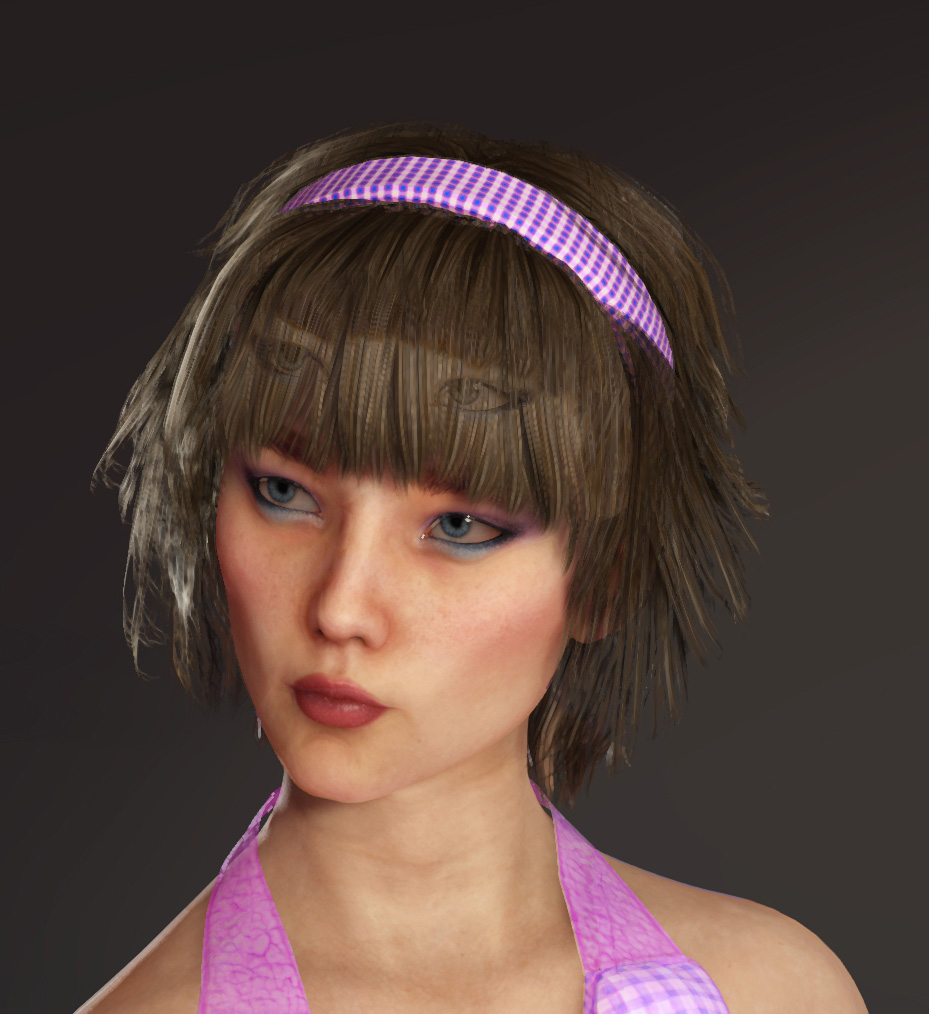
1. Anyway, rendering with new TemporalAA Anti-Aliasing option generates a ghost of some sort. This is for both CC and IC.
FT: https://www.reallusion.com/FeedBackTracker/Issue/Rendering-with-TemporalAA-creates-a-ghost-mask-over-character-same-in-iClone8
==============================================================================================
2. Someone reported similar issue in FT and I replied there with current issue: https://www.reallusion.com/FeedBackTracker/Issue/CC4-Clothing-and-Hair-disappear-after-selecting-new-animation-or-pose
When you hide cloth/hair/eyes/teeth...etc in iClone and then send character to CC, it is not possible to reveal those items in CC anymore.
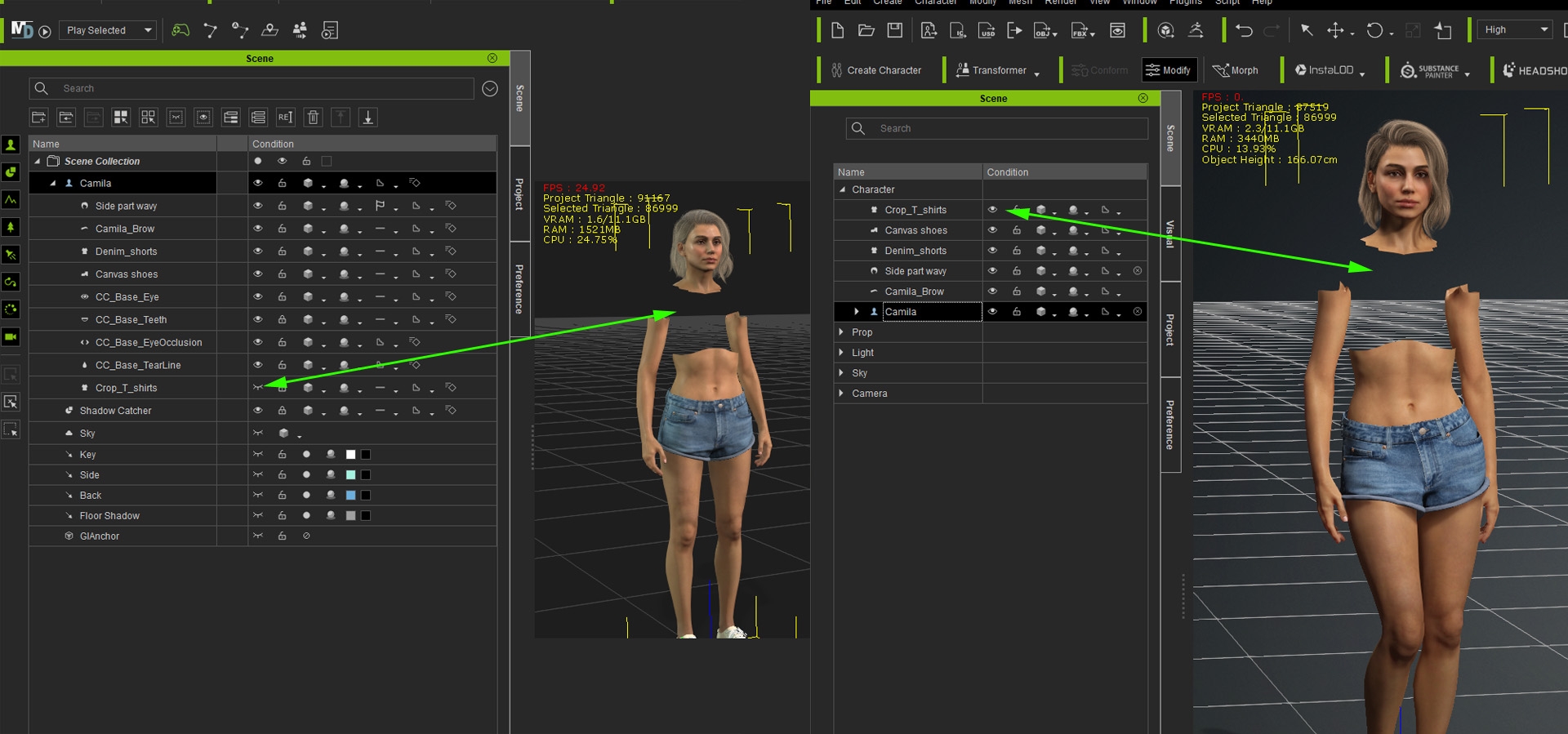
Same happens if you hide something on character, apply a different pose and then try to reveal hidden item. It never appears back.
==============================================================================================
3. There was a very convenient button at the top toolbar in CC3 - Pose, which I so got used to. It used to take you directly to Calibration poses, where you can switch them quickly.

Now it's gone for good. And depending where you are in CM, you have to do a few clicks before you get there.
FT: https://www.reallusion.com/FeedBackTracker/Issue/Please-return-Pose-icon-to-the-toolbar-and-add-an-A-Bind-Pose-already-to-the-list-of-Calibration-poses
==============================================================================================
More to come....
|
|
By Marty3DGuru - 4 Years Ago
|
Anyone else get a missing slider error for the new characters? A head and body slider missing when loading up?
Thanks
|
|
By yepkoo - 4 Years Ago
|
I'm not sure if I should post this message here.
The Auto Setup Plugin should automatically generate the Rig file for UE5 for the characters we import to Unreal Engine.
It's quite long and tedious to do this for each character.
Very simple Vroid Character comes with all rig files with a simple plugin and it only took me 2-3 minutes to integrate it into UE5.
The other problem is the hair. Hair physics still doesn't work properly in UE5.
|
|
By facr73 - 4 Years Ago
|
The home button is not available on the toolbar in CC4? It is possbile to access it by press the home button (keyboard) or using the menu for that but...
CC4

CC3

Is there a way to add it to the toolbar?
facr
|
|
By yepkoo - 4 Years Ago
|
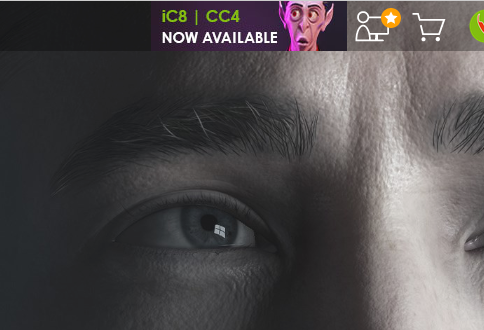
I have always found RL's website perfectly compatible.
But "iC8 | CC4 Now Available" in this picture must be the worst thing I've seen on the official site :)
|
|
By harris.josephd - 4 Years Ago
|
|
Marty3DGuru (5/14/2022)
Anyone else get a missing slider error for the new characters? A head and body slider missing when loading up?
Thanks
Yes. I don't have any character head morphs availible. The new CC4 avatars will load, but I have no sliders for them or any of the other avatars from any other CC product.
|
|
By wires - 4 Years Ago
|
harris.josephd (5/15/2022)
Marty3DGuru (5/14/2022)
Anyone else get a missing slider error for the new characters? A head and body slider missing when loading up?
ThanksYes. I don't have any character head morphs availible. The new CC4 avatars will load, but I have no sliders for them or any of the other avatars from any other CC product.
Make sure that you have everything installed in the Content tab.
Select Template > Pack > All > Not Installed as shown below:
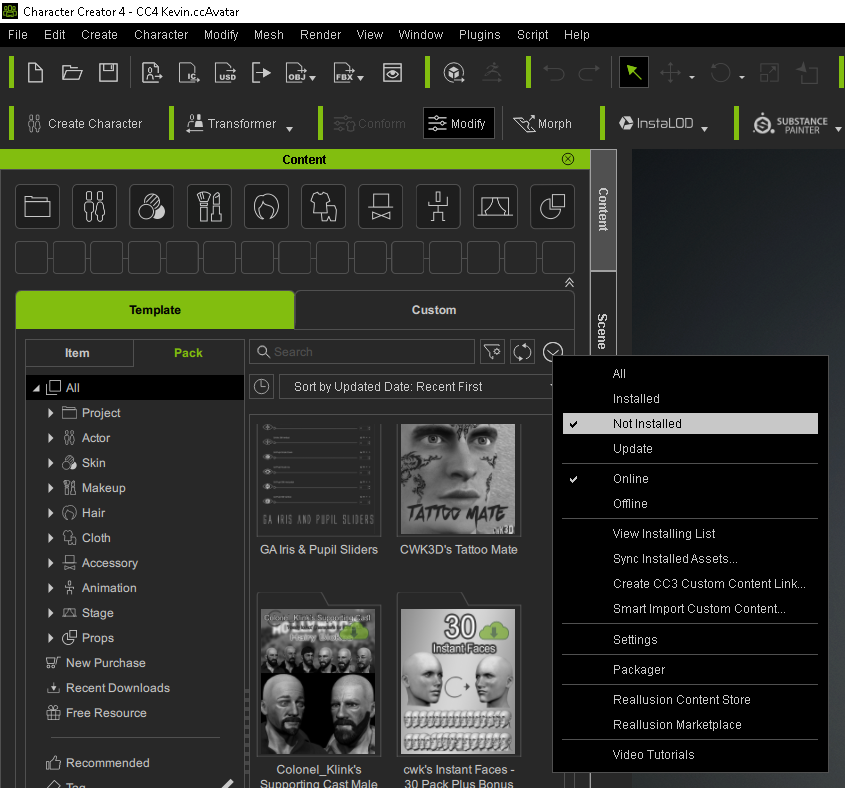
Click "the "Refresh" icon to sync everything:
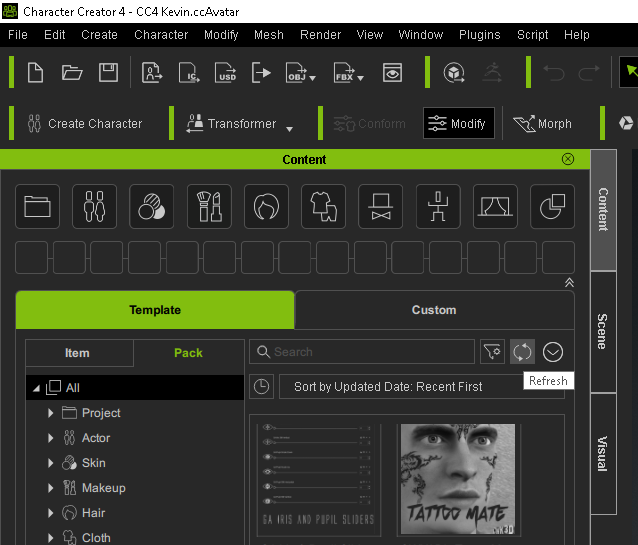
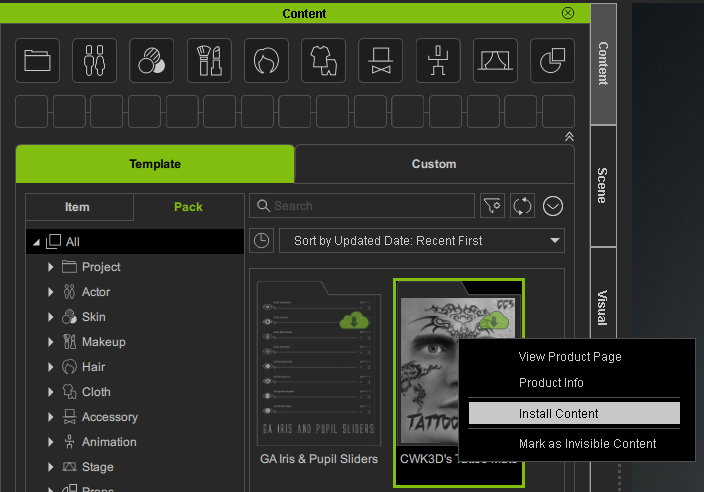
Anything not installed will be shown in Black & White with a small Green download arrow. Double click on the Thumbnail for each Pack / item, or right click on the Thumbnail and select "Install Content" to get the assets.
|
|
By wires - 4 Years Ago
|
facr73 (5/15/2022)
The home button is not available on the toolbar in CC4? It is possbile to access it by press the home button (keyboard) or using the menu for that but... CC4 CC3 Is there a way to add it to the toolbar? facr
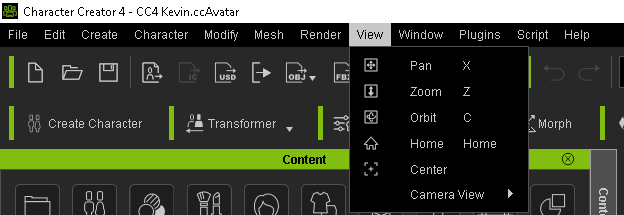
Press the "Home" key on the keyboard.
|
|
By facr73 - 4 Years Ago
|
Hi Gerry.
Yeah, I pointed that (It is possbile to access it by press the home button (keyboard) or using the menu for that but...)
But I think it should have a button on the toolbar too as in IClone 7/8 or in CC3.
facr
|
|
By wires - 4 Years Ago
|
|
facr73 (5/15/2022)
Hi Gerry.
Yeah, I pointed that (It is possbile to access it by press the home button (keyboard) or using the menu for that but...)
But I think it should have a button on the toolbar too as in IClone 7/8 or in CC3.
facr
I think that there are more than enough buttons present to keep touch typists happy, and sometimes too many for my liking. :w00t:

|
|
By raitan2008 - 4 Years Ago
|
|
My skingen premium pack had everything except the makeup. This method worked for me, and It showed me some other stuff that also had not installed. Thanks. Now I just need to fix the uber slow morph sliders and this program is just what I need.
|
|
By 4413Media - 4 Years Ago
|
Got a major program bug concerning iClone and CC4.
The character will not animate when applied a new motion, the eyeballs will not move. It happens with both CC4 and iClone. It's a program breaker.
|
|
By luke (RL) - 4 Years Ago
|
|
any character? how about save the character and load it again?
|
|
By wires - 4 Years Ago
|
|
4413Media (5/16/2022)
Got a major program bug concerning iClone and CC4.
The character will not animate when applied a new motion, the eyeballs will not move. It happens with both CC4 and iClone. It's a program breaker.
Which character do you have loaded, and which character base version are you using? Without that information it's impossible to see if the issue can be reproduced. :unsure::Whistling:
|
|
By Marty3DGuru - 4 Years Ago
|
I'm sure when I first installed CC4 no sliders were appearing at all. I only got the sliders to appear when I installed the Ultimate Morph Pack. I just wondered for default install why no basic ones were there to begin with.
Has no one else got the missing slider error for the new CC4 characters. No head or body sliders error?
Also no default project was set on first install. If I click load default project nothing happens. I know how to set a default project on startup, just the behaviour on the first install seemed odd and not like CC3 was.
|
|
By wires - 4 Years Ago
|
|
There were uncountable complaints regarding CC being started with a character in the project, and the request was for it to be the same as iClone starting with an empty project. If you wish you can have it load with a full project, you just need to select which one in the Preferences settings and that will be loaded at every start.
|
|
By Marty3DGuru - 4 Years Ago
|
Ok sure. I'm sure something is not right with my CC4.
None of the head or body sliders are available to morph in.
In CC3 whether they were Elite characters or stock ones, older morph packs or the new human anatomy, you could morph in a head or a body either fully or partially.
This function is not there or not working right, no sliders are available at all. Only general and human anatomy has options for heads or body. What about all the other characters heads and body etc.?
I guess if you start out with the base character they are available to use and morph the heads in. I'm just a bit confused as to why I get an error message with the new characters in CC4 saying missing head or body slider.
I suppose it's all to do with the CC3, the CC3+ differences. I was certain I could still tweak with an older morph, I guess I had forgotten about the CC3, CC3+ difference.
I would be happier if anyone could at least confirm this CC4 head and body missing slider thing for the new character, that is all.
|
|
By Peter (RL) - 4 Years Ago
|
|
Marty3DGuru (5/16/2022)
Ok sure. I'm sure something is not right with my CC4.
None of the head or body sliders are available to morph in.
In CC3 whether they were Elite characters or stock ones, older morph packs or the new human anatomy, you could morph in a head or a body either fully or partially.
When you are in CC4 you can check in the Modify Panel > Morphs tab which morph packs are installed by expanding the list in each category as shown below.
So please look in your morphs list and if you find morphs are not there, do make sure you have installed the corresponding pack that contained the morphs. For example if you have installed the Elite Characters pack you can find the morphs under CC3_RTL in Full Head and Full Body categories.

|
|
By Marty3DGuru - 4 Years Ago
|
Thanks for your help Peter.
I have discovered the cause of it and I'll explain what I did.
I installed all my packs through the content library, including the new CC4 characters. They could be loaded into scene and used but i found issues as explained with morphs.
I went into item rather than pack for content library in the CC embed morphs hierarchy. Inside the CC Embed Morphs/CC4 Characters folder was a bunch of stuff not installed for some reason? I clicked to download camilla head morph and everything else was updated as well.
Now all appears fine at my end. I'm unsure why this wasn't installed with the pack itself. Anyway all good. :D
My apologies to the earlier poster who was helping, I must have missed the detailed help about not installed content. I was looking through smart phone and must have missed a page when tracking my issues. Thanks all.
|
|
By aaron_vfx - 4 Years Ago
|
My CC4 is CONSTANTLY and randomly crashing, its pretty unusable for me
Reinstalling windows is not a option for me, and should that really be part of an install process anyway?. I have had NO problems with any other software on my PC.
Unreal, MD, Maya, Max, Blender, Adobe Suite, Zbrush, Cubase, Reaper, Davinci Resolve. None of them have a problem, only CC4 and iClone 8.
Below is an example, this particlur crash is what happens every time I try import a rig.
32% of original size (was 1606x954) - Click to enlarge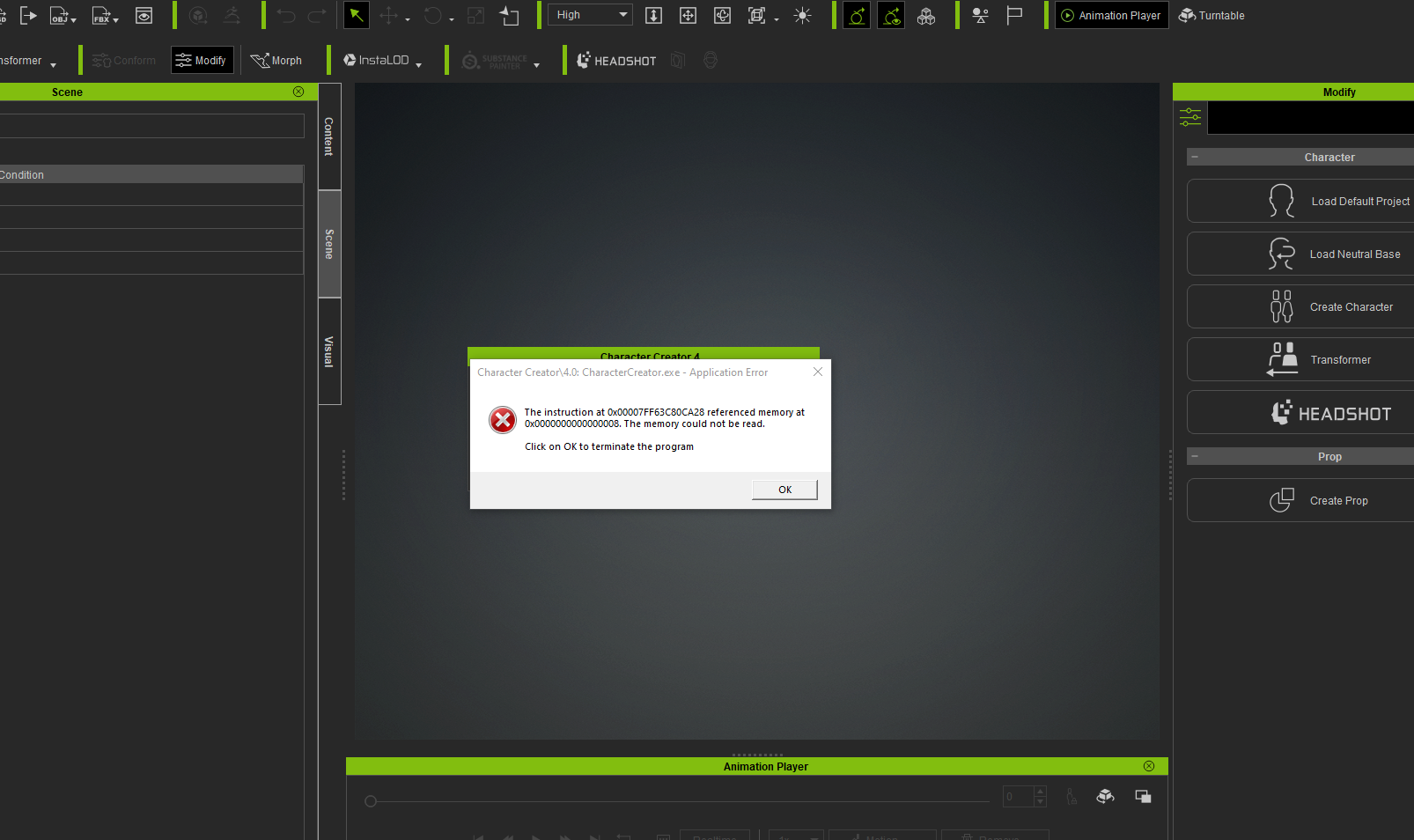
And then when I try to restart I get this over and over again:
32% of original size (was 1606x954) - Click to enlarge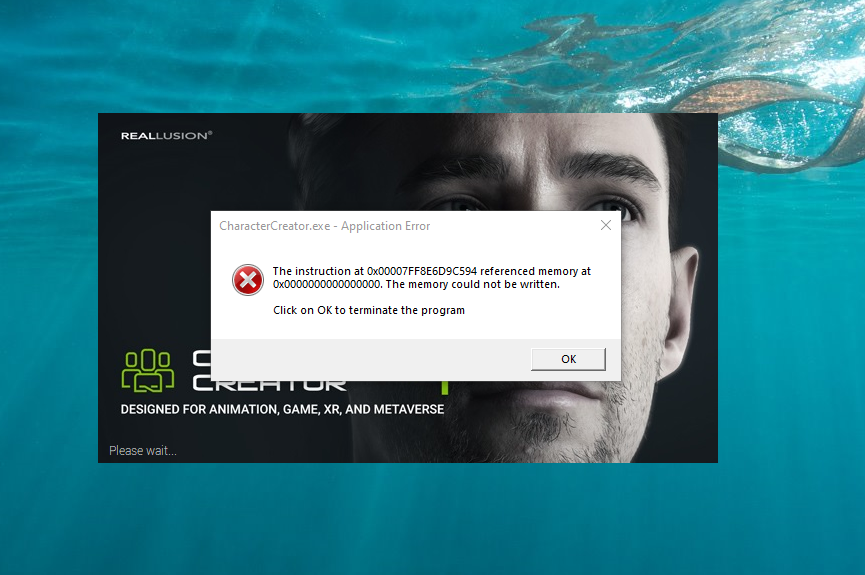
Support have a ticket but this has been going on since I installed CC4 last week, I've not heard anything back yet, so it sounds like it could be complicated, but it worries me, iClone 8 is more usuable but CC4 just has issue all over the place for right now, making it totally untrustworthy that I cannot use it.
|
|
By nachout - 4 Years Ago
|
|
@aaron_vfx I have the same issue as you.
|
|
By wsessoms - 4 Years Ago
|
Hi Everyone
,
I installed CC4and none of the content template files loaded during the installation. I get the 'Not found any content in "Update" filter' message when I click on any of the items in the template list.
Please Advice.
Thank you
See attached


|
|
By sungod - 4 Years Ago
|
nachout (5/17/2022)
@ aaron_vfx I have the same issue as you.
Can you guys try some professional uninstaller like Revo uninstaller pro and run advanced mode in Medium mode.
I usually clean all installations with it.
I use the Portable Pro version .
Many times it could be issue in some checksum etc.
All the best.
|
|
By wires - 4 Years Ago
|
|
wsessoms (5/18/2022)
Hi Everyone
,
I installed CC4and none of the content template files loaded during the installation. I get the 'Not found any content in "Update" filter' message when I click on any of the items in the template list.
Please Advice.
Thank you
See attached
You need to select "All" and Pack, or "Installed" and Pack to see just what is installed. You can do the same for single items after checking if your Packs are present.
|
|
By MilesV - 4 Years Ago
|
|
Viewport morphing isn't working correctly for either the morph gizmo or the headshot sculpt morph tools. Moving the mouse horizontally adjusts the length instead of width/thickness.
|
|
By virtualfilmer - 4 Years Ago
|
Not sure where to post this issue… :)
One of the new official videos about CC4 on the main Reallusion channel has the wrong title and also wrong graphic.
The video is called “Characterizing Humanoid Characters” - but watch it, and you’ll see it’s about NON-Humanoid characters.
https://youtu.be/oqZJyGSf1zM
ATTENTION: @RLpeter :)
|
|
By yepkoo - 4 Years Ago
|
I think he means the skeletal system here, not the shape of the character. In other words, animation can be applied in a human-like way.
You can apply existing animations to this character.The non-humanoid characters are different.For example, a completely different skeletal system that you use to regenerate a plant.
|
|
By wsessoms - 4 Years Ago
|
wires (5/18/2022)
wsessoms (5/18/2022)
Hi Everyone
,
I installed CC4and none of the content template files loaded during the installation. I get the 'Not found any content in "Update" filter' message when I click on any of the items in the template list.
Please Advice.
Thank you
See attached
You need to select "All" and Pack, or "Installed" and Pack to see just what is installed. You can do the same for single items after checking if your Packs are present.
Thanks Gerry for your reply
I have looked in All in Pack and Item and the same message appears "Not found any content in "Update" filter.
I installed CC4 on my other computer and it installed correctly but I really want to use it on the same computer that I am running iClone 8.
iClone 8 installed correctly so I am thinking that somewhere a the configuration file I may need to correct the path to the content directory but I am not sure how to do that.
Anyone have any idea where to view that information?
Your help is appreciated and thanks in advance
|
|
By MBusch - 4 Years Ago
|
Using Transformer in Advanced mode in CC4 to bake textures gives a weird result. I tried a couple of times with different DAZ characters always with bad results.
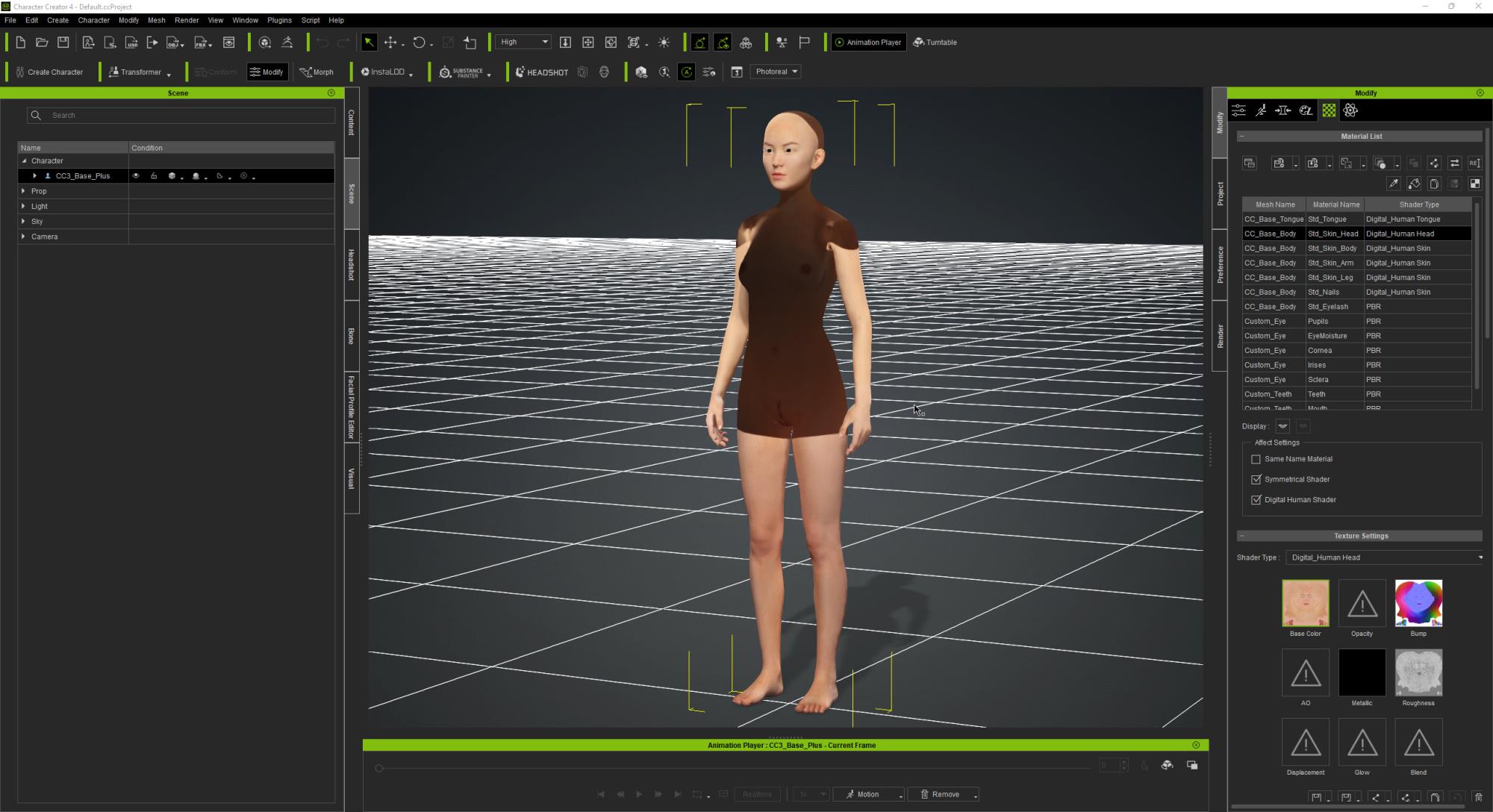
The same FBX file with the same Texture INI profile in CC3 gives the correct result
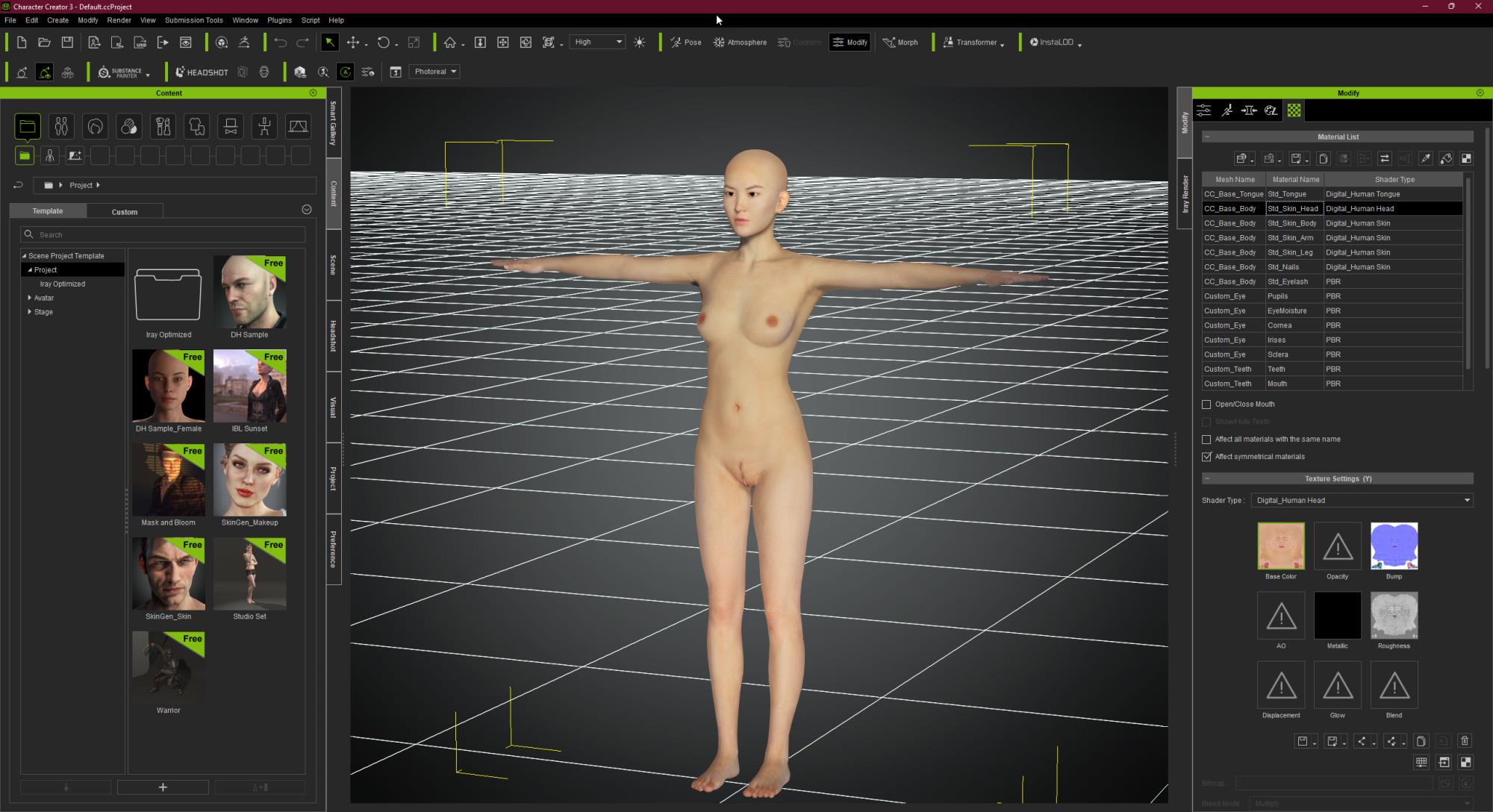
I hope this can be fixed soon.
Feedback Tracker issue 8508
|
|
By mcmikexx - 4 Years Ago
|
Not sure if this is a bug or not. When I use some sliders for eyes or mouth, the character jumps up a little. I have only noticed the behavior in those two areas, there may be others.
If the Headshot face matching tool is open, the image and the character become misaligned. My workaround is to open an editing session by making a tiny adjustment on one of the affected sliders and immediately hitting the Bake button and then open the matching tool. That seems to lock the character for the rest of the edit session.
|
|
By paro_3453 - 4 Years Ago
|
Group: Forum Members
Last Active: 4 hours ago
Posts: 116, Visits: 499
| Hi Everyone , I installed CC4and none of the content template files loaded during the installation. I get the 'Not found any content in "Update" filter' message when I click on any of the items in the template list. Please Advice. Thank you See attached 25% of original size (was 2000x1088) - Click to enlargeHi wssessoms, Try selecting the button (yellow arrow), then select All (red arrow). I suspect you may have Update selected rather than All. Make sure to refresh Content Manager after doing this by preesing the button to the left of the yellow arrow. Hope thsi helps.  |
|
|
By OB1Flow - 4 Years Ago
|
MBusch (5/20/2022)
Using Transformer in Advanced mode in CC4 to bake textures gives a weird result. I tried a couple of times with different DAZ characters always with bad results.The same FBX file with the same Texture INI profile in CC3 gives the correct resultI hope this can be fixed soon.
Feedback Tracker issue 8508
I have seen this too. Primarily torso texture or face. I've also imported as non-standard and only some of the textures come in. Non-standard the eyes do not come at all, they are white.
|
|
By wsessoms - 4 Years Ago
|
paro_3453 (5/20/2022)
Group: Forum Members
Last Active: 4 hours ago
Posts: 116, Visits: 499
| Hi Everyone , I installed CC4and none of the content template files loaded during the installation. I get the 'Not found any content in "Update" filter' message when I click on any of the items in the template list. Please Advice. Thank you See attached 25% of original size (was 2000x1088) - Click to enlargeHi wssessoms, Try selecting the button (yellow arrow), then select All (red arrow). I suspect you may have Update selected rather than All. Make sure to refresh Content Manager after doing this by preesing the button to the left of the yellow arrow. Hope thsi helps. |
Thanks Paro,
I figured it out. I had moved the content from the c drive to my e drive to gain more space on my c drive with CC3. So I had to move the files from the e drive to the c drive so the CC4 could find it and change the path in setup to the c drive. Now everything is showing up as it should. May want to move files back to my e drive for space issue later but for now it's time to play with the new software. So impressed with Reallusion''s software!
|
|
By SyrDoN - 4 Years Ago
|
I have surprisingly few issues with the new versions. I have come across a problem though that repeats every time.
I searched the forums but couldn't find anything related to this. My apologies if there is a reply already.
I am using Camilla Character. Using curly_fringe hair. I have physx on for the hair. If I render out images, no problem. If I render out as a video, it will do the entire render. At the very end of the render I get an error dialog that states an instruction referenced meory that could not be read. The only thing that I have done different is add a custom decal on the face. Actually 2 decals (both are the same - one is smaller than the other).
|
|
By SyrDoN - 4 Years Ago
|
|
I get this error also. But, I only get this problem with one scene so far. The rest are all fine.
|
|
By 4u2ges - 4 Years Ago
|
Every time you try to open CC1 base characters in newly started CC4, it takes nearly 3 min to open.
It's getting stuck on "Update Morph Data" event.
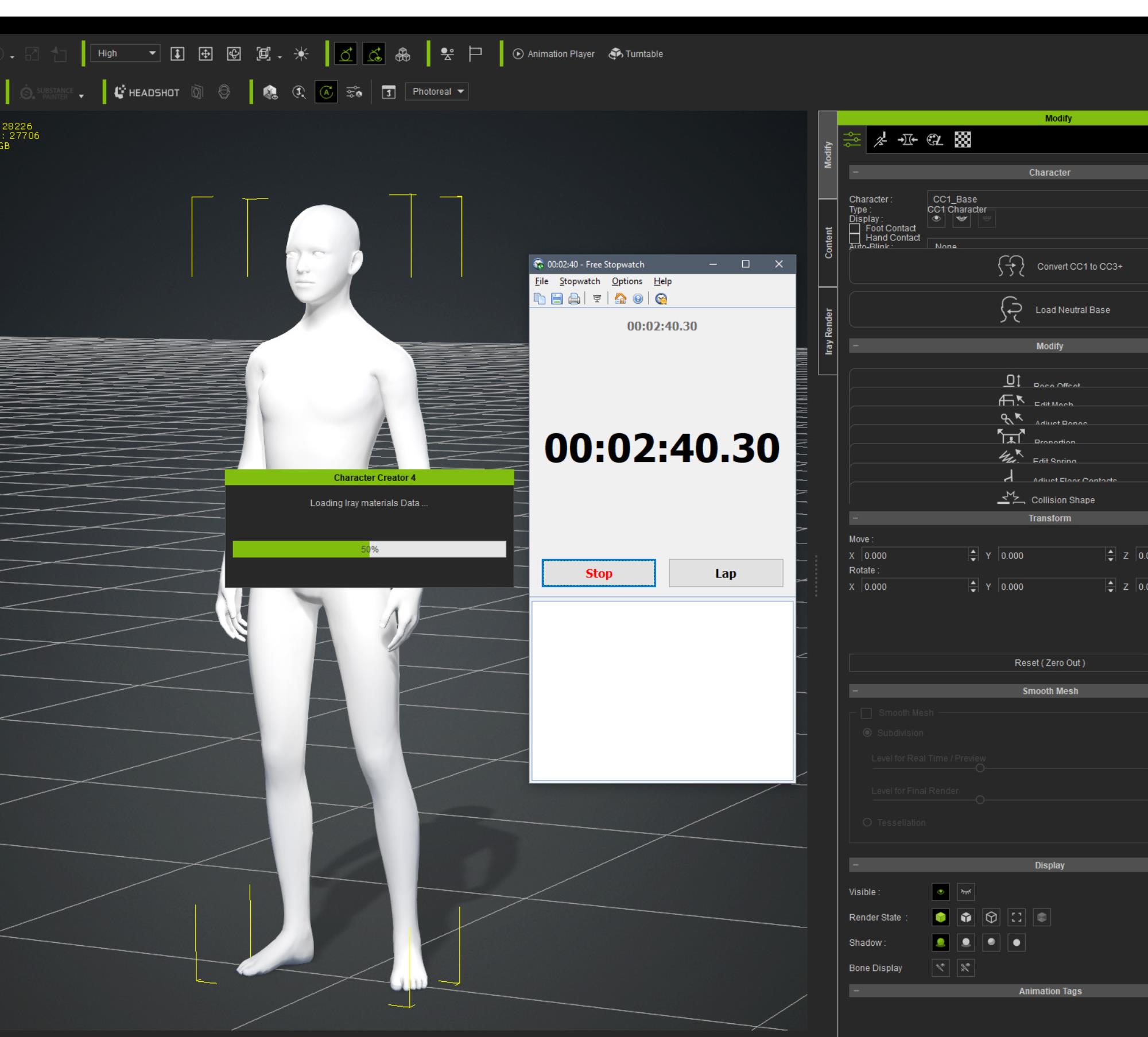
Each consecutive attempt however only takes 10-15 seconds.
There was no such a problem in CC3.
FT: https://www.reallusion.com/FeedBackTracker/Issue/It-takes-nearly-3-min-to-load-CC1-base-characters-in-newly-opened-CC4
And then this:
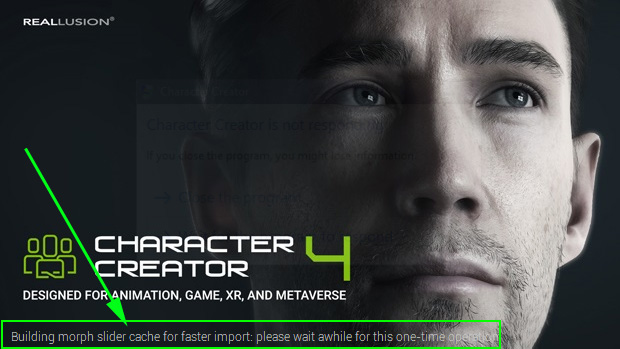
I am not sure what to make of it. Is this "one time" operation should run every time CC4 starts?
|
|
By Edward (RL) - 4 Years Ago
|
|
Thanks Paro,I figured it out. I had moved the content from the c drive to my e drive to gain more space on my c drive with CC3. So I had to move the files from the e drive to the c drive so the CC4 could find it and change the path in setup to the c drive. Now everything is showing up as it should. May want to move files back to my e drive for space issue later but for now it's time to play with the new software. So impressed with Reallusion''s software!
Hello,You may try to right-click the pack you want to move and then choose "Move Location" in the menu
 |
|
By lau.ho.tin - 4 Years Ago
|
Issue 8527
Cannot apply check pose after drag the pose to character Steps:
1. Import new clothes and apply skin weight
2. Select the check pose and drag to the character
Actual Result:
Character pose did not change to the selected check pose
Expected Result:
Character should changed to the selected pose for skin weight checking
|
|
By 4u2ges - 4 Years Ago
|
So basically none of the face bones are mapped correctly when applying CC_G3Standard profile for the character imported as Humanoid.
It was working fine in 3Dxchange.
To replicate:
1. Load CC3+ Neutral base in CC4
2. Export to FBX (I use Blender profile)
3. Import back as non-standard, select CC _G3Standard profile
4. Try to open mouth or move eyeballs in Edit Facial - DOES NOT WORK!
5. Import the same FBX to 3DXchange7. CC_G3Standard profile is automatically loaded. Go to Expression Editor and Drop Jaw - WORKS FINE!

I wonder what else I must do to make facial bones active in CC4...
Anyone has an idea? Otherwise I will open an FT ticket.
BTW I can import all face morphs from the same FBX and they are working just fine on re-imported Neutral base as non-standard. Only facial bones are not active!
FT: https://www.reallusion.com/FeedBackTracker/Issue/Facial-bones-on-imported-non-standard-characters-with-HIK-profiles-are-not-activated
|
|
By Jfrog - 4 Years Ago
|
I am not sure if this has been discussed before But CC4 has huge problem. Everytime I work for a few minutes,and make a change to a character(skin morph for example) it work for a while (until 14% complete) then it stucks forever on "please wait"... Than I have to force shut down my computer. because even the task manager can not quit the application. Edit: I have find the problem on this one , there is a message appearing in my second monitor to ckeck some fields. it was hiding behing another window.... So now I can use the tools without restarting or rebooting. This was my fault.

|
|
By Amper Sand - 4 Years Ago
|
Seems they didn't fix it yet :D
https://forum.reallusion.com/FindPost457963.aspx
|
|
By dgaban - 4 Years Ago
|
My biggest issue, which I already reported on the feedback tracker, is that the project file I'm working on will randomly get deleted. This did not happen to me in CC3. I've lost countless projects to this bug because I wasn't paying attention when it happened.
|