|
Author
|
Message
|
|
Peter (RL)
|
Peter (RL)
Posted 3 Years Ago
|
|
Group: Administrators
Last Active: Last Year
Posts: 23.1K,
Visits: 36.6K
|
blazerjones (3/16/2022)
Hi So I've installed iClone 7.93 trial version and the smart gallery plug in, but had to change the directory of the software because of space in HD. So I've decided to uninstall the plug in first, but when I was going to instal iClone 7.93 the software was gone from my uninstall program (I use Revo Uninstaller), now I can't instal OR uninstall iClone 7.93 because the files went missing but still is "installed" on Reallusion hub, and when I press to uninstall, nothing happens. I've tried to press to start the program, but it always brings me to 'my documents". Can anyone help me?Hi... If you haven't already, please shut down your computer and then restart and try to uninstall iClone from the Reallusion Hub. If that doesn't help, look under Start > Settings > Apps > Apps & Features to see if iClone is still listed there? If it is, try uninstalling from there. If the problem still continues after that, please feel free to contact Technical Support using the link below. They should be able to supply you with a registry cleaner to remove iClone that way. https://www.reallusion.com/CustomerSupport/UserEx/QForm.html
Peter
Forum Administrator www.reallusion.com
|
|
|
|
|
blazerjones
|
blazerjones
Posted 3 Years Ago
|
|
Group: Forum Members
Last Active: 3 Years Ago
Posts: 1,
Visits: 5
|
Hi So I've installed iClone 7.93 trial version and the smart gallery plug in, but had to change the directory of the software because of space in HD. So I've decided to uninstall the plug in first, but when I was going to instal iClone 7.93 the software was gone from my uninstall program (I use Revo Uninstaller), now I can't instal OR uninstall iClone 7.93 because the files went missing but still is "installed" on Reallusion hub, and when I press to uninstall, nothing happens. I've tried to press to start the program, but it always brings me to 'my documents". Can anyone help me?
|
|
|
|
|
sundarspeaking
|
sundarspeaking
Posted 4 Years Ago
|
|
Group: Forum Members
Last Active: Last Year
Posts: 1,
Visits: 19
|
my avatars are named as rootnode...and these rootnode nonstandard avatars are not showing in the unreal livelink plugin... 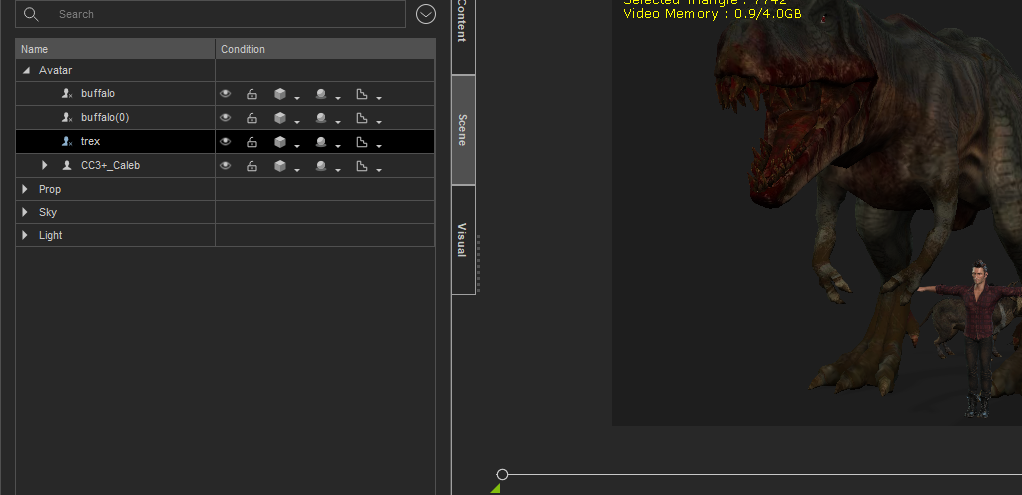 what is rootnode and what is the cross into mark in it...how to convert this... anyone please help to solve this issue...
|
|
|
|
|
hobbyuser3d
|
hobbyuser3d
Posted 4 Years Ago
|
|
Group: Forum Members
Last Active: 3 Years Ago
Posts: 90,
Visits: 576
|
this is the bug i reported realted to that 4u2ges its basically a dialog focus issue in my case im working a character in CC I click to import to iclone and the iclone app is not open before the import. if there is a SG update in background upon Iclone opens a yes or now take the update dialog pops up and its under the loading character dialog and just locks the whole gui unclickable requiring task manager to terminate the iclone app my work around is open iclone before i do any importing this is probably less likely to happen if the app is open at the same time and for users that have minimal content. seems like a simple fix..iclone should know an import is happening and finish that task before content update dialogs with the SG I cannot make a video to replicate the pending update when i open iclone the programming team can. Common sense. .
|
|
|
|
|
4u2ges
|
4u2ges
Posted 4 Years Ago
|
|
Group: Forum Members
Last Active: Last Month
Posts: 5.3K,
Visits: 16.8K
|
I really do not like this new feature with SG checking and notifying at startup. It should be taken away. You start IC and CC and expect to it to be functional right away. It's not like apps have a quick startup.. now I have to wait for some more time for it to settles before I can do anything and occasionally click away that annoying message about updates, which causing form focus lock according to hobbyuser3d message above. If I need to check for updates, I can do that myself when I need it :ermm:
Or at least, there should be a way to turn it OFF.
|
|
|
|
|
hobbyuser3d
|
hobbyuser3d
Posted 4 Years Ago
|
|
Group: Forum Members
Last Active: 3 Years Ago
Posts: 90,
Visits: 576
|
peter where is the correct bug report location i tried the feedback tracker and a ticket
and the staff answering has no clue..and resulted in what amounts to incoherent wasting time
and me not wanting to report bugs in future. I explained the bug twice and none of my specific points
were addressed got generic support answers when i am talking about dialog boxes and focus bugs in the gui
in a specific case..the request to make a video of it after 2 explanations indicates they do not get it.
|
|
|
|
|
nildoessa
|
nildoessa
Posted 4 Years Ago
|
|
Group: Forum Members
Last Active: 6 Months Ago
Posts: 269,
Visits: 1.8K
|
Hello, When i export an animation via fbx to blender (3dsmax as well) the resulted animation file has the mesh in place.. even if a choose Reset motion root.. the animation is broken. how can i fix this? i was working ok on previous iclone using iclone 7.93.5904.1 and blender 2.93.6 (also blender 3.0) please see wetransfer link. https://we.tl/t-7gDXGi4Ifl
|
|
|
|
|
4u2ges
|
4u2ges
Posted 4 Years Ago
|
|
Group: Forum Members
Last Active: Last Month
Posts: 5.3K,
Visits: 16.8K
|
No problem hicksight. Actually I like the way Real-Time options maintenance used to work. That is when you modify the preset option, it would immediately change to Custom at the toolbar. Now it is very confusing sometimes. You uncheck HRD for instance and in Preferences an asterisk would appear next to built-in option (High in this case) with option to reset on the right.  But it is still shows "High" at the toolbar without ANY indication it was changed from the default a few projects back (where you set it and forget),  And now you wonder just what a heck is going on... :ermm:
I got into that "trap" myself in the past.
I would strongly suggest to RL to make an indication at the toolbar as well, like so (reconstructed):

Probably need to open an FT ticket for that...
|
|
|
|
|
General Picture Animation
|
General Picture Animation
Posted 4 Years Ago
|
|
Group: Forum Members
Last Active: 11 Months Ago
Posts: 335,
Visits: 6.6K
|
Thank you, 4u2ges. ============================= ME: That didn't solve the problem. You neglected to tell me what someone on the Forum told me: HDR needs to checked in the Real-Time preferences. Now of course it works. This was another failure from support. =============================
Animating now to life itself --Walt Whitman
|
|
|
|
|
4u2ges
|
4u2ges
Posted 4 Years Ago
|
|
Group: Forum Members
Last Active: Last Month
Posts: 5.3K,
Visits: 16.8K
|
If bloom shows up in viewport during render, then you have Real-time set for anything other than "High". It must be "High" to show up (specifically HDR must be checked in Real-time options in Preferences).
|
|
|
|