|
By Peter (RL) - 5 Years Ago
|
Dear iClone Users,
We have now released the 7.93 update for iClone. However, as always we still need your assistance to help us track down any bugs, glitches or other annoying issues that may still remain.
Important: If you do find any bugs, issues or glitches in iClone 7.93, please can you report them first in the Feedback Tracker. Then feel free to discuss the issues in this thread but do try to include a link back to the original Feedback Tracker report or your tracker number.
As always it will help us greatly if we can keep all technical issue discussion in the one place (this thread). This will help the development team keep track of any problems.
Please do try to provide your full system specifications and a detailed description of the problem when reporting issues and include screenshots and/or a workflow video whenever possible. If you can provide specific steps so we can try and reproduce the problem that will be even better.
Many thanks and have fun with iClone. :)
|
|
By charly Rama - 5 Years Ago
|
Hi, I tried to create a Feed back tracker but there's no ref for version 7.9 yet
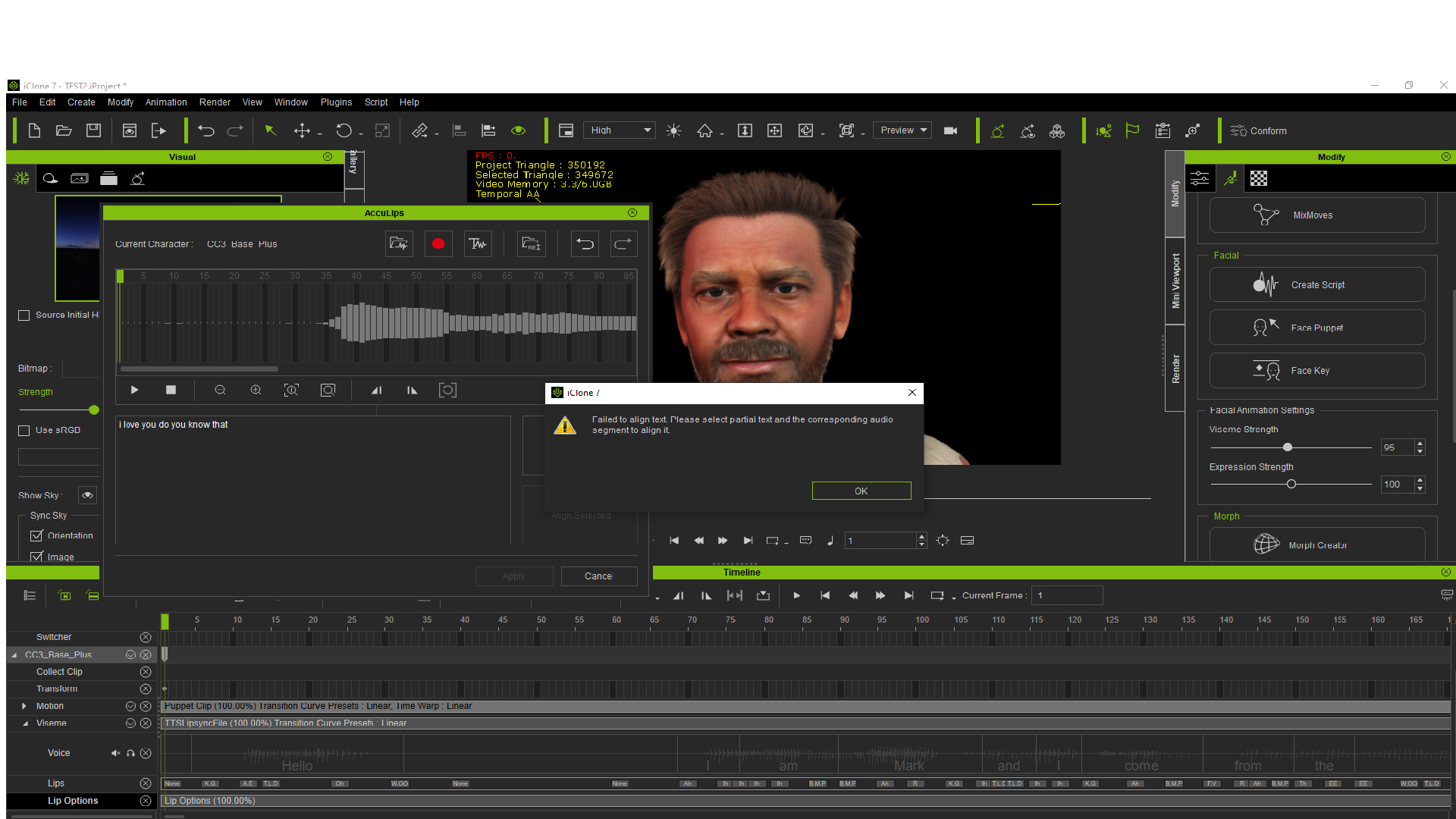
My problem is every audio I use, the acculips says this and I can't apply the animation
|
|
By animagic - 5 Years Ago
|
I am unable to access the two new free character projects.
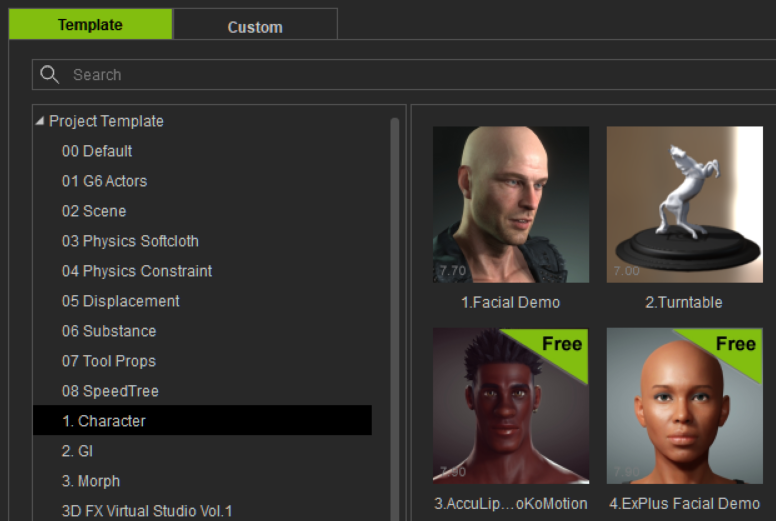
It says Free, and if I click on either one I am directed to the Smart Gallery. There is a Free content section there, but I already updated that without success.
Update: I had to actually do a manual refresh for the new projects to show up as updates.
|
|
By Kelleytoons - 5 Years Ago
|
charly Rama (3/24/2021)
Hi, I tried to create a Feed back tracker but there's no ref for version 7.9 yet My problem is every audio I use, the acculips says this and I can't apply the animation
Just for fun, Charly, try cutting out the silence at the very beginning of that clip (in an outside program) and try again. Also, if the clip is longer than 30 seconds or so, cut it down to that length (just to see something).
|
|
By rosuckmedia - 5 Years Ago
|
animagic (3/24/2021)
I am unable to access the two new free character projects. It says Free, and if I click on either one I am directed to the Smart Gallery. There is a Free content section there, but I already updated that without success. Update: I had to actually do a manual refresh for the new projects to show up as updates.
Hello animagic, I can load it Got the Smart Gallery Iclone 7.9 Refresh Greetings rosuckmedia 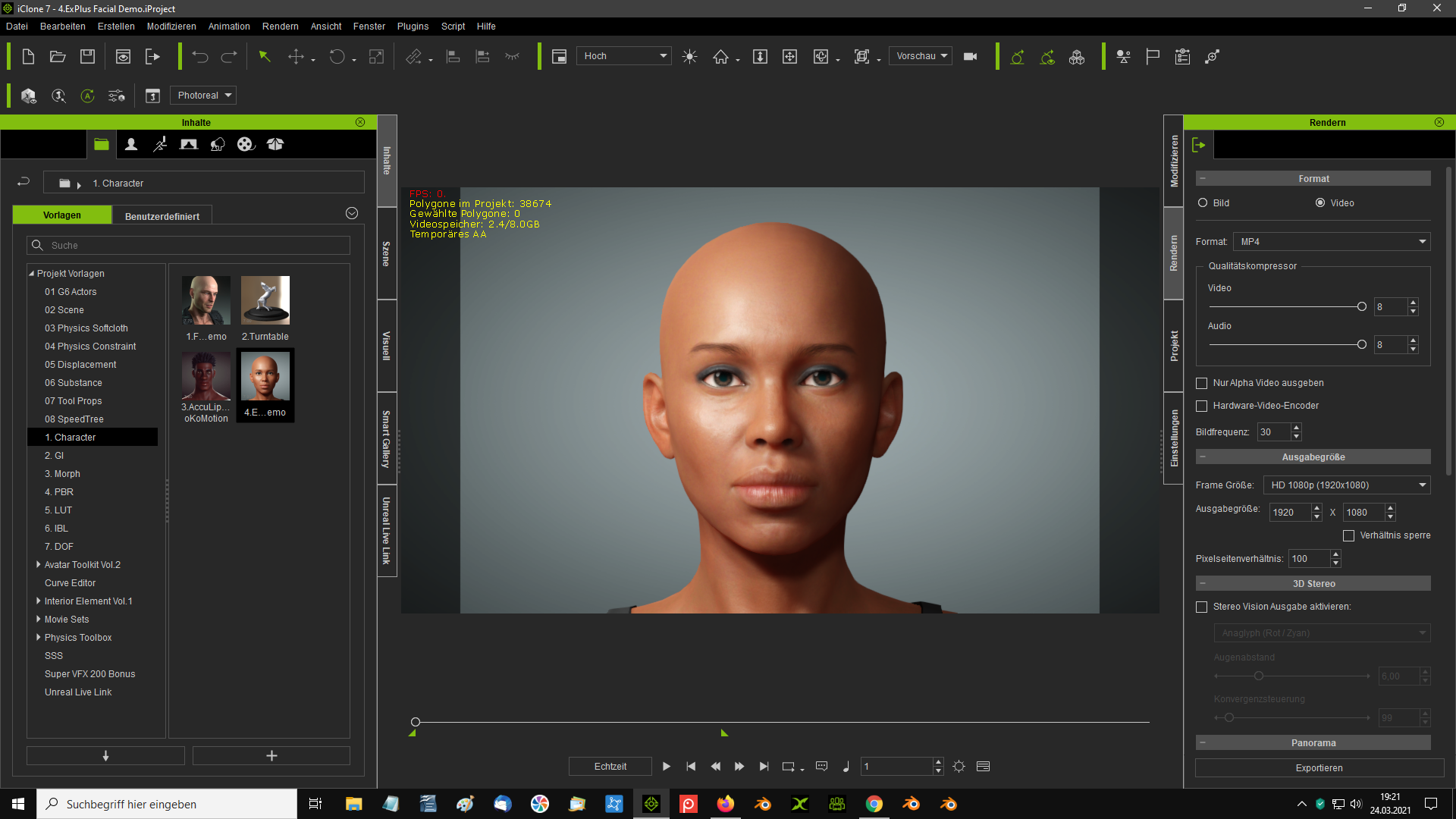
|
|
By Amper Sand - 5 Years Ago
|
I have exactly the same problem as @animagic but, unfortunately, for me @rosuckmedia's fix didn't work, the projects doesn't appear in the Smart Gallery, no matter how many refreshes I'm doing
iClone 7.9 installed using RL Hub, as update to iClone 7.83
========================================================================================
First of all, thanks RL for the updates (apps and plugins).
Now, I have a question/issue to be reported: on each update, I'm looking for the demo projects: now there are two (in Project/Template/Character folder):
- 3.AccuLips_Demo_Lewis_ToKoMotion.Project
- 4.ExPlus Facial Demo.iProject
both marked as "Free". But when I double click them to open, I'm switched to Smart Gallery/Free Resource/Pack tab, no way to open.
P.S.1: As far as I remember, in iClone 7.83 there was a similar one (I will chck which) with the same behavior, but I assumed at that time it didn't open because maybe's too old (from a prev iClone version)
P.S.2: PopcornFX Tools all demo projects (in Project/PopcornFX Tools folder)
P.S.3 The same happen for newly added Hair/Element/Beard, Hair/Element/Hair/, Hair/Element/Hair/Accessory/, Hair/Group/Beard/, Hair/Group/Eyebrows/, Hair/Group/Hair/ (Hair/Group/Hair/_Legacy is OK)
|
|
By charly Rama - 5 Years Ago
|
Kelleytoons (3/24/2021)
charly Rama (3/24/2021)
Hi, I tried to create a Feed back tracker but there's no ref for version 7.9 yet My problem is every audio I use, the acculips says this and I can't apply the animation Just for fun, Charly, try cutting out the silence at the very beginning of that clip (in an outside program) and try again. Also, if the clip is longer than 30 seconds or so, cut it down to that length (just to see something).
Thank you Mike, I've tried but still the same error
|
|
By StyleMarshal - 5 Years Ago
|
Charly, I know that ToyStoryLab had the same issue and it had to do with his Audio Codec.
|
|
By mr_vidius - 5 Years Ago
|
animagic (3/24/2021)
I am unable to access the two new free character projects. It says Free, and if I click on either one I am directed to the Smart Gallery. There is a Free content section there, but I already updated that without success. Update: I had to actually do a manual refresh for the new projects to show up as updates.
didn't work for me. maybe i'll try again tomorrow. or this is be fixed in a couple of months:w00t:
|
|
By animagic - 5 Years Ago
|
I like the new features, but I have a problem where iClone very easily becomes unresponsive with a high CPU usage, after which I have to kill the process. I haven't discovered a specific pattern yet.
It seems to occur when I apply older clothing to a CC3+ character in iClone. Maybe I shouldn't do that...:unsure:
|
|
By Eric C (RL) - 5 Years Ago
|
charly Rama (3/24/2021)
Hi, I tried to create a Feed back tracker but there's no ref for version 7.9 yet My problem is every audio I use, the acculips says this and I can't apply the animation
Hi Charly,
Thanks for report! We fixed it and now you can submit 7.9 Feedback Tracker.

|
|
By charly Rama - 5 Years Ago
|
|
Bassline303 (3/24/2021)
Charly, I know that ToyStoryLab had the same issue and it had to do with his Audio Codec.
Ah, interesting Bassline, Could you tell me what did you do with his sound card ?
|
|
By lianchiu - 5 Years Ago
|
charly Rama (3/25/2021)
Bassline303 (3/24/2021)
Charly, I know that ToyStoryLab had the same issue and it had to do with his Audio Codec.
Ah, interesting Bassline, Could you tell me what did you do with his sound card ?
it's not a issue or defect
Follow this use Align Select to Wave Area (Select words align to audio wave)
1:18 Transcription Adjustments & Alignment
|
|
By charly Rama - 5 Years Ago
|
Did you met the problem that you afirm it's not issue ?
I can not come to this step you show to align to audio wave. I can't because of this error message. I can't select words because there's no showed words to align. Look at the capture screen I posted
|
|
By lianchiu - 5 Years Ago
|
|
charly Rama (3/25/2021)
Did you met the problem that you afirm it's not issue ?
I can not come to this step you show to align to audio wave. I can't because of this error message. I can't select words because there's no showed words to align. Look at the capture screen I posted
Provide AUDIO to FT I Will Check it out. you can post in Private comment
|
|
By charly Rama - 5 Years Ago
|
Thank you so much Lianchiu. I fixed it. The problem was from my soundcard.
On Iclone I've selected my external sound card to record the audio. But at my system, the default input soundcard was the build one with the motherboard. I changed the setting to have THE SAME SOUNDCARD and everything work fine now.
Once again, thank you for your help proposition, cheers
|
|
By lianchiu - 5 Years Ago
|
|
charly Rama (3/25/2021)
Thank you so much Lianchiu. I fixed it. The problem was from my soundcard.
On Iclone I've selected my external sound card to record the audio. But at my system, the default input soundcard was the build one with the motherboard. I changed the setting to have THE SAME SOUNDCARD and everything work fine now.
Once again, thank you for your help proposition, cheers
Got it I am glad that you are able to use it. and enjoy IC7.9
|
|
By animagic - 5 Years Ago
|
I have a problem with accessing the new Hair content in Content Manager. It partially works, but when I click on Style, iClone gets stuck. It is fine in Smart Gallery.
I already applied the provided patch. As I have other issues as well, I wonder if I should just completely uninstall and reinstall iClone as well as CC.
|
|
By joel.lovell - 5 Years Ago
|
|
Same issue for me about the two free projects, even after refresh.
|
|
By mr_vidius - 5 Years Ago
|
animagic (3/24/2021)
I am unable to access the two new free character projects. It says Free, and if I click on either one I am directed to the Smart Gallery. There is a Free content section there, but I already updated that without success. Update: I had to actually do a manual refresh for the new projects to show up as updates.
interesting. i'm very surprised RL does not have a content pack made for just such a problem. personally, i think this is
absurd to continue to go thru such a hassle for 2 projects. i tried your suggestion. epic failure. i did notice that when smart gallery is doing whatever it's supposed to do, but failing.
the thumb nails flickered for awhile. and when it stopped doing that. nothing. still no projects. how ever, the same issue is with CC too. i was able to install something i purchased for
both. and it installed perfectly. :crazy:
|
|
By Amper Sand - 5 Years Ago
|
It's even more obvious if you right-click any of these two new "free" projects and choose "Search in Smart Gallery" - you get a nice message box happily saying "Item not Found!" then guiding you "Please make sure the search filter is set properly or reinstall the pack." Which pack? It's everybody's guess. "If the item is of old custom content, please import into Smart Gallery first". So, you go to the website and search for, let's say, "Lewis" - there's no Lewis there. Go back to the local machine, check the Hub - all products are up to date. Go back to the iclone's Smart gallery, do one refresh, two, three, count for me - nothing, "Item not found!" :)
|
|
By theschemer - 5 Years Ago
|
animagic (3/24/2021)
I am unable to access the two new free character projects. It says Free, and if I click on either one I am directed to the Smart Gallery. There is a Free content section there, but I already updated that without success. Update: I had to actually do a manual refresh for the new projects to show up as updates.
I have this same problem as I can find these in IC7 but not in CC3. When I try to do anything with either one it basically does nothing but sends me back to the last directory or something. If I click on "Find File" it takes me to them on my hard drive. How to fix or how to use these 2 NEW files?
Thanks
|
|
By lianchiu - 5 Years Ago
|
Follow this
Hello, Try this hotfix for those who have the new hair install issue. Please read the "HowTo.txt" in the .zip before updating. And if you keep the Smart Gallery in Offline mode when updating to CC3.4/IC7.9. The hotfix install flow should be: 1. Switch the Smart Gallery to Online mode. 2. Close program 3. Run the Hotfix .bat 4. Open the program and click Refresh manually. Edward
|
|
By charly Rama - 5 Years Ago
|
|
When I save DEBRA as a avatar in iclone, it's normal it's marked trial ?
|
|
By theschemer - 5 Years Ago
|
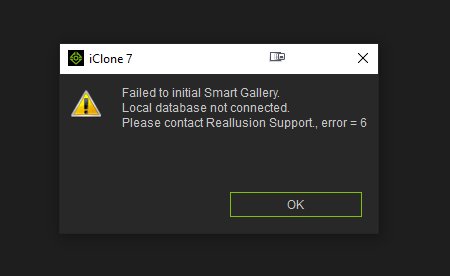
So I run the "fix" and it just made things worse. Now it can't open or find the database and I am supposed to contact Reallusion with the ERROR CODE = 6. Now instead of getting things done around here I am fighting my PC over a couple of FREE things. Arrrgghhh! Where is the log file located? Should I remove and reinstall the Smart Gallery from IC7 and CC3?
Help!
|
|
By wires - 5 Years Ago
|
|
theschemer (3/26/2021)
So I run the "fix" and it just made things worse. Now it can't open or find the database and I am supposed to contact Reallusion with the ERROR CODE = 6. Now instead of getting things done around here I am fighting my PC over a couple of FREE things. Arrrgghhh! Where is the log file located? Should I remove and reinstall the Smart Gallery from IC7 and CC3?
Help!
The best thing to try before contacting support would be to uninstall both SG versions and reinstall them. Make sure that both versions are Online, exit both CC and iClone and then run the patch .Bat files.
At the time of writing this it is after 11:00PM in Taiwan and you won't get any support answers until at least Monday, but if it doesn't work out after the reinstall then waiting is your only choice. :crying::pinch:
|
|
By theschemer - 5 Years Ago
|
Thanks. I will try that and report the results later.
TS
|
|
By joel.lovell - 5 Years Ago
|
lianchiu (3/26/2021)
Follow thisHello, Try this hotfix for those who have the new hair install issue. Please read the "HowTo.txt" in the .zip before updating. And if you keep the Smart Gallery in Offline mode when updating to CC3.4/IC7.9. The hotfix install flow should be: 1. Switch the Smart Gallery to Online mode. 2. Close program 3. Run the Hotfix .bat 4. Open the program and click Refresh manually. Edward
There isn't a readme file in the zip file. Running this broke something for me.
|
|
By wires - 5 Years Ago
|
Below is a screen grab of the files in the SGv1.13_Hotfix folder
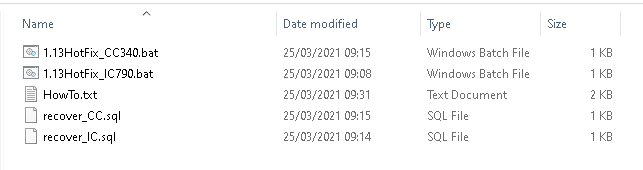
Here's the HowTo (Readme) text:
How to update iClone 7.9
1. Make sure you installed the latest version of iClone7.9 and Smart Gallery for IC v1.13 2. Make sure the iClone program closed 3. Copy the entire hotfix files to local and double click "1.13HotFix_IC790.bat" 4. Done
==========================================================================
How to update Character Creator 3.4
1. Make sure you installed the latest version of Character Creator 3.4 and Smart Gallery for CC v1.13 2. Make sure the Character Creator program closed 3. Copy the hotfix files to local and double click "1.13HotFix_CC340.bat" 4. Done
========================================================================== Fixed
1. CC cannot install the new free hair resource pack. 2. Smart Gallery appears "Item not found" message when installing some hair pack. 3. Some packs duplicated shows in Smart Gallery including: . IC: IC7 Base Characters Pack . CC: CC3 Base Characters Pack . CC: Hivewire Pack 4. Apply some item always shows morph slider refresh and then nothing happens.
5. Smart Gallery for CC failed to initial with appearing the error "Failed to connect to Smart Gallery Server or Server Busy" in some environments.
|
|
By theschemer - 5 Years Ago
|
It sure messed my stuff up. I ended up with no Smart Gallery in IC7 and CC3 after running that. It had a bunch of error messages about different things when it ran. Then I pushed any button to continue then it stalled and after a while I pushed another button and nothing. So I exited and got a message about an attempted exit and then some more errors... So I uninstalled both the Smart Galleries and then downloaded the new ones. I installed them but that just installs them into the Hub, where you have to install them from there. Now I am almost back to normal but am missing 2 FREE things that I was trying to fix. They are still there but you cannot get them to run or anything. You can select "find file" and it will take you to the files though. But am afraid to run the hot fix after all of that. I may wait until Reallusion chimes in.
TS
|
|
By Garry_Seven_of_one - 5 Years Ago
|
|
I Did the exact the same process as you, and ended up reinstalling smart gallery. Still in same position , this is pretty useless for software that you have invested a few thousand in over the years.
|
|
By Laugh Atlantic - 5 Years Ago
|
If I try to attach the new hair options I get "need to update Morph sliders" I ok this. It finishes then I try to attach again and it ask again to update the morph sliders. I restarted but still the same.
|
|
By Catpickle! - 5 Years Ago
|
Yeah same, knew it can't just be me, any 'free' hair item causes CC to have a meltdown and go into a loop for around 5mins trying to install or update sliders....looks like it has done it but when trying to apply same 'free' hair it repeats.
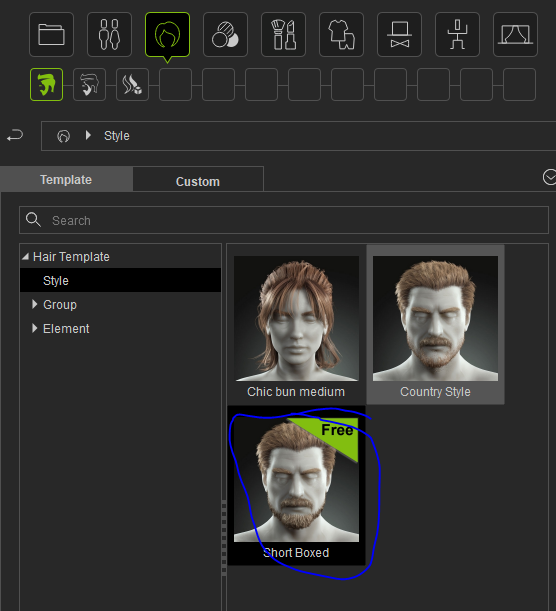
|
|
By wires - 5 Years Ago
|
bwfc91a (3/27/2021)
Yeah same, knew it can't just be me, any 'free' hair item causes CC to have a meltdown and go into a loop for around 5mins trying to install or update sliders....looks like it has done it but when trying to apply same 'free' hair it repeats.
See my reply here to the same question you have already asked.
|
|
By mark - 5 Years Ago
|
All of the new hair items seemed to have installed just fine in iC7 & CC kinda surprised since others have been reporting issues.
However the AccuLip & ExPlus projects projects marked "FREE" appear to have been installed but if I try to launch them pretty nothing happens, a spinning icon and a jump to the SG "Free Resource" folder and that's it. And I can find no "AccuLips & ExPlus Facial Profile" either. I have "Refreshed" the SG in iClone and CC many times with no change in the outcome. Any ideas
|
|
By Amper Sand - 5 Years Ago
|
RL just updated iClone's "IC7 Demo Project Pack", so it now properly includes the two IC7.9 Projects.
Click the Smart Gallery tab and there, in Pack subtab, below "New Purchase" and "Free Resource", there's an "Update" - click it and it will show the "IC7 Demo Project Pack"; right-click it and choose "Update".
|
|
By Laugh Atlantic - 5 Years Ago
|
I'm not getting that in my smart gallery. I still have the same issue.
|
|
By theschemer - 5 Years Ago
|
I tried uninstalling and then updating that pack and it has nothing to do with the 2 missing FREE files. I have spent way too much time messing with this for now. I already contacted support and will wait to hear from them. The weird part is I can right click on the demo and select find file and the file actually exists on my hard drive. If I try a drag and drop it won't work and defaults back to the Smart Gallery tab.
|
|
By mark - 5 Years Ago
|
Thanks for the tip ampertox! Didn't seem to work for me though. This is what I'm seeing...
|
|
By Amper Sand - 5 Years Ago
|
|
mark (3/28/2021)
Thanks for the tip ampertox! Didn't seem to work for me though. This is what I'm seeing...
Hi Mark
Yeah, it was almost identical in my case yesterday - I saw the "Update" item appeared below "Free Resource" (it wasn't there previously since I upgraded to 7.9) and when clicked it shown "IC7 Demo project pack"; when right-click and choose "Update", in the explanation dialog it was shown something like "Added - [and the two projects.iProject]". Once updated it, then in the Content tab for both projects the green "Free" label disappeared and I was able to open them. I see you have the "IC7 Demo project pack", but I cannot figure out why it doesn't appear in the Update tab - me I didn't anything special, I even didn't (want to) install the hotfix.
|
|
By mark - 5 Years Ago
|
Pretty weird for sure. And just so ya know a complete uninstall/reinstall of iC7 imitated a complete "Refresh" of all the old demo projects in SG but it still failed to recognize the two new demo projects, they are still marked 'Free" in the Template/Character folder responding the very same way as before. Oh well can't really complain RL has been very good to me!!!:)
|
|
By mark - 5 Years Ago
|
Wondering if the "Hot-Fix" which I see in some posts is no longer necessary, would fix the "Free-Demo" project issue I'm having?
I had no problem with the "Smart-Hair" items they installed just fine in iC7 and CC3 . My issue was with the "Free" AccuLip & ExPlus Demos and I assume the "Face Morph Profile" which I don't seem to have in the SG.
Just wondering if the folks that were having issues with the "Smart-Hair" not installing correctly in SG had no problem with the 2 free Demos being installed?
|
|
By theschemer - 5 Years Ago
|
Mark,
No it probably won't but you can try it anyhow as it won't hurt anything. I have the same exact issue and tech support had me run the Hotfix again and it didn't fix anything. Then I ran DebugView and sent them the output. Now they have forwarded my support ticket to the developers... If you run the Hotfix make sure you unzip the fix into the C drive as that is what they are calling local.
TS
|
|
By Peter (RL) - 5 Years Ago
|
|
mark (3/30/2021)
Wondering if the "Hot-Fix" which I see in some posts is no longer necessary, would fix the "Free-Demo" project issue I'm having?
I had no problem with the "Smart-Hair" items they installed just fine in iC7 and CC3 . My issue was with the "Free" AccuLip & ExPlus Demos and I assume the "Face Morph Profile" which I don't seem to have in the SG.
Just wondering if the folks that were having issues with the "Smart-Hair" not installing correctly in SG had no problem with the 2 free Demos being installed?
Hi Mark
Please can you try the following:
Try right clicking the IC7 Demo Project Pack in Smart Gallery and select "View Items". Do you see the two new Demo Projects listed?
If not, try uninstalling the IC7 Demo Project Pack, then close down iClone and restart.
Now open Smart Gallery, reinstall the IC7 Demo Project Pack and see if the two Demo Projects are now listed in "View Items".
If not, wait a little (or click Refresh) to see if the Update appears as an option when right clicking. If it does, update and the Demo Projects should now be available.
|
|
By theschemer - 5 Years Ago
|
Peter,
I just tried that and it did not fix the issue. The only way I can see the 2 FREE projects is to go to the Content-Template-Character section.
TS
added: If I right click and the Find File, it takes me to the installed file here:
C:\Users\Public\Documents\Reallusion\Template\iClone 7 Template\iClone Template\Project\1. Character
where both of the demo files seem to be there.
|
|
By mr_vidius - 5 Years Ago
|
Peter (RL) (3/30/2021)
mark (3/30/2021)
Wondering if the "Hot-Fix" which I see in some posts is no longer necessary, would fix the "Free-Demo" project issue I'm having?
I had no problem with the "Smart-Hair" items they installed just fine in iC7 and CC3 . My issue was with the "Free" AccuLip & ExPlus Demos and I assume the "Face Morph Profile" which I don't seem to have in the SG.
Just wondering if the folks that were having issues with the "Smart-Hair" not installing correctly in SG had no problem with the 2 free Demos being installed?
Hi Mark Please can you try the following: Try right clicking the IC7 Demo Project Pack in Smart Gallery and select "View Items". Do you see the two new Demo Projects listed? If not, try uninstalling the IC7 Demo Project Pack, then close down iClone and restart. Now open Smart Gallery, reinstall the IC7 Demo Project Pack and see if the two Demo Projects are now listed in "View Items". If not, wait a little (or click Refresh) to see if the Update appears as an option when right clicking. If it does, update and the Demo Projects should now be available.
very interesting. yesterday, i uninstalled SG. and then reinstalled it. no changes. but this afternoon, i repeated the process, which included closing IC7 and restarting my machine.
and the projects magically appeared, and work. thank you for the info Peter.
vidius
|
|
By Peter (RL) - 5 Years Ago
|
|
theschemer (3/30/2021)
Peter,
I just tried that and it did not fix the issue. The only way I can see the 2 FREE projects is to go to the Content-Template-Character section.
TS
added: If I right click and the Find File, it takes me to the installed file here:
C:\Users\Public\Documents\Reallusion\Template\iClone 7 Template\iClone Template\Project\1. Character
where both of the demo files seem to be there.
Sorry to hear it didn't work for you Schemer. As you have already contacted Support they should hopefully be able to find a workaround for you once the dev team has done further testing. It really is causing some head scratching why for some there are no issues but for others the content will just not appear. We can only apologise for the frustration and inconvenience these issues must be causing.
|
|
By mark - 5 Years Ago
|
Thanks for the tips Peter.
That's pretty much what I have been doing the last few day but after I tried it again it still doesn't work. I also tried Mr. Vidus' solution again and still no go.
I hate to cause you guys any more headaches for sure!;)
|
|
By theschemer - 5 Years Ago
|
I also noticed when I tried to rename the two Free files in explorer by adding "-old" to them, it just changed their names in IC7 with the the "-old" added. So I cut them out of that folder and saved them elsewhere hoping it would see they were missing and reinstall them but no dice. I did notice the file size seems small though for being a demo. One is 874kb and the other is 867kb.
TS
|
|
By 4u2ges - 5 Years Ago
|
|
theschemer (3/30/2021)
I also noticed when I tried to rename the two Free files in explorer by adding "-old" to them, it just changed their names in IC7 with the the "-old" added. So I cut them out of that folder and saved them elsewhere hoping it would see they were missing and reinstall them but no dice. I did notice the file size seems small though for being a demo. One is 874kb and the other is 867kb.
TS
Wow, that certainly not projects. Original project sizes are 142 MB and 289 MB
|
|
By Edward (RL) - 5 Years Ago
|
|
theschemer (3/30/2021)
I also noticed when I tried to rename the two Free files in explorer by adding "-old" to them, it just changed their names in IC7 with the the "-old" added. So I cut them out of that folder and saved them elsewhere hoping it would see they were missing and reinstall them but no dice. I did notice the file size seems small though for being a demo. One is 874kb and the other is 867kb.
TS
Hello,
Sorry about this issue, after some hard tracking, it is coming more clear now. :pinch:
We found our mechanism has a serious issue, if you clicking the new item in Content Manager, it will cause the Smart Gallery to misjudge the content was updated in some environment, but actually not.
And then the update notification will disappear in the Smart Gallery. If you update the content by clicking the Update in the Smart Gallery will no problem.
We optimized our backend server that for who have this issue will see the Update notification again.
Please refresh to wait for the Update to show again in the Smart Gallery.
Remind you must update the content pack by the Smart Gallery.
If you cannot wait for the Update resume you can manually run the hotfix again, the Update should be resume immediately.
Edward
|
|
By theschemer - 5 Years Ago
|
Thanks Edward. That fixed the issue. I appreciate it. :D
TS
|
|
By smallWstudio - 5 Years Ago
|
That seems to have fixed the issue Edward. I did not need to do the "Hot-Fix".
Thanks to all the RL team for tracking this little annoyance down!
mp
|
|
By marymayadedipe - 5 Years Ago
|
|
Wow this fixed it. Thanks so much RL Team, you're amazing.
|
|
By BuckyBlaster - 5 Years Ago
|
|
I am unable to access the two new free character projects also.
|
|
By 3DChick - 5 Years Ago
|
Hi there! I've noticed something with the new updates that I haven't found anyone else reporting here or in Feedback tracker: "restore" seems to have disappeared. I've had several crashes since the update (which I think is my poor sad laptop, not your software) and not once has either iClone or Character Creator come up with the "unsaved data found, do you wan to restore" box.
That always worked so well, I'l admit I've gotten very lazy about constant saving, but it was always such a wonderful feature...I went looking for settings thinking maybe I needed to re-enable it somewhere, and don't know if it was removed on purpose or it if it's a bug.
Should I open a ticket or was that something on purpose?
Thank you!
Nicole
|
|
By animagic - 5 Years Ago
|
Nicole, the feature has not been removed, so it should still work. I have also noticed on occasion that it didn't work, so I think it's good to report it.
One question: the temp files for restoration are by default stored on the C: drive. How much space do you have left on C:?
|
|
By Kelleytoons - 5 Years Ago
|
I agree with Nicole - I won't say it doesn't work at all, but it sure doesn't work MOST of the time anymore.
I'll go one step further -- the few times it HAS asked me if I want to restore it won't restore. So there are definitely some bugs in what used to be a very robust feature (not that I don't save often nor have ever really needed restore -- about 90% of the time I chose not to restore because I always had versions I knew worked).
|
|
By 3DChick - 5 Years Ago
|
@Animagic,
I have approx 100 gigs left out of 246 on C drive. Reallusion stuff is installed on D drive, which is proportionately much more at only approx 200 gigs free of a terabyte. I also clear my temp constantly, if the Windows command to do that affects the Reallusion temp file.
New computer is--theoretically--coming this month (if stupid bitcoin would settle down and oh, maybe the Suez wasn't blocked. Sigh), and it will have reasonable amount of space.
Nicole
|
|
By 3DChick - 5 Years Ago
|
Lack of Restore Function: Feedback Tracker Issue #7778.
:-)
|
|
By subongo - 5 Years Ago
|
I can not see the Mouth Viseme In iClone 3DXChange 7.8 Pipeline: Issue 7782
Hello.
I am having problems making the lips sync look real when I use the BMP and FV Visemes.
The shapes do not look real and so I thought I would edit my Character in Iclone 3DXChange 7.8 Pipeline.
Once I got my character in 3DXChange 7.8 Pipeline I opened the Expressions Editor.
However when I open up the Viseme tab I see none of the Viseme one sees in Iclone 7.9.
I want to make the FV shape look more real but there is no way of changing the shape that makes sense
The Viseme panel has a long list of sliders some for lips and others for eye and face.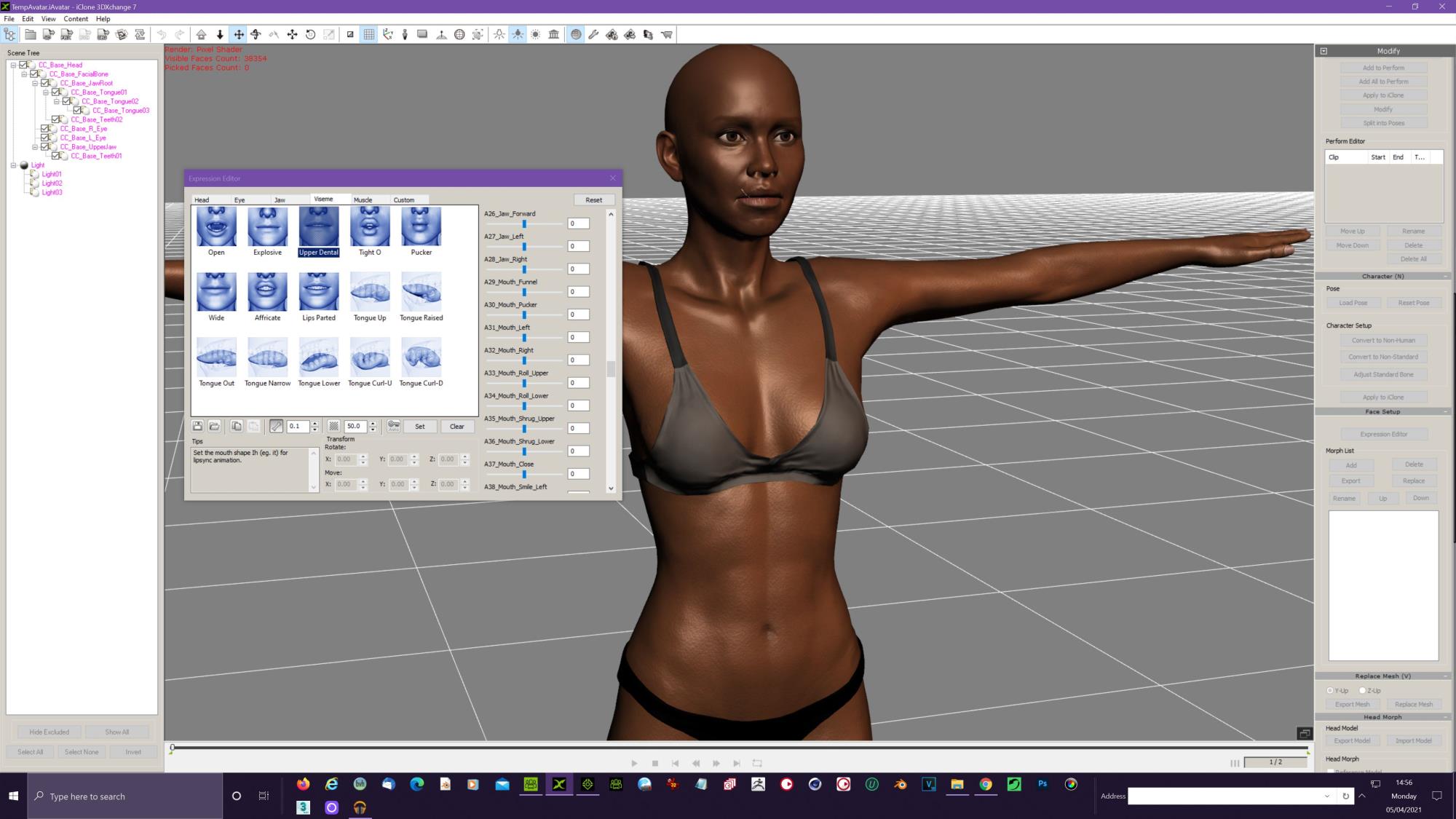
The eye sliders make no sense being in the Viseme panel.
|
|
By animagic - 5 Years Ago
|
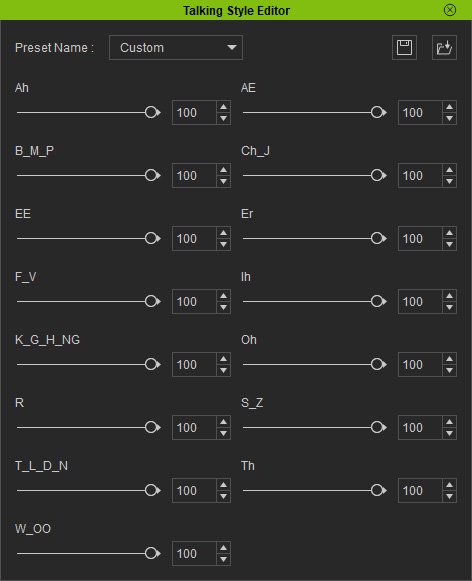
You can now edit the strength of each viseme right inside iClone, allowing you to reduce the strength of all BMP visemes with one setting. No need to bother with 3DXchange.
Check this section in the manual: https://manual.reallusion.com/iClone_7/ENU/Content/iClone_7/7.9/08-Animation/Facial-Animation/Three-Levels-of-Setting-Strength-for-Visemes.htm and look under Clip Level/Talking Style Editor.
- The Talking Style Editor panel will show.
|
|
By subongo - 5 Years Ago
|
Hi.
I already know that. what I was asking is for the ability to move the jaw back or forward when making the FV sound. Most people who use Iclone do not look at other peoples mouths when they talk. The sliders only determine how much of the morph shape the mouth take. Try making the FV sound and look at your face in a mirror. You will find that you do not always have the same mouth shape because different sounds require different mouth shapes. IClone have been trying for years to make their software make their animation have realistic looking lip sync animation but their have never got it right. As soon as new feature is added to the software people that are new to animation leave very complementary comments like, "Amazing" even before they have tried that new feature.
When they see the characters mouth move up and down trigged by text to speech or audio their 1st reaction is to say the video is "Amazing."
BUT it is not amazing. The mouth action is robotic.
There a few people recently who have posted lip sync videos using Iclone 7.9 who lips sync animation looks very realistic. However there tons of other people that have posted lip sync videos using Iclone 7.9 who I would not hire if I was making a movie because there lips shapes do not look right
. Nearly all the videos have thumbs up and have comments like "amazing"
And before I get totally side tracked iClone 3DXchange 6 has a very comprehensible Expression Editor. If you Have iClone 3DXchange 6 go take a look at it's Expression Editor viseme tab; and then compart it to Clone 3DXchange 7 Editor.
Please check it out so that I do not spend forever trying to explain myself
|
|
By animagic - 5 Years Ago
|
|
I have been using various implementations of iClone lip-syncing over the years, so I am not exactly new to this. I was just trying to help.
|
|
By subongo - 5 Years Ago
|
I know you are trying to help. I followed the link you showed me. I wanted emphasis on sounds like FV and BMP only some times but I think the changes are global. That's no good. I was hoping to be able to make custom mouth shape for different pronunciations.
Thanks for the link: I will read up more on it when I have time and experiment and see if I can get positive results.
I did not want to embarrass you and ask to see the results of your lip syncing with Iclone. I tried with earlier versions of Iclone 6 and 7 and I soon gave up because the results where too mechanical.
|
|
By Kelleytoons - 5 Years Ago
|
If you are TRULY after good lip sync then the best way is to use a CC3+ character and enable the Arkkit extensions. These are a brand new way of looking at sync that doesn't use visemes. Because, as you point out, people don't just speak in visemes. They move their entire face and the Arkkit uses this approach (it's proprietary to Apple so if you are doing facial mocap you'll need an iPhone. However, both Acculips as well as facial puppeting can use the Arkkit expressions).
It's game changing -- nothing else using visemes can compete. It actually makes things which are better than Hollywood can do (in the right hands). Check out all the RL videos on it and see.
|
|
By subongo - 5 Years Ago
|
.
.
|
|
By subongo - 5 Years Ago
|
.
.
|
|
By letsdothis - 5 Years Ago
|
Hi
New user here.
I was wondering if the iClone team could review the Blender export. I seems like not all the materials get linked up fully and that some textures might be missing. If the iClone team could just spend a bit of time to clean up that part of the workflow then I would be able to create a buttload of content.
If there's any tutorials that anyone know of that helps sort these issues out please post a link. I've been googling but haven't found anything yet.
Btw the acculips + live capture is really great. Congrats to the team on making it so easy.
|
|
By Jeasy - 5 Years Ago
|
After updating to CC and iClone an hour ago, The IRAY render issue is back with the eyebrows, beards and hair. In IRAY Renders, there is a black patch showing up, please check the screenshot below. Original CC Project on right and IRAY render window on the left. This render issue is in iClone and Character Creator. Also the Prime Hair Pack hair coulours change dramatically when in IRAY.
Do we know how to fix this please @Peter(RL)

|
|
By wires - 5 Years Ago
|
@Jeasy,
I posted an answer to your same question here.
|
|
By Peter (RL) - 5 Years Ago
|
|
iClone 7.91 has now been released. Please continue to post any issues you may find first in the Feedback Tracker and then feel free to discuss in this thread. Thanks.
|
|
By e1_scheer - 5 Years Ago
|
If I have my facial animation looking fine in I-clone, how do export it to unity and have it include any talking style changes I've made?
I've now tried a straightforward fbx export from i-clone (which already isn't ideal) as well as 3DXchange and that doesn't export or bake
the talking style edits either! This is areal problem for me and needs some kind of fix.
I've also made an entry for this in the feedback tracker and in a seperate thread :
https://www.reallusion.com/FeedBackTracker/Issue/Talking-Style-Export-Animation-Baking
https://forum.reallusion.com/480256/Viseme-TalkingStyle-MotionPlus
|
|
By Amper Sand - 5 Years Ago
|
Now I observed that Morph Creator no longer launches - when clicking, the "Please wait" message box appears briefly, the green progress bar fills, then disappear but nothing happens. There's nothing in the Task Manager.
I thought I could be related with the character, but it doesn't work even with older ones, no matter CC3 or CC3+.
Is there any way to troubleshoot this? :crying:
|
|
By 4u2ges - 5 Years Ago
|
|
ampertox (4/24/2021)
Now I observed that Morph Creator no longer launches - when clicking, the "Please wait" message box appears briefly, the green progress bar fills, then disappear but nothing happens. There's nothing in the Task Manager.
I thought I could be related with the character, but it doesn't work even with older ones, no matter CC3 or CC3+.
Is there any way to troubleshoot this? :crying:
Yes :)
https://forum.reallusion.com/FindPost479974.aspx
|
|
By Amper Sand - 5 Years Ago
|
|
I just found it meantime and wanted to reply :) Thank you :)
|
|
By 3DChick - 5 Years Ago
|
Really odd issue I've never seen before. When I save an Acculips dialogue track to MotionPlus, and apply it to another character, about half the time I later try to break that clip to nudge the timing, iClone crashes. (I always unlink the motion track from the viseme track first.)
I thought maybe it was my custom CC3+ characters but I tested it the Caleb CC3+ avatar and it still happened. It mostly happens if the actual viseme parts are close together (like between words). It doesn't seem to happen when it's a longer pause, like between lines. Pre-Acculips versions let me break the long clip anywhere without a problem, even in the middle of words...
Anyone else noticed this?
|
|
By Walvince - 5 Years Ago
|
Hi, I just updated from 7.8 to the 7.9.1.
Because my sets are rather big, I always had a little freeze of 4/5 seconds when I stopped the playback. But today, I have to wait almost 25 seconds after each time I press the pause button :blink:, that's obviously impossible to wait for so long each time I want to test a motion. It's like it's activating again something that's already activated, like global illumination or something, because I don't see why it would be so long to just pause.
I saw that if i delete some props it's getting better, but I can't delete everything. It was working before, so I hope a workaround can be found. Is this a bug ? Maybe there's a new option somewhere that can cause this problem ? I tried almost everything in the real time render options with no success :ermm:
|
|
By TimothyMasters - 5 Years Ago
|
I tried posting this in FeedbackTracker but did not see how to post there. Sorry. Anyhow, the latest iClone randomly crashes with the error shown here. It can happen any time, but most likely after saving the project. Luckily the project appears to save correctly, because I can then load it again. Also interesting is the fact that when this crash happens, a similar crash happens the next time I start iClone! I doubt if this is a hardware problem, because I run iClone on two computers, my big tower when I'm home and a laptop when I travel. It happens on both.
|
|
By matthewsomeday127 - 5 Years Ago
|
You mean to say you're getting the " runaround?" Brother, I've been going through this for days and I'm brand new, just bought the stuff. Going to apply for a refund, since the support team is no use. Wish I had the answer for you. Gerry knows about this, too.
|
|
By matthewsomeday127 - 5 Years Ago
|
|
At least you got Acculips. I just bought the software a few days ago...no acculips, no Caleb, no Lewis, Katherine, etc. and no content packs no Smart Gallery, nothing.What hurts is I got some of this in the Trial Version, but after I put money down I got none of it.
|
|
By matthewsomeday127 - 5 Years Ago
|
|
Well okay Peter, you said it would be appropriate to post issues, so here goes. Same problem as in the Trial days, except worse. Bought over $500 of software.....no acculips, no Smart Gallery for either iClone nor CC3, no Katherine, n o Caleb, no Lewis, etc. nothing and the support team doesn't answer anymore. Acculips was a selling point with Reallusion and all of these critical things missing is not a minor issue. You'd think someone would call me, Skype, screenshare, something to save this sale, because I'm going to have to apply for a refund. Damned shame, it's a GREAT product, but of no use if you can't get it!
|
|
By subongo - 5 Years Ago
|
Hi.
have you tried updating your Iclone software? You can go to the help menu and click on the "check for updates" tab. You should also have the "Reallusion Hub" that is used for updating all your software.
|
|
By Postfrosch - 5 Years Ago
|
Hello matthewsomeday127Just one question:You have the trial versions of- Iclone 7- CC 3- Smart Gallery Iclone 7 and CC 3installed on your computer.You must install the full version before you install itfirst delete the trial versions otherwise you will have installation problemsMy suggestion:
Delete the versions on your computer (including the full versions)
Also delete the hubThen reinstall the HUBInstall from the HUB
Iclone 7.9SmartGallery for IcloneCC3If you have Iclone 3 Pipeline, then the CC 3 Pipeline Extensionthen Smart Gallery for CC 3Then everything should actually work as expected
You can find Acculipos at IClone 7.9 here (see picture)

Greets from Germany
Postfrosch
PS: Sorry my bad englisch
its only a google translation
|
|
By matthewsomeday127 - 5 Years Ago
|
|
Well now I don't feel so bad, because every problem you fellows have enumerated, I HAVE, from soup to nuts. Sure wish somebody had the answer.
|
|
By matthewsomeday127 - 5 Years Ago
|
Oh yeah, thanks man for your reply, but.....I know that and I've done that. It's just that it works and then all of a sudden one day, it'll just stop and I've got no idea what's happening. Also, I've reinstalled multiple times and have NEVER gotten the Smart Gallery at all. Rampa's probably sick and tired of hearing from me, and if I want the embedded content from iClone I have to click and drag from an external folder. So, great as the program is, it's given me a lot of grief.
|
|
By matthewsomeday127 - 5 Years Ago
|
|
Thanks Subongo, but yeah, over the months I've done everything humanly possible but still, no Smart Gallery, no content INSIDE the program ( You've got to click and drag from an external folder) and now.....no acculips. Wish I could find a teacher who'd share my screen and walk me through this. Could be some stupid thing I'm doing, but you know, I came across some other guys who are presumably much more skilled than I, that had encountered the very same problems.
|
|
By Alvin (RL) - 5 Years Ago
|
|
Hi matthewsomeday127,
I have seen some tickets reported by you in the Technical Support system, and it seems that your problem has been resolved.
|
|
By Peter (RL) - 5 Years Ago
|
|
We have today released the 7.93 update for iClone. However, as always we still need your assistance to help us track down any bugs, glitches or other annoying issues that may still remain.
Important: If you do find any bugs, issues or glitches in iClone 7.93, please can you report them first in the Feedback Tracker. Then feel free to discuss the issues in this thread but do try to include a link back to the original Feedback Tracker report or your tracker number.
Thank you.
|
|
By bennydee - 5 Years Ago
|
iclone omniverse is asking for update. my iclone is up to date
|
|
By Peter (RL) - 5 Years Ago
|
|
bennydee (11/4/2021)
iclone omniverse is asking for update. my iclone is up to date
Hi Benny
If you still have the same problem, can you post a screenshot of the error message.
|
|
By General Picture Animation - 5 Years Ago
|
I've come across a serious and unnecessary bug in iClone 7: HDR Bloom refuses to display in preview mode, and only shows up during render out.
I thought it was totally nonfunctional because no matter how much I fiddled with the controls in preview mode, the image never changed.
Tech support, as usual, was apathetic and incompetent and told me to watch the instructional video on HDR.
I was quite surprised to see Bloom appear as the video rendered.
|
|
By animagic - 5 Years Ago
|
I have HDR bloom.
Scene without bloom:

Scene with bloom:

|
|
By General Picture Animation - 5 Years Ago
|
But I TAKE IT FOR GRANTED that HDR works on most PCs.
But I've got a Razer with a 2070 Max Q GPU, which is no shabby platform, and it DOESN'T preview on my machine.
What AM I supposed to do?????
|
|
By 4u2ges - 5 Years Ago
|
If bloom shows up in viewport during render, then you have Real-time set for anything other than "High".
It must be "High" to show up (specifically HDR must be checked in Real-time options in Preferences).
|
|
By General Picture Animation - 5 Years Ago
|
Thank you, 4u2ges.
=============================
ME: That didn't solve the problem. You neglected to tell me what someone on the Forum told me: HDR needs to checked in the Real-Time preferences. Now of course it works. This was another failure from support. =============================
|
|
By 4u2ges - 5 Years Ago
|
No problem hicksight.
Actually I like the way Real-Time options maintenance used to work. That is when you modify the preset option, it would immediately change to Custom at the toolbar.
Now it is very confusing sometimes. You uncheck HRD for instance and in Preferences an asterisk would appear next to built-in option (High in this case) with option to reset on the right.

But it is still shows "High" at the toolbar without ANY indication it was changed from the default a few projects back (where you set it and forget),

And now you wonder just what a heck is going on... :ermm:
I got into that "trap" myself in the past.
I would strongly suggest to RL to make an indication at the toolbar as well, like so (reconstructed):

Probably need to open an FT ticket for that...
|
|
By nildoessa - 5 Years Ago
|
Hello,
When i export an animation via fbx to blender (3dsmax as well) the resulted animation file has the mesh in place.. even if a choose Reset motion root.. the animation is broken. how can i fix this?
i was working ok on previous iclone
using iclone 7.93.5904.1 and blender 2.93.6 (also blender 3.0)
please see wetransfer link. https://we.tl/t-7gDXGi4Ifl
|
|
By hobbyuser3d - 5 Years Ago
|
peter where is the correct bug report location i tried the feedback tracker and a ticket
and the staff answering has no clue..and resulted in what amounts to incoherent wasting time
and me not wanting to report bugs in future. I explained the bug twice and none of my specific points
were addressed got generic support answers when i am talking about dialog boxes and focus bugs in the gui
in a specific case..the request to make a video of it after 2 explanations indicates they do not get it.
|
|
By 4u2ges - 5 Years Ago
|
I really do not like this new feature with SG checking and notifying at startup. It should be taken away.
You start IC and CC and expect to it to be functional right away.
It's not like apps have a quick startup.. now I have to wait for some more time for it to settles before I can do anything and occasionally click away that annoying message about updates,
which causing form focus lock according to hobbyuser3d message above.
If I need to check for updates, I can do that myself when I need it :ermm:
Or at least, there should be a way to turn it OFF.
|
|
By hobbyuser3d - 5 Years Ago
|
this is the bug i reported realted to that 4u2ges its basically a dialog focus issue
in my case im working a character in CC I click to import to iclone and the iclone app is not open before the import.
if there is a SG update in background upon Iclone opens a yes or now take the update dialog pops up and its under the
loading character dialog and just locks the whole gui unclickable requiring task manager to terminate the iclone app
my work around is open iclone before i do any importing
this is probably less likely to happen if the app is open at the same time and for users that have minimal content.
seems like a simple fix..iclone should know an import is happening and finish that task before content update dialogs with the SG
I cannot make a video to replicate the pending update when i open iclone the programming team can. Common sense.
.
|
|
By sundarspeaking - 5 Years Ago
|
my avatars are named as rootnode...and these rootnode nonstandard avatars are not showing in the unreal livelink plugin...
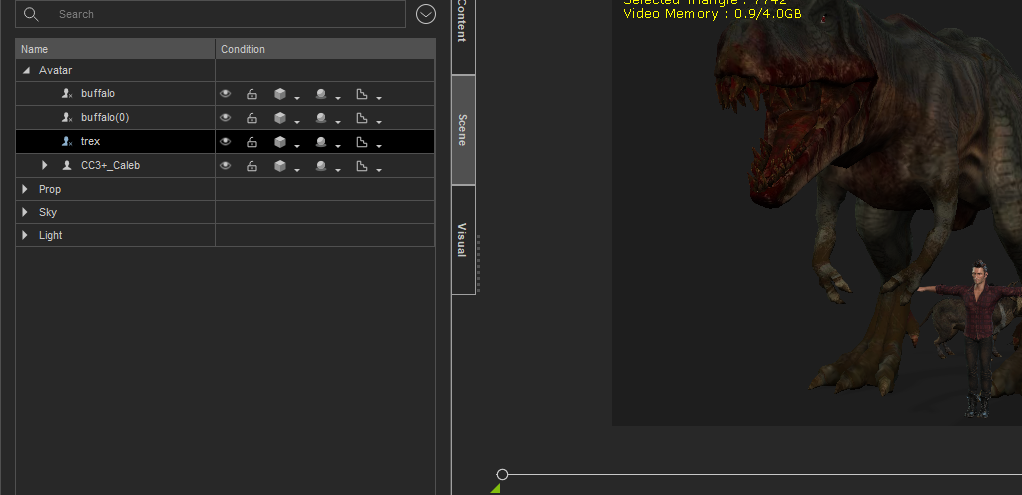
what is rootnode and what is the cross into mark in it...how to convert this...
anyone please help to solve this issue...
|
|
By blazerjones - 4 Years Ago
|
|
Hi So I've installed iClone 7.93 trial version and the smart gallery plug in, but had to change the directory of the software because of space in HD. So I've decided to uninstall the plug in first, but when I was going to instal iClone 7.93 the software was gone from my uninstall program (I use Revo Uninstaller), now I can't instal OR uninstall iClone 7.93 because the files went missing but still is "installed" on Reallusion hub, and when I press to uninstall, nothing happens. I've tried to press to start the program, but it always brings me to 'my documents". Can anyone help me?
|