|
Group: Forum Members
Last Active: 2 Years Ago
Posts: 131,
Visits: 479
|
Wilby (2/25/2021)
rfbindl (1/30/2021)
Peter (RL) (1/11/2021)
You work with Affinity Designer (or Affinity Photo) in the same way as Photoshop using PSD sync and raster layers.
If you are working with vectors you will need to Rasterize first to flatten the layer otherwise Cartoon Animator will ignore it when saved.
This leads me to a question on importing PSD files for props and characters and then launching the prop or character back into Affinity Photo with the PSD link. How are artists managing the process when they draw complex vector object, save to PSD, bring into CTA4, tweak bone and 360 positions, and then lauch back into Affinity Photo to edit the image again? (Where the PSD vector capabilities are lost). I realize that PSD is a raster image, but in editing and saving it has vector properties and keeps them, but they're lost in the transition to CTA4. I can create the PSD, save, and open again in Affinity Photo and all the vector properties are kept in tact. Is this the only option? --- I've been saving the *.afphoto file and doing a copy/paste between the launched image and the original, but it's a little awkward. Most of the time I draw with raster brush (I like the feel of drawing that way with pressure sensitivity and things), but I see so many people are drawing with the vector features that I'm pulled into that idea. I'd like to try more. I was planning on using Affinity Designer (AD) to create vector characters and save in PNG. But will export said PNG with "Continuous Mode" feature turned on in AD so it automatically updates the said external file when I edit it in vector. If Cartoon Animator will constantly read the external referenced PNG files, this might work. But that is a big "if". I discovered someone who uses Spine Pro and Affinity Designer has this work flow. Nah, this doesn't work. Any imported PNG does not refresh automatically. So I'm back to using a launched PSD from CTA4 and just copy-pasting image elements from an opened master vector file in Affinity Designer.
|
|
Ibis Fernandez
|
Ibis Fernandez
Posted 3 Years Ago
|
|
Group: Forum Members
Last Active: 11 Months Ago
Posts: 1.2K,
Visits: 4.3K
|
....and two ears later FLASH is still king hahahahah.... next time listen to me. The SWF format will be strong for another 5-8 years. Only things thats really gonna replace Flash is something like Unreal Engine...the new Flash. Wilby (1/20/2021)
hicksight (1/19/2021)
" Ibis Fernandez (11/20/2020)
Keep in mind this flash player nonsense has nothing to do with animation and the actual production of animated content. That's just for browser based webstuff which no one is really making any more anyway.
The SWF format is still the best format for animated vector based toons "
Ibis Fernandez is far more accomplished than I, but that doesn't prevent him from being just plain wrong.
When he says SWF is the best format and criticisms of it are "nonsense," he's just reflecting a deep bias from having long success with it. He also trash-talks SVG, which is plenty powerful and open source.
You all should be lobbying hard for CA5 to support SVG and then we can design with free tools such as Inkscape or great-value tools like Affinity Designer.Adding support for SVG may be the next best thing for Cartoon Animator 4. While I was checking updates for my Win 10 OS after resetting it, I got reminded by this message... :crying: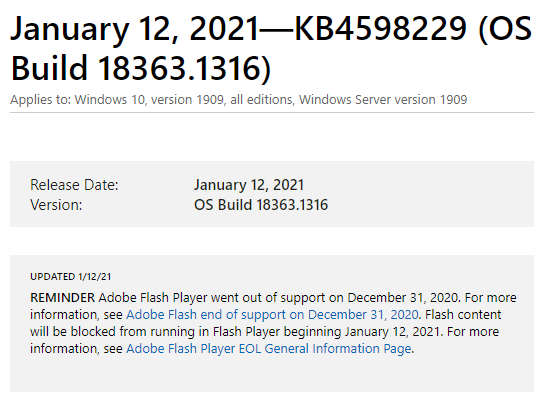
Ibis Fernandez | (available for hire)
----------------------------------------------------------------------------------------
Professional Animator, Filmmaker | Creator of the highest quality (modular) G2 rigs for cartoon animator and developer of Toon Titan and Puppet Producer
Author of Flash Animation and Cartooning: A Creative Guide
>>> be sure to check out http://toontitan.com for professional grade assets, templates, and custom tools for Cartoon Animator and more.
|