|
By Wilby - 5 Years Ago
|
|
Hi there! I'm planning to get Affinity Designer and thinking of retiring my old Adobe Photoshop and Illustrator CS5. But before I do so, I have these questions that I hope someone can clarify: Is it possible to work with vector art and be able to import/export changes directly from Affinity Designer to Cartoon Animator 4 Pipeline and vice-versa? Just like how Cartoon Animator 4 Pipeline currently works and can launch Adobe Photoshop inside the software when a part of the image is modified... But this time, updates are done by editing vector art in Affinity Designer instead of a raster image. Has anyone ever tried this and have worked with Affinity Designer and Cartoon Animator 4 Pipeline? How is it?
Note: I also already posted this in the Affinity forum and just awaiting any reply.
|
|
By Peter (RL) - 5 Years Ago
|
Hi...
You work with Affinity Designer (or Affinity Photo) in the same way as Photoshop using PSD sync and raster layers.
If you are working with vectors you will need to Rasterize first to flatten the layer otherwise Cartoon Animator will ignore it when saved.
Please also remember to activate the "Enable "Save" over imported PSD files" check box under the General setting group of Preferences in Affinity Designer or Photo.
|
|
By Wilby - 5 Years Ago
|
|
Peter (RL) (1/11/2021)
Hi...
You work with Affinity Designer (or Affinity Photo) in the same way as Photoshop using PSD sync and raster layers.
If you are working with vectors you will need to Rasterize first to flatten the layer otherwise Cartoon Animator will ignore it when saved.
Please also remember to activate the "Enable "Save" over imported PSD files" check box under the General setting group of Preferences in Affinity Designer or Photo.
I see. hmm... I don't have much info yet on Affinity Designer. But I am guessing the workflow will then be: Every time I modify a character's body part by launching Affinity Designer inside CA4 Pipeline, it will open up the Raster image. I then have to edit the specific body part in another Vector file backup that I have and copy-paste the changed image parts as Raster to the opened PSD file in Affinity Designer which is connected to CA4 Pipeline. Lastly, I then have to save it in Affinity Designer so updates will get reflected in CA4 Pipeline. Is that right?
|
|
By Wilby - 5 Years Ago
|
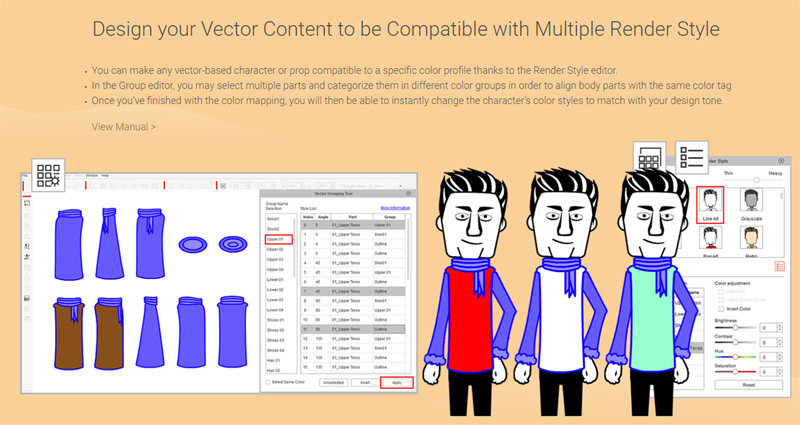
In addition, I was wondering what "vector-based character or prop" means in this page (or see image below) and how can I import them in CA4 Pipeline so they would also work with Render Style?
|
|
By vidi - 5 Years Ago
|
|
SWF File format is the only one of vector support
|
|
By jlittle - 5 Years Ago
|
Render Styles are associated with G2 characters and props which are created using SWF files (as Vidi mentioned).
Render Styles consists of several predefined groups that you can assign the various vector drawings of a character or prop to.
You can then change the color of the group which in turn changes the colors of all the vectors assigned to that group.
Jeff
|
|
By Wilby - 5 Years Ago
|
Thanks Vidi and Jeff! That answered my question. :-) But didn't Adobe stopped supporting Flash software and the SWF format already? If that's the case, are there any good alternative design software you know that can export SWF and is fully compatible with CA4 Pipeline? Affinity Designer, it seems, is not capable of exporting to SWF file format according to this thread. I hope CA4 Pipeline will soon support more vector file formats.
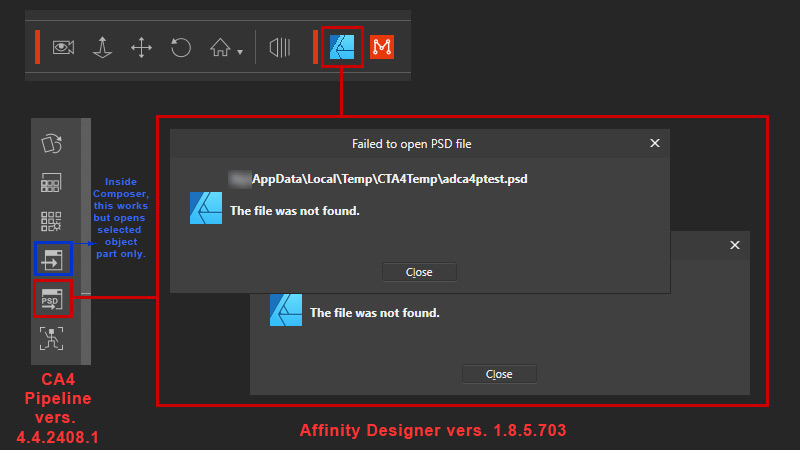
Furthermore, I have tested the trial version of Affinity Designer and tried working with CA4 Pipeline. I encountered an error when launching a PSD in both Stage and Composer Mode. If editing, the only thing that worked is using the "Launch External Image Editor" when an object part is selected inside Composer Mode. Meaning, I was only able to edit one object or body part and cannot open the full PSD file for editing. Creating a new Character in CA4 Pipeline by opening a PSD file generated by Affinity Designer using a layered template seems to have worked too. Kindly refer to image below.
|
|
By jlittle - 5 Years Ago
|
|
Wilby (1/12/2021)
But didn't Adobe stopped supporting Flash software and the SWF format already?
Here is something that Ibis said that is pertinent:
Ibis Fernandez (11/20/2020)
Keep in mind this flash player nonsense has nothing to do with animation and the actual production of animated content. That's just for browser based webstuff which no one is really making any more anyway.
The SWF format is still the best format for animated vector based toons (at least during the development phase) Maybe not as a publishing format. There are some apps that are trying top work with svg but they are still a long way from achieving what swf does. Flash is not going away any time soon, it's still the most relevant production format for this type of content.
In terms of documentation all you need to know is that you can drag and drop swf into cta. Everything else just read the adobe Flash/Animate docs themselves.
Wilby (1/12/2021)
If that's the case, are there any good alternative design software you know that can export SWF and is fully compatible with CA4 Pipeline? The one I use is Serif DrawPlus x8 BUT use version V14.0.0.19 and DO NOT UPGRADE to V14.0.1.21 since SWF export for CTA is broken in that version.
Adobe Flash/Animate can also be used.
Jeff
|
|
By Wilby - 5 Years Ago
|
jlittle (1/13/2021)
Wilby (1/12/2021)
But didn't Adobe stopped supporting Flash software and the SWF format already?Here is something that Ibis said that is pertinent: Ibis Fernandez (11/20/2020)
Keep in mind this flash player nonsense has nothing to do with animation and the actual production of animated content. That's just for browser based webstuff which no one is really making any more anyway.
The SWF format is still the best format for animated vector based toons (at least during the development phase) Maybe not as a publishing format. There are some apps that are trying top work with svg but they are still a long way from achieving what swf does. Flash is not going away any time soon, it's still the most relevant production format for this type of content.
In terms of documentation all you need to know is that you can drag and drop swf into cta. Everything else just read the adobe Flash/Animate docs themselves. Wilby (1/12/2021)
If that's the case, are there any good alternative design software you know that can export SWF and is fully compatible with CA4 Pipeline? The one I use is Serif DrawPlus x8 BUT use version V14.0.0.19 and DO NOT UPGRADE to V14.0.1.21 since SWF export for CTA is broken in that version.
Adobe Flash/Animate can also be used.
Jeff
hmm... At this stage, I don't plan on subscribing to Adobe so Flash/Animate is not an option for me. :-( I will check out Serif DrawPlus x8... Thanks for the suggestion! :-) But it's kinda worrying that the later version is broken with regards to SWF export to Cartoon Animator. Would you know if there is a high chance that bug will still be fixed on future versions?
I have actually sort of accepted that I will probably just work with raster and create the initial artwork in vector. Based on videos I've seen, I like how Affinity Designer looks like and how fast some stuff can be done using its shape tools that seem to work similarly to CorelDraw. What's keeping me from getting Affinity Designer is that I'm not sure how compatible it is with CA4 Pipeline. There seems to be an error launching a PSD file from from CA4 Pipeline into Affinity Designer with all the character body parts available to be edited therein.
|
|
By jlittle - 5 Years Ago
|
|
Wilby (1/13/2021)
Would you know if there is a high chance that bug will still be fixed on future versions?No, Serif moved on to developing the Affinity series and is not supporting the DrawPlus, PhotoPlus, etc series anymore.
You should be able to find a copy online, just check the version first.
Wilby (1/13/2021)
What's keeping me from getting Affinity Designer is that I'm not sure how compatible it is with CA4 Pipeline. There seems to be an error launching a PSD file from from CA4 Pipeline into Affinity Designer with all the character body parts available to be edited therein.Not sure what you are doing wrong but many, including me, are using Affinity Designer and Photo with CA4 without issues.
Jeff
|
|
By Wilby - 5 Years Ago
|
jlittle (1/13/2021)
Wilby (1/13/2021)
Would you know if there is a high chance that bug will still be fixed on future versions?No, Serif moved on to developing the Affinity series and is not supporting the DrawPlus, PhotoPlus, etc series anymore. You should be able to find a copy online, just check the version first. Wilby (1/13/2021)
What's keeping me from getting Affinity Designer is that I'm not sure how compatible it is with CA4 Pipeline. There seems to be an error launching a PSD file from from CA4 Pipeline into Affinity Designer with all the character body parts available to be edited therein.Not sure what you are doing wrong but many, including me, are using Affinity Designer and Photo with CA4 without issues. Jeff
Oh, I will probably stay away from learning to use DrawPlus if Serif already dropped its support for it. It might be better to just get into the Affinity products for "future-proofing". The issue I am experiencing with CA4 Pipeline might be because I am still using the Trial version of Affinity Designer. May I ask, for "launching to PSD" from CA4 Pipeline, which image editor software did you set to open? Is it Affinity Photo or Affinity Designer?
|
|
By jlittle - 5 Years Ago
|
Either one works but I'm using Affinity Photo.
Jeff
|
|
By Wilby - 5 Years Ago
|
|
jlittle (1/14/2021)
Either one works but I'm using Affinity Photo.
Jeff
Ok, I will just probably get Affinity Designer after I finish up a tutorial on Udemy. I need something new, affordable, and fast to replace Illustrator CS5. I will just have to work around with the issue if it ever happens again after I reinstall everything. Thanks for the information sir! :-)
|
|
By vepop - 5 Years Ago
|
|
I am using Affinity Designer for my character creation. So far no problem.
|
|
By Wilby - 5 Years Ago
|
|
vepop (1/14/2021)
I am using Affinity Designer for my character creation. So far no problem.
Thanks for the feedback! :-) I contacted Affinity tech support and we found out the problem was related to my Windows 10 operating system's User folder name. It was divided into two (2) words with a space in between and Affinity Designer has trouble with that. The program automatically truncates my User folder name and just recognizes one (1) word. In consequence, Affinity Designer couldn't find the PSD file in the correct directory. :-P
|
|
By Wilby - 5 Years Ago
|
Ok, so my problem hasn't been fixed yet. A forum member in Affinity commented that the problem is with Cartoon Animator 4 Pipeline not properly encapsulating text (i.e. directory path, folder names with multiple words) thrown to external image editors. Thus, I made further testing using Clip Studio Paint Pro and the same error appeared. So I contacted Reallusion tech support for clarification.

|
|
By General Picture Animation - 5 Years Ago
|
" Ibis Fernandez (11/20/2020)
Keep in mind this flash player nonsense has nothing to do with animation and the actual production of animated content. That's just for browser based webstuff which no one is really making any more anyway.
The SWF format is still the best format for animated vector based toons "
Ibis Fernandez is far more accomplished than I, but that doesn't prevent him from being just plain wrong.
When he says SWF is the best format and criticisms of it are "nonsense," he's just reflecting a deep bias from having long success with it. He also trash-talks SVG, which is plenty powerful and open source.
You all should be lobbying hard for CA5 to support SVG and then we can design with free tools such as Inkscape or great-value tools like Affinity Designer.
|
|
By vepop - 5 Years Ago
|
|
Is there any other option to create something like the animated SWF format?
|
|
By Wilby - 5 Years Ago
|
Here's the bug:
|
|
By vepop - 5 Years Ago
|
No such problem on my side.
|
|
By Wilby - 5 Years Ago
|
|
vepop (1/20/2021)
No such problem on my side.
hmm... Maybe your set up is a little different than mine. Do you use more than two (2) words for your "Users" folder name in Windows 10 64-bit? Folder is located by default at "C:/Users/[Your Name]/". As further testing, I've created a new User account and Windows automatically generated a single word "Users" folder name. I re-logged in into my system using that account and ran Cartoon Animator 4 Pipeline launching each of these same graphics editing software... and they worked in that kind of set up. But I would still like to retain my original User account so I hope this issue can be fixed soon.
|
|
By vepop - 5 Years Ago
|
I've never heard of anyone having the same issue as yours.
Perhaps, this is a first case.
|
|
By Peter (RL) - 5 Years Ago
|
|
Wilby (1/20/2021)
hmm... Maybe your set up is a little different than mine. Do you use more than two (2) words for your "Users" folder name in Windows 10 64-bit? Folder is located by default at "C:/Users/[Your Name]/". As further testing, I've created a new User account and Windows automatically generated a single word "Users" folder name. I re-logged in into my system using that account and ran Cartoon Animator 4 Pipeline launching each of these same graphics editing software... and they worked in that kind of set up. But I would still like to retain my original User account so I hope this issue can be fixed soon.
I used to use a two word username with Windows 10 and never had a problem with Affinity Paint or Designer. Sadly I no longer have a two word username in Windows so can't test it now. Please do keep in touch with Technical Support about this issue. They will be able to advise you if the issue is with CTA.
|
|
By Wilby - 5 Years Ago
|
I've already contacted Reallusion Tech Support yesterday but I just couldn't wait for the reply any longer. I've just reset my Windows 10 operating system, created a new user account (the system auto-generated a single word "Users" folder name), and have reinstalled almost everything. I can now launch Affinity Designer without any issues so far. My machine is now also "fresher" and a little bit more responsive than before. Thanks everyone for trying to help me! :-)
|
|
By Wilby - 5 Years Ago
|
|
hicksight (1/19/2021)
" Ibis Fernandez (11/20/2020)
Keep in mind this flash player nonsense has nothing to do with animation and the actual production of animated content. That's just for browser based webstuff which no one is really making any more anyway.
The SWF format is still the best format for animated vector based toons "
Ibis Fernandez is far more accomplished than I, but that doesn't prevent him from being just plain wrong.
When he says SWF is the best format and criticisms of it are "nonsense," he's just reflecting a deep bias from having long success with it. He also trash-talks SVG, which is plenty powerful and open source.
You all should be lobbying hard for CA5 to support SVG and then we can design with free tools such as Inkscape or great-value tools like Affinity Designer.
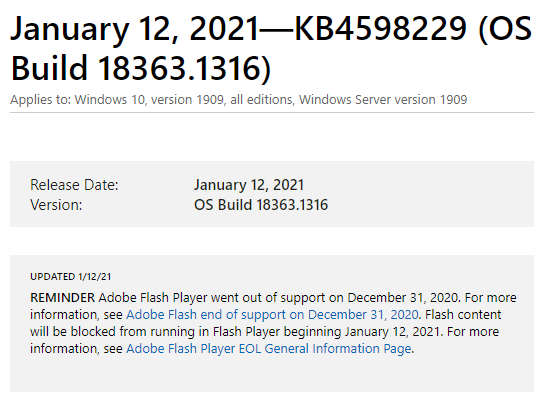
Adding support for SVG may be the next best thing for Cartoon Animator 4. While I was checking updates for my Win 10 OS after resetting it, I got reminded by this message... :crying:
|
|
By rfbindl - 5 Years Ago
|
|
Peter (RL) (1/11/2021)
You work with Affinity Designer (or Affinity Photo) in the same way as Photoshop using PSD sync and raster layers.
If you are working with vectors you will need to Rasterize first to flatten the layer otherwise Cartoon Animator will ignore it when saved.
This leads me to a question on importing PSD files for props and characters and then launching the prop or character back into Affinity Photo with the PSD link.
How are artists managing the process when they draw complex vector object, save to PSD, bring into CTA4, tweak bone and 360 positions, and then lauch back into Affinity Photo to edit the image again? (Where the PSD vector capabilities are lost).
I realize that PSD is a raster image, but in editing and saving it has vector properties and keeps them, but they're lost in the transition to CTA4. I can create the PSD, save, and open again in Affinity Photo and all the vector properties are kept in tact.
Is this the only option? --- I've been saving the *.afphoto file and doing a copy/paste between the launched image and the original, but it's a little awkward.
Most of the time I draw with raster brush (I like the feel of drawing that way with pressure sensitivity and things), but I see so many people are drawing with the vector features that I'm pulled into that idea. I'd like to try more.
|
|
By Wilby - 5 Years Ago
|
|
vepop (1/19/2021)
Is there any other option to create something like the animated SWF format?
I just discovered SVGator. Seeing what it can do, I think SVGs can possibly work like an animated SWF file... but it will require some adjustments to the future version of Cartoon Animator.
|
|
By General Picture Animation - 5 Years Ago
|
I have been lobbying Reallusion to ditch support for SWF and incorporate SVG instead.
A glance at your SVGator link is VERY intriguing -- I sure would love to see a partnership between them and Reallusion!
|
|
By Wilby - 5 Years Ago
|
|
hicksight (2/24/2021)
I have been lobbying Reallusion to ditch support for SWF and incorporate SVG instead.
A glance at your SVGator link is VERY intriguing -- I sure would love to see a partnership between them and Reallusion!
If Cartoon Animator will be able to read and use any imported animated SVG files regardless of what software it was created in, that would be magnificent! If ever Reallusion will partner with SVGator, I hope it would be more on how to integrate the technology into CA and NOT to involve any requirements to subscribe to a new service. I'm avoiding Adobe Creative Cloud and anything similar. :-P
|
|
By Wilby - 5 Years Ago
|
rfbindl (1/30/2021)
Peter (RL) (1/11/2021)
You work with Affinity Designer (or Affinity Photo) in the same way as Photoshop using PSD sync and raster layers.
If you are working with vectors you will need to Rasterize first to flatten the layer otherwise Cartoon Animator will ignore it when saved.
This leads me to a question on importing PSD files for props and characters and then launching the prop or character back into Affinity Photo with the PSD link. How are artists managing the process when they draw complex vector object, save to PSD, bring into CTA4, tweak bone and 360 positions, and then lauch back into Affinity Photo to edit the image again? (Where the PSD vector capabilities are lost). I realize that PSD is a raster image, but in editing and saving it has vector properties and keeps them, but they're lost in the transition to CTA4. I can create the PSD, save, and open again in Affinity Photo and all the vector properties are kept in tact. Is this the only option? --- I've been saving the *.afphoto file and doing a copy/paste between the launched image and the original, but it's a little awkward. Most of the time I draw with raster brush (I like the feel of drawing that way with pressure sensitivity and things), but I see so many people are drawing with the vector features that I'm pulled into that idea. I'd like to try more.
I was planning on using Affinity Designer (AD) to create vector characters and save in PNG. But will export said PNG with "Continuous Mode" feature turned on in AD so it automatically updates the said external file when I edit it in vector. If Cartoon Animator will constantly read the external referenced PNG files, this might work. But that is a big "if". I discovered someone who uses Spine Pro and Affinity Designer has this work flow.
|
|
By Wilby - 5 Years Ago
|
Wilby (2/25/2021)
rfbindl (1/30/2021)
Peter (RL) (1/11/2021)
You work with Affinity Designer (or Affinity Photo) in the same way as Photoshop using PSD sync and raster layers.
If you are working with vectors you will need to Rasterize first to flatten the layer otherwise Cartoon Animator will ignore it when saved.
This leads me to a question on importing PSD files for props and characters and then launching the prop or character back into Affinity Photo with the PSD link. How are artists managing the process when they draw complex vector object, save to PSD, bring into CTA4, tweak bone and 360 positions, and then lauch back into Affinity Photo to edit the image again? (Where the PSD vector capabilities are lost). I realize that PSD is a raster image, but in editing and saving it has vector properties and keeps them, but they're lost in the transition to CTA4. I can create the PSD, save, and open again in Affinity Photo and all the vector properties are kept in tact. Is this the only option? --- I've been saving the *.afphoto file and doing a copy/paste between the launched image and the original, but it's a little awkward. Most of the time I draw with raster brush (I like the feel of drawing that way with pressure sensitivity and things), but I see so many people are drawing with the vector features that I'm pulled into that idea. I'd like to try more. I was planning on using Affinity Designer (AD) to create vector characters and save in PNG. But will export said PNG with "Continuous Mode" feature turned on in AD so it automatically updates the said external file when I edit it in vector. If Cartoon Animator will constantly read the external referenced PNG files, this might work. But that is a big "if". I discovered someone who uses Spine Pro and Affinity Designer has this work flow.
Nah, this doesn't work. Any imported PNG does not refresh automatically. So I'm back to using a launched PSD from CTA4 and just copy-pasting image elements from an opened master vector file in Affinity Designer.
|
|
By Ibis Fernandez - 4 Years Ago
|
....and two ears later FLASH is still king hahahahah.... next time listen to me.
The SWF format will be strong for another 5-8 years. Only things thats really gonna replace Flash is something like Unreal Engine...the new Flash.
Wilby (1/20/2021)
hicksight (1/19/2021)
" Ibis Fernandez (11/20/2020)
Keep in mind this flash player nonsense has nothing to do with animation and the actual production of animated content. That's just for browser based webstuff which no one is really making any more anyway.
The SWF format is still the best format for animated vector based toons "
Ibis Fernandez is far more accomplished than I, but that doesn't prevent him from being just plain wrong.
When he says SWF is the best format and criticisms of it are "nonsense," he's just reflecting a deep bias from having long success with it. He also trash-talks SVG, which is plenty powerful and open source.
You all should be lobbying hard for CA5 to support SVG and then we can design with free tools such as Inkscape or great-value tools like Affinity Designer.Adding support for SVG may be the next best thing for Cartoon Animator 4. While I was checking updates for my Win 10 OS after resetting it, I got reminded by this message... :crying:
|