Profile Picture

Eyelash Shadow In Unreal

Posted By cinemyscope 6 Years Ago
You don't have permission to rate!
Author
Message
cinemyscope
cinemyscope
Posted 6 Years Ago
View Quick Profile
Distinguished Member

Distinguished Member (2.4K reputation)Distinguished Member (2.4K reputation)Distinguished Member (2.4K reputation)Distinguished Member (2.4K reputation)Distinguished Member (2.4K reputation)Distinguished Member (2.4K reputation)Distinguished Member (2.4K reputation)Distinguished Member (2.4K reputation)Distinguished Member (2.4K reputation)

Group: Forum Members
Last Active: 4 Years Ago
Posts: 239, Visits: 608
Hi,
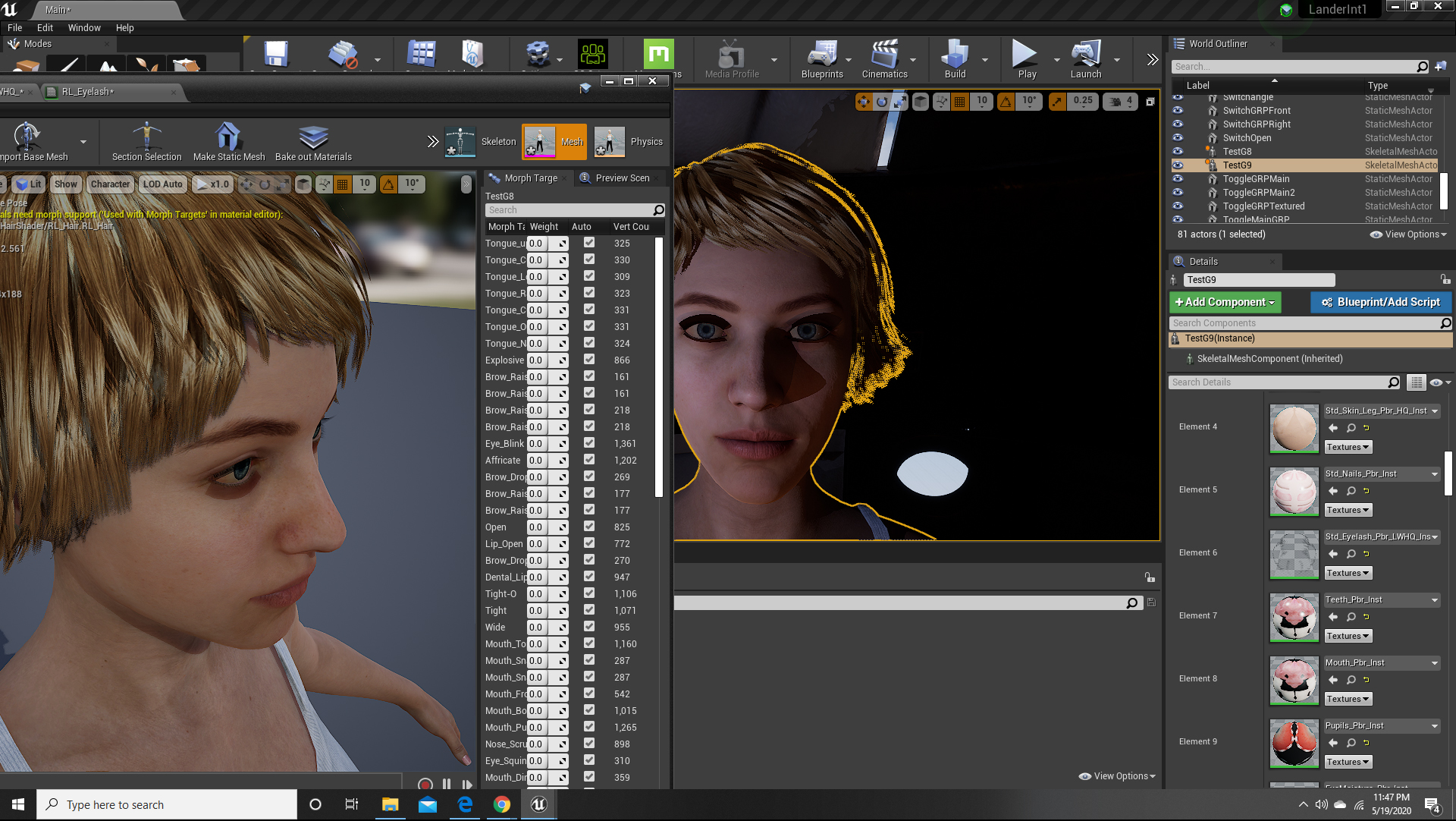
Let me say upfront I am very new to UE4, to Character Creator, to iClone, to Daz, etc.  My interest are Cinematics.  I successfully moved a Daz character to CC3/iClone and used their UE4 plug in for import.  My problem is that the eyelash geometry (I guess the alpha mask) throws a shadow in the shape of the invisible geometry.  The hair also doesn't look right, which I assume may be due to a similar issue.
I tried to find a solution for this but the imported node tree for the eyelashes alone looks daunting for a newbie.  I've searched google to death and even though I found some others with the same problem I really haven't found a solution online.  I'd really appreciate any help!  Just please word it so a novice can follow:)
I'm attaching an image to illustrate.
Thank you!
https://forum.reallusion.com/uploads/images/ae97296a-f793-4c89-9188-f1c2.jpg


Threaded View

Threaded View
Forum Post Eyelash Shadow In Unreal By cinemyscope ( 6 Years Ago )
Forum Post Hi, welcome to the forum :) Can you please show the eyelash material?... By 3dtester ( 6 Years Ago )
Forum Post Thank you so much for trying to help! I'm attaching the screen grab... By cinemyscope ( 6 Years Ago )
Forum Post This looks like your opacity map is inverted. Could you show the base... By 3dtester ( 6 Years Ago )
Forum Post The base color is a solid brown square. I'm attaching it. Thank... By cinemyscope ( 6 Years Ago )
Forum Post Seems that the problem is located somewhere before you are importing... By 3dtester ( 6 Years Ago )
Forum Post I'm attaching a frame grab of the same model in iClone. Also note the... By cinemyscope ( 6 Years Ago )
Forum Post Ok, i also have some characters that have their eyelashes that way.... By 3dtester ( 6 Years Ago )
Forum Post I can't thank you enough for taking the time. Thank you - truly! By cinemyscope ( 6 Years Ago )
Forum Post Unfortunately i have to say that it works for me. The eye lashes also... By 3dtester ( 6 Years Ago )
Forum Post Thank you! The Character is the standard G8 character imported with... By cinemyscope ( 6 Years Ago )
Forum Post [quote][b]cinemyscope (5/20/2020)[/b][hr] Hi, Let me say upfront I am... By unit23 ( 6 Years Ago )
Forum Post Thank you! I'll give it a try. I followed 2 different tutorials.... By cinemyscope ( 6 Years Ago )
Forum Post Hi, I've followed the exact instructions with a new character coming... By cinemyscope ( 6 Years Ago )
Forum Post I've now also tried a CC3 character with CC3 hair. The export and... By cinemyscope ( 6 Years Ago )
Forum Post Hi Cinemyscope.. I edit my message a third time.. You still have the... By doubblesixx ( 6 Years Ago )
Forum Post [quote][b]cinemyscope (5/21/2020)[/b][hr]I've now also tried ..... By unit23 ( 6 Years Ago )
Forum Post You are using translucent blendmode : Do this : Wrong : Right :... By StyleMarshal ( 6 Years Ago )
Forum Post A huge THANK YOU to everyone who replied!!! Dear Baseline303 your... By cinemyscope ( 6 Years Ago )
Forum Post You are welcome :-) For some UE4 tips & tricks you may take a look... By StyleMarshal ( 6 Years Ago )
Forum Post Just came here to praise Bassline303 for the solution! I experienced... By markcheng247 ( 5 Years Ago )


Reading This Topic