|
Author
|
Message
|
|
Miranda (RL)
|
Miranda (RL)
Posted 6 Years Ago
|
|
Group: Administrators
Last Active: 4 Years Ago
Posts: 1.8K,
Visits: 11.2K
|
Upon first launch of the Smart Gallery in iClone or Character Creator, the system will automatically synchronize the installed content packs in your local PC with Smart Gallery. Which means, if you have downloaded a content pack in your local PC before, the installation status of this content pack should be shown as Installed. 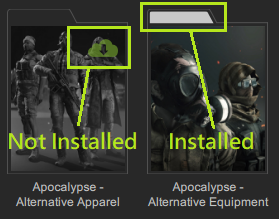 Under some conditions, the Not Installed warning may appear in the Smart Gallery even it's actually downloaded and applicable in the Content Manager. Under some conditions, the Not Installed warning may appear in the Smart Gallery even it's actually downloaded and applicable in the Content Manager.- The path or name of the content packs have been manually changed from the default.
For example, if you moved the content pack from path A to path B in your local PC, Smart Gallery will see this content pack as Not Installed.
Note: Smart Gallery will be able to detect the installed content with custom path or name in the future, so you can choose to keep your current arrangement for now.
- Some *legacy content packs which were installed during Jan. 15th to Feb. 21st, 2020.
This is a side effect of our updated back-end server to optimize the Smart Gallery system.
If you found that there are some duplicate content assets in different folders of the Content Manager after initiating Smart Galley, you can manually delete the extra content items.
Here is a tool to assist you to find all redundant content. (DOWNLOAD)
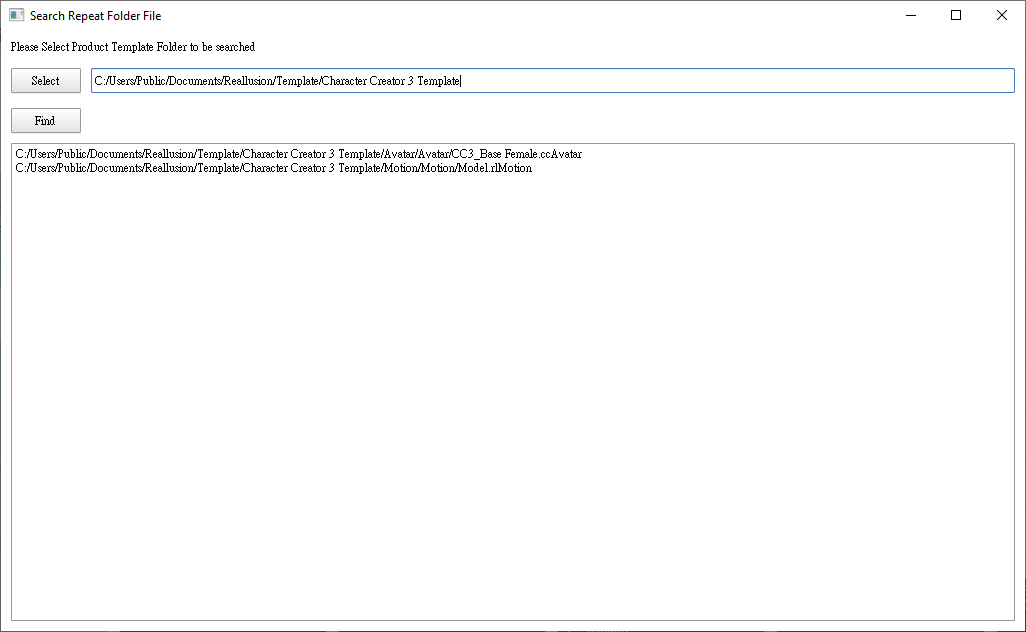
*Redundant content assets are mostly found with duplicate folders like Motion > Motion, Prop > Prop, Avatar > Avatar folder.
*The legacy content packs include, but not limited to the following: - Stage-Magician
- Total Materials Vol 1: General Texture
- IC - WW2 -> B219_US Army Infantry.iAvatar
- Battleground: Fort and Village
- Combat Motions & Interactive Guns
- Fundamentals Training Resource
- Special Effects Vol.2 Natural Phenomenon
- HDRi Fundamentals 25
- Terms of Endearment Vol. 2: Lovers
- G5 CloneCloth for Chuck
- G5 CloneCloth for Gwynn
- Total Materials Vol. 16: Architectural Showroom
- Total Materials Vol.6: Clean Texture
- The installed content pack has been updated by the author after the time of download.
It happens when a content pack in your local PC is not consistent to its current state in the cloud. Smart Gallery detects the inconsistencies within the packs; So it will download the newly added item(s) when you double-click to install. The installation speed is likely to be very fast, because it only prompts to download the newly added items instead of the entire pack.
Note: The ability to push update notifications will be a new feature within Smart Gallery and will be made available in an upcoming patch.
- Content assets with incorrect filenames.
There are very few cases of content items given invalid filenames, e.g. some content in the Iray Material 600+ pack. The installation speed is likely to be very fast when you double-click to install, because there are only a few content items with invalid filenames.
If there are any uninstalled content packs that don't meet the conditions mentioned above, please leave a comment in this thread or submit a ticket to the Feedback Tracker.
Thank you!
Reallusion Team
|
|
|
|
|
animagic
|
animagic
Posted 6 Years Ago
|
|
Group: Forum Members
Last Active: Last Month
Posts: 15.8K,
Visits: 31.4K
|
SG does not correctly use the existing subcategories under Materials. For example, I have the 3dFoin Hydra pack, which comes with different Skin materials, which are correctly installed under Materials/Skin/3dFoin Hydra. However, SG does not recognize this and reinstalls directly under Materials, so Materials/3dFoin Hydra. This may be a general problem with materials that reside under the legacy categories: Upper, Lower, Skin, Hair, etc. I know I can move the materials to correct this but I think it's important to keep the existing legacy categories.
|
|
|
|
|
Edward (RL)
|
Edward (RL)
Posted 6 Years Ago
|
|
Group: Forum Members
Last Active: Last Year
Posts: 301,
Visits: 4.9K
|
animagic (2/25/2020)
SG does not correctly use the existing subcategories under Materials.
For example, I have the 3dFoin Hydra pack, which comes with different Skin materials, which are correctly installed under Materials/Skin/3dFoin Hydra. However, SG does not recognize this and reinstalls directly under Materials, so Materials/3dFoin Hydra.
This may be a general problem with materials that reside under the legacy categories: Upper, Lower, Skin, Hair, etc.
I know I can move the materials to correct this but I think it's important to keep the existing legacy categories.Hello Animagic,
Thank you for the issue feedback. We will track this issue and I'll let you know once we fixed. :):)
Edward
|
|
|
|
|
Edward (RL)
|
Edward (RL)
Posted 6 Years Ago
|
|
Group: Forum Members
Last Active: Last Year
Posts: 301,
Visits: 4.9K
|
animagic (2/25/2020)
SG does not correctly use the existing subcategories under Materials.
For example, I have the 3dFoin Hydra pack, which comes with different Skin materials, which are correctly installed under Materials/Skin/3dFoin Hydra. However, SG does not recognize this and reinstalls directly under Materials, so Materials/3dFoin Hydra.
This may be a general problem with materials that reside under the legacy categories: Upper, Lower, Skin, Hair, etc.
I know I can move the materials to correct this but I think it's important to keep the existing legacy categories.Hello Animagic,
After some investigation, we found that the installation path for this pack has an issue.
The Downloader and the Smart Gallery is the same, But the legacy content installer is different.
Did you remember whether you install it by the legacy installer?
After some quick discussion, we will keep the current setting of Downloader and Smart Gallery if no other concerns.
Because the legacy content installer is impossible to provide the same data to sync to the Downloader or Smart Gallery and we will phase it out.
To phase out the legacy installer is to fulfill the future complex syncing between cloud and local, and providing more and better service for your content.
Anyway, we are sorry for the confusion.
Edward
|
|
|
|
|
gekido
|
gekido
Posted 6 Years Ago
|
|
Group: Forum Members
Last Active: Last Month
Posts: 60,
Visits: 244
|
|
|
|
|
|
Edward (RL)
|
Edward (RL)
Posted 6 Years Ago
|
|
Group: Forum Members
Last Active: Last Year
Posts: 301,
Visits: 4.9K
|
Hello,
We do some tests for the three packs, but it looks correct on display and installation. We use the Downloader to install and then process "Sync Local Content" in the Smart Gallery. After that, uninstall it from the SG and install it again in the SG. During the testing, we aware that some of the items only show in All. Ex. the "Rock Band - Rock Performances" should appear in the Motion category, but you can see in the All category only. We update the setting in our backend to fix it quickly. If you are in this case, you can refresh your Smart Gallery to see whether the pack appears.
If the pack was not displaying in your all list, you need to confirm whether the filter not set to Installed.
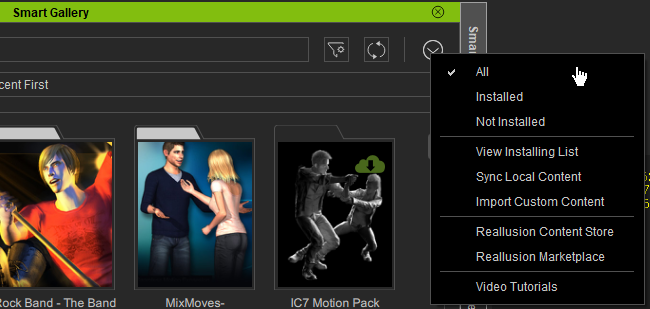
Please also confirm whether the purchase account is the same as the iClone program. If above not resolve your issue, you may need to submit a support ticket that we can get more information from you and keep checking it.
Edward
|
|
|
|
|
animagic
|
animagic
Posted 6 Years Ago
|
|
Group: Forum Members
Last Active: Last Month
Posts: 15.8K,
Visits: 31.4K
|
I just noticed today that for some reason characters under 00_CC_Character, 01_G6_Character, and 02_G5_Character (i.e., Christian, Natalie, Mason, Heidi, Chuck, and Gwynn) do not show up in Smart Gallery.
|
|
|
|
|
animagic
|
animagic
Posted 6 Years Ago
|
|
Group: Forum Members
Last Active: Last Month
Posts: 15.8K,
Visits: 31.4K
|
Edward (RL) (2/26/2020)
After some investigation, we found that the installation path for this pack has an issue. The Downloader and the Smart Gallery is the same, But the legacy content installer is different.
Did you remember whether you install it by the legacy installer?
Edward, this is older content that I did install with the legacy installer. As I indicated the new and improved download paths are not always consistent, so I think I will wait until we can set custom paths for content. It seems that in the new setup materials are sort of lumped together. Even though we have Smart Gallery, it is still nice to have some kind of organization in the Content Manager itself.
|
|
|
|
|
PIO C
|
|
|
Group: Forum Members
Last Active: Last Year
Posts: 18,
Visits: 697
|
I have a problem that isnt listed above, I bought Occupation Solution which is a pack containing
* Professional Outfits
* Occupations Series - Career Gears
* Occupations - Career Motions
When I load into CC3.3.3 I can only find and install Professional Outfits. I have looked everywhere but cant find Career gears.
Any Ideas whats wrong?
|
|
|
|
|
Peter (RL)
|
Peter (RL)
Posted 6 Years Ago
|
|
Group: Administrators
Last Active: 2 Years Ago
Posts: 23.1K,
Visits: 36.6K
|
If you are having problems locating the content in Smart Gallery, please try checking the pack is registered on your Reallusion Account > Order History page. Note: You can also install from there if you wish. https://www.reallusion.com/member/#/en/order-history
Peter
Forum Administrator www.reallusion.com
|
|
|
|