|
Author
|
Message
|
|
TonyDPrime
|
TonyDPrime
Posted 4 Years Ago
|
|
Group: Forum Members
Last Active: Last Year
Posts: 3.4K,
Visits: 12.4K
|
JoeGideon (1/10/2021)
Bassline303 do you think that the problem with the upper and lower lip (during smoothing) could be fixed by slightly opening the mouth before subdividing? Is that even possible? My thought is that giving Maya or Blender a clear space between the upper and lower lip might allow the subdivision smoothing to work properly.
This also may be related to an issue that I am finding when I take my CC3 characters into Zbrush. After every round trip to Zbrush and back, the character's mouth slightly opens just a tiny bit. After a few round trips the mouth gap is very noticeable and I have to go into CC3 sliders to close the mouth again.
Just a thought!Joe, when I try from Maya to Ue4 with SubD, UE4 hangs on import when building the LOD skeletal mesh. The thing is, the same file works fine without SubD Maya to UE4. So that one little step causes a problem for UE4. Have you gotten a character with SubD into UE4 from ZBrush?
|
|
|
|
|
JoeGideon
|
JoeGideon
Posted 4 Years Ago
|
|
Group: Forum Members
Last Active: 10 Months Ago
Posts: 246,
Visits: 1.7K
|
Hi TonyDPrime - No, I have not even tried to go from Zbrush to UE4 yet. When I'm using Zbrush, so far, I import my CC3 characters, subdivide them several times, sculpt on the high resolution, then take the characters back to lowest resolution and export the mesh changes to CC3. As I mentioned, just doing this causes the mouth to open very slightly on each round trip. After 4 or 5 round trips, I have to go into CC3 modify sliders and close the mouth (lips) because you want closed lips, neutral position for animation.
I'm not very technical at all, but when I saw the mouth problems Bassline303 was getting subdividing the characters, I just threw out the idea that maybe all of these mouth distortion problems might be related to having the lips closed and the computer not being able to differentiate upper and lower lips during a subdivision.
As far as importing higher resolution characters, I'm not sure about why that would be hanging up for you.
|
|
|
|
|
StyleMarshal
|
StyleMarshal
Posted 4 Years Ago
|
|
Group: Forum Members
Last Active: Last Year
Posts: 5.8K,
Visits: 14.3K
|
CC3 ----> UE4 Mesh-Smoothing/Subdivide
Ok , got it working , open mouth didn't help (I would have lost my bet) ;)
What I did is to exclude the lips while Mesh Smoothing.
I don't see any big difference with facials , but when you are working with displacement maps you will see a difference , it has more details. (good for wrinkles a.s.o)
And the frame rates are good in UE4 with SubD !
|
|
|
|
|
meletis3d
|
meletis3d
Posted 4 Years Ago
|
|
Group: Forum Members
Last Active: Last Month
Posts: 19,
Visits: 485
|
Hi all! I wonder if there is way to get multiple face textures in Character Creator on one UV set like they did here in Ancestors Legacy so I can have variation in Unreal. I know how to do this using external apps but because I'm using CC3 to do the final export to Unreal with the rig and skins, it complicates things. Any help would be awesome! 
|
|
|
|
|
toystorylab
|
toystorylab
Posted 4 Years Ago
|
|
Group: Forum Members
Last Active: 3 Months Ago
Posts: 4.6K,
Visits: 29.9K
|
Nice... As I don't have Maya or C4d, no option for me. Sure subdivided looks better, though I don't think it is that important for my kinda story telling. And it would also mean an additional step/work... Thanx for elaborating this. ;)
Toystorylab on Vimeo :  Crassitudes (my "Alter Ego") on Youtube: Crassitudes (my "Alter Ego") on Youtube: 
|
|
|
|
|
StyleMarshal
|
StyleMarshal
Posted 4 Years Ago
|
|
Group: Forum Members
Last Active: Last Year
Posts: 5.8K,
Visits: 14.3K
|
toystorylab (1/11/2021)
Nice...
As I don't have Maya or C4d, no option for me.
Sure subdivided looks better, though I don't think it is that important for my kinda story telling.
And it would also mean an additional step/work...
Thanx for elaborating this. ;)
It will in UE5 and when RL will come out with their facial wrinkles system , guess RL will let us export the SubD Character :-)
|
|
|
|
|
toystorylab
|
toystorylab
Posted 4 Years Ago
|
|
Group: Forum Members
Last Active: 3 Months Ago
Posts: 4.6K,
Visits: 29.9K
|
Bassline303 (1/11/2021)
It will in UE5 and when RL will come out with their facial wrinkles system , guess RL will let us export the SubD Character :-)Sounds good :w00t:
Toystorylab on Vimeo : Crassitudes (my "Alter Ego") on Youtube:
|
|
|
|
|
TonyDPrime
|
TonyDPrime
Posted 4 Years Ago
|
|
Group: Forum Members
Last Active: Last Year
Posts: 3.4K,
Visits: 12.4K
|
Bassline303 (1/11/2021)
CC3 ----> UE4 Mesh-Smoothing/Subdivide
Ok , got it working , open mouth didn't help (I would have lost my bet) ;)
What I did is to exclude the lips while Mesh Smoothing.
I don't see any big difference with facials , but when you are working with displacement maps you will see a difference , it has more details. (good for wrinkles a.s.o)
And the frame rates are good in UE4 with SubD !
What do you mean "exclude the lips"....you SubD Body, right? How would you exclude the lips from "Body" object
|
|
|
|
|
StyleMarshal
|
StyleMarshal
Posted 4 Years Ago
|
|
Group: Forum Members
Last Active: Last Year
Posts: 5.8K,
Visits: 14.3K
|
I selected the whole body and excluded the faces of the lips in face mode , I used the rubber band for selecting all and ctrl for deselecting....  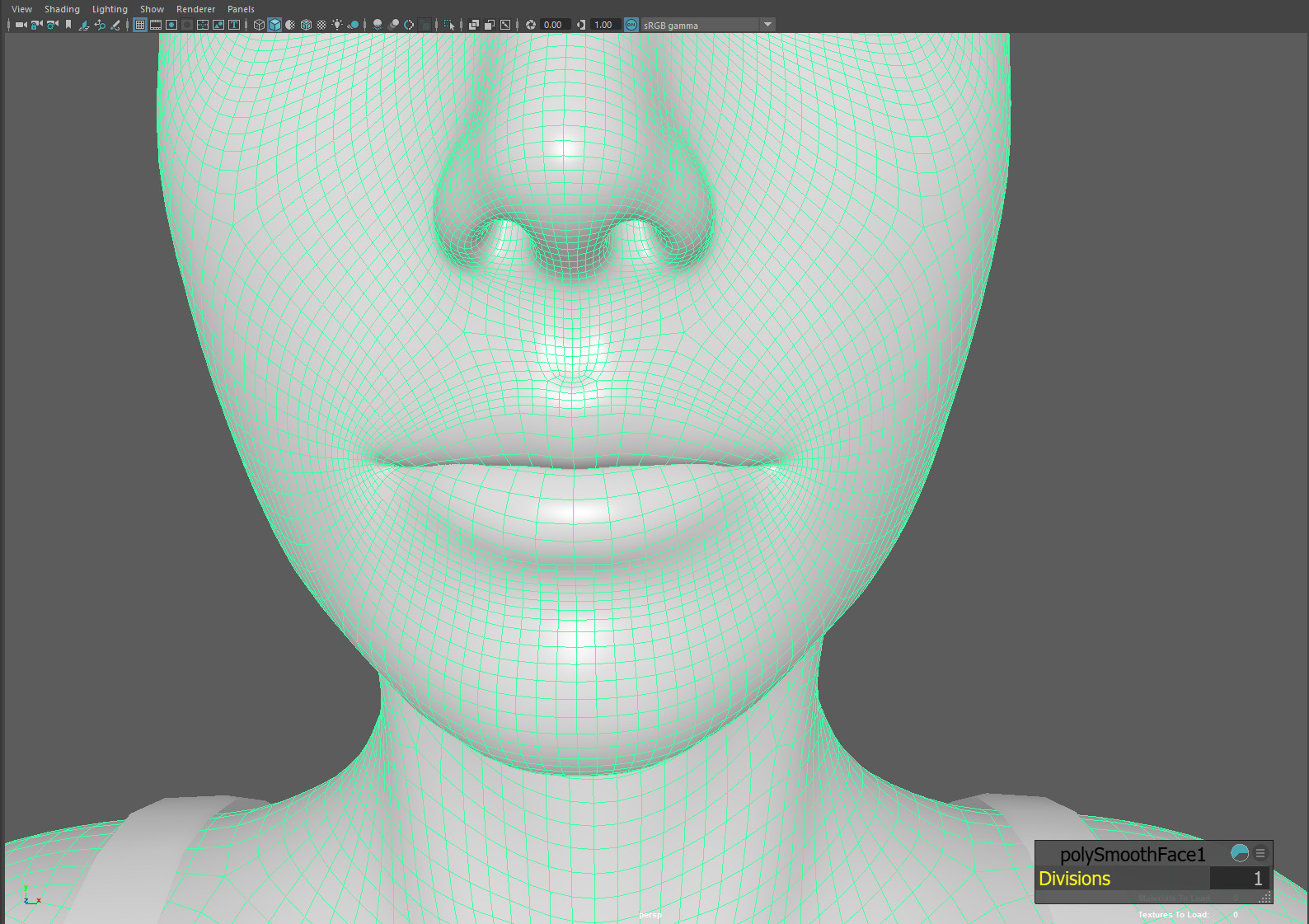 After smoothing , you have to do this (it's like baking) or UE4 will not load it .... ( could take 30sec ) ... then export all with "smooth mesh" ticked - and triangulate unticked .... 
|
|
|
|
|
rosuckmedia
|
rosuckmedia
Posted 4 Years Ago
|
|
Group: Forum Members
Last Active: 7 Months Ago
Posts: 3.2K,
Visits: 4.8K
|
Hi all
I can only endorse this post from Toystorylab.
It is an unreal problem if subdevision is not imported from CC3
I don't see any difference either.
There are definitely more important things:D:D:D
Thanks for this test
Greetings Robert
|
|
|
|