|
Author
|
Message
|
|
StyleMarshal
|
StyleMarshal
Posted 4 Years Ago
|
|
Group: Forum Members
Last Active: Last Year
Posts: 5.8K,
Visits: 14.3K
|
[b]TonyDPrime (1/9/2021)
I am now trying a super HD character and I am able to subdivide in Maya and then export back into UE4 BUT it seems it would either take a very long time, or it just freezes up the engine. I am still waiting to see if it actually finishes the import-in.... :ermm:My Reg was 16 mb, HD was 91mb [/quote] 91mb sounds good , did you delete " Non-Deformer History" in Maya before export ? I also did Game-Export and don't tick triangulate .... UE4 should do the triangulation while importing. Import shouldn't take that long but maybe you have to assign the CC HQ Materials again. Didn't have the time to do some more tests yet ...
|
|
|
|
|
StyleMarshal
|
StyleMarshal
Posted 4 Years Ago
|
|
Group: Forum Members
Last Active: Last Year
Posts: 5.8K,
Visits: 14.3K
|
Here is the issue I get after smoothing the body , looks like the upper and lower lip did have some connections while smoothing. Will have a deeper look into it ....   It could be so easy if RL would let us export the subdivided Character ...
|
|
|
|
|
Jeasy
|
|
|
Group: Forum Members
Last Active: Last Year
Posts: 178,
Visits: 2.4K
|
Bassline303 (12/13/2020)
Live Link IK  :( :( :( I can't get my LiveLink to work this way... I have tried and tried and tried. Followed your tutorial and still no luck. using Unreal 4.25. I really need this to work Alas, if only somehow there was a full tutorial.
|
|
|
|
|
JoeGideon
|
JoeGideon
Posted 4 Years Ago
|
|
Group: Forum Members
Last Active: 10 Months Ago
Posts: 246,
Visits: 1.7K
|
That's crazy! I agree - Reallusion needs to give the option to export subdivision for professional results. Or we can tell the audience all the characters have big mouthfuls of bubble gum! Bassline303 (1/9/2021)
Here is the issue I get after smoothing the body , looks like the upper and lower lip did have some connections while smoothing. Will have a deeper look into it .... It could be so easy if RL would let us export the subdivided Character ...
|
|
|
|
|
TonyDPrime
|
TonyDPrime
Posted 4 Years Ago
|
|
Group: Forum Members
Last Active: Last Year
Posts: 3.4K,
Visits: 12.4K
|
For what’s its worth, I myself have tried and tried to import in a HD character and it just hangs on import. But, I think you have shown that even were it to come in, it’s then subject to some anomalies right now as we don’t have a consistent format to bring HD into UE4 from CC3/iClone.
With UE5 Nanite coming it makes sense for RL to have an HD subdivision export. Although, for all we know Tessellation lines might be gone in UE5, in which case you’d just use the regular.
Waiting I can’t take this tension anymore!!!
At least the rest of the world is calm and relaxed...
|
|
|
|
|
Jeasy
|
|
|
Group: Forum Members
Last Active: Last Year
Posts: 178,
Visits: 2.4K
|
Bassline303 (1/9/2021)
Going to go through your tutorial again now and start from scratch to ensure I do everything as you have shown. Will come back to you. Thank you.So I have followed your tutorial 5 times, put the power_ik Ground node on CCLiveLink_v23 AnimBP as shown, hit link activated in iclone, pressed play on UE, character flys up in the air, the iclone animation is playing but not sure what I am doing wrong now. Could you please do a tutorial without cropping the screen and from scratch as in Transfer character to UE using iclone live link, then setting up in UE 4.25 with Power IK, activating link and running animation Move_Run_M applied to the character in iclone. (Animation is part of the new Artcore Spunky Moves free animation pack). Playing the animation on iclone with Live Link activated and then fix the character in UE 4.25 with full screen showing Please. I am feeling lost. Spent 8 hours today trying to figure out what is happening but am totally lost. Please Help! :(
Can you make a dummy terrain that is uneven so the feet can follow the terrain please.[/quote] Guess you have to deactivate ground in details for the Character because only PowerIK should calculate the distance to the ground via trace ....do this :
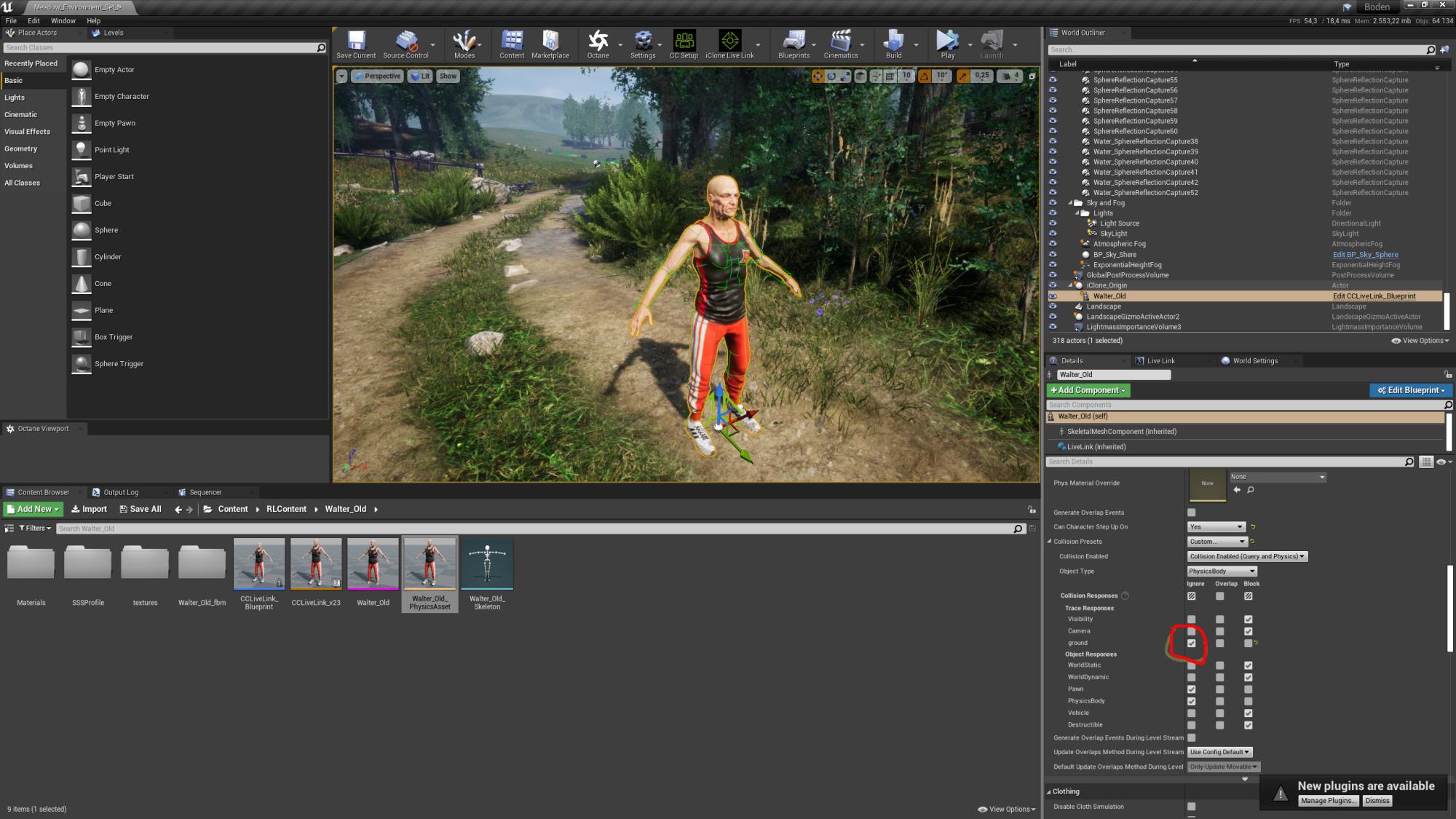 [/quote] SO did what you suggested here with the Collison. Worked temporarily, but because I have trees etc on the terrain and the terrain is uneven, the character jumps all over the place and bounces in the air. :( This is weird, Really Really Weird. I have a scene where a man and woman are being chased in the forest, they reach a cliff edge and then the man draws his sword and fights the bear, injuring the bear but when the bear attacks, he is struck down after the fight. I am not sure what must I do to get this working so I can do this scene.
|
|
|
|
|
StyleMarshal
|
StyleMarshal
Posted 4 Years Ago
|
|
Group: Forum Members
Last Active: Last Year
Posts: 5.8K,
Visits: 14.3K
|
@Jeasy
Can you show me a picture of your environment / terrain ?
If I do a tutorial again , I would try to take a similar terrain ...
|
|
|
|
|
TonyDPrime
|
TonyDPrime
Posted 4 Years Ago
|
|
Group: Forum Members
Last Active: Last Year
Posts: 3.4K,
Visits: 12.4K
|
Bassline303 (1/10/2021)
@Jeasy
Can you show me a picture of your environment / terrain ?
If I do a tutorial again , I would try to take a similar terrain ...Later, on ArtStation, VIP servicing, for a fee 😉
|
|
|
|
|
JoeGideon
|
JoeGideon
Posted 4 Years Ago
|
|
Group: Forum Members
Last Active: 10 Months Ago
Posts: 246,
Visits: 1.7K
|
Bassline303 do you think that the problem with the upper and lower lip (during smoothing) could be fixed by slightly opening the mouth before subdividing? Is that even possible? My thought is that giving Maya or Blender a clear space between the upper and lower lip might allow the subdivision smoothing to work properly.
This also may be related to an issue that I am finding when I take my CC3 characters into Zbrush. After every round trip to Zbrush and back, the character's mouth slightly opens just a tiny bit. After a few round trips the mouth gap is very noticeable and I have to go into CC3 sliders to close the mouth again.
Just a thought!
|
|
|
|
|
StyleMarshal
|
StyleMarshal
Posted 4 Years Ago
|
|
Group: Forum Members
Last Active: Last Year
Posts: 5.8K,
Visits: 14.3K
|
Yeah , I would bet that open the mouth a tiny bit will work....
|
|
|
|