|
Author
|
Message
|
|
Scyra
|
 Scyra
Posted 7 Years Ago
Scyra
Posted 7 Years Ago
|
|
Group: Forum Members
Last Active: 6 Years Ago
Posts: 220,
Visits: 2.5K
|
There are some problems using Transformer on very fat/muscled characters. I am primarily interested in workarounds at this time—your creative solutions are appreciated. In the first set of images, notice how the area between the shoulders/trapezius is deformed. 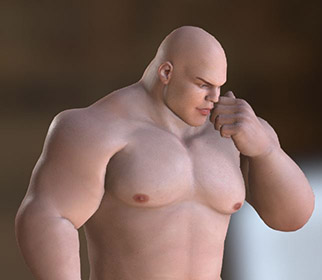   My current solution to this problem is to use the Essential Morphs Pack to decrease the trapezius and shoulder width/scale while increasing the shoulder tops. This works fairly well but can cause the bicep to intersect with the chest, and I have no bicep morph in CC3 (can be done in Daz). You may also encounter problems with the neck as below... 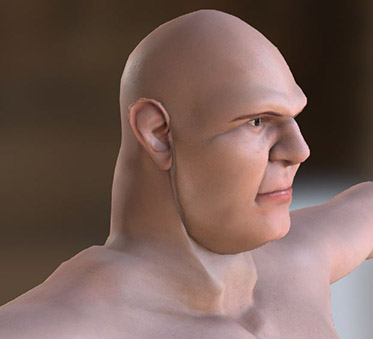 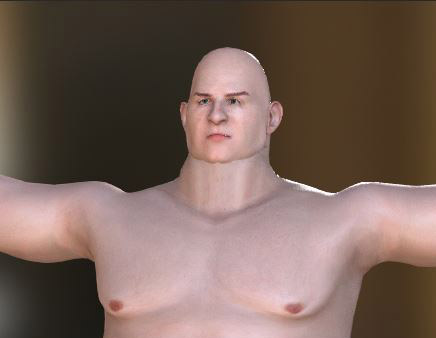 UPDATE: Potential Solution Here UPDATE: Potential Solution HereI consider this problem to be unfixable/not worth the effort—forget about using the George character, but this problem is not exclusive to George. In addition to the trapezius/shoulder area you should also be cautious working with the upper chest/neck. My suggestion is to avoid using Daz morphs in these areas as much as possible and build them up using the CC Essential Morphs instead. If you need to work with Daz morphs in these areas, do Transformer test-exports often. Boots can be another problem...
  If there is any mesh overlap is will result in a melded/ruined mesh when it gets to CC3. My current solution to this is not a good one—I am shrinking the calves to bring the boots in, saving them out as custom content, and then manually adjusting the fit (I am presently unfamiliar with CC3's Conform toolset but am looking into it). There are also Daz products which add morphs to clothing items which may be worth checking into. Update — I found a decent fix, though I cannot be sure if it will cause problems down the road (due to very minor bone twist), it looks promising...in Daz, after applying the T-pose, use the Translate Tool to drag the ankles apart to the distance shown below, then export. You can File > Save As > Pose Preset (current frame) for later use. By the way, love-note to Reallusion: I love this product. It is excellent. Not perfect—there are quite number of things that remain troublesome, but overall it is just great. Also, special thanks to Mr. Kelley for his video tutorials.
CC3 & Daz Tricks | CC3 to Unity workflow
|
|
|
|
|
Kelleytoons
|
Kelleytoons
Posted 7 Years Ago
|
|
Group: Forum Members
Last Active: 2 Years Ago
Posts: 9.2K,
Visits: 22.1K
|
You talk about having no bicep morph (but you have one in Daz) -- go ahead and make your own. IOW, any morph you can do in Daz you can do in CC3 (and it will be good for all your characters). The easiest way is to export a base character that has such a morph but with the morph set to 0. Then export it with the morph all the way (as much as would be reasonable). Use these two figures to generate your own base morph (one of my tutorials shows just this -- if I knew exactly what bicep morph you were talking about I'd make a tutorial for it). There are some morphs I "miss" in CC3 and I have done this to fill in the gap.
Alienware Aurora R16, Win 11, i9-149000KF, 3.20GHz CPU, 64GB RAM, RTX 4090 (24GB), Samsung 870 Pro 8TB, Gen3 MVNe M-2 SSD, 4TBx2, 39" Alienware Widescreen Monitor
Mike "ex-genius" Kelley
|
|
|
|
|
Scyra
|
|
|
Group: Forum Members
Last Active: 6 Years Ago
Posts: 220,
Visits: 2.5K
|
That is a great idea. I will do it. I have watched almost all your videos but I am still assimilating the information. Thanks! I'm aware you already have two tutorials on the subject CC3 - Creating Morphs from Daz Morphs and Daz Morphs to CC3 - Head Only. I do have iClone so I will give that method a go later.
CC3 & Daz Tricks | CC3 to Unity workflow
|
|
|
|
|
Kelleytoons
|
Kelleytoons
Posted 7 Years Ago
|
|
Group: Forum Members
Last Active: 2 Years Ago
Posts: 9.2K,
Visits: 22.1K
|
I already had a bicep morph in CC3 (I have SO many morphs half the time I don't know what I have) so I created a neck one I didn't have (or at least didn't work right) just to show.
Alienware Aurora R16, Win 11, i9-149000KF, 3.20GHz CPU, 64GB RAM, RTX 4090 (24GB), Samsung 870 Pro 8TB, Gen3 MVNe M-2 SSD, 4TBx2, 39" Alienware Widescreen Monitor
Mike "ex-genius" Kelley
|
|
|
|
|
Scyra
|
|
|
Group: Forum Members
Last Active: 6 Years Ago
Posts: 220,
Visits: 2.5K
|
That was VERY helpful, Mike, thanks again...(and again). Another problem I ran into with these big guys is deformed clothing meshes. Usually Daz's autofit is solid, but not always. Fortunately, CC3's Edit Mesh tools can handle the problem. The image below shows the non-corrected vest on top, which had poke-through issues...  Edit Mesh > Faces > Relax Faces is the key to uncrumpling the geometry, which can then be pulled and smoothed from the Sculpt menu. Note that you'll want to correct geometry before polygon reduction.
CC3 & Daz Tricks | CC3 to Unity workflow
|
|
|
|
|
Kelleytoons
|
Kelleytoons
Posted 7 Years Ago
|
|
Group: Forum Members
Last Active: 2 Years Ago
Posts: 9.2K,
Visits: 22.1K
|
See I always go the other way around. In Daz I always export clothing on a default figure, no matter what it is. That way it always fits. Inside of CC3, when I put it on an exaggerated one (either using CC3 or a Daz+CC3 morphs to get the character the way I want) the clothing loads in almost perfect, with conform taking care of any issues. You seldom if ever have to mess around with the other tools (although, as you've found, they are there). But it depends on what you are used to. I'm still not comfortable in Daz, so I want to do nearly everything I do in CC3.
Alienware Aurora R16, Win 11, i9-149000KF, 3.20GHz CPU, 64GB RAM, RTX 4090 (24GB), Samsung 870 Pro 8TB, Gen3 MVNe M-2 SSD, 4TBx2, 39" Alienware Widescreen Monitor
Mike "ex-genius" Kelley
|
|
|
|
|
Scyra
|
|
|
Group: Forum Members
Last Active: 6 Years Ago
Posts: 220,
Visits: 2.5K
|
Yikes...I tried your method with the default figure and it is far superior to what I was doing with the vest. Effortless, too. It didn't work for the boots, though. I tried many Conform settings, including maxing out the Increase Size, Loose Fitting, and Iteration settings and didn't receive a good result. I'll continue using my method for the boots at least. For reference, here is how the boots from a default G8 look when applied to a fat man...
CC3 & Daz Tricks | CC3 to Unity workflow
|
|
|
|
|
Kelleytoons
|
Kelleytoons
Posted 7 Years Ago
|
|
Group: Forum Members
Last Active: 2 Years Ago
Posts: 9.2K,
Visits: 22.1K
|
What boots are those, specifically?
Alienware Aurora R16, Win 11, i9-149000KF, 3.20GHz CPU, 64GB RAM, RTX 4090 (24GB), Samsung 870 Pro 8TB, Gen3 MVNe M-2 SSD, 4TBx2, 39" Alienware Widescreen Monitor
Mike "ex-genius" Kelley
|
|
|
|
|
Scyra
|
|
|
Group: Forum Members
Last Active: 6 Years Ago
Posts: 220,
Visits: 2.5K
|
dForce Orelius Gladiator Outfit, which is part of the Brute 8 bundle (the character I've been working on is also based on Brute 8 morphs).
CC3 & Daz Tricks | CC3 to Unity workflow
|
|
|
|
|
Kelleytoons
|
Kelleytoons
Posted 7 Years Ago
|
|
Group: Forum Members
Last Active: 2 Years Ago
Posts: 9.2K,
Visits: 22.1K
|
 Okay, those boots won't load in for me unless I use my "trick" of loading in TWO Gen 8 male characters (the second one is really the one that comes into CC3) because with the Gen 8 male selected and boots added they hide part of the figure. There are other ways around this, but loading in the second figure is what you really need do for this to be properly fitted (IOW, you can't just load the boots in without selected the figure first or this doesn't work). I cover this in a fairly recent video. If you do this the boots will be fitted properly and then no matter what morphs are applied they will, more or less, follow (you may still need to use conform and/or hide the underlying mesh parts, but this is what Daz does as well). 
Alienware Aurora R16, Win 11, i9-149000KF, 3.20GHz CPU, 64GB RAM, RTX 4090 (24GB), Samsung 870 Pro 8TB, Gen3 MVNe M-2 SSD, 4TBx2, 39" Alienware Widescreen Monitor
Mike "ex-genius" Kelley
|
|
|
|