Profile Picture

Newbie having serious issues with CTA4 not doing what the tutorials do

Posted By StormKatt 6 Years Ago
You don't have permission to rate!
1
2
3
4
5
6
7
...
9

Newbie having serious issues with CTA4 not doing what the tutorials do...

Author
Message
johnb78
johnb78
Posted 6 Years Ago
View Quick Profile
Junior Member

Junior Member (124 reputation)Junior Member (124 reputation)Junior Member (124 reputation)Junior Member (124 reputation)Junior Member (124 reputation)Junior Member (124 reputation)Junior Member (124 reputation)Junior Member (124 reputation)Junior Member (124 reputation)

Group: Forum Members
Last Active: 6 Years Ago
Posts: 11, Visits: 26
Hello ,  Hopefully Peter will come back with a good answer or some advice for you...   This is bothering me also as i have the nuisance of rerigging a whole character just because i move one bone ,  or resizing a limb because its not where its meant to be when imported ,  and this is after i have been using the shift button to move the bone and now i cannot , not today anyway ....    the problems i had today with the scarecrow tutorials were unbelievable ,  i had to just give up.....    

it does bother me that a computer program can do something one day and the next day it cannot  , are they all just AI  and taking the p*** out of us creators....


could you specify which tutorial it was  , i would like to have a go at it and see what happens ...

i just noticed there is a post from 6 days ago pointing out the shift/bone problem and peter has no answer bar go the manual   ,  i hope it decides to work today...
johnb78
johnb78
Posted 6 Years Ago
View Quick Profile
Junior Member

Junior Member (124 reputation)Junior Member (124 reputation)Junior Member (124 reputation)Junior Member (124 reputation)Junior Member (124 reputation)Junior Member (124 reputation)Junior Member (124 reputation)Junior Member (124 reputation)Junior Member (124 reputation)

Group: Forum Members
Last Active: 6 Years Ago
Posts: 11, Visits: 26
I hope you resolve the problem you have Stormkatt   ,  i am now in the same place , things that should work ,  don't ....


Peter (RL)
Peter (RL)
Posted 6 Years Ago
View Quick Profile
Distinguished Member

Distinguished Member (124.4K reputation)Distinguished Member (124.4K reputation)Distinguished Member (124.4K reputation)Distinguished Member (124.4K reputation)Distinguished Member (124.4K reputation)Distinguished Member (124.4K reputation)Distinguished Member (124.4K reputation)Distinguished Member (124.4K reputation)Distinguished Member (124.4K reputation)

Group: Administrators
Last Active: Last Year
Posts: 23.1K, Visits: 36.6K
StormKatt (7/11/2019)
Thanks for the reply!

This is the video: https://www.reallusion.com/cartoon-animator/tutorial.html

It's really easy to follow, and I'd find it valuable if my program did what his does.

0:42 Select human dummy form (only thing I'm doing different here is G3 F because my character is front-facing)
1:22 Select hipbone, import reference image
3:08 He says to  hold the "shift" key to move a bone without affecting its child bones = the shift key has no effect
6:29 Import sprite, check "Keep Parent Transform" in order to get bone to align and size to the reference image
=== If I click "Keep Parent Transform," I get a giant image
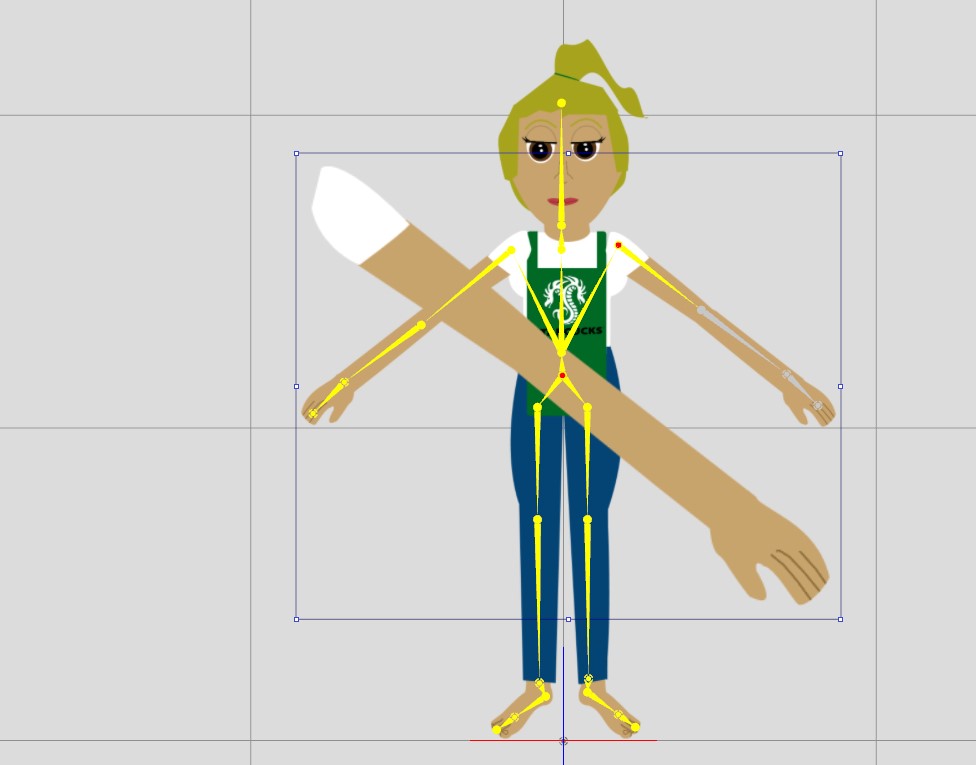
If I try again and UN-check "Keep Parent Transform, I get the correct sized sprite, but in the middle of nowhere. It also pastes on top instead of replacing.
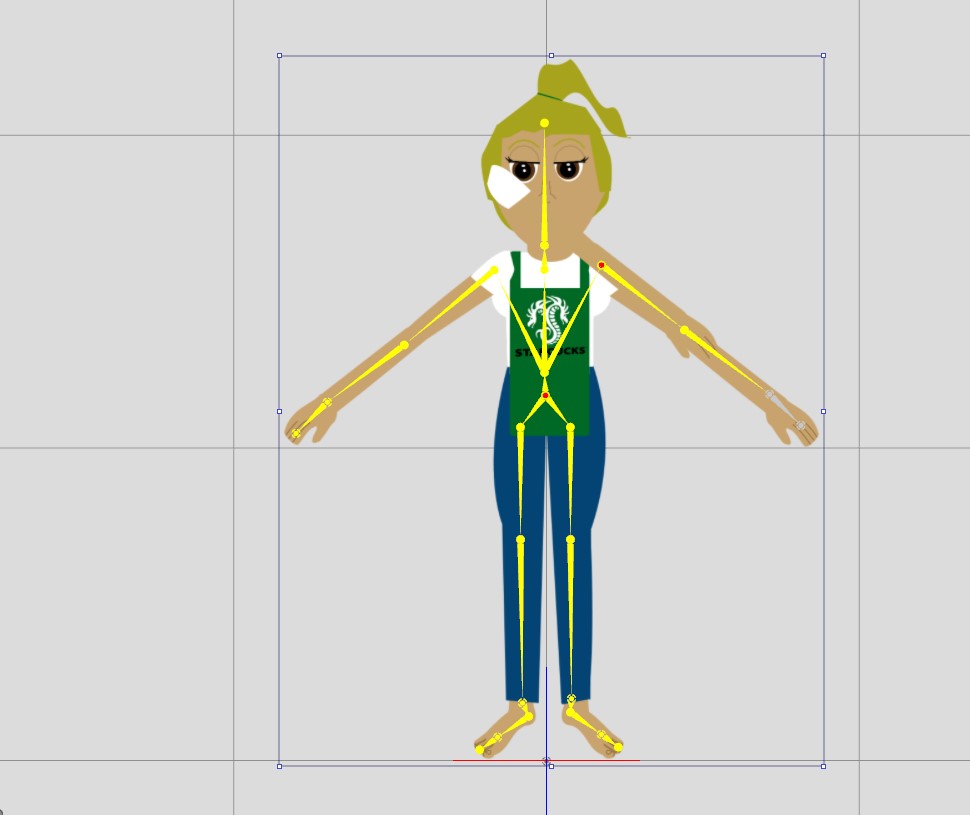

I have tried this with the arm separated in three parts and with the arm as one. I get the same results.


Hi...

Unfortunately, the link you supplied was just to the Tutorials page. It didn't link to the specific video you are using.

However, I think I know the video from the steps you have listed and will base my answers on the tutorial below.

CrazyTalk Animator 3 - Character Creation with G3 Template
https://youtu.be/kN-mKg5KlmM

The instructions shown in the tutorial are referring to CTA3 so there may be some differences in CTA4. For example, holding the Shift key while moving the bone does not currently work as it did in CTA3.

EDIT: Although not well documented you can now use the hotkey E to move the bone without influencing the child bones.

For the second issue you are having with "Keep Parent Transform" not working, I could not reproduce this problem and the steps in the tutorial @ 6:29 worked exactly as shown with the imported image resizing and positioning itself correctly.

To see if this is an issue with specific to your character, please can you send me a private message with your character images so I can try using the same body parts as you are using. Can you also confirm if you are using the Mac version or Windows version (I'm testing with the Windows version). Thanks.


Peter
Forum Administrator

www.reallusion.com


StormKatt
StormKatt
Posted 6 Years Ago
View Quick Profile
Senior Member

Senior Member (449 reputation)Senior Member (449 reputation)Senior Member (449 reputation)Senior Member (449 reputation)Senior Member (449 reputation)Senior Member (449 reputation)Senior Member (449 reputation)Senior Member (449 reputation)Senior Member (449 reputation)

Group: Forum Members
Last Active: 3 Years Ago
Posts: 9, Visits: 67
Here's the YT link to to the tutorial.

https://www.youtube.com/watch?time_continue=1&v=kN-mKg5KlmM
denise.wilson1
denise.wilson1
Posted 6 Years Ago
View Quick Profile
Senior Member

Senior Member (491 reputation)Senior Member (491 reputation)Senior Member (491 reputation)Senior Member (491 reputation)Senior Member (491 reputation)Senior Member (491 reputation)Senior Member (491 reputation)Senior Member (491 reputation)Senior Member (491 reputation)

Group: Forum Members
Last Active: 3 Years Ago
Posts: 43, Visits: 687

Another very frustrated Newbie – Not sure what I am doing wrong.  I have had same problems with ‘Character Creation with G3 Template’ as the others have had – still can’t do it.  But right now, I have another question.  I have CTA-4 pipeline and, like the other Newbie stated, things don’t seem to work in my CTA the way they do in the tutorials. I think I followed the tutorial step by step (CrazyTalk Animator 3 Tutorial - Creating Multi-Sprite Free Bone Characters). But all of a sudden, some of the bones turn gray – I guess that means inactive - although the button on layer manager indicates it is active (see attached).  The Active/Inactive buttons don’t work at all – can’t change them either way.  Also, when I duplicated and masked the left arm, the original left arm didn’t disappear - the process did work for the head (see attached).  PLEASE HELP!!!!!

Attachments
CTA - problems.png (83 views, 157.00 KB)
vepop
vepop
Posted 6 Years Ago
View Quick Profile
Distinguished Member

Distinguished Member (6.0K reputation)Distinguished Member (6.0K reputation)Distinguished Member (6.0K reputation)Distinguished Member (6.0K reputation)Distinguished Member (6.0K reputation)Distinguished Member (6.0K reputation)Distinguished Member (6.0K reputation)Distinguished Member (6.0K reputation)Distinguished Member (6.0K reputation)

Group: Forum Members
Last Active: Last Year
Posts: 1.0K, Visits: 9.9K
Make sure the body parts eg. Head, RArm, LArm, RThigh, LThigh are attached to the 'Hip'.
Otherwise, it is as good as not connected.  


https://forum.reallusion.com/uploads/images/9331d0a4-6a4b-4e86-9f88-963f.jpg
YouTube Tutorials Here
denise.wilson1
denise.wilson1
Posted 6 Years Ago
View Quick Profile
Senior Member

Senior Member (491 reputation)Senior Member (491 reputation)Senior Member (491 reputation)Senior Member (491 reputation)Senior Member (491 reputation)Senior Member (491 reputation)Senior Member (491 reputation)Senior Member (491 reputation)Senior Member (491 reputation)

Group: Forum Members
Last Active: 3 Years Ago
Posts: 43, Visits: 687
Thank you for your response – but it still did not work
denise.wilson1
denise.wilson1
Posted 6 Years Ago
View Quick Profile
Senior Member

Senior Member (491 reputation)Senior Member (491 reputation)Senior Member (491 reputation)Senior Member (491 reputation)Senior Member (491 reputation)Senior Member (491 reputation)Senior Member (491 reputation)Senior Member (491 reputation)Senior Member (491 reputation)

Group: Forum Members
Last Active: 3 Years Ago
Posts: 43, Visits: 687
Thank you for your response – but it still did not work
vepop
vepop
Posted 6 Years Ago
View Quick Profile
Distinguished Member

Distinguished Member (6.0K reputation)Distinguished Member (6.0K reputation)Distinguished Member (6.0K reputation)Distinguished Member (6.0K reputation)Distinguished Member (6.0K reputation)Distinguished Member (6.0K reputation)Distinguished Member (6.0K reputation)Distinguished Member (6.0K reputation)Distinguished Member (6.0K reputation)

Group: Forum Members
Last Active: Last Year
Posts: 1.0K, Visits: 9.9K
can u share the project file?
I'll check it.

https://forum.reallusion.com/uploads/images/9331d0a4-6a4b-4e86-9f88-963f.jpg
YouTube Tutorials Here
denise.wilson1
denise.wilson1
Posted 6 Years Ago
View Quick Profile
Senior Member

Senior Member (491 reputation)Senior Member (491 reputation)Senior Member (491 reputation)Senior Member (491 reputation)Senior Member (491 reputation)Senior Member (491 reputation)Senior Member (491 reputation)Senior Member (491 reputation)Senior Member (491 reputation)

Group: Forum Members
Last Active: 3 Years Ago
Posts: 43, Visits: 687

Sorry if I am totally stupid – but how would I get a project file – which I would happily send to you.  I did delete the character, because couldn’t get it to work.  But I would re-create it again (because every time I do, the same thing happens) and send you the project file, if you can tell me how to do that


1
2
3
4
5
6
7
...
9


Reading This Topic