|
Author
|
Message
|
|
The-any-Key
|
The-any-Key
Posted 6 Years Ago
|
|
Group: Forum Members
Last Active: Last Year
Posts: 356,
Visits: 1.9K
|
rosuckmedia (6/15/2019)
@ The-any-Key
Loaded a Script Camera Follow and now I have the Iclonepy.exe in my folder. (Hurray)
I've created a folder called Open Plugin myself, and now have your Super Bone Editor Plugin (Screenshot)
Thanks for the plugin and your help,
Greetings Robert. 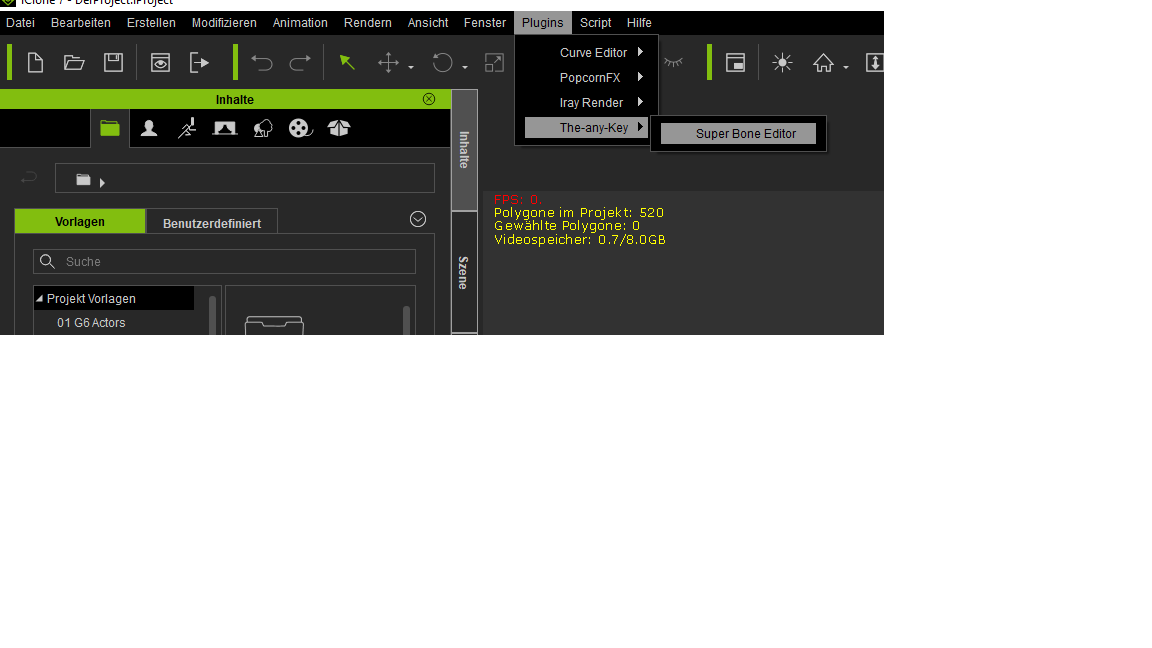 Thanks. Added this to the installation notes.
iClone 7, 3DXchange 7 Pipeline, CC3 Pipeline, CT8 Pipeline, Iray, Live Face, iPhone Xr, Win 10, i9 9900K ~5GHz, Nvidia RTX 2080 8GB, 16GB Ram, M.2 SSD
|
|
|
|
|
The-any-Key
|
The-any-Key
Posted 6 Years Ago
|
|
Group: Forum Members
Last Active: Last Year
Posts: 356,
Visits: 1.9K
|
4u2ges (6/15/2019)
Fixed in version 1.2. Expand dynamically for any number of bones. Live now. Just download and replace old files.
Perfect!
I have another request. Can you set Range lower value for the Position to 0.1? While doing precise tweaking the value of 1 works fine for the rotation,
but I am struggling a bit with Position transform. Thanks.
Fixed in version 1.3. Range, limit and SUM minimum is now 0.0001 for rotation and position. Live now. Just download and replace old files.
iClone 7, 3DXchange 7 Pipeline, CC3 Pipeline, CT8 Pipeline, Iray, Live Face, iPhone Xr, Win 10, i9 9900K ~5GHz, Nvidia RTX 2080 8GB, 16GB Ram, M.2 SSD
|
|
|
|
|
4u2ges
|
4u2ges
Posted 6 Years Ago
|
|
Group: Forum Members
Last Active: Last Month
Posts: 5.3K,
Visits: 16.8K
|
Fixed in version 1.3. Range, limit and SUM minimum is now 0.0001 for rotation and position. Live now. Just download and replace old files. Awesome, I will check it out later. Now I want to mention something about having a low range for transform on a global scale for all Gizmo controls in iClone. This should rather be addressed to RL since I doubt it would be possible to arrange with Python (I'll probably add it to FT later). Having dealing with precision transformations is probably the most tiresome for the hand and fingers operating a pointing device - dozens of unnecessary clicks and moves to get a Gizmo precisely where you want it. (in Blender for instance you hold a Shift key to lower the range while transforming an object (rotate/scale/move)) That is mouse pointer is traveling asynchronously in relation to the transformed object (probably x10), thus allowing precise positioning, rotating with lot less effort. Such a simple but invaluable feature is a must in iClone. This and of course an Orthogonal camera.
|
|
|
|
|
The-any-Key
|
The-any-Key
Posted 6 Years Ago
|
|
Group: Forum Members
Last Active: Last Year
Posts: 356,
Visits: 1.9K
|
4u2ges (6/16/2019)
Fixed in version 1.3. Range, limit and SUM minimum is now 0.0001 for rotation and position. Live now. Just download and replace old files. Awesome, I will check it out later. Now I want to mention something about having a low range for transform on a global scale for all Gizmo controls in iClone. This should rather be addressed to RL since I doubt it would be possible to arrange with Python (I'll probably add it to FT later). Having dealing with precision transformations is probably the most tiresome for the hand and fingers operating a pointing device - dozens of unnecessary clicks and moves to get a Gizmo precisely where you want it. (in Blender for instance you hold a Shift key to lower the range while transforming an object (rotate/scale/move)) That is mouse pointer is traveling asynchronously in relation to the transformed object (probably x10), thus allowing precise positioning, rotating with lot less effort. Such a simple but invaluable feature is a must in iClone. This and of course an Orthogonal camera. In theory you can create a plugin for a custom gizmo. Currently the quaternion set function for bones is broken in the Python API both standard and dev (reported). But I would be able to create a smooth gizmo for objects. So you can do 0.0001 steps for position, rotation and scale when you move your mouse that works in world and local axis. But this would currently only work in the developer version of iclone as the quaternion is broken for objects in the stable version.
iClone 7, 3DXchange 7 Pipeline, CC3 Pipeline, CT8 Pipeline, Iray, Live Face, iPhone Xr, Win 10, i9 9900K ~5GHz, Nvidia RTX 2080 8GB, 16GB Ram, M.2 SSD
|
|
|
|
|
4u2ges
|
4u2ges
Posted 6 Years Ago
|
|
Group: Forum Members
Last Active: Last Month
Posts: 5.3K,
Visits: 16.8K
|
The-any-Key (6/16/2019)In theory you can create a plugin for a custom gizmo. Currently the quaternion set function for bones is broken in the Python API both standard and dev (reported). But I would be able to create a smooth gizmo for objects. So you can do 0.0001 steps for position, rotation and scale when you move your mouse that works in world and local axis. But this would currently only work in the developer version of iclone as the quaternion is broken for objects in the stable version. That would be interesting to see. However, maybe I am wrong, but I have some reservations about Python scripting API interface and speed. I understand this idea gives RL some break, where small (and maybe not so small) customers requests could be taken care by community developers, giving a chance RL to concentrate on something more important. And practically anyone can learn stuff and do at least some basic things themselves for that matter. But understand me right, Gizmo control for instance is a primary tool in iClone and if working with it through API interface would give some performance issues (even with added convenience tools), I personally would not go for it. Would be glad to be convinced otherwise however (I can be extremely fussy :)). OK, back to Super Bone Editor. It is really a must have tool. Here is a fun with just 4 iClone boxes connected together: Finally, I wonder if it is feasible to work with non-humans (like a cat for instance). Or is it out of the question because of the non-linear bones hierarchy? 
|
|
|
|
|
The-any-Key
|
The-any-Key
Posted 6 Years Ago
|
|
Group: Forum Members
Last Active: Last Year
Posts: 356,
Visits: 1.9K
|
We will see if future versions of the Python API will be faster. Some things are quite slow. But it is in beta so that is somewhat expected.
Nice video example.
I have been thinking that animals like snakes, worms or non-humans with tentacles should work. Or a cats tail maybe?
iClone 7, 3DXchange 7 Pipeline, CC3 Pipeline, CT8 Pipeline, Iray, Live Face, iPhone Xr, Win 10, i9 9900K ~5GHz, Nvidia RTX 2080 8GB, 16GB Ram, M.2 SSD
|
|
|
|
|
4u2ges
|
4u2ges
Posted 6 Years Ago
|
|
Group: Forum Members
Last Active: Last Month
Posts: 5.3K,
Visits: 16.8K
|
Hopefully yes, a stable API release would be faster than the current one. Meantime a cat tail was the first thing I tried, but unfortunately it did not work and I thought it was because of non-linear hierarchy.
|
|
|
|
|
The-any-Key
|
The-any-Key
Posted 6 Years Ago
|
|
Group: Forum Members
Last Active: Last Year
Posts: 356,
Visits: 1.9K
|
Curve a road tutorial that will explain the limit, SUM and curve maker in the plugin:
iClone 7, 3DXchange 7 Pipeline, CC3 Pipeline, CT8 Pipeline, Iray, Live Face, iPhone Xr, Win 10, i9 9900K ~5GHz, Nvidia RTX 2080 8GB, 16GB Ram, M.2 SSD
|
|
|
|
|
The-any-Key
|
The-any-Key
Posted 6 Years Ago
|
|
Group: Forum Members
Last Active: Last Year
Posts: 356,
Visits: 1.9K
|
4u2ges (6/16/2019)
Hopefully yes, a stable API release would be faster than the current one.
Meantime a cat tail was the first thing I tried, but unfortunately it did not work and I thought it was because of non-linear hierarchy.
That is just because you are using Schrödinger's cat. That cat is both dead and alive at the same time. Old props like that need an update. Here is a quick workaround that will make it work.
iClone 7, 3DXchange 7 Pipeline, CC3 Pipeline, CT8 Pipeline, Iray, Live Face, iPhone Xr, Win 10, i9 9900K ~5GHz, Nvidia RTX 2080 8GB, 16GB Ram, M.2 SSD
|
|
|
|
|
4u2ges
|
4u2ges
Posted 6 Years Ago
|
|
Group: Forum Members
Last Active: Last Month
Posts: 5.3K,
Visits: 16.8K
|
That is just because you are using Schrödinger's cat. That cat is both dead and alive at the same time. Old props like that need an update. Here is a quick workaround that will make it work.
Thanks! lol, we now talking quantum mechanics!
But let me tell you something funnier. I just found out the cat from the picture a few posts above also works.
That is because just before posting it, I sent it to Blender and made that stupid face morph for it. But I never bother to check the plugin after that.
And now the funniest thing. The other day I removed animation key from a timeline and recreated it and it did not help.
Today when I saw you post I sent a default cat again to Morph Creator and noticed the message about removed animation. I sent the cat right back to iClone and it start working.
Then I figure let me try "Remove Object Animation" and it also worked. So the "Remove Object Animation" does a complete cleanup of whatever is hidden and stops the plug-in from working.
Not all bones are working properly, but at least the tail works just fine.
I have also noticed that if the bones for the prop are not straight by default, the plugin looks like gets confused about axis. Z and Y might swap direction and so on.
So I wonder what is the anchor upon which the direction of movement is getting calculated.
I enclosed this project if you want to play.
Cheers.
|
|
|
|