|
By The-any-Key - 7 Years Ago
|
My latest plugin. Super Bone Editor. Select multiple bones and rotate all at the same time. You can also use bezier curve to gradually apply values along the selected bones. Limiter and SUM can also be set. Good when you want a specific angle for one or more bones.
Trial: https://marketplace.reallusion.com/super-bone-editor---trial
|
|
By Tony (RL) - 7 Years Ago
|
This plug-in does feed many iClone users' needs.
Great job, Andreas!
The-any-Key (6/12/2019)
My latest plugin. Super Bone Editor. Select multiple bones and rotate all at the same time. You can also use bezier curve to gradually apply values along the selected bones. Limiter and SUM can also be set. Good when you want a specific angle for one or more bones.
Trial: https://marketplace.reallusion.com/super-bone-editor---trial
|
|
By Rampa - 7 Years Ago
|
That is pretty cool! :)
A grouping feature might be useful, so you can just click on each group rather than reselecting the individual bones again each time. That bone list could get pretty long, with vines and things.
|
|
By vidi - 7 Years Ago
|
|
WOW ! That looks exactly what I was looking for :cool::w00t:
|
|
By The-any-Key - 7 Years Ago
|
|
Rampa (6/13/2019)
That is pretty cool! :)
A grouping feature might be useful, so you can just click on each group rather than reselecting the individual bones again each time. That bone list could get pretty long, with vines and things.
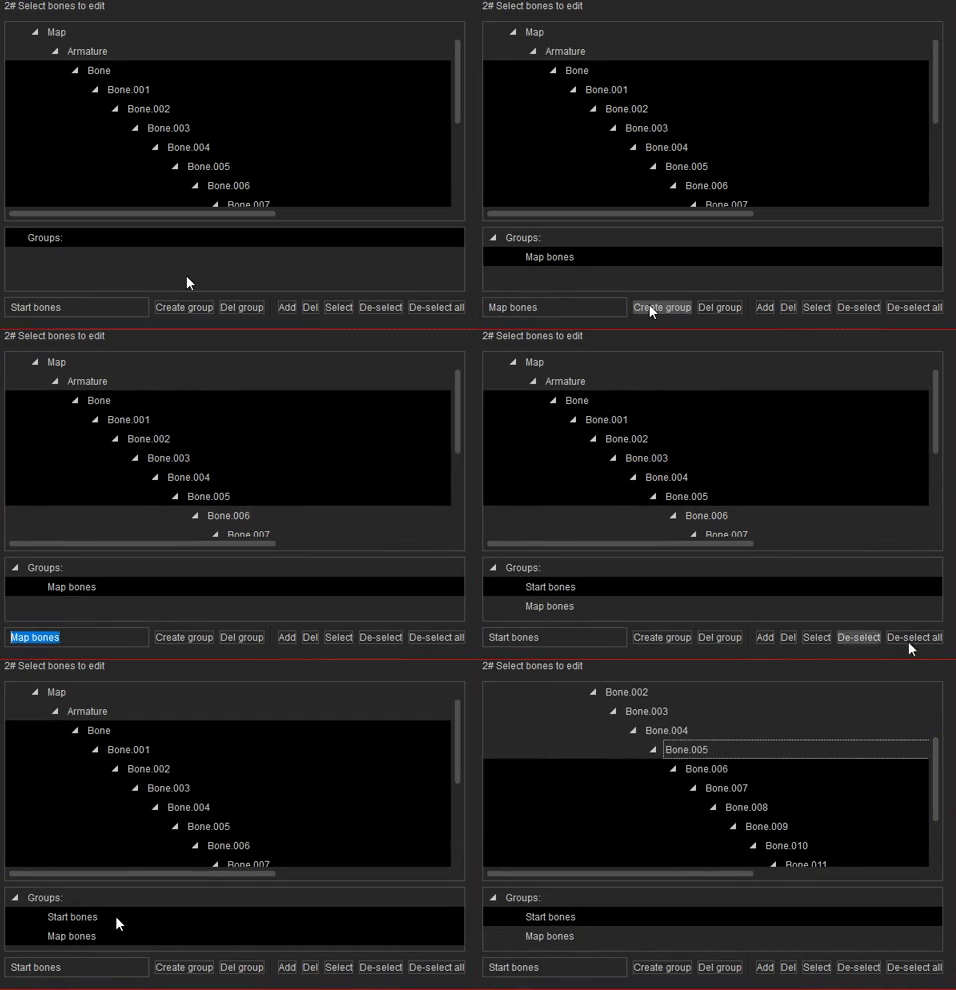
Good idea. Groups added:
|
|
By 4u2ges - 7 Years Ago
|
It looks close to what I have requested recently (specially with added groups support).
I downloaded a trial (from itch). External plugins have been installed with first run.
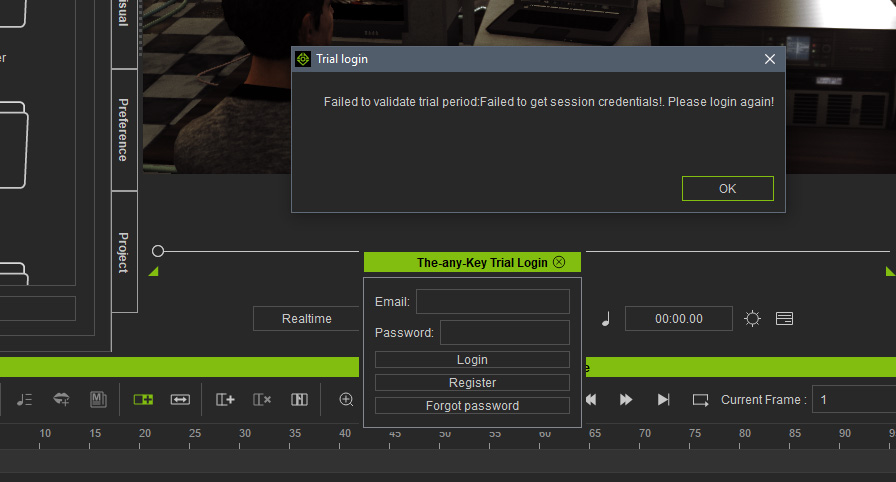
However, when I try to load plugin I get this. Where do I go from here?
|
|
By The-any-Key - 7 Years Ago
|
4u2ges (6/14/2019)
It looks close to what I have requested recently (specially with added groups support). I downloaded a trial (from itch). External plugins have been installed with first run. However, when I try to load plugin I get this. Where do I go from here?
Make sure you run iClone in admin mode the first time you register as trial user.
Enter an email and a password you want. Click register.
Go to your mail and click the activation link.
Go back to iclone and click login.
Video tutorial here from 1:54:
|
|
By 4u2ges - 7 Years Ago
|
|
Thanks, I was doing it a hurry following text doc. without checking the video...
|
|
By 4u2ges - 7 Years Ago
|
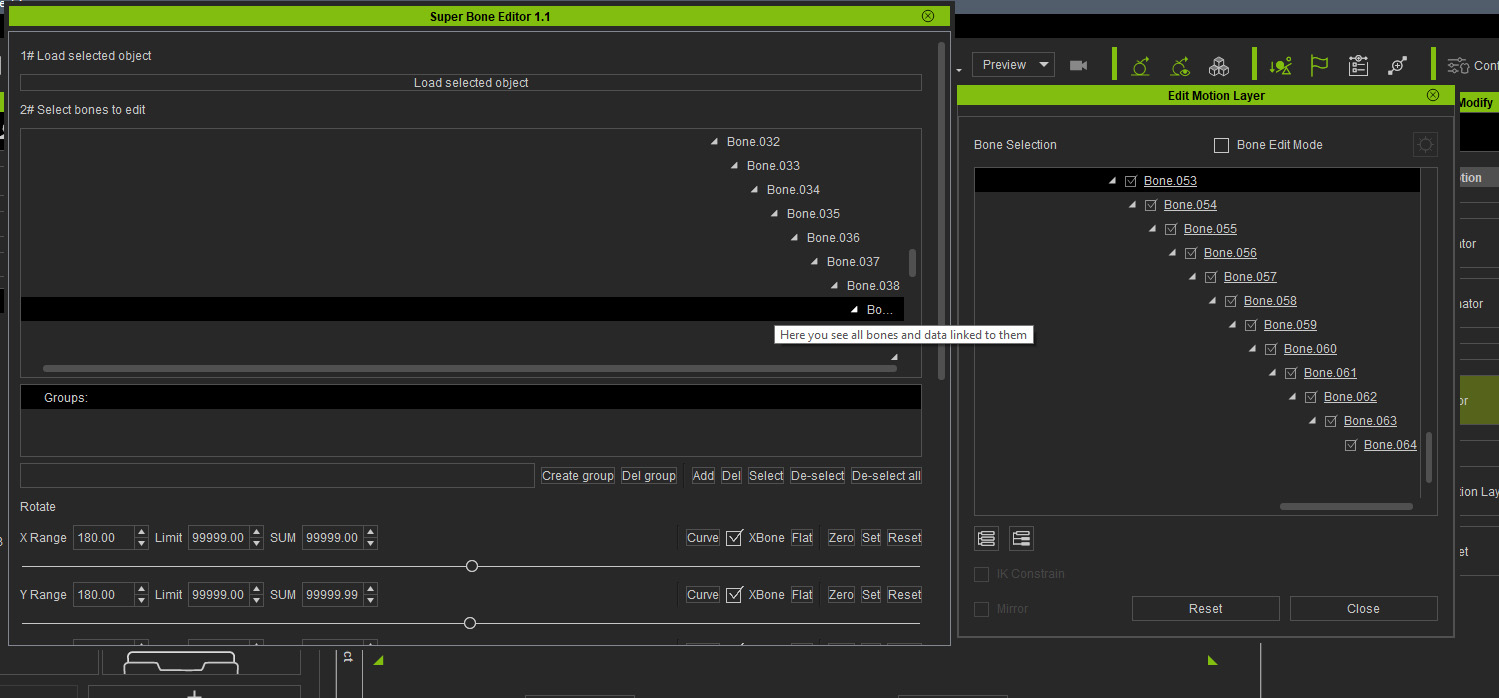
I have a little problem. The prop I am trying to animate is very long and has 64 bones.
In Edit Motion Layer window I can see all of them, but in Plugin windows there is a limit of 38 or so
and scroll bar does not accommodate for the rest. Is it possible to expand the scrolling?
Thanks
|
|
By The-any-Key - 7 Years Ago
|
4u2ges (6/15/2019)
I have a little problem. The prop I am trying to animate is very long and has 64 bones. In Edit Motion Layer window I can see all of them, but in Plugin windows there is a limit of 38 or so and scroll bar does not accommodate for the rest. Is it possible to expand the scrolling? Thanks
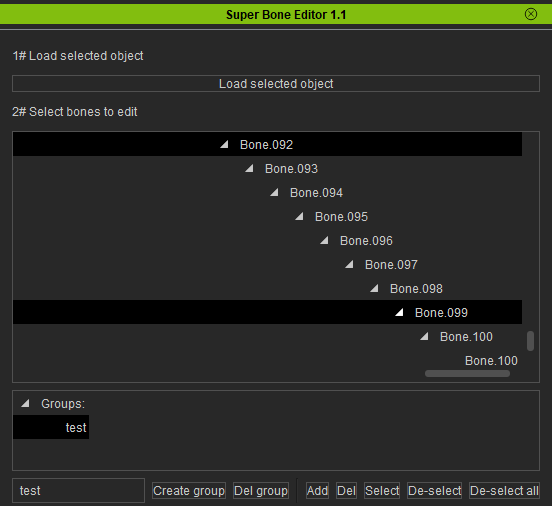
Fixed in version 1.2. Expand dynamically for any number of bones. Live now. Just download and replace old files.
|
|
By vidi - 7 Years Ago
|
|
i have not such a folder openplugin , what do I missing ?
|
|
By The-any-Key - 7 Years Ago
|
vidi (6/15/2019)
i have not such a folder openplugin , what do I missing ?
Ex of the path: C:\Program Files\Reallusion\iClone 7\Bin64\OpenPlugin
Should exists from iClone 7.4.
|
|
By vidi - 7 Years Ago
|
C:\Program Files\Reallusion\iClone 7\Bin64\OpenPlugin Yes I have read it already , Otherwise I would not know why I asked for openplugin folder but there is nothing such a folder by me My Iclone is uptodate Also trying to install it in "Plugin" and "shared Plugin" Folder do not work . I run also also admin . I can not successfully install the plugin More ideas what I'm missing ? Maybe a extra ibstall Phyton thing ?
|
|
By wires - 7 Years Ago
|
The folder is a default folder and was created during the iClone 7.4 install:
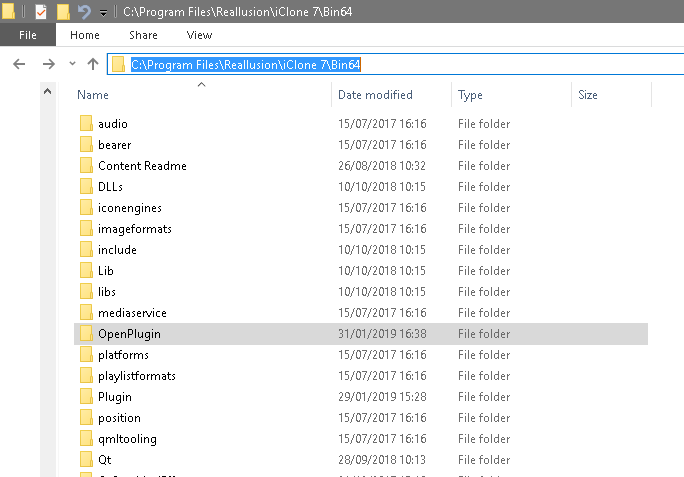
|
|
By rosuckmedia - 7 Years Ago
|
Hi Vidi,
I also do not have the Open Plugin folder in the normal version of Icone, only in the Developer version, Python API 073 for Icloe 741.
you will find in this forum under Iclone plug-in market at Smoth Camera Follow.
special version of iClone (Zip) [Link Removed By Moderator]
Greetings Robert
|
|
By The-any-Key - 7 Years Ago
|
vidi (6/15/2019)
C:\Program Files\Reallusion\iClone 7\Bin64\OpenPlugin Yes I have read it already , Otherwise I would not know why I asked for openplugin folder but there is nothing such a folder by me My Iclone is uptodate Also trying to install it in "Plugin" and "shared Plugin" Folder do not work . I run also also admin . I can not successfully install the plugin More ideas what I'm missing ? Maybe a extra ibstall Phyton thing ?
Hm strange. Maybe an iClone uninstall and reinstall is in order? But the folder is in the ordinary iClone installation. No need to install any extra Python or anything. And it will only work in the OpenPlugin folder. I know RL got MotionLIVE in the OpenPlugin folder. You can do a search for that folder in the iClone folder. Can you provide a sceenshoot of your program iclone folder?
|
|
By 4u2ges - 7 Years Ago
|
|
Fixed in version 1.2. Expand dynamically for any number of bones. Live now. Just download and replace old files.
Perfect!
I have another request. Can you set Range lower value for the Position to 0.1? While doing precise tweaking the value of 1 works fine for the rotation,
but I am struggling a bit with Position transform. Thanks.
|
|
By rosuckmedia - 7 Years Ago
|
@ The-any key
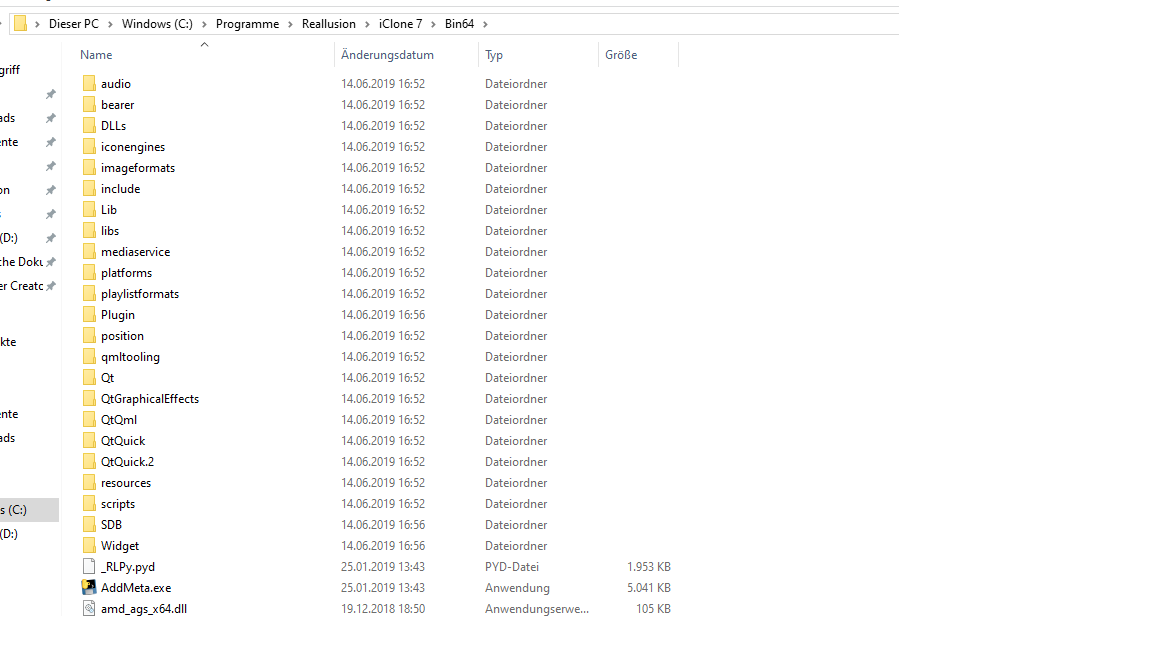
Yesterday I just reinstalled my Iclone 7.41, and I do not have this Open Plugin folder either.
see the screenshot.
Greetings Robert
|
|
By The-any-Key - 7 Years Ago
|
rosuckmedia (6/15/2019)
@ The-any key Yesterday I just reinstalled my Iclone 7.41, and I do not have this Open Plugin folder either. see the screenshot. Greetings Robert
Super strange.
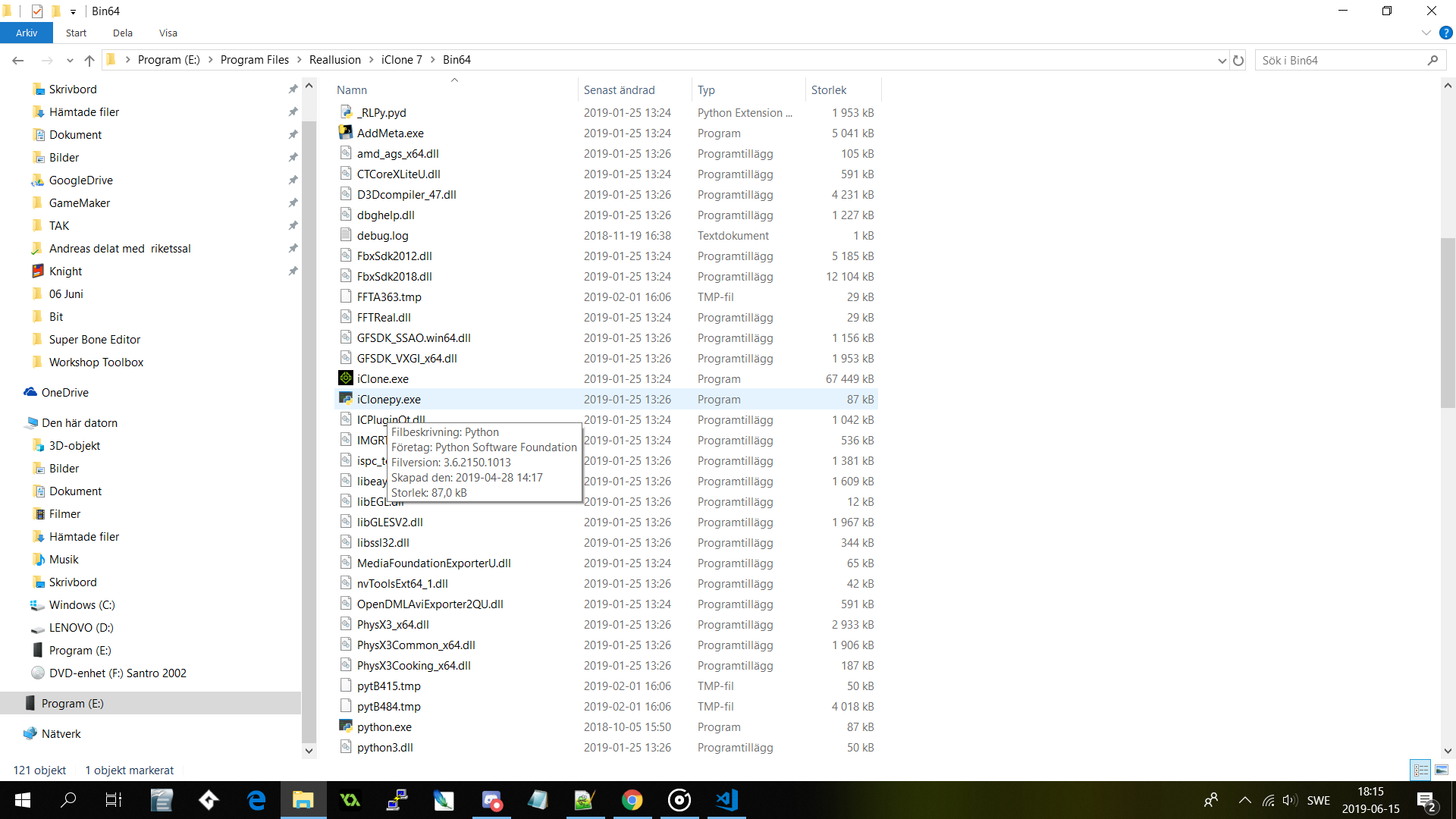
Can you check if you got the iClonepy.exe? If you do got the iClonepy.exe. Check if you got the Script>Load Python menu in iClone. If you do a long shoot would be to create the OpenPlugin folder manually and try put a plugin in there and see if iClone accept it.
|
|
By rosuckmedia - 7 Years Ago
|
@ The-any-Key
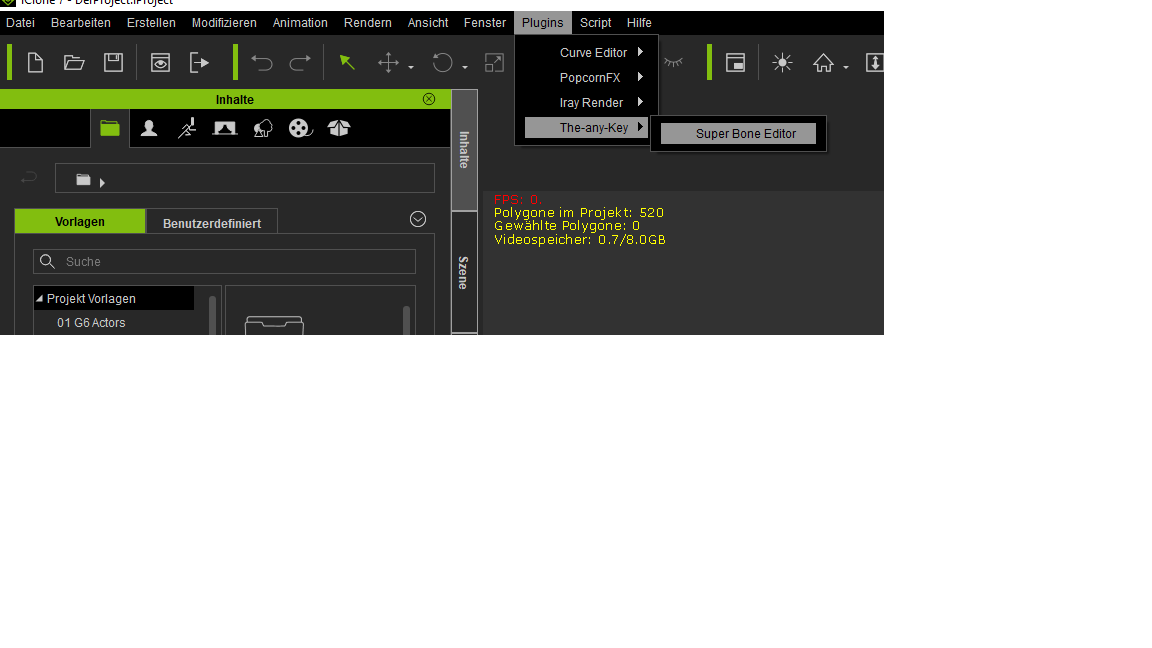
Loaded a Script Camera Follow and now I have the Iclonepy.exe in my folder. (Hurray)
I've created a folder called Open Plugin myself, and now have your Super Bone Editor Plugin (Screenshot)
Thanks for the plugin and your help,
Greetings Robert.
|
|
By The-any-Key - 7 Years Ago
|
rosuckmedia (6/15/2019)
@ The-any-Key
Loaded a Script Camera Follow and now I have the Iclonepy.exe in my folder. (Hurray)
I've created a folder called Open Plugin myself, and now have your Super Bone Editor Plugin (Screenshot)
Thanks for the plugin and your help,
Greetings Robert.
Thanks. Added this to the installation notes.
|
|
By The-any-Key - 7 Years Ago
|
4u2ges (6/15/2019)
Fixed in version 1.2. Expand dynamically for any number of bones. Live now. Just download and replace old files.
Perfect!
I have another request. Can you set Range lower value for the Position to 0.1? While doing precise tweaking the value of 1 works fine for the rotation,
but I am struggling a bit with Position transform. Thanks.
Fixed in version 1.3. Range, limit and SUM minimum is now 0.0001 for rotation and position. Live now. Just download and replace old files.
|
|
By 4u2ges - 7 Years Ago
|
|
Fixed in version 1.3. Range, limit and SUM minimum is now 0.0001 for rotation and position. Live now. Just download and replace old files.
Awesome, I will check it out later.
Now I want to mention something about having a low range for transform on a global scale for all Gizmo controls in iClone.
This should rather be addressed to RL since I doubt it would be possible to arrange with Python (I'll probably add it to FT later).
Having dealing with precision transformations is probably the most tiresome for the hand and fingers operating a pointing device -
dozens of unnecessary clicks and moves to get a Gizmo precisely where you want it.
(in Blender for instance you hold a Shift key to lower the range while transforming an object (rotate/scale/move))
That is mouse pointer is traveling asynchronously in relation to the transformed object (probably x10), thus allowing precise positioning, rotating with lot less effort.
Such a simple but invaluable feature is a must in iClone. This and of course an Orthogonal camera.
|
|
By The-any-Key - 7 Years Ago
|
4u2ges (6/16/2019)
Fixed in version 1.3. Range, limit and SUM minimum is now 0.0001 for rotation and position. Live now. Just download and replace old files. Awesome, I will check it out later. Now I want to mention something about having a low range for transform on a global scale for all Gizmo controls in iClone. This should rather be addressed to RL since I doubt it would be possible to arrange with Python (I'll probably add it to FT later). Having dealing with precision transformations is probably the most tiresome for the hand and fingers operating a pointing device - dozens of unnecessary clicks and moves to get a Gizmo precisely where you want it. (in Blender for instance you hold a Shift key to lower the range while transforming an object (rotate/scale/move)) That is mouse pointer is traveling asynchronously in relation to the transformed object (probably x10), thus allowing precise positioning, rotating with lot less effort. Such a simple but invaluable feature is a must in iClone. This and of course an Orthogonal camera.
In theory you can create a plugin for a custom gizmo. Currently the quaternion set function for bones is broken in the Python API both standard and dev (reported). But I would be able to create a smooth gizmo for objects. So you can do 0.0001 steps for position, rotation and scale when you move your mouse that works in world and local axis. But this would currently only work in the developer version of iclone as the quaternion is broken for objects in the stable version.
|
|
By 4u2ges - 7 Years Ago
|
|
The-any-Key (6/16/2019)In theory you can create a plugin for a custom gizmo. Currently the quaternion set function for bones is broken in the Python API both standard and dev (reported). But I would be able to create a smooth gizmo for objects. So you can do 0.0001 steps for position, rotation and scale when you move your mouse that works in world and local axis. But this would currently only work in the developer version of iclone as the quaternion is broken for objects in the stable version.
That would be interesting to see. However, maybe I am wrong, but I have some reservations about Python scripting API interface and speed.
I understand this idea gives RL some break, where small (and maybe not so small) customers requests could be taken care by community developers,
giving a chance RL to concentrate on something more important. And practically anyone can learn stuff and do at least some basic things themselves for that matter.
But understand me right, Gizmo control for instance is a primary tool in iClone and if working with it through API interface would give some performance issues (even with added convenience tools),
I personally would not go for it. Would be glad to be convinced otherwise however (I can be extremely fussy :)).
OK, back to Super Bone Editor. It is really a must have tool.
Here is a fun with just 4 iClone boxes connected together:
Finally, I wonder if it is feasible to work with non-humans (like a cat for instance). Or is it out of the question because of the non-linear bones hierarchy?

|
|
By The-any-Key - 7 Years Ago
|
We will see if future versions of the Python API will be faster. Some things are quite slow. But it is in beta so that is somewhat expected.
Nice video example.
I have been thinking that animals like snakes, worms or non-humans with tentacles should work. Or a cats tail maybe?
|
|
By 4u2ges - 7 Years Ago
|
Hopefully yes, a stable API release would be faster than the current one.
Meantime a cat tail was the first thing I tried, but unfortunately it did not work and I thought it was because of non-linear hierarchy.
|
|
By The-any-Key - 7 Years Ago
|
Curve a road tutorial that will explain the limit, SUM and curve maker in the plugin:
|
|
By The-any-Key - 7 Years Ago
|
|
4u2ges (6/16/2019)
Hopefully yes, a stable API release would be faster than the current one.
Meantime a cat tail was the first thing I tried, but unfortunately it did not work and I thought it was because of non-linear hierarchy.
That is just because you are using Schrödinger's cat. That cat is both dead and alive at the same time. Old props like that need an update. Here is a quick workaround that will make it work.
|
|
By 4u2ges - 7 Years Ago
|
|
That is just because you are using Schrödinger's cat. That cat is both dead and alive at the same time. Old props like that need an update. Here is a quick workaround that will make it work.
Thanks! lol, we now talking quantum mechanics!
But let me tell you something funnier. I just found out the cat from the picture a few posts above also works.
That is because just before posting it, I sent it to Blender and made that stupid face morph for it. But I never bother to check the plugin after that.
And now the funniest thing. The other day I removed animation key from a timeline and recreated it and it did not help.
Today when I saw you post I sent a default cat again to Morph Creator and noticed the message about removed animation. I sent the cat right back to iClone and it start working.
Then I figure let me try "Remove Object Animation" and it also worked. So the "Remove Object Animation" does a complete cleanup of whatever is hidden and stops the plug-in from working.
Not all bones are working properly, but at least the tail works just fine.
I have also noticed that if the bones for the prop are not straight by default, the plugin looks like gets confused about axis. Z and Y might swap direction and so on.
So I wonder what is the anchor upon which the direction of movement is getting calculated.
I enclosed this project if you want to play.
Cheers.
|
|
By Rampa - 7 Years Ago
|
Awesome that the solution is really simple! Perhaps the plugin can check for and remove animation as well?
I suppose adding an animation back from the right-click menu probably overwrites the new tail animation?
|
|
By 4u2ges - 7 Years Ago
|
Yes, it would override the existed animation. And since there is no individual bones on the timeline, adding Super Bone movements after applying a perform, acting weird.
But it is still good for manual animation. A whole lot better than fiddling with individual bones.
If only the movement directions for the hands and feet could be figured out (right now it is kind of mess), this would have been super invaluable!
|
|
By The-any-Key - 7 Years Ago
|
|
4u2ges (6/18/2019)
I have also noticed that if the bones for the prop are not straight by default
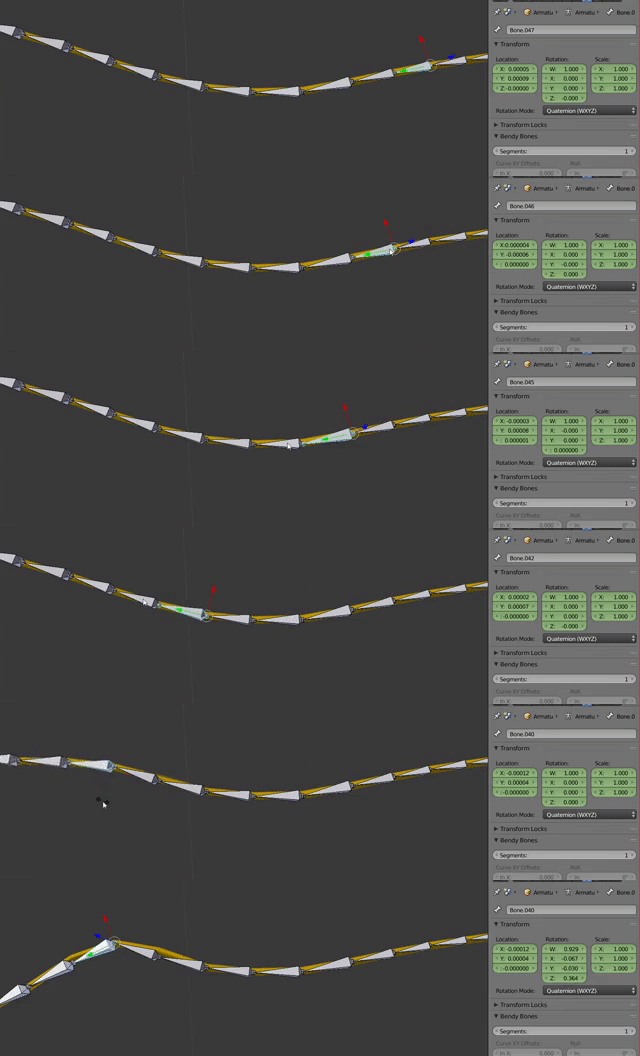
That is because the bones where extruded/created in an angle along the mesh. So the head and the tail of the bone is not straight. And there might be a roll to the bone. And this is on a bone create level. Blender and iClone animations works on a pose level. So if you check the bones in the pose mode you will notice the rotation is 0,0,0 on the bone. But the bone is clearly not straight. So if you try rotate the bones it will rotate from the created orientation and will give an unexpected rotation.
Here is the cable rotation values in Blender. All at 0,0,0 but they are clearly not straight.
4u2ges (6/18/2019)
the plugin looks like gets confused about axis. Z and Y might swap direction and so on.
That is because the bones are in different orientations (as above also talks about). Here is a close up to the cable you sent me:
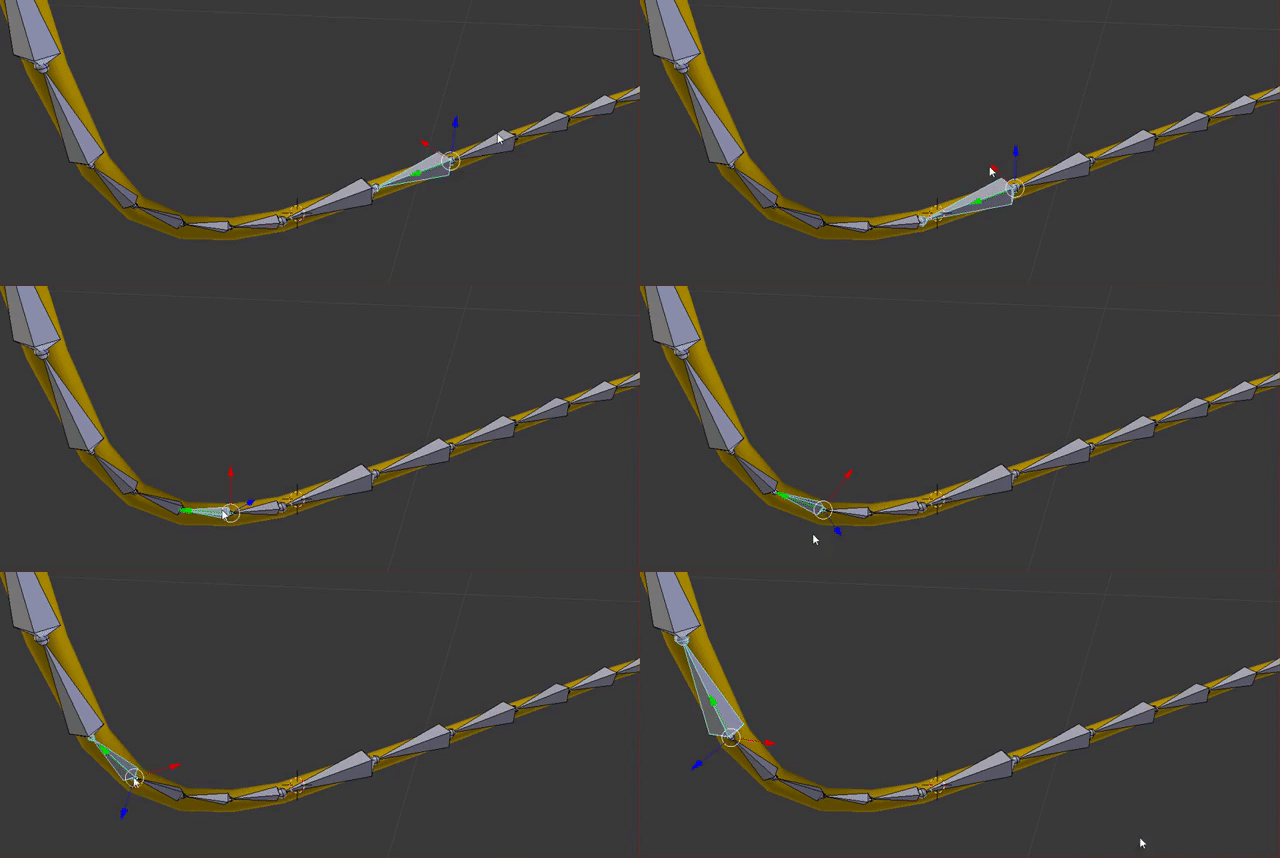
As you can see the local rotation is different on most of the bones. So a roll is applied on these bones making them unusable. And they are also different in length. So this is a bad rig to animate. So the bones where placed along the cable or more likely straight when created but at some point bended and set as default. So the original data is lost.
If the API would let me get the head and tale for each bone I could make the plugin calc the rotation after that. So hopefully in the future.
|
|
By The-any-Key - 7 Years Ago
|
|
Rampa (6/18/2019)
Awesome that the solution is really simple! Perhaps the plugin can check for and remove animation as well?
The current Python API don't let me do that, but hopefully in the future.
|
|
By 4u2ges - 7 Years Ago
|
No, the cable was shaped first and then rigged. But I was thinking the move is done by Global coordinates (World), like in Edit Animation Layer.
Anyways, it's OK, as long as I can move it, I'll figure the direction out :)
|
|
By The-any-Key - 7 Years Ago
|
|
4u2ges (6/19/2019)
No, the cable was shaped first and then rigged. But I was thinking the move is done by Global coordinates (World), like in Edit Animation Layer.
Anyways, it's OK, as long as I can move it, I'll figure the direction out :)
Currently you can only move bones using local Euler coordinates. Get world transform is bugged out when it comes to bones with the API (reported). Also quaternion rotation set function is also bugged out when it comes to bones (also reported). But the plugin is prepared to use it when RL fix that. So hopefully soon.
|
|
By toystorylab - 7 Years Ago
|
Cool tool ;)
BUT
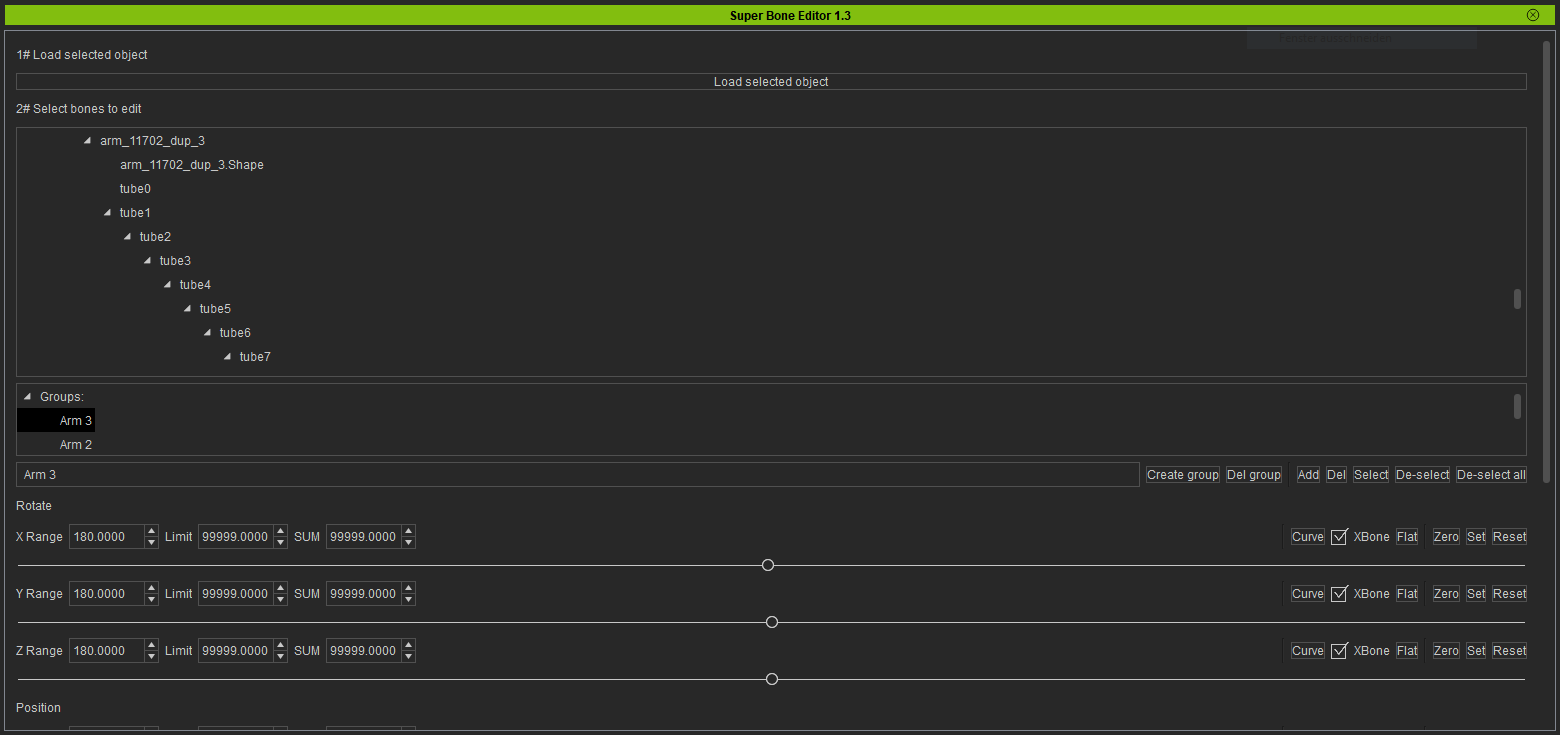
1. i created groups, but when i select a group nothing gets selected... By the way, i use 7.5, could this be the problem??
( when i select group "arm 3" tube 1 till 19 should be selected)
2. The window with the bones is so small, is there a way to make it bigger??
(for the moment i can only see 10 bones, that's not many)
3. Could you add the function "select 1 shift 19" instead of scrolling with wheelmouse?
|
|
By 4u2ges - 7 Years Ago
|
|
Currently you can only move bones using local Euler coordinates. Get world transform is bugged out when it comes to bones with the API (reported). Also quaternion rotation set function is also bugged out when it comes to bones (also reported). But the plugin is prepared to use it when RL fix that. So hopefully soon.
Hi Key, it looks as if some (or all) of the related bugs and shortcomings were eliminated in the latest 7.5. Any plans for going back and changing the routine?
Also (probably question to RL), do we still have to use Dev Edition, or official 7.5 has already covering it all?
Thanks
G
|
|
By toystorylab - 7 Years Ago
|
4. The keyframes do not appear where they should... Mostely way further in the timeline:pinch:
|
|
By The-any-Key - 7 Years Ago
|
toystorylab (7/25/2019)
Cool tool ;)BUT 1. i created groups, but when i select a group nothing gets selected... By the way, i use 7.5, could this be the problem?? ( when i select group "arm 3" tube 1 till 19 should be selected) 2. The window with the bones is so small, is there a way to make it bigger?? (for the moment i can only see 10 bones, that's not many) 3. Could you add the function "select 1 shift 19" instead of scrolling with wheelmouse?
1# When you create a new group it is always empty (Even if you got selected bones in the tree. So after you create a group click the "Add" button. I added a tooltip for this on the button)
2# Increased the window.
3# Shift select added. Also changed so when click one item you de-select the other selected bones. So you need to use Ctrl+Click to select one by one. You can still drag the mouse over to select multiple bones.
All in the next version. Will post when it is out.
|
|
By The-any-Key - 7 Years Ago
|
|
toystorylab (7/25/2019)
4. The keyframes do not appear where they should... Mostely way further in the timeline:pinch:
Seem to work fine.

Can you send a project file that cause the issue? Also make sure you follow: https://youtu.be/_B95xoUB4Ik?t=22 if you get a message when you add the prop to the plugin. Some older default animation clips cause issues. So you need to remove them and create a new fresh one.
|
|
By toystorylab - 7 Years Ago
|
I sent the project but it is made in 7.5...
|
|
By TBone50 - 7 Years Ago
|
|
does this work with characters?
|
|
By toystorylab - 7 Years Ago
|
Ok, got the groups working ;)
|
|
By toystorylab - 7 Years Ago
|
After a new attempt with a blank project the keyframes get where they should...
In the project i sent you i have been mixing the "bone editor" + "edit animation layer".
Could that cause my issues?
|
|
By toystorylab - 7 Years Ago
|
Started working further on this and keyframes still don't drop on my cursor position :pinch:
|
|
By The-any-Key - 7 Years Ago
|
4u2ges (7/25/2019)
Currently you can only move bones using local Euler coordinates. Get world transform is bugged out when it comes to bones with the API (reported). Also quaternion rotation set function is also bugged out when it comes to bones (also reported). But the plugin is prepared to use it when RL fix that. So hopefully soon.
Hi Key, it looks as if some (or all) of the related bugs and shortcomings were eliminated in the latest 7.5. Any plans for going back and changing the routine?
Also (probably question to RL), do we still have to use Dev Edition, or official 7.5 has already covering it all?
Thanks
G
Some of the quaternion bugs are fixed. But bone.localTransform() is still buggy. I also found a new bug in BoneTransformControl.SetValue(). You can only set one bone at a time. So we need to wait some more until we get those fixed.
|
|
By toystorylab - 7 Years Ago
|
After quitting and reopening project, groups must be recreated...
I guess it's probably not possible, but is there a way SBE can remind the groups created for a particular object?
|
|
By The-any-Key - 7 Years Ago
|
|
toystorylab (7/26/2019)
After quitting and reopening project, groups must be recreated...
I guess it's probably not possible, but is there a way SBE can remind the groups created for a particular object?
I could add a save and load feature for the groups. All bones in an object need to have different names however. But that is commonly the case I think.
|
|
By toystorylab - 7 Years Ago
|
|
The-any-Key (7/26/2019)
I could add a save and load feature for the groups. All bones in an object need to have different names however. But that is commonly the case I think.
That would be cool...
|
|
By 4u2ges - 7 Years Ago
|
|
Some of the quaternion bugs are fixed. But bone.localTransform() is still buggy. I also found a new bug in BoneTransformControl.SetValue(). You can only set one bone at a time. So we need to wait some more until we get those fixed.
OK, no problem. We'll wait.
|
|
By The-any-Key - 7 Years Ago
|
|
toystorylab (7/26/2019)
Started working further on this and keyframes still don't drop on my cursor position :pinch:
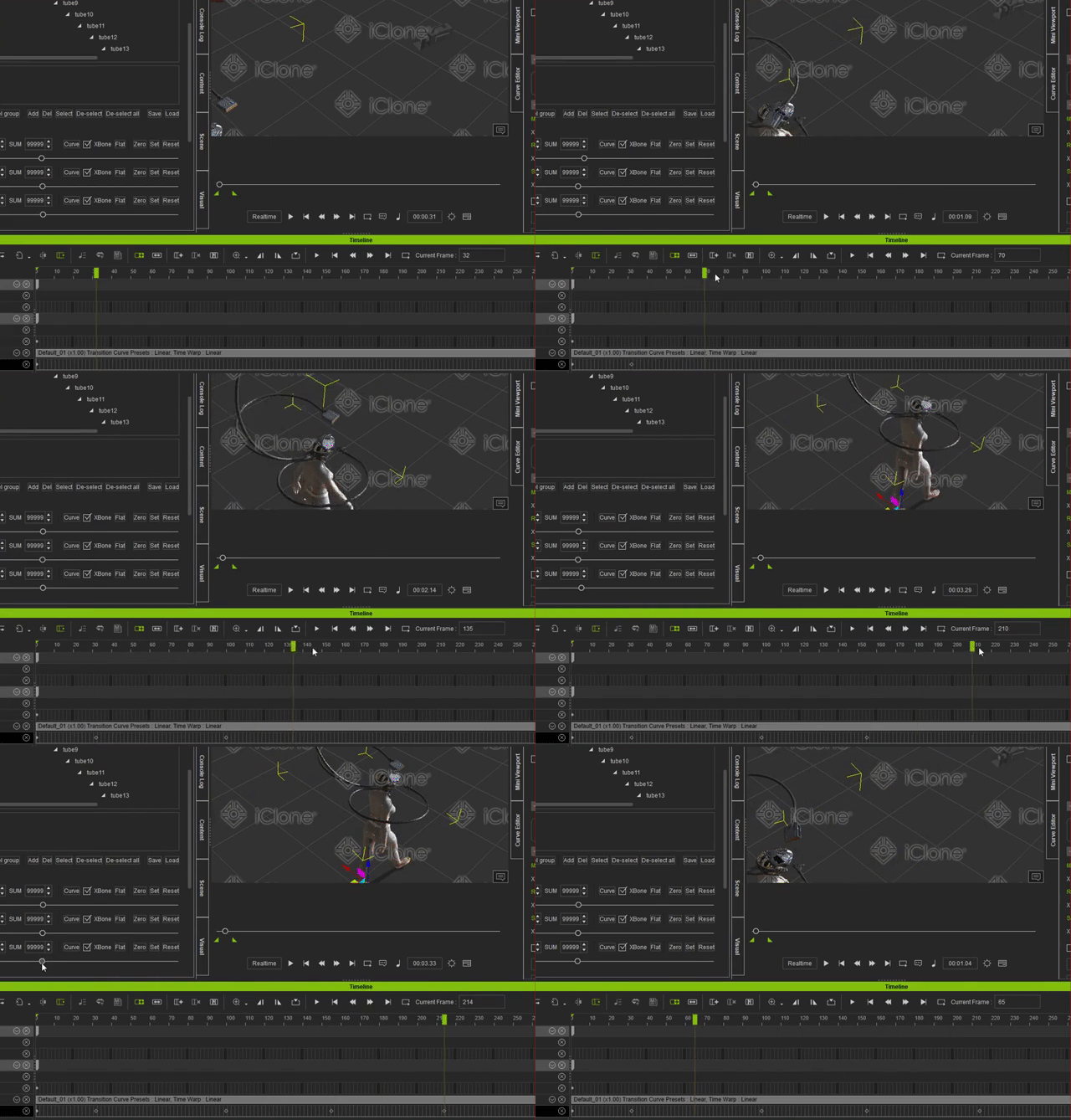
Works fine here. Can you give an example how your workflow is?
|
|
By The-any-Key - 7 Years Ago
|
|
TBone50 (7/25/2019)
does this work with characters?
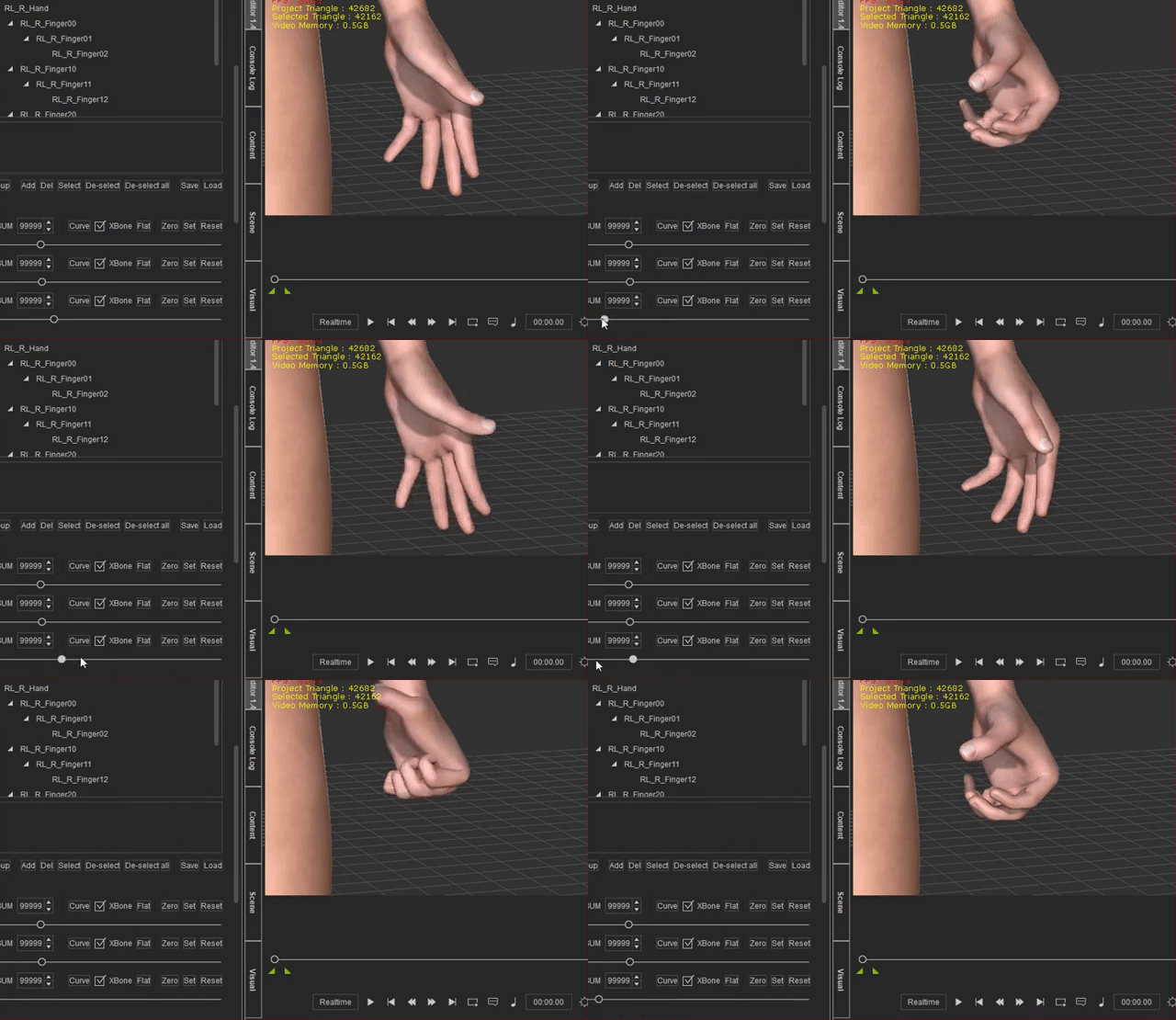
Yep:
|
|
By toystorylab - 7 Years Ago
|
The-any-Key (7/27/2019)
toystorylab (7/26/2019)
Started working further on this and keyframes still don't drop on my cursor position :pinch:
Works fine here. Can you give an example how your workflow is?
Wow, that's stunning...
I don't get this accurate behaviour and keyframes flip further in the timeline.
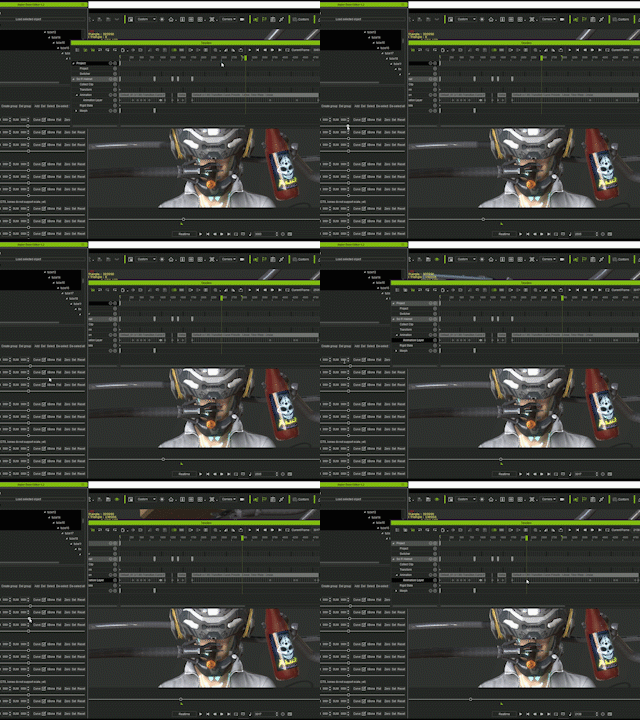
Took me a while to get this gif...
Never done before, used premiere.
How do you make your gifs?
|
|
By toystorylab - 7 Years Ago
|
I still have no clue why it behaves so strange on my pc, but here is my first result:
|
|
By The-any-Key - 7 Years Ago
|
toystorylab (7/27/2019)
The-any-Key (7/27/2019)
toystorylab (7/26/2019)
Started working further on this and keyframes still don't drop on my cursor position :pinch:
Works fine here. Can you give an example how your workflow is? Wow, that's stunning...
I don't get this accurate behaviour and keyframes flip further in the timeline.
Took me a while to get this gif...
Never done before, used premiere.
How do you make your gifs?
Found the time issue and it is now fixed.
Version 1.4 is now out:
Bigger bone window
Save and load groups
Fix key time issue
|
|
By toystorylab - 7 Years Ago
|
|
The-any-Key (7/27/2019)
Found the time issue and it is now fixed.
Version 1.4 is now out:
Bigger bone window
Save and load groups
Fix key time issue
Hm, it does not show up in iClone...
I see it loading (super Bone Editor) in the opening screen but it's not there.
As the content of the exe is very different to 1.3:
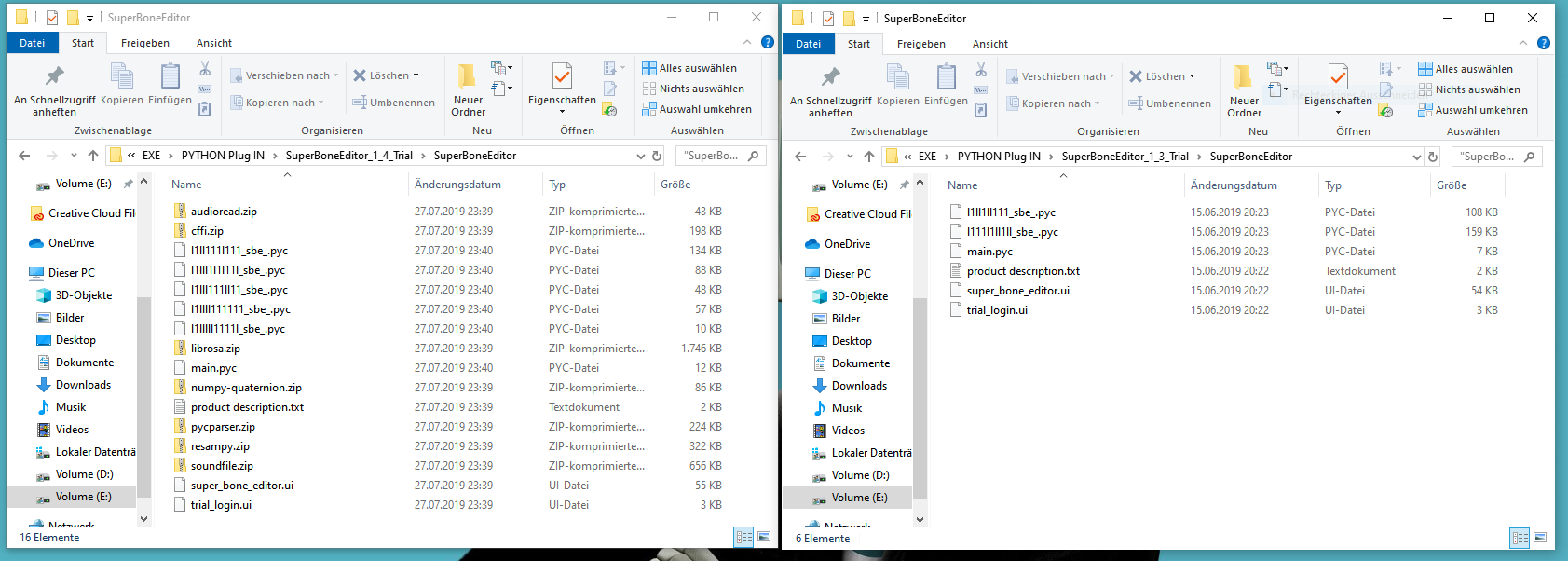
Do i have tu unzip all these files? I simply put the whole folder in "OpenPlugin" as i did with 1.3...
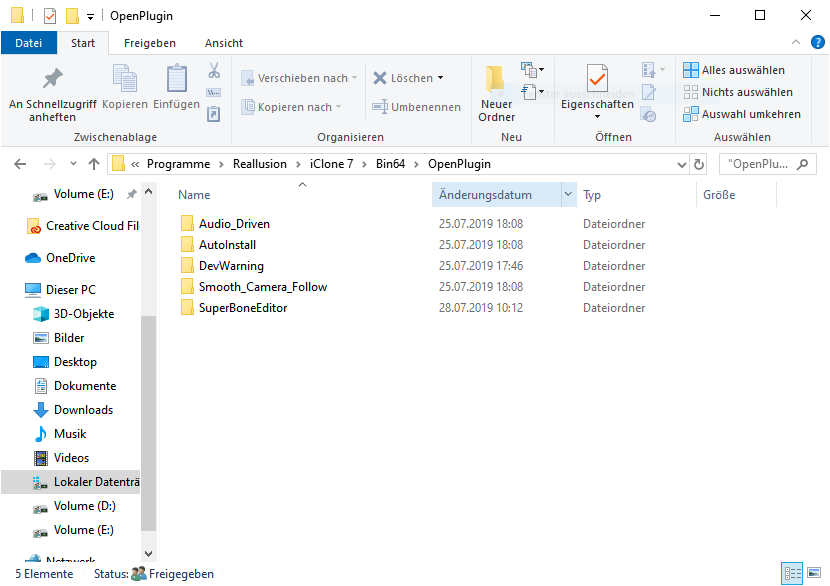
|
|
By toystorylab - 7 Years Ago
|
Sorry, it appears...
BUT only when i start iClone as administrator.
In version 1.3, i only had tu run as administrator once...
|
|
By The-any-Key - 7 Years Ago
|
|
toystorylab (7/28/2019)
Sorry, it appears...
BUT only when i start iClone as administrator.
In version 1.3, i only had tu run as administrator once...
When you update you should run it in admin mode once. The plugin might ask you that Python need write access to the site-packages folder in iClone (as some new modules use cache folders there). So after you run it once or twice you should be able to start it in non-admin mode.
|
|
By toystorylab - 7 Years Ago
|
|
The-any-Key (7/27/2019)
[quote]toystorylab (7/27/2019)
Found the time issue and it is now fixed.
Version 1.4 is now out:
Bigger bone window
Save and load groups
Fix key time issue
Yo, bigger bone window ;)
Save and load groups works fine
Fix key time seems to work fine at first glance...
And selecting multiple bones with shift works too :)
The only problem is it works only in admin mode...
I opened several times in admin and in non-admin.
It would be no big deal to simply always run iClone in admin mode.
Is there a way to tell my IC7 "icon" on taskbar to always run it in admin mode?
Though i noticed that for unknown reasons, you can't send an avatar from CC (non admin) to IC (admin)
but you can send an avatar from IC (admin) to CC (non admin) :pinch:
Seems to be a bug...
Running both in admin mode, send back and forth is no problem.
IC (admin) back and forth to 3DXChange (non admin) works fine...
Though you have to start from IC (admin) and send something.
Having IC (admin) open, then start 3DXChange (non admin), load a prop with it, you can't send it to IC (admin) :pinch:
So, at first glance, and besides (admin/non-admin) everything is fine.
If i can tell my 3 tool-icons on taskbar to automatically run in admin mode...;)
|
|
By The-any-Key - 7 Years Ago
|
toystorylab (7/28/2019)
The-any-Key (7/27/2019)
[quote]toystorylab (7/27/2019)
Found the time issue and it is now fixed.
Version 1.4 is now out:
Bigger bone window
Save and load groups
Fix key time issueYo, bigger bone window ;)
Save and load groups works fine
Fix key time seems to work fine at first glance...
And selecting multiple bones with shift works too :)
The only problem is it works only in admin mode...
I opened several times in admin and in non-admin.
It would be no big deal to simply always run iClone in admin mode.
Is there a way to tell my IC7 "icon" on taskbar to always run it in admin mode?
Though i noticed that for unknown reasons, you can't send an avatar from CC (non admin) to IC (admin)
but you can send an avatar from IC (admin) to CC (non admin) :pinch:
Seems to be a bug...
Running both in admin mode, send back and forth is no problem.
IC (admin) back and forth to 3DXChange (non admin) works fine...
Though you have to start from IC (admin) and send something.
Having IC (admin) open, then start 3DXChange (non admin), load a prop with it, you can't send it to IC (admin) :pinch:
So, at first glance, and besides (admin/non-admin) everything is fine.
If i can tell my 3 tool-icons on taskbar to automatically run in admin mode...;)
So you never got a message like this? What OS do you use?
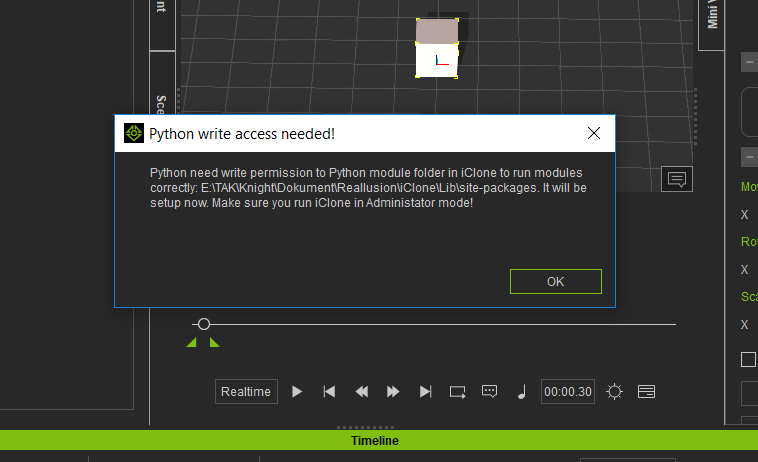
|
|
By toystorylab - 7 Years Ago
|
The-any-Key (7/28/2019)
So you never got a message like this?
Hm, i'm not sure, i got a few messages like this, (new python elements (audio, etc) and clicked all "OK"...
WIN 10, but postponed updates, do you want me to do them?
Postponing ends on juli 30th anyway...
Shall i redo the process?
And what is the best/safest way to do so?
|
|
By vidi - 7 Years Ago
|
|
My firt impression ... Oh Boy it is so easy in DAZ studio to grab all bones and rotate it at once. Not more not less I want 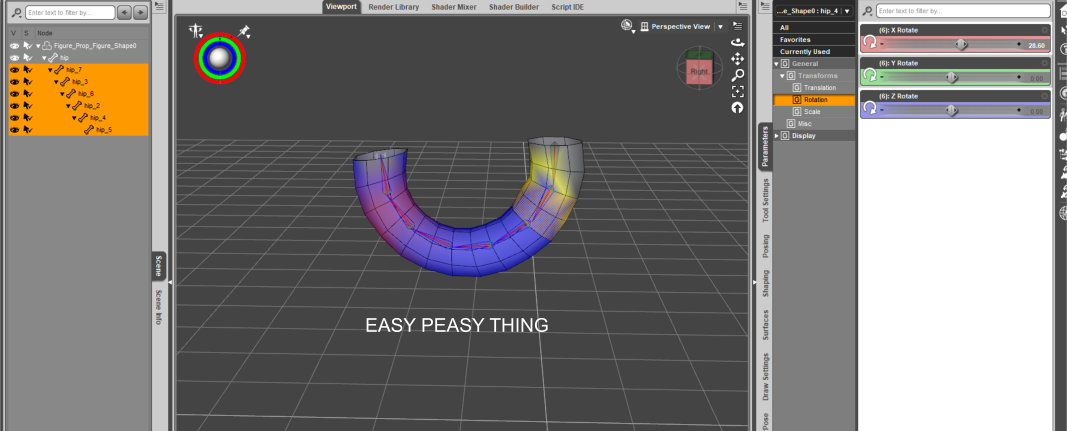 I was hope this super bone thing is the same . But it isn't. I get a huge menue for what ? It seems an extra buy and need a registration. Also I get not acess with a Zylinder with bone. I can rotate my bone in single steps but I want all thogether Anyway The super bones do not show my bones. Therefore Seems not to work for me 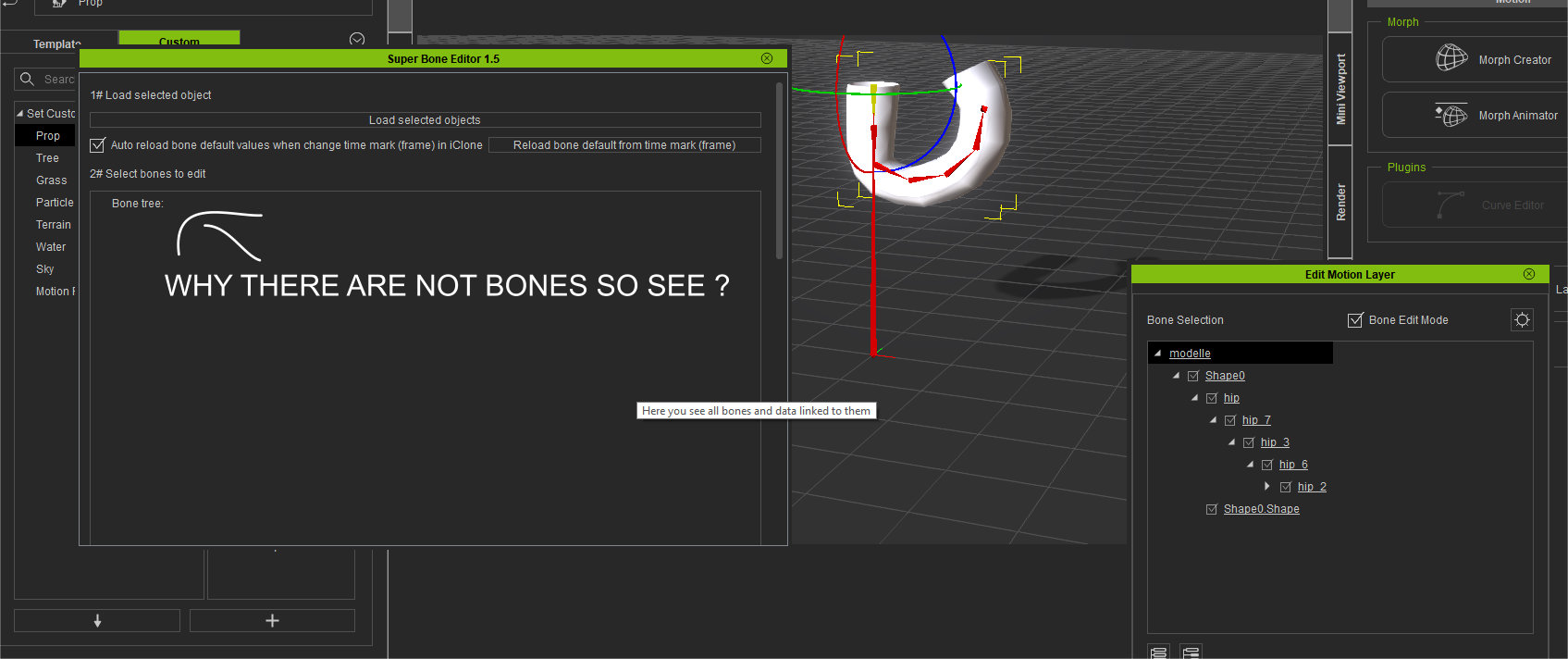 Really it is normaly a essencial Thing in any 3D Programm for that a extera Plugin is not needed. Sorry but not that waht i'm looking / waiting for. It can not to be so hard to implemented, for select all bone an rotate in only a step , or ?
|
|
By 4u2ges - 7 Years Ago
|
|
It can not to be so hard to implemented, for select all bone an rotate in only a step , or ?
That is a question to RL I suppose... and not to the fellow developer who was trying hard to make and support something out of buggy (as it appears so far) API interface.
But I generally agree, it had to be part of the application by default. It is due for a long time and I do have a similar request (FT6026) about it. There are other similar entries exist as well in FT.
|
|
By vidi - 7 Years Ago
|
That is a question to RL I suppose... and not to the fellow develope ....since many many years but nothing happend and this plugin is in contex somehow https://forum.reallusion.com/150849/Bone-Editor-improvement
For sure it is many work for a single developer to create a plugin and maybe if it would working, I had not a reason to complain . But Super Bones do not work for me.and I have not the time and motivation for beta testing for a commercial extra thing what actually should be essentaly . Maybe RL need developer like @any key to improve the Main Aplication, instead all function to split in commercial extra plugs?
|
|
By vidi - 7 Years Ago
|
|
I got it working . I had to update iclone . It do exactly what I want . Sorry for my rant.:blush: What will it cost at the end ?
|
|
By The-any-Key - 7 Years Ago
|
vidi (7/28/2019)
I got it working . I had to update iclone . It do exactly what I want . Sorry for my rant.:blush: What will it cost at the end ?
No problem. Added text to the description what iClone version it require. What version did you use? 7.4?
Did you get the message box:
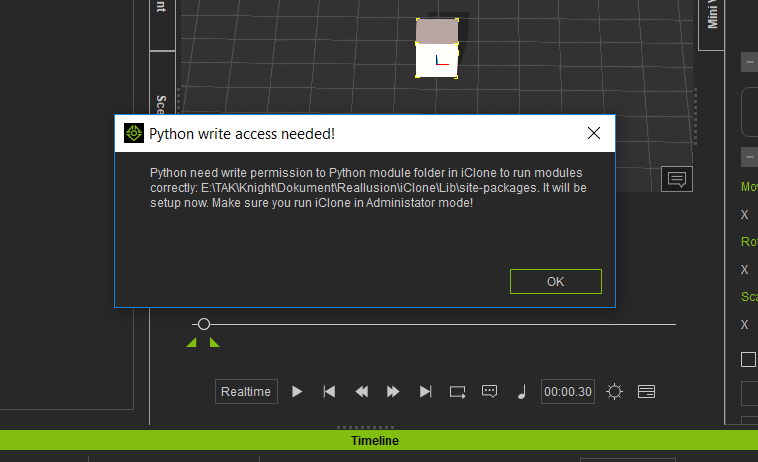
And you can run iClone in non-admin mode and see the plugin in the menu?
|
|
By The-any-Key - 7 Years Ago
|
toystorylab (7/28/2019)
The-any-Key (7/28/2019)
So you never got a message like this? Hm, i'm not sure, i got a few messages like this, (new python elements (audio, etc) and clicked all "OK"... WIN 10, but postponed updates, do you want me to do them? Postponing ends on juli 30th anyway... Shall i redo the process? And what is the best/safest way to do so?
Hmm. Windows updates is not involved in this issue. But windows itself might be involved. There is a permission issue in windows that lock Python from using its own folders. I had these issues on one of my computers and added an auto fix for it in the plugin, and that worked for me. But as Windows is a very individual being, it might be that you need to manually set it.
Got a video for that you can try, please report back if that fix the issue.
|
|
By toystorylab - 7 Years Ago
|
Meanwhile i set IC7+CC3+3DX all to "start in admin mode"... (are there reasons not to set this as standard?)
|
|
By The-any-Key - 7 Years Ago
|
|
toystorylab (7/29/2019)
Meanwhile i set IC7+CC3+3DX all to "start in admin mode"... (are there reasons not to set this as standard?)
Only if you install doubtful plugins that want to harm your computer.
Did you try the Python permission video?
|
|
By toystorylab - 7 Years Ago
|
|
The-any-Key (7/29/2019)
Did you try the Python permission video?
Yo, worked ;)
So, i set IC7 + CC3 + 3DX back to non-admin.
Cause, a few minutes ago, i started Photoshop with iClone (admin)
and later on i wanted to send a downloaded texture to Photoshop
and that suddenly didn't work. Had to close Photoshop and then it worked.
So, everything fine now, thanx!
|
|
By The-any-Key - 7 Years Ago
|
toystorylab (7/29/2019)
The-any-Key (7/29/2019)
Did you try the Python permission video?
Yo, worked ;)
So, i set IC7 + CC3 + 3DX back to non-admin.
Cause, a few minutes ago, i started Photoshop with iClone (admin)
and later on i wanted to send a downloaded texture to Photoshop
and that suddenly didn't work. Had to close Photoshop and then it worked.
So, everything fine now, thanx!
Good. Added some extra checks for permission in the plugin in the next update.
Hopefully vidi will respond and report back if she was able to use the plugin when iClone was in non-admin mode.
|
|
By The-any-Key - 7 Years Ago
|
New tutorial for the new features:
|
|
By toystorylab - 7 Years Ago
|
Yo, nice...
My brain didn't get it completely after first sight, but will play around with my Medusa :D
|
|
By toystorylab - 7 Years Ago
|
Makes fun ;)
Is it possible to allow "rename" group?
While creating groups, after a while i needed more accurate naming.
For the moment i have to delete the group and create a new one, take care all the required bones are selected...
As it makes sense to create several groups to make nice moves;
would it be possible to make group-panel "scalable"?
Let's say i want more room in group-panel, i can scroll the upper border to the top,
knowing that the bone panel would shrink in the same amount...
Cause as soon groups are made, one probably work more with the group-panel as with the bone-panel.

And is it possible SBE reminds where he saved or loaded a preset?
That's it so far...
Thanx :kiss:
|
|
By toystorylab - 7 Years Ago
|
Oops, altering the speed of an animation seems to make it glitchy... :pinch:
Can you check this?
|
|
By toystorylab - 7 Years Ago
|
Copy and paste a keyframe not possible??
|
|
By The-any-Key - 7 Years Ago
|
|
toystorylab (7/29/2019)
Oops, altering the speed of an animation seems to make it glitchy... :pinch:
Can you check this?
Yes, dont do that.
You can try change speed. And then collect that part, and create a new perform or motion clip. This might make it work properly again. But as keyframes in a clip itself can float between frames, we can't do anything about that as the Python API don't cover it.
|
|
By The-any-Key - 7 Years Ago
|
|
toystorylab (7/29/2019)
Copy and paste a keyframe not possible??
Elaborate
|
|
By The-any-Key - 7 Years Ago
|
toystorylab (7/29/2019)
Makes fun ;)And is it possible SBE reminds where he saved or loaded a preset? would it be possible to make group-panel "scalable"? Is it possible to allow "rename" group?
Yes, but in a future update.
No, as the Python UI dont welcome these kind of things, will just make it a bit bigger.
Maybe, but you should really just name them better the first time, and as you can just select a group and create a new one and delete the old. It will be dropped to the bottom of my list.
|
|
By toystorylab - 7 Years Ago
|
|
The-any-Key (7/29/2019)
Elaborate
What does that mean? A yes or no?
|
|
By The-any-Key - 7 Years Ago
|
toystorylab (7/29/2019)
The-any-Key (7/29/2019)
ElaborateWhat does that mean? A yes or no?
What do you mean copy and paste keys?
Select a key and hold the mouse pointer over the key and use Ctrl+C to copy it and Ctrl+V to paste it. Or do this not work on your side?
|
|
By toystorylab - 7 Years Ago
|
Damn, i just noticed you have a 1.5 out there, that was not clear for me :blush:
I'm working with 1.4...
Anyway, i will gather my questions and will stop writing every 15 minutes :ermm:
|
|
By toystorylab - 7 Years Ago
|
Another little Test with SBE...
Used with:
https://www.daz3d.com/quadropod
|
|
By rosuckmedia - 7 Years Ago
|
@toystorylab
You are very creative, very good.:D
Greeting rosuckmedia
|
|
By 4u2ges - 7 Years Ago
|
Looks nice... s***t :D
|
|
By The-any-Key - 7 Years Ago
|
Update 1.6:
Fix crash when just open plugin and change timeline
Re-arrange buttons to make the plugin less wide
Remember save and load location
|