Hi,
the "trick" is to use QT Creator is to organize your GUI with layouts, as also suggested by Jeff.
The best way I got so far is to string widgets together as much as possible with nested layouts.
For example, imagine you have a label and a text input control and you want to have them always staying close on the same line.
Then, you can select both the widgets and then apply an horizontal layout.
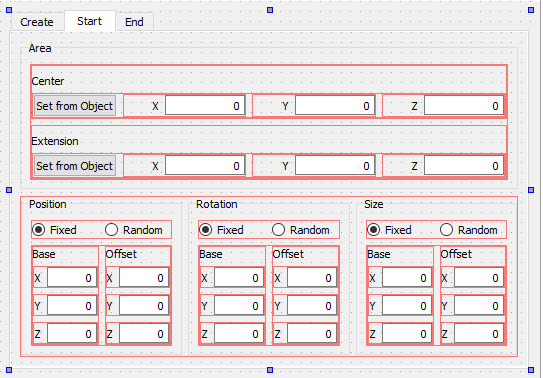
Here is a picture, which should clarify what i mean and how i managed to keep everything under control.
It is a snapshot of Qt creator.
All the red boxes are layouts.
For example, the label X, Y, Z are linked with an horizontal layout to their input fields.
Then there is another horizontal layout that put all the widgets on the same row together. etc. etc.
Here is Qt Creator GUI.
Here is the result in iClone.
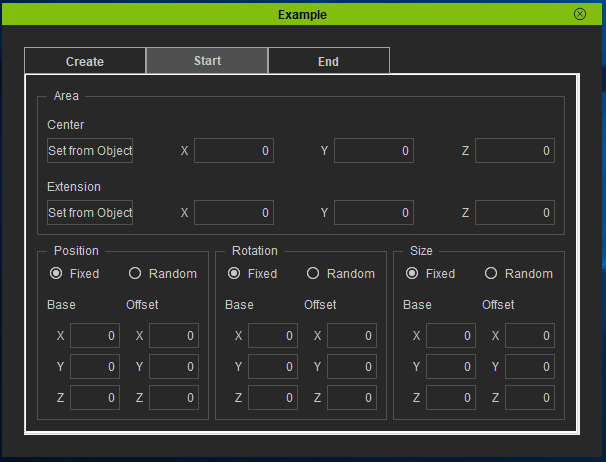
No constraints have been used so far.
You have basically 4 layout types to choose from, and they are selectable either by a right-click pop-up menu or by the icon tools on the top bar.
If you need to change anything, you will have to break the layouts... so better to plan ahead (if ever possible...) how your GUI is going to look (I am not able at all... if fact I had to break and rebuild the layouts so many times...
:( )
I started using the constraints like min and max, but I dropped them soon because it was a mess to keep everything under curb when the GUI was "growing" in complexity.
So, I used this method to string together group of widgets as far as they shall always stay together,
The advantage of doing like this is that the all widgets always perfectly fit in the space.
Obviously sometimes they fit too much, like the wide input fields of the "Area" and "extension" groups: when the GUI is really the final one, I will apply the min/max coinstraints to reduce them.
It is also important to have a top level layout to the full Dialog widget otherwise you get an empty window in iClone.
Then, of course, if you use QtCreator, you need to get the handlers to the various controls in order to be able to use them.
Your "friend" for this is the findChild() function of your GUI object.
My suggestion is to spend some time to assign meaningful names to the various widget objects, so that referring them in the code would be more meaningful than findChild(..., "widget_16" )
;););)Cheers
Roberto
My PC:
OS: Windows 10 Pro English 64-bit / CPU: Intel i7-9700 3.6GHz / MB: ASUS ROG Strix Z390 RAM: 32GB DDR4 2.6GHz / HD: 2TB+3TB / SSD: 2x512GB Samsung 860 EVO + 1x2TB Samsung
VB: Palit GTX2080 TI GamingPro 11GB / AB: embedded in the MB and VB (audio from the MOTU M4 I/F) / DirectX: 12