|
Author
|
Message
|
|
TonyDPrime
|
TonyDPrime
Posted 6 Years Ago
|
|
Group: Forum Members
Last Active: Last Year
Posts: 3.4K,
Visits: 12.4K
|
Hi Miranda, thank you so much. Unfortunately I have discovered that the command you noted does not 'fix' the problem in certain lighting situations. This one is with the Pixels Per Triangle set to 500,000, and it has tessellation break on the leg: 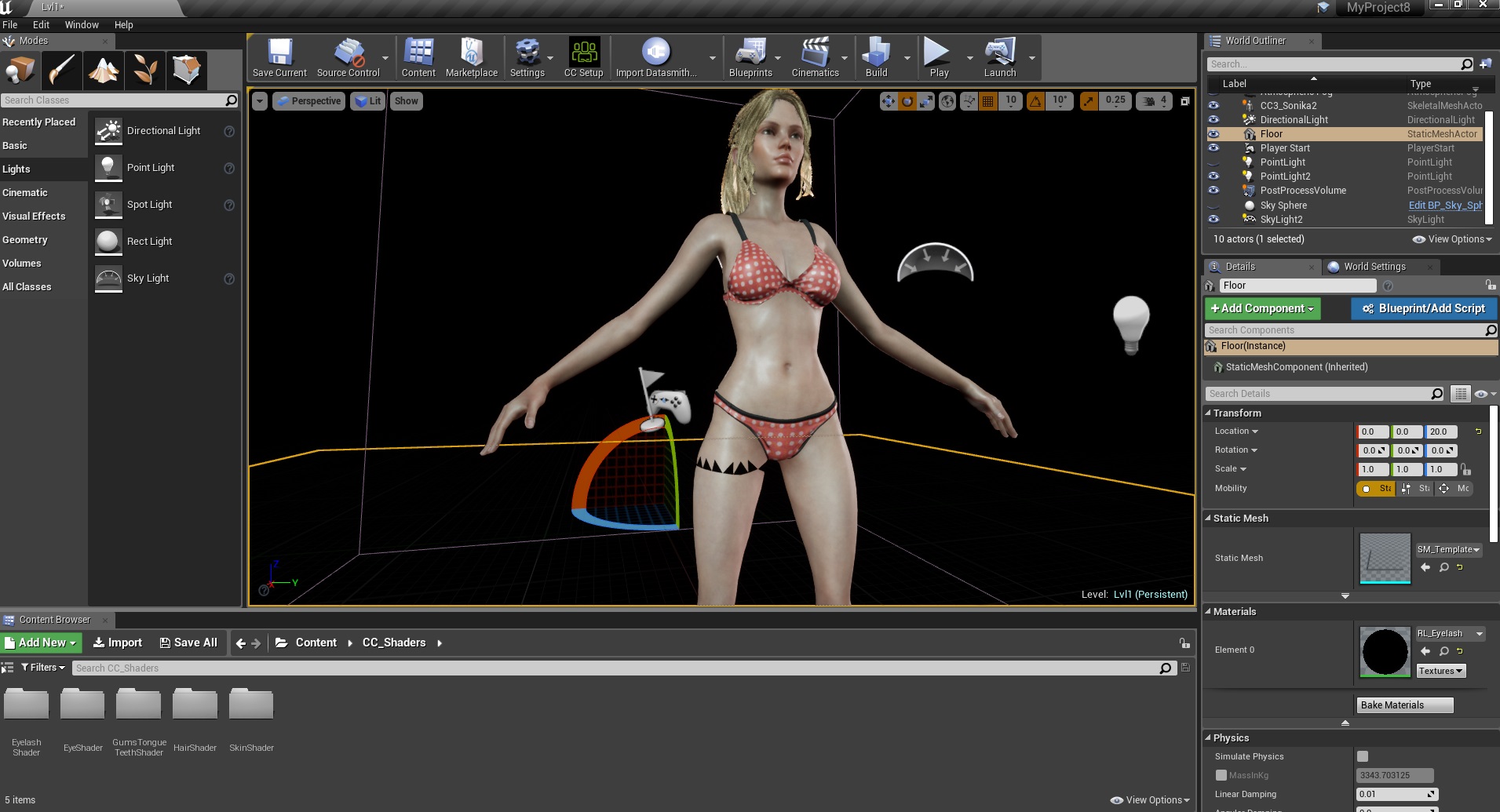 Miranda, can I ask this- With the Plugin's HQ/LQ shader, we are in UE able to open the material Editor for the 'shader' (skin), but not for the specific 'channel' itself (arm, leg, body, head). Whereas with Plugin v1.0's traditional import, you would have the ability to mod the individual avatar material part in the node editor (arm, leg, body, head). I am wondering, in UE4, when using the HQ shader, can you still node-tweak say the body, but not the arms in the node editor, or is this per-avatar -part (arm, leg, body, head) editing no longer available when using the HQ shader. Thanks!
|
|
|
|
|
Miranda (RL)
|
Miranda (RL)
Posted 6 Years Ago
|
|
Group: Administrators
Last Active: 3 Years Ago
Posts: 1.8K,
Visits: 11.2K
|
TonyDPrime (3/31/2019)
Hi Miranda, thank you so much. Unfortunately I have discovered that the command you noted does not 'fix' the problem in certain lighting situations.
This one is with the Pixels Per Triangle set to 500,000, and it has tessellation break on the leg:It's likely to be a bug in UE4. May you try to adjust the value randomly and change it back to see the updated viewer? or try to tweak it to a bit higher?
Miranda, can I ask this-
With the Plugin's HQ/LQ shader, we are in UE able to open the material Editor for the 'shader' (skin), but not for the specific 'channel' itself (arm, leg, body, head).
Whereas with Plugin v1.0's traditional import, you would have the ability to mod the individual avatar material part in the node editor (arm, leg, body, head).
I am wondering, in UE4, when using the HQ shader, can you still node-tweak say the body, but not the arms in the node editor, or is this per-avatar -part (arm, leg, body, head) editing no longer available when using the HQ shader.
Thanks!
The route is a bit different, but it's adjustable. We will show you the screenshot tomorrow.
|
|
|
|
|
TonyDPrime
|
TonyDPrime
Posted 6 Years Ago
|
|
Group: Forum Members
Last Active: Last Year
Posts: 3.4K,
Visits: 12.4K
|
Hi Miranda, thank you so much for the suggestion. Kind of funny, after reading your post I had put another character in the scene and that took away the breakage. So your suggestion was correct!
Thanks also for looking into my other question, I am very sorry to impose. You are very kind to respond with such help!
|
|
|
|
|
Miranda (RL)
|
Miranda (RL)
Posted 6 Years Ago
|
|
Group: Administrators
Last Active: 3 Years Ago
Posts: 1.8K,
Visits: 11.2K
|
Hi Tony, This is how you access to the interface for tweaking the materials. Step 1: Find the Material that you are going to adjust, and double click to open the editor. 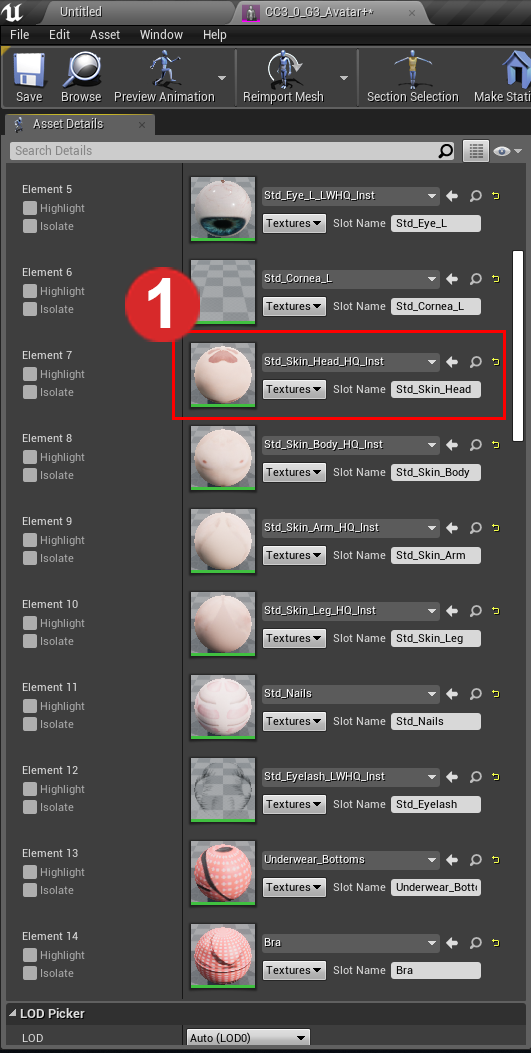 Step 2: Find the Material (Shader) corresponding to Parent under the General Section, and double click to expand the parameter panel. 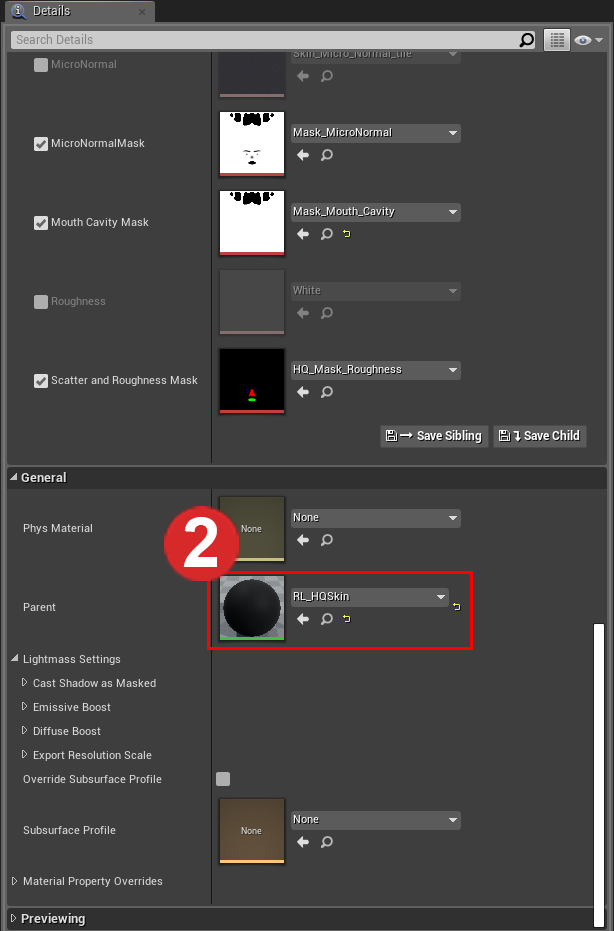 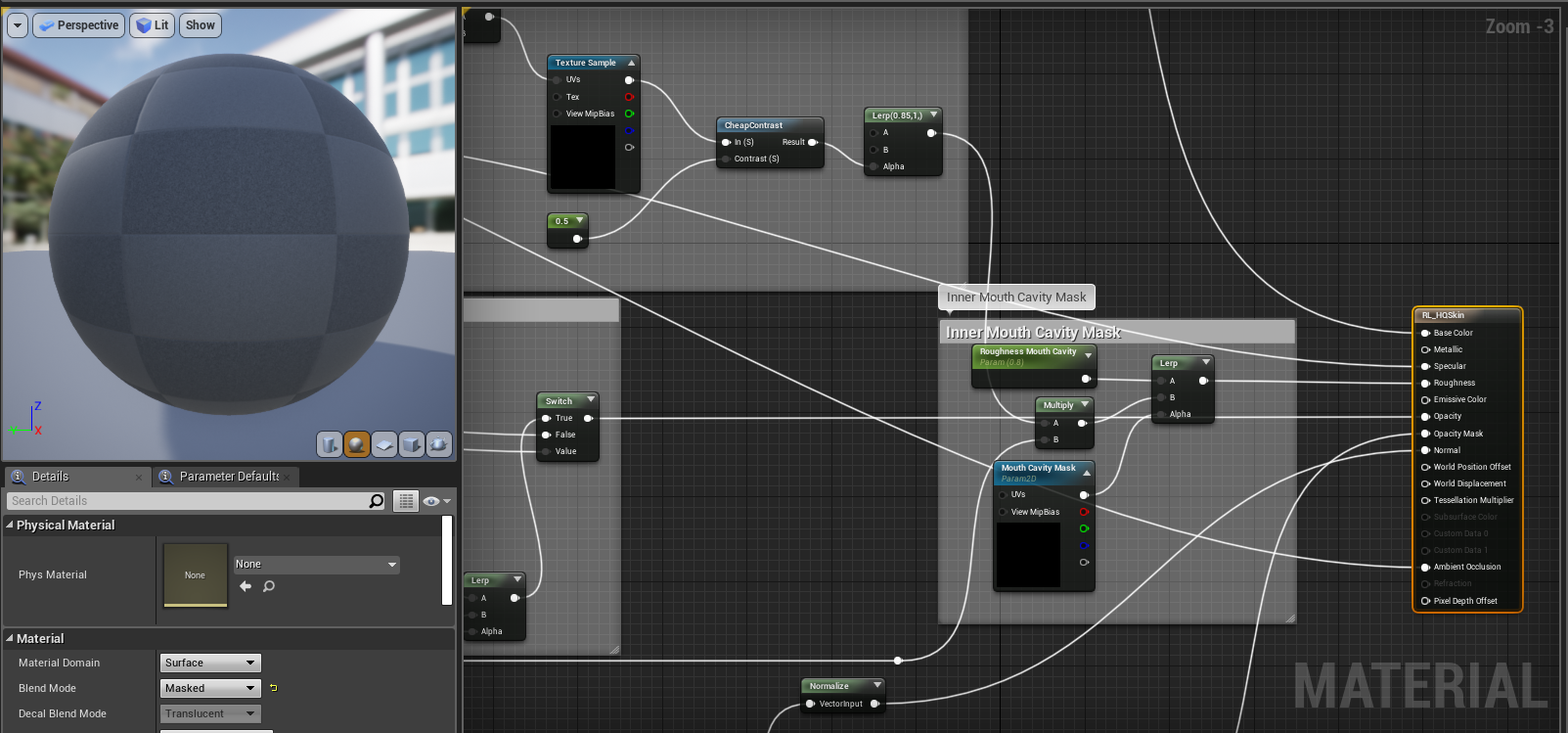 You can also find the most common parameter settings in Parameter Groups. 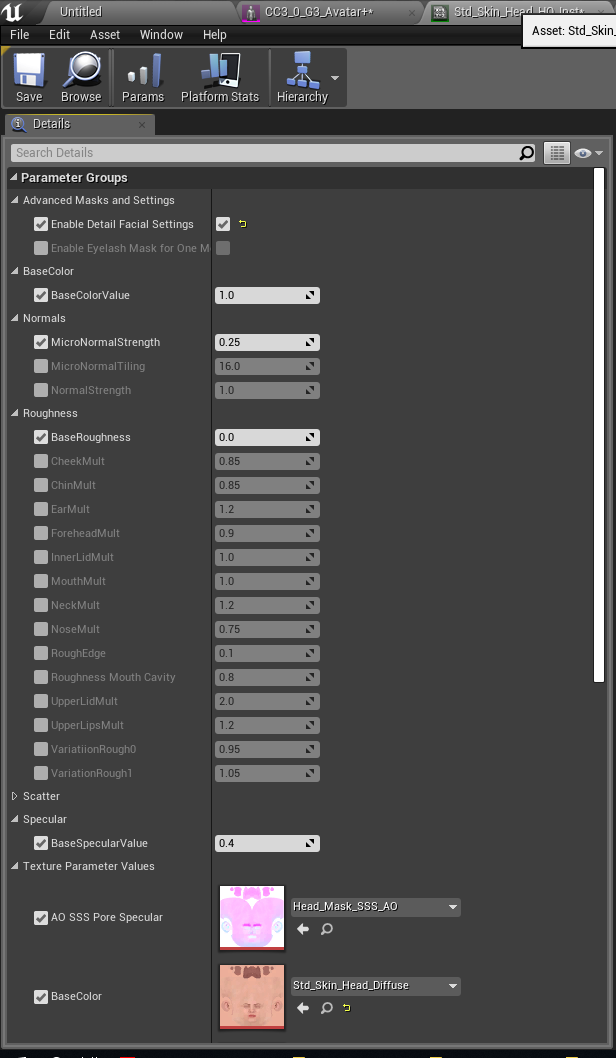
|
|
|
|
|
TonyDPrime
|
TonyDPrime
Posted 6 Years Ago
|
|
Group: Forum Members
Last Active: Last Year
Posts: 3.4K,
Visits: 12.4K
|
Hi Miranda, thank you for taking the time to show us this.
When I do do this, it always only opens up the head materials in the shader...I can't seem to accomplish opening up a node editor with the body, arms, and legs materials.
Is your team able to do it on your end?
Any changes I do make to the RL_HQSkin do affect all channels (arms, legs, body, head), which is nice, but I am looking to see if I could affect one without affecting the other, but in a Node Editor scenario.
Maybe it would require that I make individual versions of the HQSkin such that each body part has its own editable HQ shader?
THX!!!
|
|
|
|
|
zeoniknights
|
zeoniknights
Posted 6 Years Ago
|
|
Group: Forum Members
Last Active: 4 Years Ago
Posts: 2,
Visits: 20
|
Guys you need to do another Update to Unreal 4.22 which as Release for CC3 to Unreal
|
|
|
|
|
StyleMarshal
|
StyleMarshal
Posted 6 Years Ago
|
|
Group: Forum Members
Last Active: Last Year
Posts: 5.8K,
Visits: 14.3K
|
zeoniknights (4/2/2019)
Guys you need to do another Update to Unreal 4.22 which as Release for CC3 to Unrealyes +1
|
|
|
|
|
Miranda (RL)
|
Miranda (RL)
Posted 6 Years Ago
|
|
Group: Administrators
Last Active: 3 Years Ago
Posts: 1.8K,
Visits: 11.2K
|
TonyDPrime (4/2/2019)
Hi Miranda, thank you for taking the time to show us this.
When I do do this, it always only opens up the head materials in the shader...I can't seem to accomplish opening up a node editor with the body, arms, and legs materials.
Is your team able to do it on your end?
Any changes I do make to the RL_HQSkin do affect all channels (arms, legs, body, head), which is nice, but I am looking to see if I could affect one without affecting the other, but in a Node Editor scenario.
Maybe it would require that I make individual versions of the HQSkin such that each body part has its own editable HQ shader?
THX!!!Hi Tony, You can choose Head, Body, Arm, Leg (#1 picture). Since those four parts sharing the same material, it's better to adjust parameters under Parameter Groups (#4 picture), instead of using the graphic material editor. (#3 picture) Example: 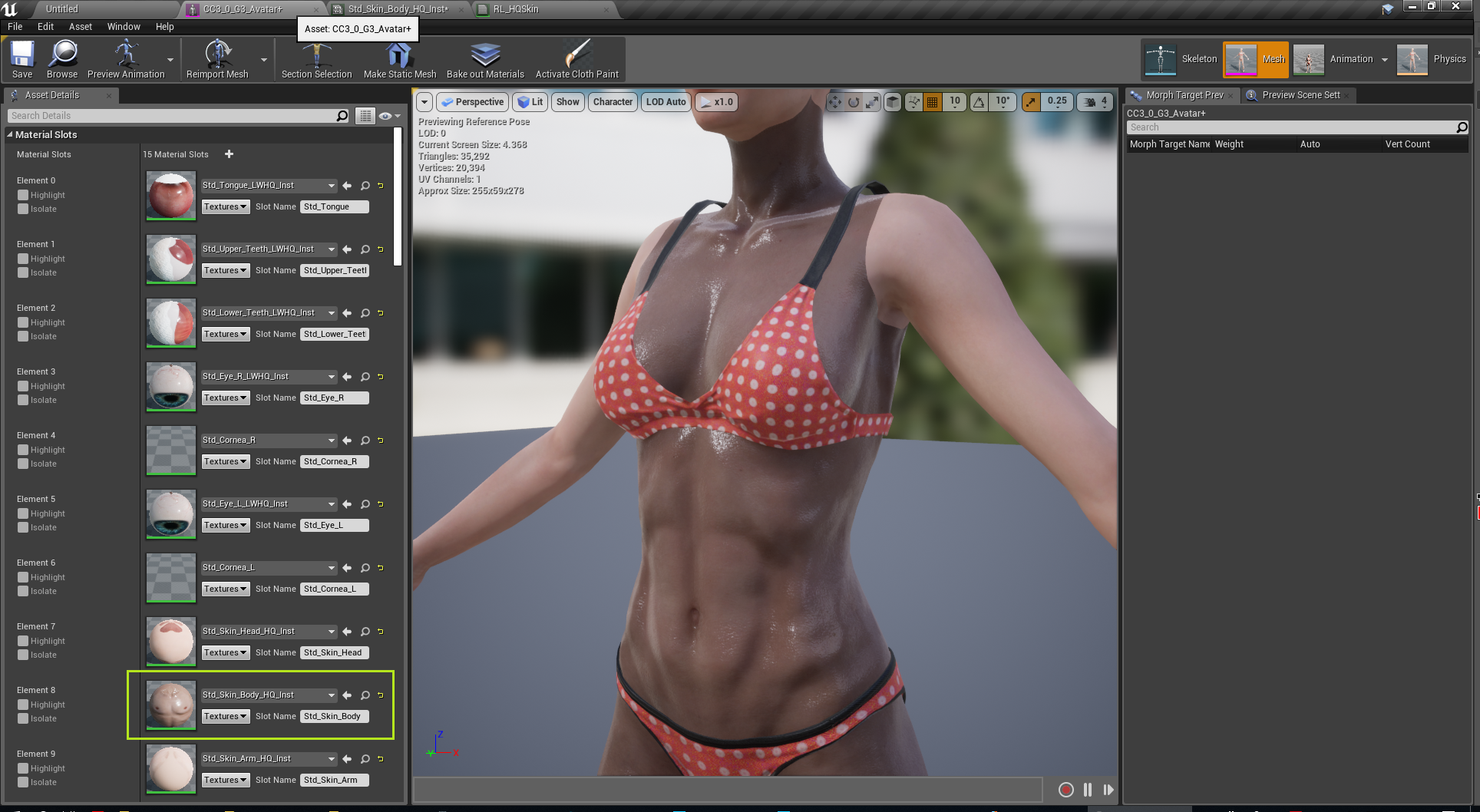 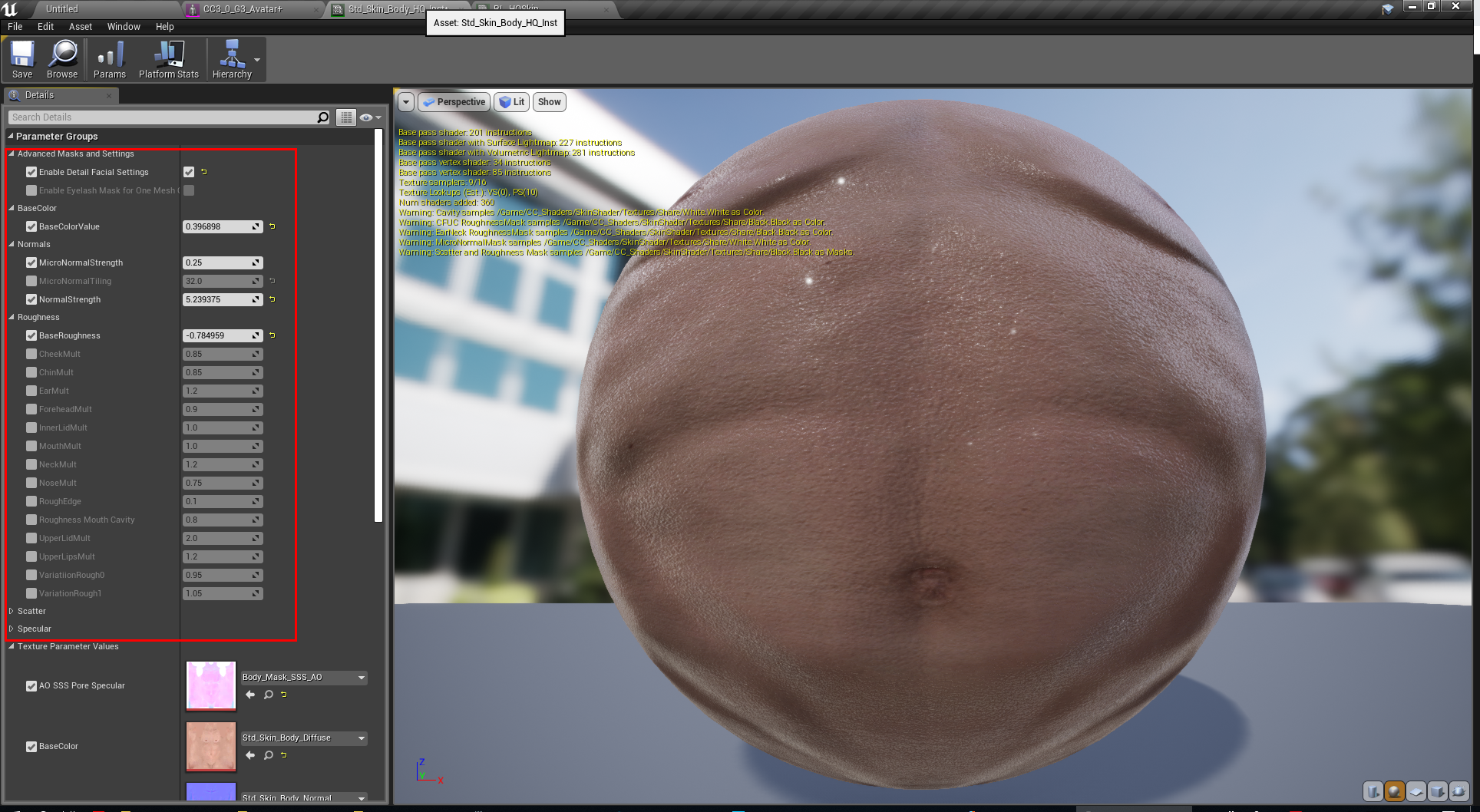
|
|
|
|
|
Miranda (RL)
|
Miranda (RL)
Posted 6 Years Ago
|
|
Group: Administrators
Last Active: 3 Years Ago
Posts: 1.8K,
Visits: 11.2K
|
Hi everyone,
We are evaluating the Unreal 4.22 now. I will update the status with you next week. Thanks!
|
|
|
|
|
TonyDPrime
|
TonyDPrime
Posted 6 Years Ago
|
|
Group: Forum Members
Last Active: Last Year
Posts: 3.4K,
Visits: 12.4K
|
Miranda (RL) (4/3/2019)
TonyDPrime (4/2/2019)
Hi Miranda, thank you for taking the time to show us this.
When I do do this, it always only opens up the head materials in the shader...I can't seem to accomplish opening up a node editor with the body, arms, and legs materials.
Is your team able to do it on your end?
Any changes I do make to the RL_HQSkin do affect all channels (arms, legs, body, head), which is nice, but I am looking to see if I could affect one without affecting the other, but in a Node Editor scenario.
Maybe it would require that I make individual versions of the HQSkin such that each body part has its own editable HQ shader?
THX!!!Hi Tony, You can choose Head, Body, Arm, Leg (#1 picture). Since those four parts sharing the same material, it's better to adjust parameters under Parameter Groups (#4 picture), instead of using the graphic material editor. (#3 picture) Example: Hi Miranda, thank you for the suggestion. I know I can tweak the individual settings per arm, leg, head, body. But let's say I wanted to add a Displacement Texture for the Displacement Node on just the arm, and not the leg. Or, lets say a blend of a basic checkerboard pattern over the avatar's arms, but not the legs. And I mean a mix of 2 diffuse textures, not a replace of one to the other. There is no 'input' for these things in the texture parameter list (ie - there is no texture input for Displacement, or Blend via a linear interpolate). I think the shader does a fantastic job but the traditional set up has more flexibility, I am looking to see if your team knows a way I could add more of this flexibility into the shader. Like, is there a way to add more body-part specific channels in the Texture Parameter list for the RL-HQSkin shader (ie World Displacement, Blend via Multiply and Linear Interpolate) such that you could add and modify with additional combining of textures for parts individually? Similar to how you can specify textures for Roughness, diffuse BaseColor, Normal, AO SSS Pore Specular - if we also could add in a 'Blend' channel in combination with the diffuse, or a World Displacement, this would actually solve what I am looking for, without having to pre-blend things in Photoshop/Gimp. THX so much!
|
|
|
|