|
Author
|
Message
|
|
Miranda (RL)
|
Miranda (RL)
Posted 6 Years Ago
|
|
Group: Administrators
Last Active: 3 Years Ago
Posts: 1.8K,
Visits: 11.2K
|
macsklad (1/25/2019)
Hi!
First of all - what a great idea!
Second: would You be so kind and include versions for unreal 4.18 (4.18 is the most stable atm for examle concerning multiplayer, which 4.20 broke)?
Please:)
Hi macsklad, We may not support versions backward, but we will do some test, and get back to you.
|
|
|
|
|
Miranda (RL)
|
Miranda (RL)
Posted 6 Years Ago
|
|
Group: Administrators
Last Active: 3 Years Ago
Posts: 1.8K,
Visits: 11.2K
|
Hi schmigel.sign, May I know if you were using the Auto-Setup Plugin to import CC characters to Unreal? From the images you provided, the Blend mode shall be "Masked", and Two-sided option shall be ticked automatically when executing the plugin. schmigel.sign (1/31/2019)
Is there any special setup for the hair texture? Opacity and specular textures are already NO srgb Here´s the hair in CC: 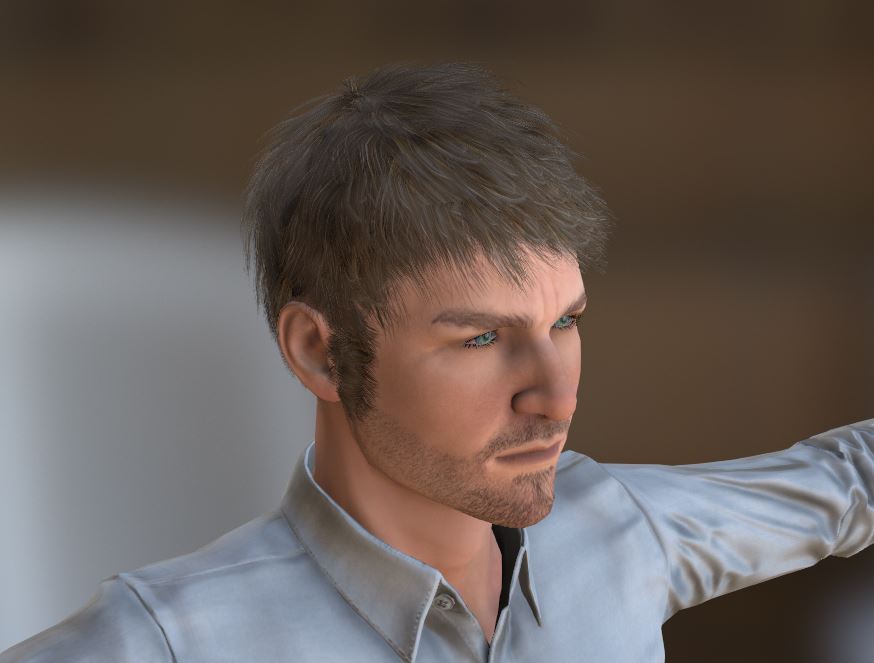 And in Unreal: 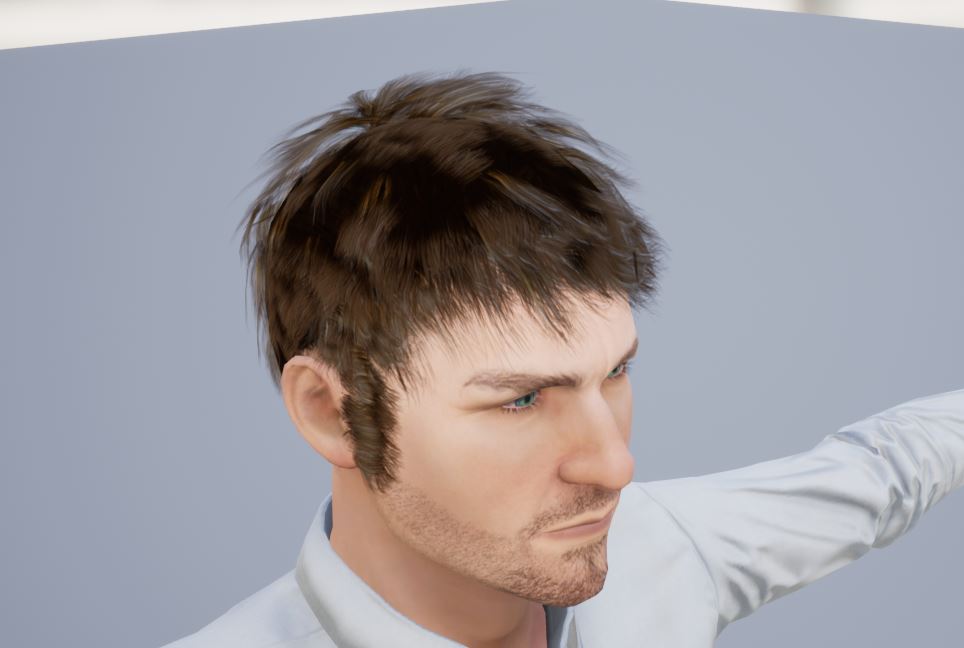 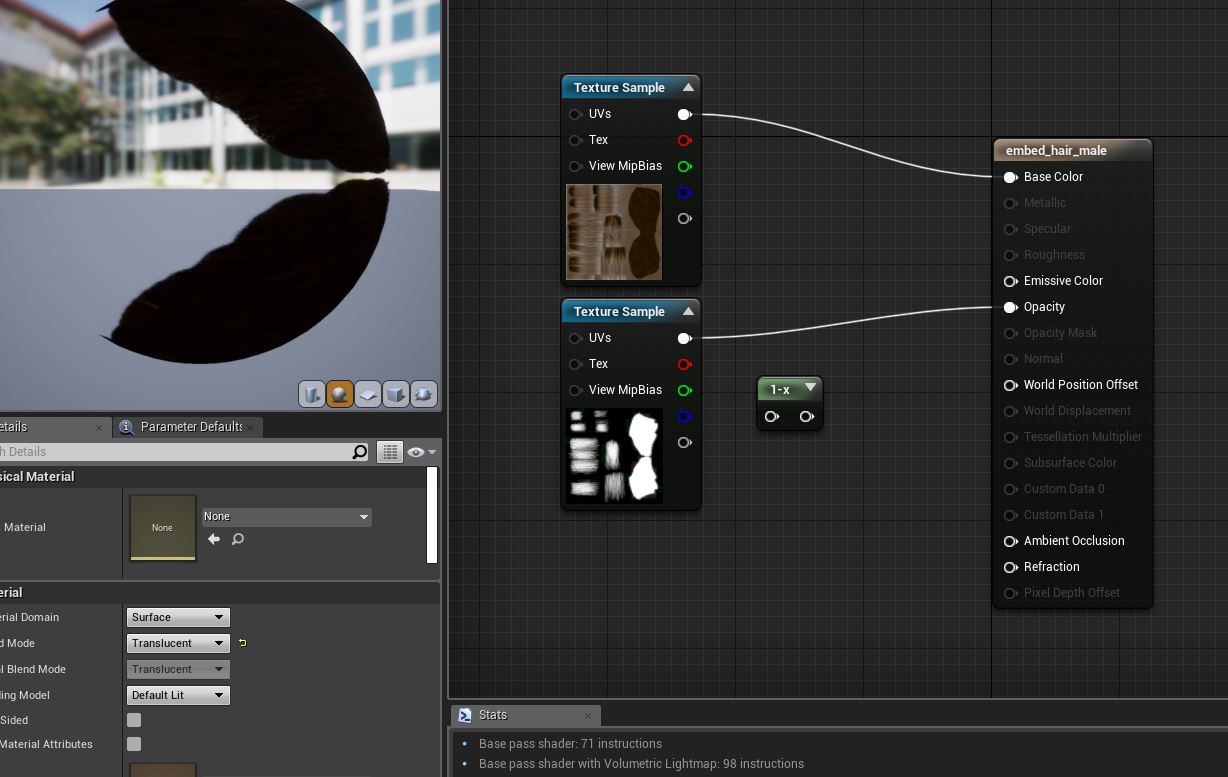
|
|
|
|
|
Ellessarr
|
Ellessarr
Posted 6 Years Ago
|
|
Group: Forum Members
Last Active: 5 Years Ago
Posts: 81,
Visits: 773
|
i have another question i'm seeying "too much textures" in my fodder, like you have the fbm folder them texture folder, them also the textures in the same folder as the materials, we really need all that "textures" to the materials work??? we can't delete it's like having 3 or 4 times the same texture in different folders it's looks a little crazy, don't have anyway to optimize it, by remove the not used folders/textures? or i must save all?
|
|
|
|
|
Miranda (RL)
|
Miranda (RL)
Posted 6 Years Ago
|
|
Group: Administrators
Last Active: 3 Years Ago
Posts: 1.8K,
Visits: 11.2K
|
Ellessarr (2/1/2019)
i've found a annoying bug, which could not be precise from the pluging but for sure is for CC3, is which the textures only worker proper if you use the default fle extension type(in this case jpeg) if you try to use things like TGA (targa) which is much better for unreal the texture get totally screwed, the textures only proper work if you use the default archive style, could be good take a look at this.
i tried today to export using the pluging and when i did it using targa format it bugged a lot the textures and only worked when using default texture type(jpg)Thanks for reporting! It's duplicated on our side, and we will fix it in the coming version.
|
|
|
|
|
macsklad
|
macsklad
Posted 6 Years Ago
|
|
Group: Forum Members
Last Active: Last Month
Posts: 6,
Visits: 107
|
Thank You, I'm sure there would be more people concerned about this, provided they'll discover Your software. Looking at UE forums a few other devs sticked to 4.18 version aswell.
|
|
|
|
|
antonio_112635
|
antonio_112635
Posted 6 Years Ago
|
|
Group: Forum Members
Last Active: 2 Years Ago
Posts: 1,
Visits: 95
|
Hello, I would like to test the animated character, is there any animated pose inside the default template poses of CC3 ? I cannot find the "cool pose" or something similar. Thx
|
|
|
|
|
Miranda (RL)
|
Miranda (RL)
Posted 6 Years Ago
|
|
Group: Administrators
Last Active: 3 Years Ago
Posts: 1.8K,
Visits: 11.2K
|
antonio_112635 (2/12/2019)
Hello, I would like to test the animated character, is there any animated pose inside the default template poses of CC3 ? I cannot find the "cool pose" or something similar. ThxYou can visit Marketplace to download some freebies, or trial assets for testing. https://marketplace.reallusion.com/iclone/motionFilter > Free 
|
|
|
|
|
Ellessarr
|
Ellessarr
Posted 6 Years Ago
|
|
Group: Forum Members
Last Active: 5 Years Ago
Posts: 81,
Visits: 773
|
any news about when the fix for the tga and others extensions export is coming??? while for now the character is let's say "fine" really the default jpg even at high resolution still a lot poor and bad for the character specially on hair, any idea of how much will take for the next update for the tool???.
thanks for the hard work
|
|
|
|
|
har355
|
har355
Posted 6 Years Ago
|
|
Group: Forum Members
Last Active: 6 Years Ago
Posts: 2,
Visits: 15
|
Where can I download the open_A_UE4 pose from???
|
|
|
|
|
Peter (RL)
|
Peter (RL)
Posted 6 Years Ago
|
|
Group: Administrators
Last Active: Last Year
Posts: 23.1K,
Visits: 36.6K
|
har355 (2/24/2019)
Where can I download the open_A_UE4 pose from???It is included with Character Creator 3 Pipeline. You should be able to find it in Content Manager under Pose > Body > Motion. If you can't find it, do check that you have installed the Character Creator 3 Pipeline Resource Pack. If you need it, you can download from your Member Account > Registration page. Just click the Download link for CC3.
Peter
Forum Administrator www.reallusion.com
|
|
|
|