|
Author
|
Message
|
|
illusionLAB
|
illusionLAB
Posted 6 Years Ago
|
|
Group: Forum Members
Last Active: 3 Years Ago
Posts: 393,
Visits: 4.8K
|
No probs... I'm diving between so many different software packages I've started recording mini tutorials so I don't have to keep learning the same thing over and over! ;-)
|
|
|
|
|
sterlingy
|
sterlingy
Posted 6 Years Ago
|
|
Group: Forum Members
Last Active: Last Year
Posts: 206,
Visits: 709
|
@illusionLAB Great Video! Fantastic.
Stick with the flock, end up a lamb chop!
www.ShivooStudios.com
|
|
|
|
|
illusionLAB
|
illusionLAB
Posted 6 Years Ago
|
|
Group: Forum Members
Last Active: 3 Years Ago
Posts: 393,
Visits: 4.8K
|
Quick video to get more light... without more lights! Each window... layout, UV, shading etc. remembers the last view you setup... I haven't done it, but I'm sure you can define your own default "ortho" view for UV or Texture.
|
|
|
|
|
4u2ges
|
4u2ges
Posted 6 Years Ago
|
|
Group: Forum Members
Last Active: Last Month
Posts: 5.3K,
Visits: 16.8K
|
That is a question to IllusionLAB exclusively. He's been playing with v2.8 beta a lot ;)
Edit: OK downloaded v2.8 - 4 area lights would do fine evenly illuminating the object at strength 0.6-0.8.
But darn! Hiding lights in viewport would turn them OFF as well? No way!
Oh boy! Switching to any view mode resets the view to Perspective from Orthogonal...
No, not for my workflow! No just yet..:Whistling:
|
|
|
|
|
sterlingy
|
sterlingy
Posted 6 Years Ago
|
|
Group: Forum Members
Last Active: Last Year
Posts: 206,
Visits: 709
|
@illusionLAB & @4u2ges I was wondering how to 'brighten' the scene in texture mode. Default is awfully dark. If the Hemi Light is no more, what is the 'new best way' to brighten things up? In Maya, there are a myriad of ways to do this, i'd assume Blender has a few too.
Stick with the flock, end up a lamb chop!
www.ShivooStudios.com
|
|
|
|
|
4u2ges
|
4u2ges
Posted 6 Years Ago
|
|
Group: Forum Members
Last Active: Last Month
Posts: 5.3K,
Visits: 16.8K
|
Good luck Sterlingy! Mark, I have seen you guys been playing with 2.8 and eevee. Me? I'm kind of slow when it comes to changes. I am still with 2.79 (I would have still been with 2.78, if not for Mike Kelley, who did not trust it when we were troubleshooting some issues). But I will sure check the new 2.8.. well sooner or later :)
|
|
|
|
|
illusionLAB
|
illusionLAB
Posted 6 Years Ago
|
|
Group: Forum Members
Last Active: 3 Years Ago
Posts: 393,
Visits: 4.8K
|
Hemi light? Haven't you heard? In v2.80 the Hemi light is "no more"... I've paused on making tutorials with Blender as there have been so many changes/improvements in the past few months - far easier to navigate (for newbies anyway).
|
|
|
|
|
sterlingy
|
sterlingy
Posted 6 Years Ago
|
|
Group: Forum Members
Last Active: Last Year
Posts: 206,
Visits: 709
|
@4u2ges. You are a rock star! * I figured the 'cube' thing was the default Blender box, thx for confirmation! * Pls. update if you figure out what the 'mesh forward thing' is.. In the meantime, will sit back by the fireplace and dig into your latest 'novel' of helpful tips & workflow, hugely appreciated!
Stick with the flock, end up a lamb chop!
www.ShivooStudios.com
|
|
|
|
|
4u2ges
|
4u2ges
Posted 6 Years Ago
|
|
Group: Forum Members
Last Active: Last Month
Posts: 5.3K,
Visits: 16.8K
|
You are welcome guys. A few notes on Sterlingys' tryout (that was very good BTW for the first time Blender user!)
1. The cube error you are getting is from the default Blender cube which placed on a stage when you start Blender.
You have to delete it I suppose before importing a character (I have a custom workspace and preferences in Blender where there is nothing on the stage when I start it).
2. That mesh forward thing is I think a CC problem. I noticed that while making some morphs for iClone with OBJ.
That could possibly relate. Need to take some time to investigate.
3. Well, materials you know. That is how Blender handles and exports them.
Some more helpful (hopefully) tips/workflow (anyone is welcome to add more).
1. Use Orthogonal mode (hit 5 on numeric pad)
2. Delete the cube (instead of hiding it)
3. Hide a gismo and switch to Material view

4. Enable Lock to Cursor (N key to enable/hide preferences panel). This extremely useful for navigating around.
Place a cursor wherever and instantly zoom/rotate around it (I wish we had something like that in iClone!)

Note: Each layout has its own preferences. So you might need to repeat those 5 steps for "Default" and "UV Editing" Layouts.
Selected preferences could be saved as default in "User Preferences". Alternatively you can just add a UV edit panel to the Default layout.
(You may create unlimited layouts - Blender is extremely flexible).
5. Add a Hemi light (while in Object mode Shift+A > Lamp > Hemi) . You may hide it in Outliner. Hemi light brightens the mesh in the Material view mode.
6. To overcome overlapping UVs, work with one material at a time. I usually hide everything else but the material I work with:
* Hide Armature, Teeth, Eyes and Tongue in Outliner. Select Body and switch to Edit mode
(TAB key switches between Edit/Object modes while mouse cursor is within the stage area)
* While in Edit mode hit an A key couple of times until no vertices are selected.
* In Materials pick a material and click "Select"

* Do Ctrl+I to invert selection and then H key to hide it. The result is - only arms are shown.
(To get everything back hit Atl+H).

* In UV Editor select whichever UV mode suits you best. Optionally enable Stretch to view the areas of tension (blue - is fully relaxed, green - stretched).
You may also hide Edges on the mesh for viewing material better.
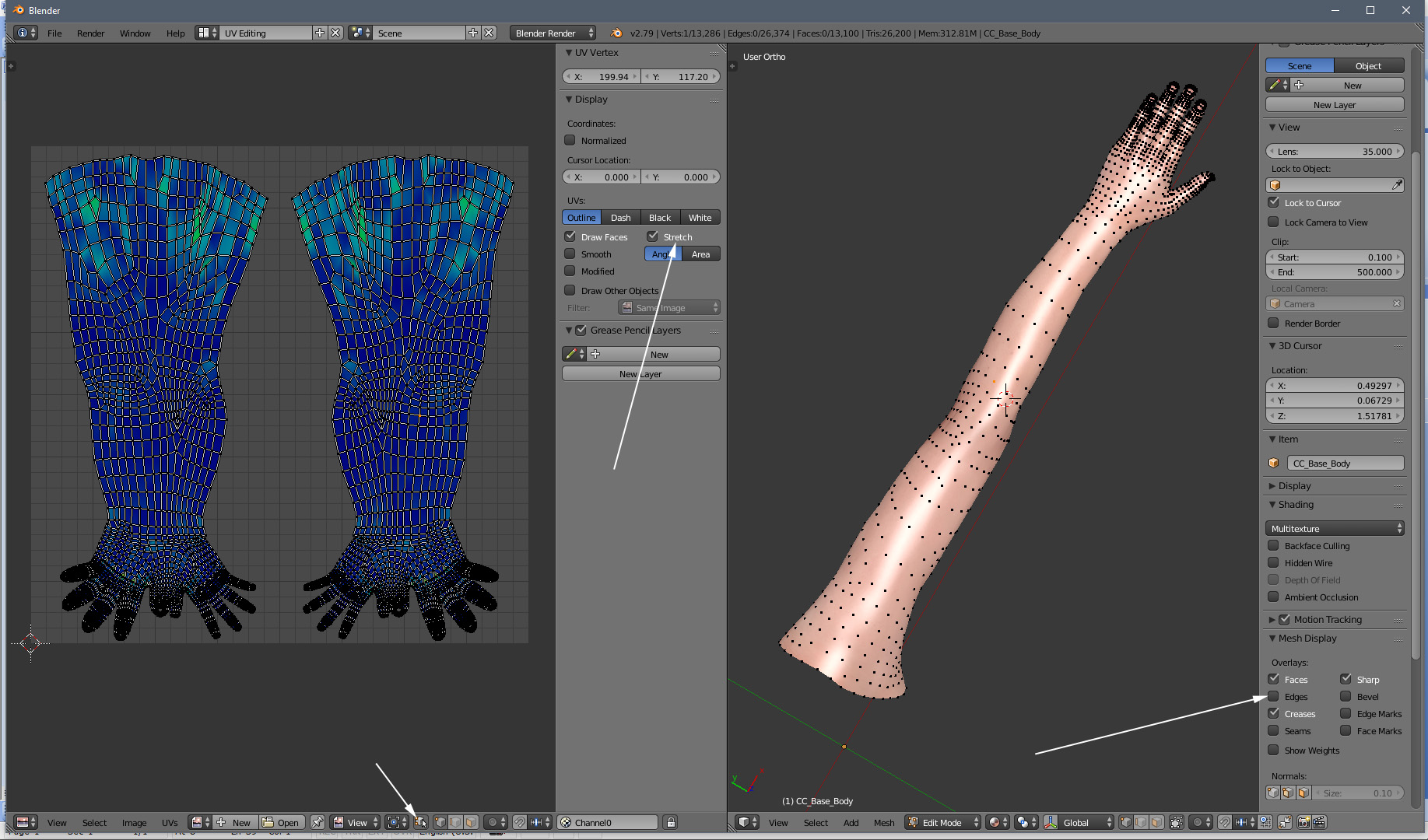
* Explore and try all the available UV editing tools from respective menus
On a side note. Somebody with Maya > CC pipeline experience should come forward and help you with the link problem. I do not believe there should be one.
|
|
|
|
|
illusionLAB
|
illusionLAB
Posted 6 Years Ago
|
|
Group: Forum Members
Last Active: 3 Years Ago
Posts: 393,
Visits: 4.8K
|
Thanks 4u2ges! I haven't tried it yet, but it seems like a winner! 3DX is a fickle beast at times, so it's good we can bypass it altogether when customizing characters (another clang on the death toll for 3DX I hope... I still don't understand why it hadn't been built into iC pipeline).
|
|
|
|