|
Author
|
Message
|
|
wires
|
|
|
Group: Forum Members
Last Active: 4 Months Ago
Posts: 5.7K,
Visits: 26.5K
|
RobertoColombo (12/25/2018)
Hi all,
Now I wonder whether the update patch works provided that the curve editor is also updated.
I will be back home only tomorrow so I have a good excuse to not try this now... :Whistling:
Do we have any brave volunteer here who wants to try to update the 7.3 to 7.4 with the patch, provided that also the Curve Editor shall be updated to the new version? :cool:
Cheers
RobertoHave fun testing, it's your PC and time.
Gerry
System: Win 10 Pro (21H2), Asus X99-E WS, CPU i7-5930K -3,5 GHz, 32 GB DDR4 2666-16 RAM, NVidia GTX 1080 Ti GPU - 11 GB VRAM(Driver Studio-536.99), Samsung 850 Pro 512 GB SSD, 6 TB HD storage.
|
|
|
|
|
RobertoColombo
|
RobertoColombo
Posted 7 Years Ago
|
|
Group: Forum Members
Last Active: 4 Years Ago
Posts: 1.6K,
Visits: 3.0K
|
Hi all,
Now I wonder whether the update patch works provided that the curve editor is also updated.
I will be back home only tomorrow so I have a good excuse to not try this now... :Whistling:
Do we have any brave volunteer here who wants to try to update the 7.3 to 7.4 with the patch, provided that also the Curve Editor shall be updated to the new version? :cool:
Cheers
Roberto
My PC:
OS: Windows 10 Pro English 64-bit / CPU: Intel i7-9700 3.6GHz / MB: ASUS ROG Strix Z390 RAM: 32GB DDR4 2.6GHz / HD: 2TB+3TB / SSD: 2x512GB Samsung 860 EVO + 1x2TB Samsung
VB: Palit GTX2080 TI GamingPro 11GB / AB: embedded in the MB and VB (audio from the MOTU M4 I/F) / DirectX: 12
|
|
|
|
|
sonic7
|
sonic7
Posted 7 Years Ago
|
|
Group: Forum Members
Last Active: 2 Years Ago
Posts: 1.7K,
Visits: 19.4K
|
lol .... but you know - I can't help but *feel* for them - they were trying so hard to dish up this really nice *treat* when they did .... Sure it's frustrating for us users .... but equally, it must be frustrating for them as well ..... they do try hard .... All the best to all !!! Great Forum - members always prepared to help - truly unique !!! :)
--------------------------------------------------------------------------------------------------------------------------------------------------------
Please be patient with me ..... I don't always 'get it' the first time 'round - not even the 2nd time! :( - yikes! ... ● MSI GT72VR Laptop, i7 7700HQ 4-Core 3.8 GHz 16GB RAM; Nvidia 1070, 8GB Vram ● iClone-7.93 ● 3DXChange Pipeline 7.81 ● CC-3 Pipeline 3.44 ● Live Face ● HeadShot ● Brekel Pro-Body ● Popcorn FX ● iRAY ● Kinect V2 ● DaVinci Resolve17 ● Mixcraft 8.1
|
|
|
|
|
wires
|
|
|
Group: Forum Members
Last Active: 4 Months Ago
Posts: 5.7K,
Visits: 26.5K
|
Rampa (12/25/2018)
Waveact actually mentioned that a few posts ago. :)
"Sorry for this new update caused you can't run iClone.
Did you install the Curve Editor before? If yes, please go to [Your iClone location]\\Bin64\Plugin\ then delete the file called "ICCurveEditor.dll" and try to restart the iClone again."There was no mention in the post by Waveact that there was/is a newer version of the Curve Editor available. His comment implied that the last CE installation was causing an issue with "left-over" files that needed to be removed - nothing about downloading and installing any newer version.
Gerry
System: Win 10 Pro (21H2), Asus X99-E WS, CPU i7-5930K -3,5 GHz, 32 GB DDR4 2666-16 RAM, NVidia GTX 1080 Ti GPU - 11 GB VRAM(Driver Studio-536.99), Samsung 850 Pro 512 GB SSD, 6 TB HD storage.
|
|
|
|
|
wires
|
|
|
Group: Forum Members
Last Active: 4 Months Ago
Posts: 5.7K,
Visits: 26.5K
|
sonic7 (12/25/2018)
Duh .... Thanks Gerry - I got tunnel vision there for a while .... great - thanks for your keen spotting .....I only discovered this by accident as I was just checking that I had all the required versions before going through the nightmare of the one and only RL uninstall/reinstall circus. :w00t::pinch:
Gerry
System: Win 10 Pro (21H2), Asus X99-E WS, CPU i7-5930K -3,5 GHz, 32 GB DDR4 2666-16 RAM, NVidia GTX 1080 Ti GPU - 11 GB VRAM(Driver Studio-536.99), Samsung 850 Pro 512 GB SSD, 6 TB HD storage.
|
|
|
|
|
Rampa
|
|
|
Group: Forum Members
Last Active: Last Week
Posts: 8.2K,
Visits: 62.6K
|
Waveact actually mentioned that a few posts ago. :)
"Sorry for this new update caused you can't run iClone.
Did you install the Curve Editor before? If yes, please go to [Your iClone location]\\Bin64\Plugin\ then delete the file called "ICCurveEditor.dll" and try to restart the iClone again."
|
|
|
|
|
sonic7
|
sonic7
Posted 7 Years Ago
|
|
Group: Forum Members
Last Active: 2 Years Ago
Posts: 1.7K,
Visits: 19.4K
|
Duh .... Thanks Gerry - I got tunnel vision there for a while .... great - thanks for your keen spotting .....
--------------------------------------------------------------------------------------------------------------------------------------------------------
Please be patient with me ..... I don't always 'get it' the first time 'round - not even the 2nd time! :( - yikes! ... ● MSI GT72VR Laptop, i7 7700HQ 4-Core 3.8 GHz 16GB RAM; Nvidia 1070, 8GB Vram ● iClone-7.93 ● 3DXChange Pipeline 7.81 ● CC-3 Pipeline 3.44 ● Live Face ● HeadShot ● Brekel Pro-Body ● Popcorn FX ● iRAY ● Kinect V2 ● DaVinci Resolve17 ● Mixcraft 8.1
|
|
|
|
|
wires
|
|
|
Group: Forum Members
Last Active: 4 Months Ago
Posts: 5.7K,
Visits: 26.5K
|
sonic7 (12/25/2018)
I decided to have another go at this. This time I first uninstalled 7.3 and used the FULL_Enu installer (from Registration Page), rather than usng the HUB. After installing it (including the requested Resource Pack), I fired it up - and yes it launched sucessfully. At the top I noted the new 'script' tab. I then fired up a 'recent project' - fine - all was good. Then I re-installed my missing "Curve Editor" and once again attempted launching iClone. There was 8 seconds of splash screen - it disappeared - and nothing. So ..... it 'seems' that the "Curve Editor" is somehow interfering with 7.4 ... (Hope this *helps* :) )There is a new version of the Curve Editor available that requires iClone 7.4 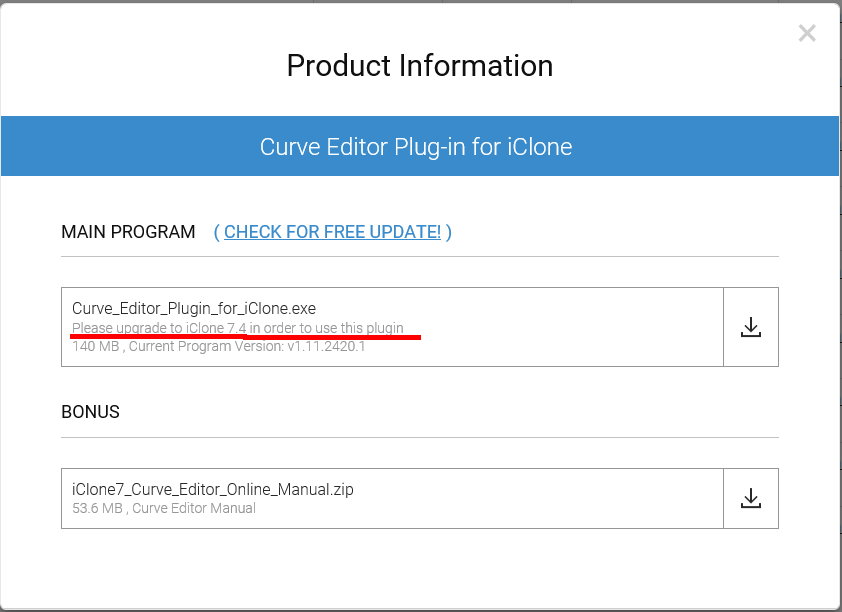 It would be really helpful if some competent person from RL would take a few moments to post ALL of the information regarding any and all updates available v- and explain what is new/improved in each. This isn't really asking too much. :crazy::Whistling:
Gerry
System: Win 10 Pro (21H2), Asus X99-E WS, CPU i7-5930K -3,5 GHz, 32 GB DDR4 2666-16 RAM, NVidia GTX 1080 Ti GPU - 11 GB VRAM(Driver Studio-536.99), Samsung 850 Pro 512 GB SSD, 6 TB HD storage.
|
|
|
|
|
sonic7
|
sonic7
Posted 7 Years Ago
|
|
Group: Forum Members
Last Active: 2 Years Ago
Posts: 1.7K,
Visits: 19.4K
|
I decided to have another go at this. This time I first uninstalled 7.3 and then used the FULL 7.4_Enu installer (from Registration Page), rather than usng the HUB. After installing it (including the requested Resource Pack), I fired it up - and yes it launched sucessfully. At the top I noted the new 'script' tab. I then fired up a 'recent project' - fine - all was good. Then I re-installed my missing "Curve Editor" and once again attempted launching iClone. There was 8 seconds of splash screen - it disappeared - and nothing. I tried re-booting, but same result. So ..... it 'seems' that the "Curve Editor" is somehow interfering with 7.4 ... (Hope this *helps* :) )
--------------------------------------------------------------------------------------------------------------------------------------------------------
Please be patient with me ..... I don't always 'get it' the first time 'round - not even the 2nd time! :( - yikes! ... ● MSI GT72VR Laptop, i7 7700HQ 4-Core 3.8 GHz 16GB RAM; Nvidia 1070, 8GB Vram ● iClone-7.93 ● 3DXChange Pipeline 7.81 ● CC-3 Pipeline 3.44 ● Live Face ● HeadShot ● Brekel Pro-Body ● Popcorn FX ● iRAY ● Kinect V2 ● DaVinci Resolve17 ● Mixcraft 8.1
|
|
|
|
|
wires
|
|
|
Group: Forum Members
Last Active: 4 Months Ago
Posts: 5.7K,
Visits: 26.5K
|
dogged2003 (12/25/2018)
How and which IDE can we use for Python in iClone? How to set up a third-party IDE to see iClone objects? Can I set up debugging? Thank. Read this post for the answer.
Gerry
System: Win 10 Pro (21H2), Asus X99-E WS, CPU i7-5930K -3,5 GHz, 32 GB DDR4 2666-16 RAM, NVidia GTX 1080 Ti GPU - 11 GB VRAM(Driver Studio-536.99), Samsung 850 Pro 512 GB SSD, 6 TB HD storage.
|
|
|
|