Profile Picture

Tutorial-- Creating a 360 Space Engine Image As a Background for Iclone

Posted By pedrosura 7 Years Ago
Rated 5 stars based on 2 votes.

Tutorial-- Creating a 360 Space Engine Image As a Background for...

Author
Message
pedrosura
pedrosura
Posted 7 Years Ago
View Quick Profile
Distinguished Member

Distinguished Member (3.9K reputation)Distinguished Member (3.9K reputation)Distinguished Member (3.9K reputation)Distinguished Member (3.9K reputation)Distinguished Member (3.9K reputation)Distinguished Member (3.9K reputation)Distinguished Member (3.9K reputation)Distinguished Member (3.9K reputation)Distinguished Member (3.9K reputation)

Group: Forum Members
Last Active: Last Year
Posts: 220, Visits: 5.7K
Hello Friends,

This is a quick tutorial on how to create the background for a Space Shot using the great Space Engine software.
Space Engine is a simulator of the ENTIRE UNIVERSE. Yes, 200 Billion Galaxies and trillions of comets, asteroids, planets etc... The objects we know about are simulated and the ones we think are there but have'nt been discovered are simulated. It is the greatest piece of software I have ever played with and it's free. Please make a small donation if you use it. The developer (one guy) deserves it. 

Thie process goes as follows: go to Space Engine and place the camera where you want to create the Skycube, Create the Skycube. The you have to modify 2 sides of the Skycube, then you have to use software to convert the six images that are the sides of the Skycube into a single 360 panoramic picture, then you take this picture as an IBL image in Iclone 7 and you are done. 
STEP 1
Get Space Engine from en.spaceengine.org Install it and learn to move the camera and do the basics. Search Youtube for "Space Engine tutorials"

STEP 2
In Space Engine, find the place where you want to create your Skybox size 2048 and PNG, it could be in space, on a Moon, Asteroid, etc.. I used for this demo Kepler 452 b Terra which you can access by going to Space Engine, Planetarrium, Keyboard shortcut "F6" select it from the list and hit "GO TO"

STEP 3
Create Skybox by hitting escape key "ESC", click on "EDITOR", click on "EXPORT SKYBOX"

STEP 4
     STEP 3 created six files located in C:\SpaceEngine\export named:
sky_neg_z.png
sky_pos_z.png
sky_neg_x.png
sky_pos_x.png
sky_neg_y.png
sky_pos_y.png

STEP 5
Go to Youtube and search "

How to Convert a Cubemap To a 360° Image (Panorama) Tutorial"


There is a standalone utility called cubemap get there or here:
https://www.dropbox.com/s/5luc6qvwg4ztx0l/CubemapTo360-64bit.exe?dl=0

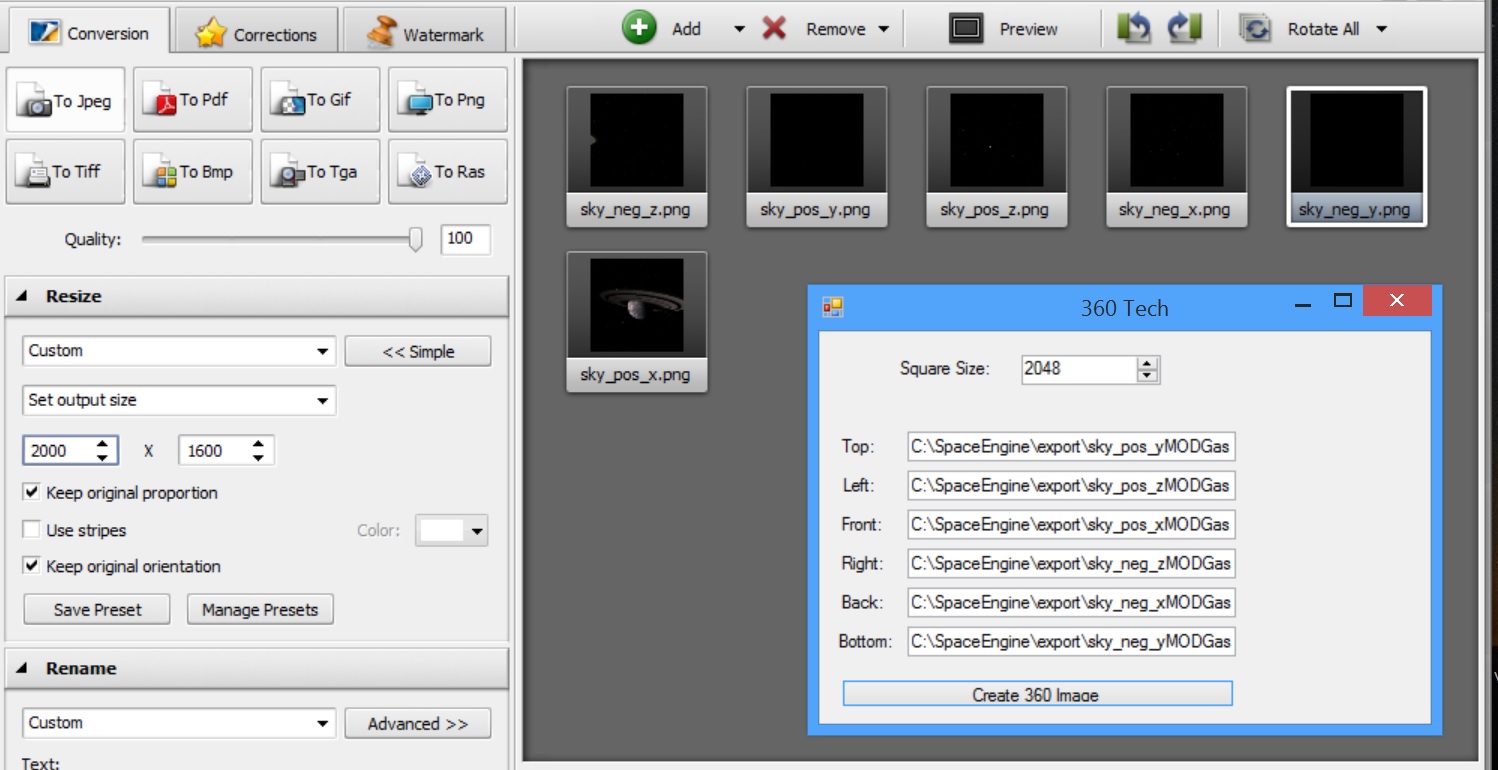
Here is an image containing the input to Cubemap utility (look at the window where it says "360Tech":
https://forum.reallusion.com/uploads/images/ff2f10e8-611c-4b5e-9c18-48c3.jpg

In Space Engine the skybox is 2048, in Cubemap I also make it 2048
The input to Cubemap
Top=sky_pos_y (Rotate image 90 deg Clockwise)
Bottom=sky_neg_y (Rotate image 90 deg CounterClockwise)
Left =sky_pos_z
Right=sky_neg_z
Front=sky_pos_x
Back=sky_neg_x
Now, here is an important step. Two of these images have to be rotated 90 degrees Clockwise and Counterclockwise respectively.
I use a program called "Image Converter" from AVS..
Free version here.. https://www.avs4you.com/es/avs-image-converter.aspx
This program is a great tool for converting images from one to another. Remember, two of the images have to be rotated. The other ones were just converted from PNG to JPG


You have to provide the full path to the file on the input to Cubemap. in my case:
TOP           C:\SpaceEngine\export\sky_pos_yMODGas.jpg
In my case I started with file C:\SpaceEngine\export\sky_pos_y.png , rotated the file 90 degrees CLOCKWISE and created file sky_pos_yMODGas.jpg

Once all sides files are  filled in click on "Create 360 degree image"
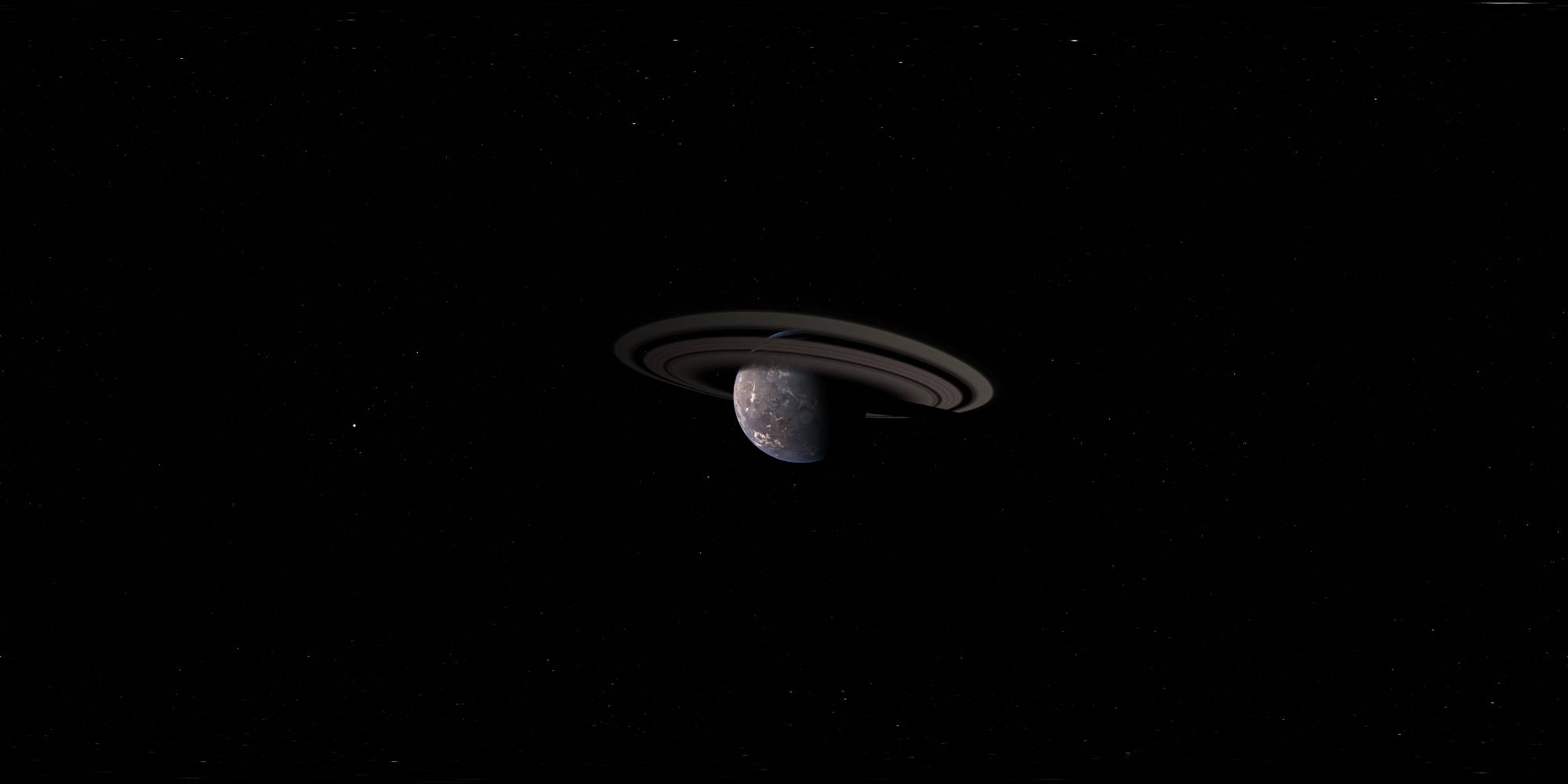
Give it a name and Cubemap will create a bitmap file, in my case...360GasGiant.bmp


Gas Giant 360 degree Image
https://www.dropbox.com/s/pd3o8widgdegj9c/360GasGiant.bmp?dl=0
https://forum.reallusion.com/uploads/images/32ec86cf-07ce-4e06-bdd3-4012.bmp


STEP 6
Go to Iclone 7, visual tab and drop the "360GasGiant.bmp" image in the IBL image slot. 
I suggest making this skybox large from 70 to 9999
Then you could add spaceships, lighting etc... Once done add sound effects, music etc.. and use it in your movies, like this:


Space Engine can create not only images in Space but from the surface of planets and Moons. Some of these terrains are created using fractals so they can be very detailed and incredibly impressive. 

Another use is to create moving video as you move through space. This movie can be used as the video for a PRIM in Iclone. This movie can be "played" on the windshield of a cockpit, etc...

That is all folks. Comment for questions, opinions...


Threaded View

Threaded View
Forum Post Tutorial-- Creating a 360 Space Engine Image As a Background for... By pedrosura ( 7 Years Ago )
Forum Post Fantastic pedro ! This is a *must keep* reference for sure ! I love... By sonic7 ( 7 Years Ago )
Forum Post Great video @kipster.. I am sure there are many ways of doing it. I... By pedrosura ( 7 Years Ago )
Forum Post [quote][b]sonic7 (11/11/2018)[/b][hr] Fantastic pedro ! This is a... By pedrosura ( 7 Years Ago )
Forum Post why not just use the cylindrical projection and avoid all this extra... By Skuzzlebutt ( 7 Years Ago )
Forum Post there are no stitching errors with the poles and i have used the... By Skuzzlebutt ( 7 Years Ago )
Forum Post [quote][b]Kipster (11/11/2018)[/b][hr] there are no stitching errors... By pedrosura ( 7 Years Ago )
Forum Post i use the camera controls, not the ships and its a pretty basic setup... By Skuzzlebutt ( 7 Years Ago )
Forum Post [quote][b]Kipster (11/11/2018)[/b][hr]i use the camera controls, not... By pedrosura ( 7 Years Ago )
Forum Post the ship editor is also pretty cool it can export to obj By Skuzzlebutt ( 7 Years Ago )
Forum Post [quote][b]Kipster (11/11/2018)[/b][hr]the ship editor is also pretty... By pedrosura ( 7 Years Ago )
Forum Post @pedrosura, Kipster: Thanks for posting. I needed some inspiration and... By animagic ( 7 Years Ago )
Forum Post [quote][b]animagic (11/11/2018)[/b][hr]@pedrosura, Kipster: Thanks for... By pedrosura ( 7 Years Ago )
Forum Post Wow, some very useful information here! I like the idea of creating... By 3dtester ( 7 Years Ago )
Forum Post if you have AE 2018 you can really make this stuff "pop" using the... By Skuzzlebutt ( 7 Years Ago )
Forum Post [quote][b]Kipster (11/11/2018)[/b][hr]if you have AE 2018 you can... By 3dtester ( 7 Years Ago )
Forum Post [quote][b]3dtester (11/11/2018)[/b][hr][quote][b]Kipster... By Skuzzlebutt ( 7 Years Ago )
Forum Post [/quote] a few things can be done inside space engine to make it look... By pedrosura ( 7 Years Ago )
Forum Post [quote][b]Kipster (11/11/2018)[/b][hr][quote][b]3dtester... By 3dtester ( 7 Years Ago )
Forum Post the planet exposure needs to be lowered in the first one this setting... By Skuzzlebutt ( 7 Years Ago )
Forum Post [quote][b]Kipster (11/11/2018)[/b][hr]the planet exposure needs to be... By pedrosura ( 7 Years Ago )
Forum Post open the console with the tilde key ~ and type set landlod 2 this... By Skuzzlebutt ( 7 Years Ago )
Forum Post [quote][b]Kipster (11/11/2018)[/b][hr]open the console with the tilde... By pedrosura ( 7 Years Ago )
Forum Post [quote][b]pedrosura (11/11/2018)[/b][hr][quote][b]Kipster... By Skuzzlebutt ( 7 Years Ago )
Forum Post [quote][b]Kipster (11/11/2018)[/b][hr][quote][b]pedrosura... By pedrosura ( 7 Years Ago )
Forum Post It looks pretty good when adjusting the tone map in iClone. The... By 3dtester ( 7 Years Ago )
Forum Post This is very useful. Thanks so much! By Alolu ( 7 Years Ago )
Forum Post I can't wait to give this a shot! By jarretttowe ( 7 Years Ago )
Forum Post [quote][b]jarretttowe (11/14/2018)[/b][hr]I can't wait to give this a... By pedrosura ( 7 Years Ago )
Forum Post [quote][b]pedrosura (11/14/2018)[/b][hr][quote][b]jarretttowe... By 3dtester ( 7 Years Ago )
Forum Post [quote][b]3dtester (11/16/2018)[/b][hr][quote][b]pedrosura... By pedrosura ( 7 Years Ago )
Forum Post I found something very interesting. There is an option called 'sync... By 3dtester ( 7 Years Ago )
Forum Post I realize those are artifacts, but MAN! It looks like you are on a... By jarretttowe ( 7 Years Ago )


Reading This Topic