|
Author
|
Message
|
|
e1_scheer
|
e1_scheer
Posted 6 Years Ago
|
|
Group: Forum Members
Last Active: 2 Years Ago
Posts: 120,
Visits: 1.1K
|
This thread is a real life saver and should be pinned to the top of the forum.
I was also wondering if anyone knows how you set Instalod to not bake the
textures when creating multiple LOD levels?
Thanks !
|
|
|
|
|
The Simulation Crew
|
The Simulation Crew
Posted 6 Years Ago
|
|
Group: Forum Members
Last Active: Last Year
Posts: 12,
Visits: 160
|
Thanks for your fast reply! I am manually removing, because the hidden mesh feature still keeps a lot of polys in tact that I don't need (in the case of this character it even kept all of the body polys underneath the clothes.. It is indeed extra confusing that the blend shapes don't have the issue. I'm doing another character the next few days, curious if it happens again. Edit: Unfortunately it happens to every character after deleting faces from the Body. This is my best solution for it so far: 
|
|
|
|
|
Kareeem
|
Kareeem
Posted 6 Years Ago
|
|
Group: Forum Members
Last Active: Last Year
Posts: 97,
Visits: 278
|
Strange. I have never seen this. I am using 3ds max though. I had similar normal issues exporting meshes from maya to max in the past...
In the end I avoid bringing my characters in to 3ds max at all. Weird is though that you dont seem to have the issue on the blend shapes...
As I understand correctly your using the hidden mesh feature. why are you also removing tris in maya?
|
|
|
|
|
The Simulation Crew
|
The Simulation Crew
Posted 6 Years Ago
|
|
Group: Forum Members
Last Active: Last Year
Posts: 12,
Visits: 160
|
I've encountered a new problem: after manually deleting polys in the character Body mesh, it shows an odd normals issue in Unity 2018.3. The blend shapes don't have that issue, so it disappears when it's morphed into one: 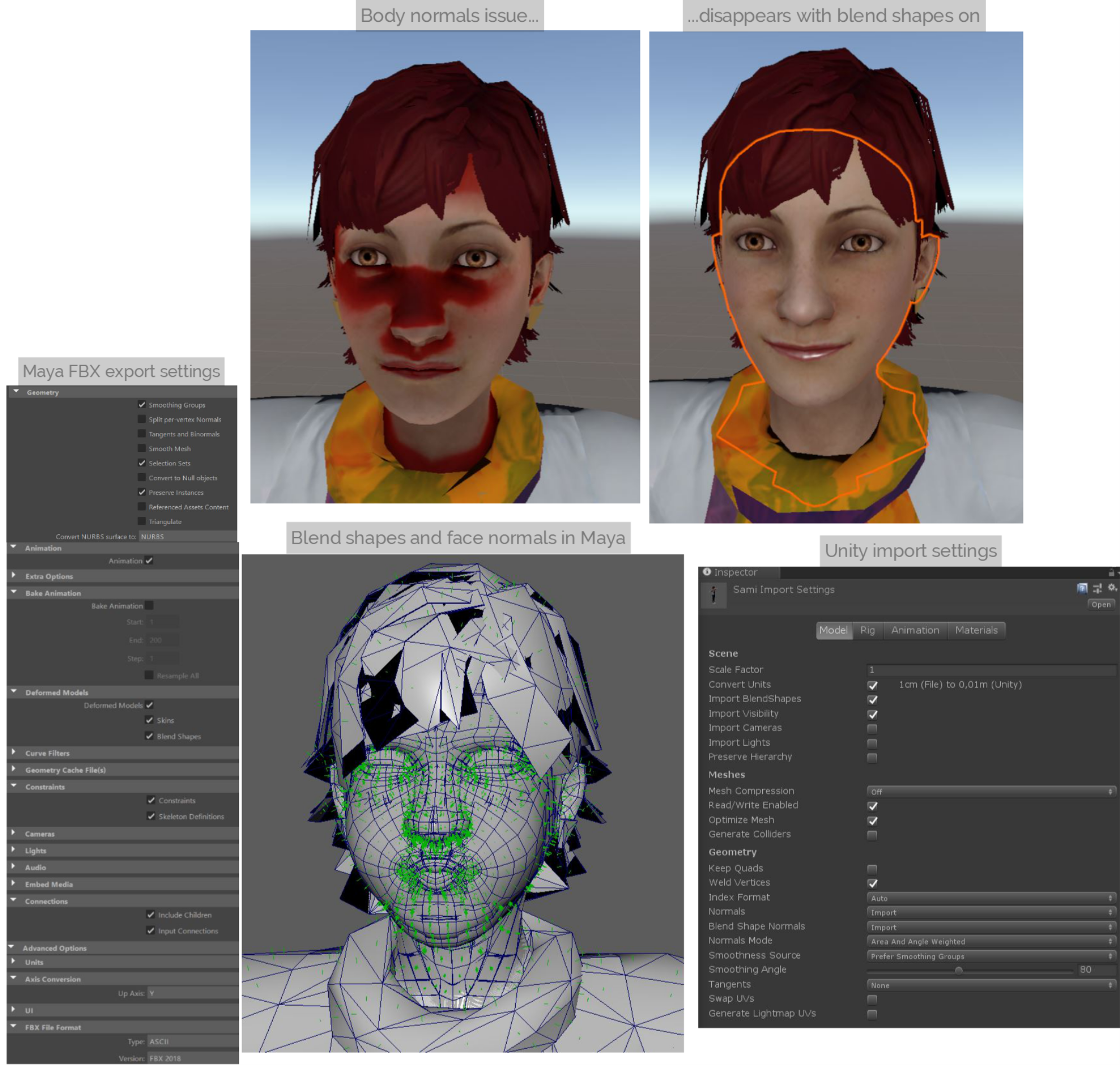 I did delete all non-deformer history, tried all Maya export and Unity import settings, but nothing works. The only workaround is to put Normals in Unity import settings to 'Calculate', but this gives some sharp edges here and there that I don't want. @Kareeem, did you not encounter this with your models? I hope someone can help :)
|
|
|
|
|
The Simulation Crew
|
The Simulation Crew
Posted 6 Years Ago
|
|
Group: Forum Members
Last Active: Last Year
Posts: 12,
Visits: 160
|
I agree and can't find a good approach to it :( That is why I'm looking forward to the new shader that Unity promises in 2019.1 ( source). Edit: I would say for now, the only solution is to hand model custom hair and tuck it inside the head mesh (so no hair cards), like they do in Sims 4.
|
|
|
|
|
Kareeem
|
Kareeem
Posted 6 Years Ago
|
|
Group: Forum Members
Last Active: Last Year
Posts: 97,
Visits: 278
|
Cool!
Although the hair in unity is just a big problem. I see your using the cutout method wich unfortunately is not giving very nice results for hair. But even with separate meshes and a Fade or Transparent method you have the issue of the z clipping... you have any approach to that?
|
|
|
|
|
The Simulation Crew
|
The Simulation Crew
Posted 6 Years Ago
|
|
Group: Forum Members
Last Active: Last Year
Posts: 12,
Visits: 160
|
@Kareeem: Thank you! Yes, unfortunately there is... For the skin I use Pre-Integrated Skin Shader (asset store), which I really recommend. In this case I combined the hair and eyelashes with the rest (Standard shader), but I can imagine you want to use a separate shader for them. In that case I suggest to combine them in Maya of Mesh Baker in Unity apart from the rest. Due to your valid question I updated the document! Result with only 9 Batches: 
|
|
|
|
|
Kareeem
|
Kareeem
Posted 6 Years Ago
|
|
Group: Forum Members
Last Active: Last Year
Posts: 97,
Visits: 278
|
Enalya this is amazing work an should be featured by Reallusion!
Although there is a ridiculous amount of klicking involved... Man oh man
The only thing which would interest me is which shaders you use in unity and if you tried separating the lashes in Maya to combine them with the hair.
|
|
|
|
|
The Simulation Crew
|
The Simulation Crew
Posted 6 Years Ago
|
|
Group: Forum Members
Last Active: Last Year
Posts: 12,
Visits: 160
|
Thank you so much Kareeem, you set the base for my findings.
As a 3D game and character artist I have tried CC3 from the release on and aimed to find the best possible pipeline for the most optimized result in Unity.
This is my workflow so far: click here for documentation.
Unfortunately these are many manual steps, but you can add or remove to your liking.
I hope it helps someone!
~Enalya
|
|
|
|
|
joseph.dalessandro
|
joseph.dalessandro
Posted 7 Years Ago
|
|
Group: Forum Members
Last Active: 4 Months Ago
Posts: 10,
Visits: 36
|
I have two main issues with CC3 at the moment that are preventing me from using it.
1) The teeth of the character do not move (the jaw remains shut) when using the facial blendshapes that open the mouth. I use a Unity Plug called "Lip Sync Pro" that makes uses of the characters facial blendshapes for lipsync, emotions and gestures. If the teeth / jaw doesn't move when the character's mouth is open then it doesn't work.
2) There are no phoneme blendshapes on CC3 characters exported as FBX? I don't see how anyone using any other piece of software is going to do any type of lip sync work without them. They are required for lipsync unless you just animate the jaw open and close... which is a lame excuse and produces amateur results at best. Reallusion is actually advertising and marketing and promoting a true ability to do real Lipsync for game-ready characters on their product page and in their teaser videos. It's only possible to do it and with proper phoneme blendshapes or the only other way that I know of to do it is with their Live mocap solution which requires the purchase of another huge program... iClone. Very sneaky! Advertise that CC3 can do lip sync character animation, but then require iClone in order for it to work? Makes no sense!
|
|
|
|