|
Author
|
Message
|
|
Renderwarrior
|
Renderwarrior
Posted 5 Years Ago
|
|
Group: Forum Members
Last Active: 3 Years Ago
Posts: 19,
Visits: 84
|
Got my leap motion yesterday. Drivers installed, it upgraded the firmware, but i got the same error about connecting it to iclone.I tried a firmware reset (not sure it worked and i was fearing to have bricked it).After a reboot the leap motion worked again but no connection agsin to iclone.But when i was trying to restore the firmware, a windows firewall popup appeared for opening the ports. Didn’t took the name of the exe. But then i added iclone to windows firewall and then added the port you see in the LIVE MOTION plugin to the firewall incoming rules.Then I checked all the checkboxes on the first tab of the leap motion driver (from the taskbar icon) and after i was able to connect leap motion to iclone. Not sure what step solved the problem. I’ll do more tests today.
|
|
|
|
|
ToonaciousD
|
ToonaciousD
Posted 5 Years Ago
|
|
Group: Forum Members
Last Active: Last Year
Posts: 23,
Visits: 113
|
There's no version info in the plugin directory either: 
|
|
|
|
|
ToonaciousD
|
ToonaciousD
Posted 5 Years Ago
|
|
Group: Forum Members
Last Active: Last Year
Posts: 23,
Visits: 113
|
I have the same issue with the Leap Trial...what version is the Leap trial? Hoping to resolve before the sale ends: 
|
|
|
|
|
Tom4891
|
Tom4891
Posted 5 Years Ago
|
|
Group: Forum Members
Last Active: 3 Years Ago
Posts: 16,
Visits: 220
|
Peter (RL) (6/15/2020)
Hi Tom
Have you updated the Leap Motion Gear Profile to v1.1.2918.1. This version is required to use V4 Orion. If you are unsure, check for the update in the Reallusion Hub.Thanks, I was asking this myself already. In the Reallusion Hub there is no update available. Where can I display the exact version? In the Reallusion Hub it says only "v1.1".
|
|
|
|
|
Peter (RL)
|
Peter (RL)
Posted 5 Years Ago
|
|
Group: Administrators
Last Active: Last Year
Posts: 23.1K,
Visits: 36.6K
|
Hi Tom Have you updated the Leap Motion Gear Profile to v1.1.2918.1. This version is required to use V4 Orion. If you are unsure, check for the update in the Reallusion Hub.
Peter
Forum Administrator www.reallusion.com
|
|
|
|
|
Tom4891
|
Tom4891
Posted 5 Years Ago
|
|
Group: Forum Members
Last Active: 3 Years Ago
Posts: 16,
Visits: 220
|
I still had the same problem. It works now with Orion 3.2.1. With Orion 4.0 I get no connection in iClone: 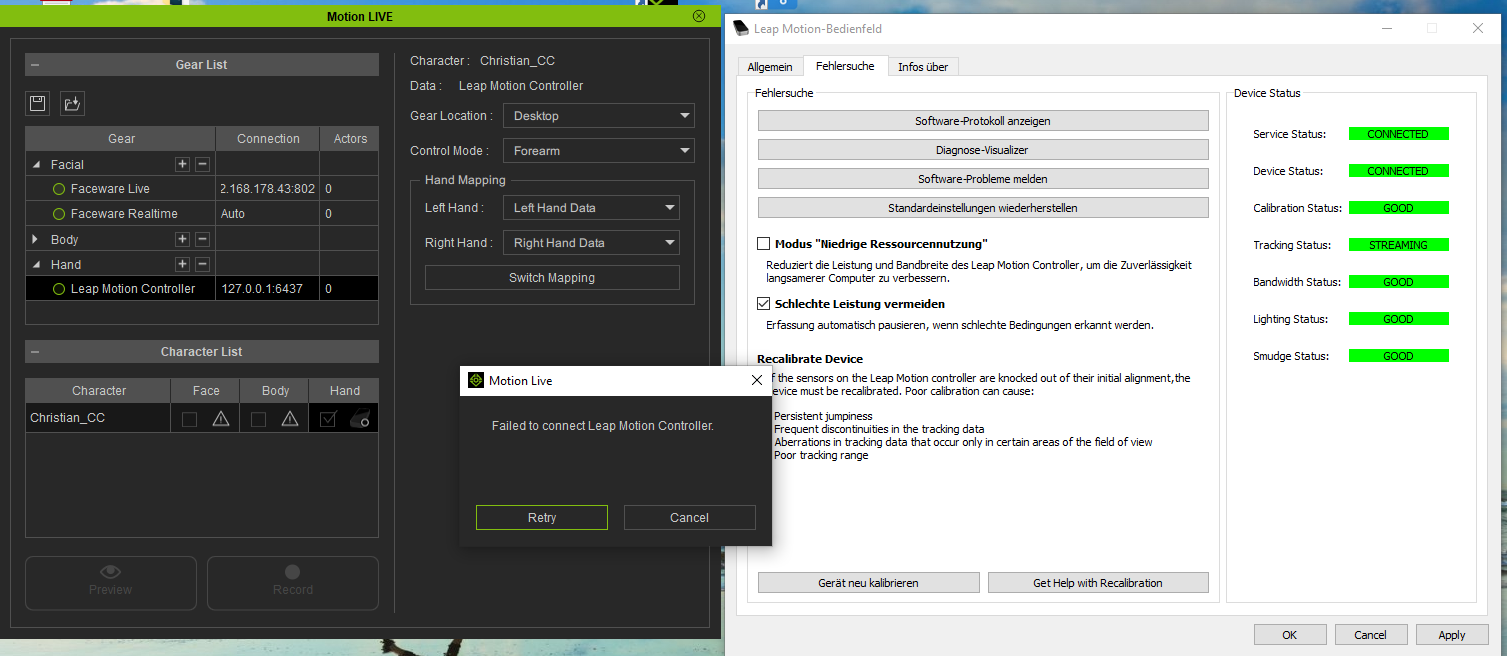 It's quite confusing because here it is stated that 4.0 should work and is supported: https://www.reallusion.com/member/EmailTemplate/OrderEmail/iC7/LeapMotion_note.html
|
|
|
|
|
Peter (RL)
|
Peter (RL)
Posted 7 Years Ago
|
|
Group: Administrators
Last Active: Last Year
Posts: 23.1K,
Visits: 36.6K
|
For anyone having problems getting the Leap Motion Profile working, please refer to the FAQ page first. It is vital that you are using the Leap Motion Orion software version 3.2.1. If you are using version 4 then you will encounter problems. If after checking the above you still have continued problems, please contact Technical Support using the link below. They will be able to advise you further. Thank you. https://www.reallusion.com/CustomerSupport/UserEx/QForm.html
Peter
Forum Administrator www.reallusion.com
|
|
|
|
|
ThePaganLullaby
|
ThePaganLullaby
Posted 7 Years Ago
|
|
Group: Forum Members
Last Active: 7 Years Ago
Posts: 1,
Visits: 10
|
Mine is similar but it just keeps saying "Failed To Connect Motion Leap Controller". I do not even get the preview and rec buttons active, they are inactive and greyed out. I have messaged Reallusion in support but they have not responded as of just yet. I have tried switching to all my usb ports and its the same thing for all of them. Device works great, iClone and stuff works great, but they don't seem to want to talk to each other and work together. Hm o.0
|
|
|
|
|
larryjbiz
|
larryjbiz
Posted 7 Years Ago
|
|
Group: Forum Members
Last Active: 5 days ago
Posts: 342,
Visits: 6.3K
|
I'm having a problem also. I have all green lights Tracking shows in visualizer. I get the button options in the motion leap controller I get the hand option checked withing the motion leap option panel But when I try to preview a capture ..nothing. Can't figure this one out. 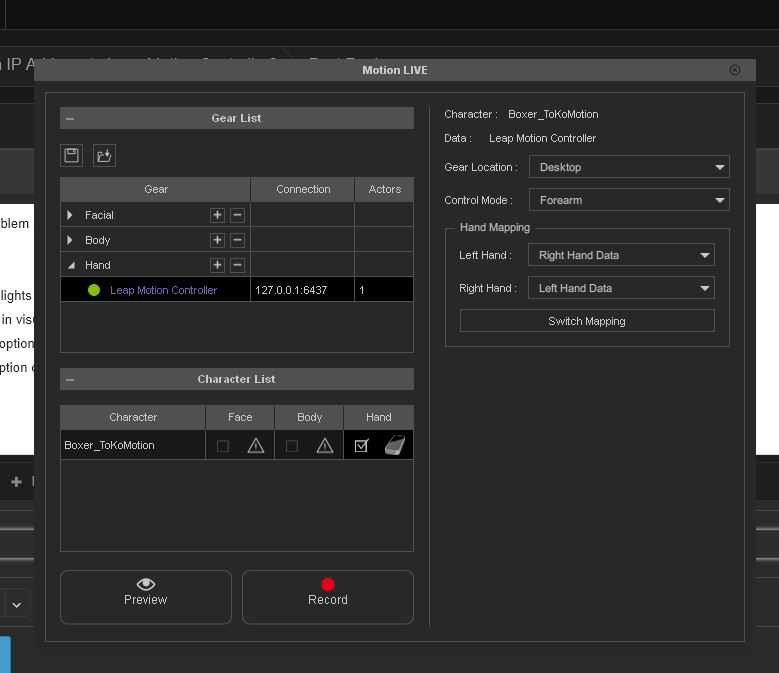
|
|
|
|
|
kungphu
|
kungphu
Posted 7 Years Ago
|
|
Group: Forum Members
Last Active: Last Month
Posts: 997,
Visits: 7.1K
|
Well, consider me part of the crew with growing pains of Leap Motion. My issue is a bit different. Of course everything works great with the leap motion diagnostic software and tracking is working fine. However when I go to Motion Live (I already bought the Leap Motion Profile and registered it), I already have the option there to use Leap Motion for Hands. I even have an IP address 127.0.0.1:6347 but when I click to connect, I get an error stating "Failed to Connect Leap Motion Controller." I can connect to Faceware Realtime, but I also get a Failed to Connect to Faceware Live. I've already uninstalled and re-installed my software input the serial numbers. Waiting on Reallusion to reply. The standalone plugins for faceware seem to still work thank goodness!
My "NEWEST" Latest:) Movie Made With Amaaaazing iClone
—> High Noon”ish” in Narrow Valley<—
|
|
|
|