|
Author
|
Message
|
|
Snarp Farkle
|
Snarp Farkle
Posted 7 Years Ago
|
|
Group: Forum Members
Last Active: Last Year
Posts: 770,
Visits: 3.6K
|
Hey sonic7 and Rampa, Thanks for pointing out that an internet connection isn't needed to run the plugin, I got that from the "Installation Page" evidently by mistake, I thought I was looking at the "Using the Mocap Plugin" page, my bad. :Wow: I'll have to try again, perhaps there's a sequence in which file to activate first, maybe I did it all backwards from what I see in the Online Manual but hey, it's a learning curve thus the reason I started this thread! :)
@sonic7 - I did activate the device console through the animation menu and was able to connect to the sensor using the "Local" setting and could see my form with bones moving around as I was moving, now I see that I didn't follow the calibration sequence properly and that's most likely the reason for my failed attempt, I'll try again today to see if that works.
Dell XPS 8900, Intel(R) Core(TM) i7-6700 CPU @ 3.40GHz, 3408 Mhz, 4 Core(s), 8 Logical Processor(s), 16 GB RAM, - 4 GB GeForce GTX 745, NVIDIA compatible.
Acer Aspire V Nitro Laptop, 2.5GHz Intel Core i5-7300HQ processor with 6MB cache, 256GB solid state drive, 16GB Ram, 4 GB NVIDIA GeForce GTX 1050 Ti graphics.
|
|
|
|
|
sonic7
|
sonic7
Posted 7 Years Ago
|
|
Group: Forum Members
Last Active: 2 Years Ago
Posts: 1.7K,
Visits: 19.4K
|
Thanks for that clarification Rampa :) .....
--------------------------------------------------------------------------------------------------------------------------------------------------------
Please be patient with me ..... I don't always 'get it' the first time 'round - not even the 2nd time! :( - yikes! ... ● MSI GT72VR Laptop, i7 7700HQ 4-Core 3.8 GHz 16GB RAM; Nvidia 1070, 8GB Vram ● iClone-7.93 ● 3DXChange Pipeline 7.81 ● CC-3 Pipeline 3.44 ● Live Face ● HeadShot ● Brekel Pro-Body ● Popcorn FX ● iRAY ● Kinect V2 ● DaVinci Resolve17 ● Mixcraft 8.1
|
|
|
|
|
Rampa
|
|
|
Group: Forum Members
Last Active: Last Week
Posts: 8.2K,
Visits: 62.6K
|
Local is what you want. Your Kinect will be directly attached to the machine you are doing the capture on.
The other setting would be if you have locally networked computers, and the mocap device is on a different machine than the one you are capturing with. I don't think it works over the internet.
|
|
|
|
|
sonic7
|
sonic7
Posted 7 Years Ago
|
|
Group: Forum Members
Last Active: 2 Years Ago
Posts: 1.7K,
Visits: 19.4K
|
Great to hear from you ! (BTW, - I've now got my V2 mocap as well as the adapter - but won't get to set it up 'till next week) - meanwhile ... ..... - I'm a little confused ... (Quite normal for me ... :crying: ...)So I click on 'Animation' tab at the top left of the iClone 7.2 screen....Then - from the drop-down list - I select 'Device Mocap', which opens the following panel: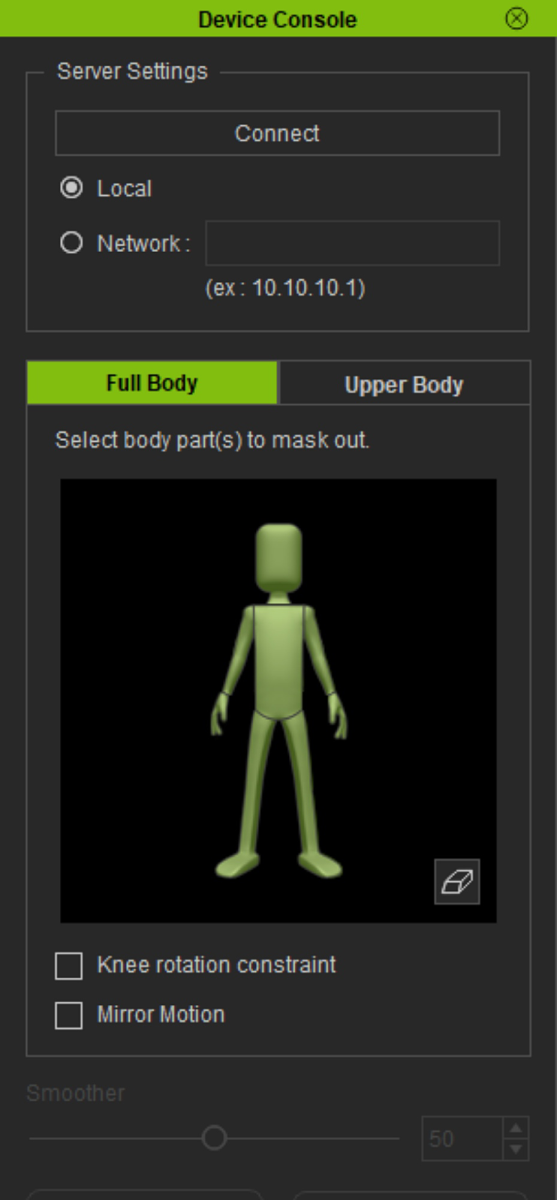 In this panel I see the options for selecting ● Local ... and ... ● NetworkSo wouldn't that mean that it's possible to run the mocap 'locally' (without the need for internet?) In this panel I see the options for selecting ● Local ... and ... ● NetworkSo wouldn't that mean that it's possible to run the mocap 'locally' (without the need for internet?)
Also the Reallusion instructions* don't mention anything about internet connection .... * https://www.reallusion.com/iclone/mocap/setup.htmlSteve.
◇◇◇ All things are difficult before they are easy. ◇◇◇ - Thomas Fuller
--------------------------------------------------------------------------------------------------------------------------------------------------------
Please be patient with me ..... I don't always 'get it' the first time 'round - not even the 2nd time! :( - yikes! ... ● MSI GT72VR Laptop, i7 7700HQ 4-Core 3.8 GHz 16GB RAM; Nvidia 1070, 8GB Vram ● iClone-7.93 ● 3DXChange Pipeline 7.81 ● CC-3 Pipeline 3.44 ● Live Face ● HeadShot ● Brekel Pro-Body ● Popcorn FX ● iRAY ● Kinect V2 ● DaVinci Resolve17 ● Mixcraft 8.1
|
|
|
|
|
Snarp Farkle
|
Snarp Farkle
Posted 7 Years Ago
|
|
Group: Forum Members
Last Active: Last Year
Posts: 770,
Visits: 3.6K
|
Well I've had other problems arise that had delayed my continuation of the Mocap trial, however today it is in the 70's and no rain so I set up my laptop and Kinect sensor and gave it a try. After connecting everything and starting the Microsoft Kinect for Xbox One, Kinect Mocap Plug-in_Xbox_One, and iClone7 I could not see anything in the "Device Mocap Plug-in" screen and could not select anything except the Connect button, this didn't do anything. So I next tried the Kinect Mocap Plug-in_Xbox_One panel and it came alive! I could see myself in the screen and all the buttons and check boxes were selectable. After all this time it wasn't working! :angry:
To make a long, boring story short, I found that I must be connected to the internet to use this software and guess what I don't have in my new office? Yeah no internet. The wifi signal isn't strong enough to connect out there so I bought a wifi extender and am working on getting that to work now. Not sure why this setup needs to connect to the internet, seems silly to me to restrict the plugin. :ermm:
At least I now know that the Kinect for Xbox One sensor is working and hopefully by tomorrow I'll actually get a chance to try it out! :w00t:
Dell XPS 8900, Intel(R) Core(TM) i7-6700 CPU @ 3.40GHz, 3408 Mhz, 4 Core(s), 8 Logical Processor(s), 16 GB RAM, - 4 GB GeForce GTX 745, NVIDIA compatible.
Acer Aspire V Nitro Laptop, 2.5GHz Intel Core i5-7300HQ processor with 6MB cache, 256GB solid state drive, 16GB Ram, 4 GB NVIDIA GeForce GTX 1050 Ti graphics.
|
|
|
|
|
sonic7
|
sonic7
Posted 7 Years Ago
|
|
Group: Forum Members
Last Active: 2 Years Ago
Posts: 1.7K,
Visits: 19.4K
|
Bruce .... I should have all the hardware this coming week. Then I'll download the trial version of iClone's mocap plugin. First hurdle will be whether or not my laptop will (can) take kindly to the Kinect .... If it won't (can't), - I'll have to go to 'plan B' ..... which I'm yet to work out ... :doze:
--------------------------------------------------------------------------------------------------------------------------------------------------------
Please be patient with me ..... I don't always 'get it' the first time 'round - not even the 2nd time! :( - yikes! ... ● MSI GT72VR Laptop, i7 7700HQ 4-Core 3.8 GHz 16GB RAM; Nvidia 1070, 8GB Vram ● iClone-7.93 ● 3DXChange Pipeline 7.81 ● CC-3 Pipeline 3.44 ● Live Face ● HeadShot ● Brekel Pro-Body ● Popcorn FX ● iRAY ● Kinect V2 ● DaVinci Resolve17 ● Mixcraft 8.1
|
|
|
|
|
bruceberg
|
bruceberg
Posted 7 Years Ago
|
|
Group: Forum Members
Last Active: 6 Years Ago
Posts: 172,
Visits: 500
|
Hey Sonic7...I had to laugh reading your last post. We have a smaller house compared to most, so we use every bit of space available to us. So the declutter exercise you refer to is SOP here:). I did purchase the Curve Editor plugin yesterday, hoping that it will be a useful tool to dramatically improve the smoothness of my character animations. I haven't had a chance to put it through it's paces yet, though. (grandkids weekend) When do you hope to have your Kinect up and running?
Regards...Bruce
|
|
|
|
|
sonic7
|
sonic7
Posted 7 Years Ago
|
|
Group: Forum Members
Last Active: 2 Years Ago
Posts: 1.7K,
Visits: 19.4K
|
Bruce ..... I take it that this is the Kinect you're using (version 1): 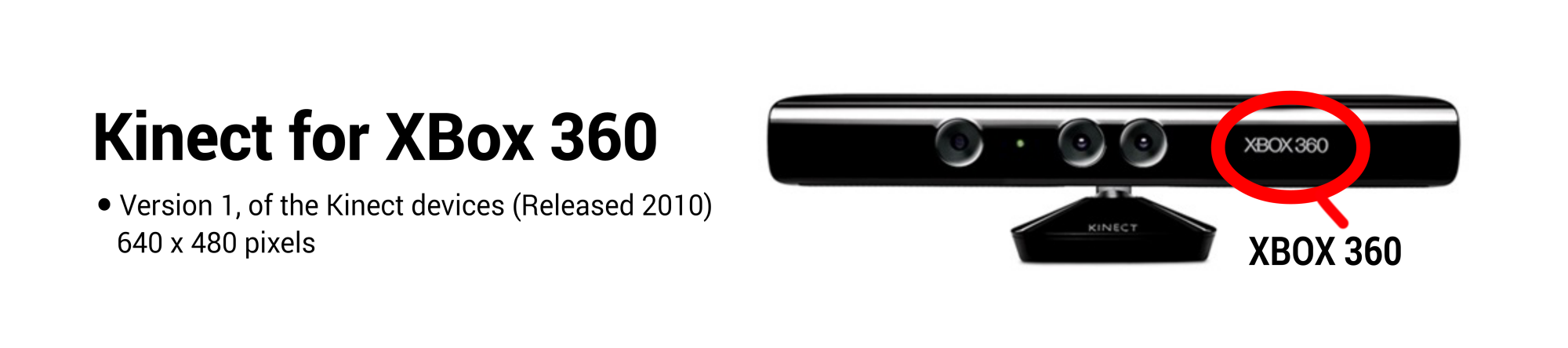 From my understanding, version 1 uses USB 2 (though requiring most of the available bandwidth). On the other hand, Version 2 has to go in via USB 3 because there's even more data being sent to the PC. - That's why I was considering Version 1, (knowing I'd be on a laptop). But as you say, if the CPU and memory are up there - then hopefully all will be sweet. It's nice you've got a basement area to set up your mocap ! At least you can leave it set up? - I'll have to 'unclutter' somewhere in my house - not sure where yet! 😩 ◇◇◇ Whether you think you can or think you can’t, you’re right. ◇◇◇ - Henry Ford
--------------------------------------------------------------------------------------------------------------------------------------------------------
Please be patient with me ..... I don't always 'get it' the first time 'round - not even the 2nd time! :( - yikes! ... ● MSI GT72VR Laptop, i7 7700HQ 4-Core 3.8 GHz 16GB RAM; Nvidia 1070, 8GB Vram ● iClone-7.93 ● 3DXChange Pipeline 7.81 ● CC-3 Pipeline 3.44 ● Live Face ● HeadShot ● Brekel Pro-Body ● Popcorn FX ● iRAY ● Kinect V2 ● DaVinci Resolve17 ● Mixcraft 8.1
|
|
|
|
|
bruceberg
|
bruceberg
Posted 7 Years Ago
|
|
Group: Forum Members
Last Active: 6 Years Ago
Posts: 172,
Visits: 500
|
Hi Sonic7...Just a couple of random thoughts...I'm certainly no computer expert by any stretch, but I wouldn't think laptop over desktop would have much to do with it. Probably more a matter of CPU and memory, both amount and speed. When I decided to get a Kinect, V1 and V2 were both available, but the V2 was more expensive. I never like to spend more than I have to, (who does?) so I asked on this forum if I would get any significant benefit from spending the money. I decided, based on comments I received, the V1 camera would work just as well as V2 for what we use it for. So I'll be curious what your experience will be. Good luck!!! BTW, I was using mine on a laptop (i5), mostly because I need to work where there's room, and that's in my basement, 1 floor down from the desktops in my studio.
Regards...Bruce
|
|
|
|
|
sonic7
|
sonic7
Posted 7 Years Ago
|
|
Group: Forum Members
Last Active: 2 Years Ago
Posts: 1.7K,
Visits: 19.4K
|
Bruce .... I'm only aware of 'field of view' and 'resolution' differences (mainly). Supposedly the V2 is able to resolve down to finger width - that's according to videos I've seen. But whether the V2 is any more immune from the 'jitter and instability' - I won't know until I try it. I actually considered getting the Version 1 - mainly because I figured it would be less demanding on resources (I use a laptop). But then down the track I might end up with a better PC - so I bought the Vers 2. Snarp, and probably yourself have beefier computing power, and if you're using a different connect version - I guess it's going to be difficult 'comparing notes' since hardware variables won't make possible any direct comparisons. But we can still post our results and all benefit from our accumulated findings. I'm not expecting great results to be honest Bruce. The other 'variable' in all this is that each of us will have different 'expectations' regarding performance. One might be wanting to capture dynamic 'action' motions - someone else - only fairly 'passive' motions. At the end of the day, it's probably the cheapest entry level mocap around, so as long as the results are 'usable' and can be done in less time than comparable 'hand made' motions - then it'll be worth it. 😊 Steve. ◇◇◇ Things work out best for those who make the best of how things work out. ◇◇◇ - Positive Quote By John Wooden
--------------------------------------------------------------------------------------------------------------------------------------------------------
Please be patient with me ..... I don't always 'get it' the first time 'round - not even the 2nd time! :( - yikes! ... ● MSI GT72VR Laptop, i7 7700HQ 4-Core 3.8 GHz 16GB RAM; Nvidia 1070, 8GB Vram ● iClone-7.93 ● 3DXChange Pipeline 7.81 ● CC-3 Pipeline 3.44 ● Live Face ● HeadShot ● Brekel Pro-Body ● Popcorn FX ● iRAY ● Kinect V2 ● DaVinci Resolve17 ● Mixcraft 8.1
|
|
|
|