|
Author
|
Message
|
|
wires
|
|
|
Group: Forum Members
Last Active: Last Month
Posts: 5.7K,
Visits: 26.5K
|
I can't see how CC3 could replace 3DXchange. How is a stand alone Character creation tool going to import and convert assets from SketchUp and the whole bunch of other Prop formats available. In this FT Issue RL said that an improved (64 Bit) version was planned for version 8. Looking at the various issues reported in the FT there are a large number listed as Assigned, and some even marked as Solved - so I believe that they are indeed still working of the Product.
Gerry
System: Win 10 Pro (21H2), Asus X99-E WS, CPU i7-5930K -3,5 GHz, 32 GB DDR4 2666-16 RAM, NVidia GTX 1080 Ti GPU - 11 GB VRAM(Driver Studio-536.99), Samsung 850 Pro 512 GB SSD, 6 TB HD storage.
|
|
|
|
|
Rogue Anime
|
Rogue Anime
Posted 8 Years Ago
|
|
Group: Forum Members
Last Active: 3 Years Ago
Posts: 548,
Visits: 3.4K
|
grabiller (3/12/2018)
I have the feeling that 3DXchange may actually disappear, from what described in the 2018 Roadmap and info we got about enhanced pipeline exchange with the next CC3. CC3 may be its replacement.
I think the unanswered question here is will the 'free' FUNCTION LIMITED CC3 version promised to us handle the tasks of 3DX7.2 is SUPPOSED to do (but does NOT) WITHOUT having to BUY the full version of CC3? I think I already know the answer, and if we are to be forced to buy the full version of CC3, WILL WE GET A REFUND on our purchase of 3DX7 in order to buy the full CC3 version? PETER - Please clarify this, I am NOT the only one asking this question, I'm certain of that. ~V~
Val RogueAnanda
|
|
|
|
|
GOETZIWOOD STUDIOS
|
GOETZIWOOD STUDIOS
Posted 8 Years Ago
|
|
Group: Forum Members
Last Active: 5 Years Ago
Posts: 1.2K,
Visits: 7.2K
|
I have the feeling that 3DXchange may actually disappear, from what described in the 2018 Roadmap and info we got about enhanced pipeline exchange with the next CC3. CC3 may be its replacement.
--
guy rabiller | GOETZIWOOD STUDIOS
"N.O.E." (Nations Of Earth) Sci-Fi TV Show, Showrunner.
|
|
|
|
|
TopOneTone
|
TopOneTone
Posted 8 Years Ago
|
|
Group: Forum Members
Last Active: 3 Years Ago
Posts: 329,
Visits: 3.2K
|
Still having constant problems with 3dxchange 7.2 crashing when the same models work perfectly well in 3dxchange 6. I notice that despite being the originators of this thread, there has been no further comment from RL, even after 3 pages of people identifying a variety of problems. Given the exorbitant price RL charge for this product you would have thought RL would be on top of these issues or at least provide regular progress updates to indicate they are working to address these problems....but not a word!
MY STRONG ADVICE TO ANYONE CONSIDERING BUYING 3DXCHANGE 7 IS DON'T!
Until the current issues are fixed this product is a total waste of money.
|
|
|
|
|
Rogue Anime
|
Rogue Anime
Posted 8 Years Ago
|
|
Group: Forum Members
Last Active: 3 Years Ago
Posts: 548,
Visits: 3.4K
|
Colonel_Klink (3/8/2018)
The workaround atm is to export from iClone 7 to 3DXchange 7 to OBJ, then import the obj into 3DXchange 6, do the smoothing, then export as OBJ... it works but it is NOT why I purchased 3DXchange 7.Colonel - I have had to go BACK to 3DX6.5 to do MANY things since I purchased 3DX7, and that's really not the most troubling thing about 3DX7 - What is more troubling about this is that by all indications there will be NO fixes for 3DX7. If there are to be ANY fixes addressed to this, I heard none here or missed something...? :angry: ~V~
Val RogueAnanda
|
|
|
|
|
GOETZIWOOD STUDIOS
|
GOETZIWOOD STUDIOS
Posted 8 Years Ago
|
|
Group: Forum Members
Last Active: 5 Years Ago
Posts: 1.2K,
Visits: 7.2K
|
FYI: 3DXchange v7.2 Replace Mesh Is Broken
--
guy rabiller | GOETZIWOOD STUDIOS
"N.O.E." (Nations Of Earth) Sci-Fi TV Show, Showrunner.
|
|
|
|
|
Colonel_Klink
|
Colonel_Klink
Posted 8 Years Ago
|
|
Group: Forum Members
Last Active: 4 hours ago
Posts: 1.1K,
Visits: 7.7K
|
OBJ export from 3DXchange 7.2 Pro is not keeping smoothing done in Xchange Recently I purchased 3DX 7 Pro so I could export my prop files from iClone 7 as 3DX 6.5 will not open iClone 7 files. However I find that I am not getting the same results from 3DX 7 as I do from 3DX 6 as you can see from the 2 pics below when I import the model into Substance Painter 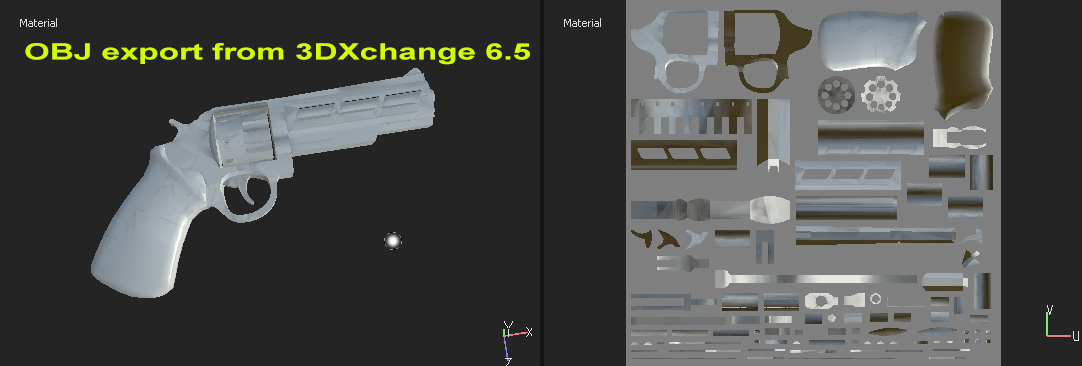 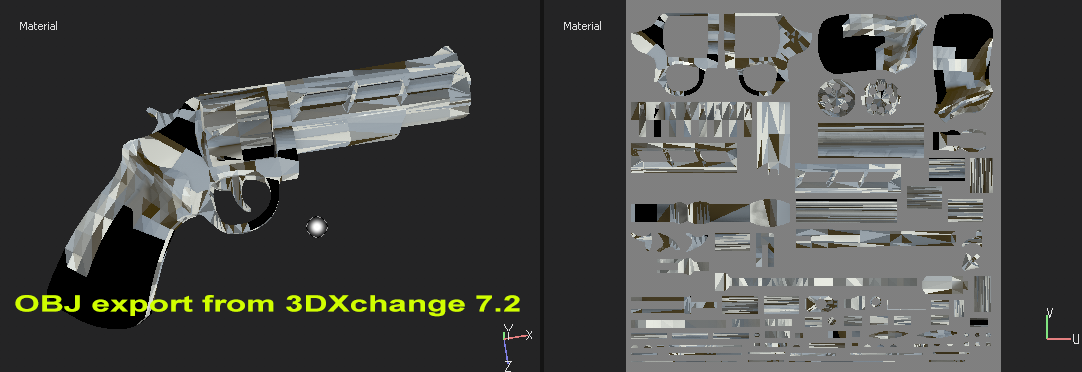 I have checked the settings are the same for both exports. The workaround atm is to export from iClone 7 to 3DXchange 7 to OBJ, then import the obj into 3DXchange 6, do the smoothing, then export as OBJ... it works but it is NOT why I purchased 3DXchange 7.
* * * * * * * * * * * * * * * * * *
See all my content in one place
Facebook Page: CWK3D Game and Film Content
Cancer Survivor - Retired Teacher - Geriatric Icloner still learning
Hardware: ZX80; Operating System- ZX80 Basic; CPU - ZX80 @ 3.25 MHz; Memory - 1KB; Hard Drive - N/A; Storage - Cassette; Monitor: Any old CRT TV
|
|
|
|
|
Rampa
|
|
|
Group: Forum Members
Last Active: 2 Months Ago
Posts: 8.2K,
Visits: 62.6K
|
TopOneTone (2/23/2018)
I have also had some problems with 3dxchange7. I purchased a Daz model of a dog and exported it out of Daz. Imported it into 3dxchange 7 ok, added the animation to perform and then converted to a non human.
My first issue was that when I tried to export into iclone I kept getting the following error message "Export Failed. Please check your access right to the folder and the disk space." I tried changing the folder locations for the character and the motion, but it made no difference. I went through the whole process again using 3dxchange 6 and it worked first time.
My second issue came when I realised I needed to increase the size of the dog. There appeared no way to do this in iclone or 3dxchange, so I went back to Daz. I simply increased the scale and everything looked fine in Daz, but when I brought it into 3dxchange 7 the front half of the dog was still the original size, while the back half was distorted with a huge bulging stomach. I tried the same thing with other Daz dogs and got exactly the same problem. Any thoughts on where I'm going wrong?
I have to say I am really disappointed that there is no way to adjust the character's size or the materials in 3dxchange. I can see there are options within the menu, but I can't access them.
For the export issue, check that you do not have any dots, or other non-alphanumerics in the names of the animations. I think the underscore "_" is the only non-alphnumeric you can use.
When you import it into 3DX, you can scale it before you convert it to an avatar. I would actually suggest not converting it, but leave it a prop. The motions will be embedded in the Perform menu for it, and iClone lets you edit the prop animation layer if you want to. A prop can be freely scaled, so you actually wouldn't even need to scale it in 3DX. You can add textures to the materials in the material section of 3DX, but I recommend doing the textures in iClone's material section. It's a bit more WYSIWYG.
|
|
|
|
|
TopOneTone
|
TopOneTone
Posted 8 Years Ago
|
|
Group: Forum Members
Last Active: 3 Years Ago
Posts: 329,
Visits: 3.2K
|
I have also had some problems with 3dxchange7. I purchased a Daz model of a dog and exported it out of Daz. Imported it into 3dxchange 7 ok, added the animation to perform and then converted to a non human.
My first issue was that when I tried to export into iclone I kept getting the following error message "Export Failed. Please check your access right to the folder and the disk space." I tried changing the folder locations for the character and the motion, but it made no difference. I went through the whole process again using 3dxchange 6 and it worked first time.
My second issue came when I realised I needed to increase the size of the dog. There appeared no way to do this in iclone or 3dxchange, so I went back to Daz. I simply increased the scale and everything looked fine in Daz, but when I brought it into 3dxchange 7 the front half of the dog was still the original size, while the back half was distorted with a huge bulging stomach. I tried the same thing with other Daz dogs and got exactly the same problem. Any thoughts on where I'm going wrong?
I have to say I am really disappointed that there is no way to adjust the character's size or the materials in 3dxchange. I can see there are options within the menu, but I can't access them.
|
|
|
|
|
Rampa
|
|
|
Group: Forum Members
Last Active: 2 Months Ago
Posts: 8.2K,
Visits: 62.6K
|
@Grfxman
Could you post a pic or video of the "ripping to shreds". It is most likely that the hip bone, or a torso bone, is incorrectly mapped.
The proper hip bone is the one right after the bone coming up from the floor. It may not be what looks like the hips.
|
|
|
|