|
Author
|
Message
|
|
elec_pikachu
|
elec_pikachu
Posted 5 Years Ago
|
|
Group: Forum Members
Last Active: Last Year
Posts: 6,
Visits: 77
|
I had this same problem. The issue is not a bug. It's that you're missing a step. iClone doesn't automatically expand your key-frames inside of a mocap or any other action. You have to force it to expand.
To do this, right click on the motion in the timeline and go to "Sample Motion Clip." You can select to sample optimized or every keyframe.
iClone will churn through the motion pulling out the individual keyframes. (May take some time) After that you should see them in the Curve Editor.
Hope this helps.
|
|
|
|
|
Snarp Farkle
|
Snarp Farkle
Posted 7 Years Ago
|
|
Group: Forum Members
Last Active: Last Year
Posts: 770,
Visits: 3.6K
|
Try watching this Webinar, it's very informative. iClone 7 1 Curve Editor Fun
Dell XPS 8900, Intel(R) Core(TM) i7-6700 CPU @ 3.40GHz, 3408 Mhz, 4 Core(s), 8 Logical Processor(s), 16 GB RAM, - 4 GB GeForce GTX 745, NVIDIA compatible.
Acer Aspire V Nitro Laptop, 2.5GHz Intel Core i5-7300HQ processor with 6MB cache, 256GB solid state drive, 16GB Ram, 4 GB NVIDIA GeForce GTX 1050 Ti graphics.
|
|
|
|
|
Alien Maniac
|
Alien Maniac
Posted 7 Years Ago
|
|
Group: Forum Members
Last Active: 4 Years Ago
Posts: 693,
Visits: 2.1K
|
Um I guess you missed the main post, it is greyed out and " not selectable". | | | | | | | | |
Text-to-speech function is limited to 200 characters
|
|
|
|
|
Podman1000
|
Podman1000
Posted 7 Years Ago
|
|
Group: Forum Members
Last Active: Last Year
Posts: 39,
Visits: 246
|
You have to convert the data as your first post reply indcated. It works for me....
|
|
|
|
|
WillFl
|
WillFl
Posted 7 Years Ago
|
|
Group: Forum Members
Last Active: 7 Years Ago
Posts: 38,
Visits: 161
|
Space Rider (1/27/2018)
Anyone else having such issues with the curve editor?
are there other people using the Curve editor who have encountered the above issue?
|
|
|
|
|
Alien Maniac
|
Alien Maniac
Posted 7 Years Ago
|
|
Group: Forum Members
Last Active: 4 Years Ago
Posts: 693,
Visits: 2.1K
|
Anyone else having such issues with the curve editor?
MSI GE66 Raider, Intel 10th Gen, I7, SC Turbo to 5.3 GHZ, 240HZ, 64GB 3300 Ram, 2x 1TB M2 SSD Drives, NVIDIA GPU RTX 2070/8GB, 55" Sony 4K Monitor External data drives total 7 TB. and an AUDIO Studio Recording system.
|
|
|
|
|
WillFl
|
WillFl
Posted 7 Years Ago
|
|
Group: Forum Members
Last Active: 7 Years Ago
Posts: 38,
Visits: 161
|
Space Rider (1/26/2018)
Confirmed
Sometimes it works but most of the time not. Same issue here. Greyed out.
I have had it working only 2 times since purchase. Arrgh.
It is greyed out in both menus. NO ability to use the PI.
I am uninstalling it and trying to re-install it....hope it works.
I will let you know the results here.
I tried re-installing as well, but to no avail. It looks like I can use the arrow keys to go up and down the items in the curve editor but clicking on them is not working.
|
|
|
|
|
Alien Maniac
|
Alien Maniac
Posted 7 Years Ago
|
|
Group: Forum Members
Last Active: 4 Years Ago
Posts: 693,
Visits: 2.1K
|
I re-installed the Curve editor PI and NO LUCK. It will not work. Same problem. Anyone have a clue? Sure would be nice to be able to use it. I did not put a ticket in yet as there may be a solution here? | | | | | | | | |
Text-to-speech function is limited to 200 characters
|
|
|
|
|
Alien Maniac
|
Alien Maniac
Posted 7 Years Ago
|
|
Group: Forum Members
Last Active: 4 Years Ago
Posts: 693,
Visits: 2.1K
|
Confirmed
Sometimes it works but most of the time not. Same issue here. Greyed out.
I have had it working only 2 times since purchase. Arrgh.
It is greyed out in both menus. NO ability to use the PI.
I am uninstalling it and trying to re-install it....hope it works.
I will let you know the results here.
MSI GE66 Raider, Intel 10th Gen, I7, SC Turbo to 5.3 GHZ, 240HZ, 64GB 3300 Ram, 2x 1TB M2 SSD Drives, NVIDIA GPU RTX 2070/8GB, 55" Sony 4K Monitor External data drives total 7 TB. and an AUDIO Studio Recording system.
|
|
|
|
|
WillFl
|
WillFl
Posted 7 Years Ago
|
|
Group: Forum Members
Last Active: 7 Years Ago
Posts: 38,
Visits: 161
|
Can(RL) (12/25/2017)
WillFl (12/21/2017)
Hi Guys,
not sure if its just me... but I can seem to click and select anything in the curve editor.. any in-depth curve editor tutorials?
Hi WillFl,
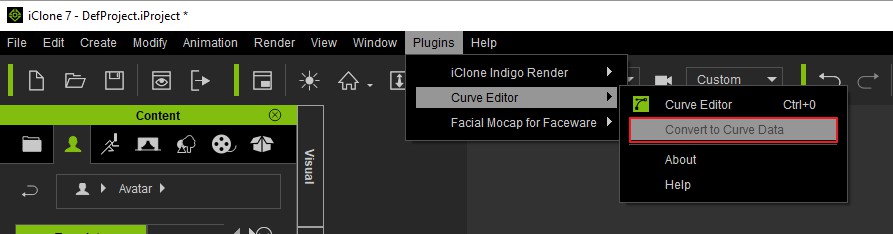
Please check the object needs to "convert to curve data" or not.- Select Object > Menu > Plugins > Curve Editor > Convert to Curve data
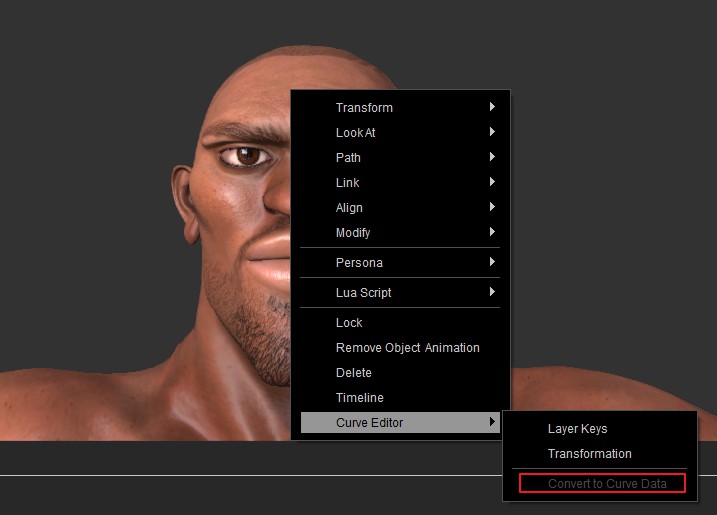
 - Select Object > Right click on the object > Curve Editor > Convert to Curve data
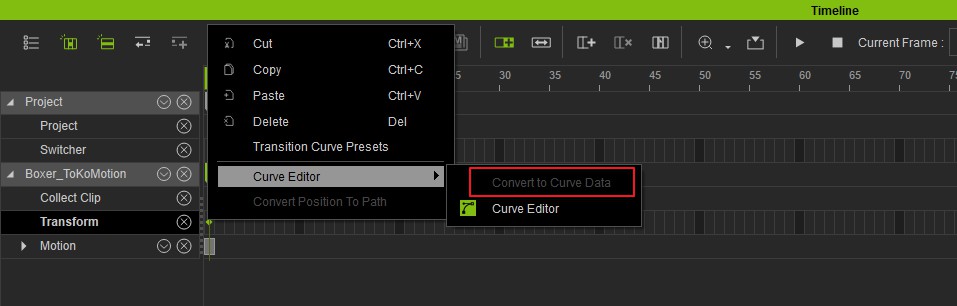
 - Select Object > Right click on the Timeline Key or Clip > Curve Editor > Convert to Curve data
Thanks,
Can(RL) When I do that, mine looks greyed out... I have tested with different characters and applied mocap to them, but that option still remains greyed out..
|
|
|
|