|
Author
|
Message
|
|
hirospot
|
hirospot
Posted 9 Years Ago
|
|
Group: Forum Members
Last Active: 5 Years Ago
Posts: 241,
Visits: 5.9K
|
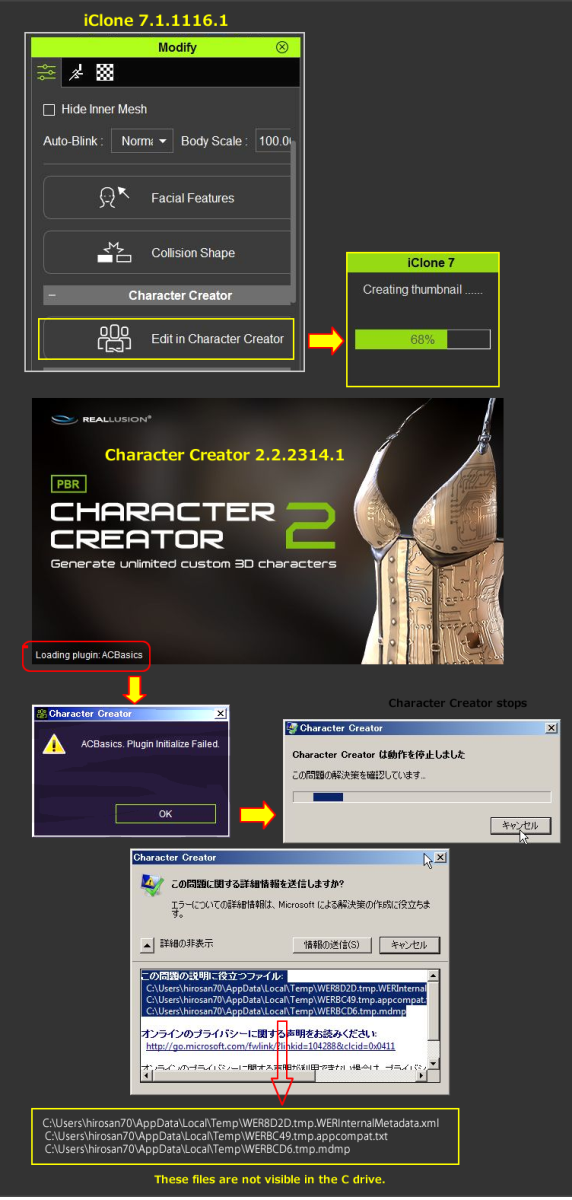
[Edit in Character Creator] fails with ACBasics. Plugin initialize Failure. iClone7.1 and CC2.2 are installed safely, however, the above issue happens in my case.
Process:
1) Apply a CC character or other character and select the character on the iC7.1 screen.
2) In the Modify panel, go to Edit tab >> Character Creator section and
click the [Edit in Character Creator] button.
3) CC2 splash screen pops up and start loading plugin.ACBasics.
4) ACBasics. Plugin Initialize Faild with the useful files information.
5) These files are not visible at the indicated location.
System: Win7 Pro SP1 64 Bit (Jp)
Thank you for your attention,
Hiro
|
|
|
|
|
wires
|
|
|
Group: Forum Members
Last Active: Last Month
Posts: 5.7K,
Visits: 26.5K
|
Colonel_Klink (11/18/2017)
Trying unsuccessfully to edit characters in CC2 using "Edit in Character Creator" from within iClone.
It appears that CC is not getting the complete message as the icon on the task bar flashes but CC doesn't load the model.
It worked fine through iClone 7.02.
Bob, Have you updated CC, and 3DXchange, after updating iClone? Everything is working as expected on my system.
Gerry
System: Win 10 Pro (21H2), Asus X99-E WS, CPU i7-5930K -3,5 GHz, 32 GB DDR4 2666-16 RAM, NVidia GTX 1080 Ti GPU - 11 GB VRAM(Driver Studio-536.99), Samsung 850 Pro 512 GB SSD, 6 TB HD storage.
|
|
|
|
|
wires
|
|
|
Group: Forum Members
Last Active: Last Month
Posts: 5.7K,
Visits: 26.5K
|
@toystorylab, I can confirm the issue with an image plane not showing on the Timeline, or Scene Manager, when added with right mouse click drag & drop. I've added a comment to the FB issue. 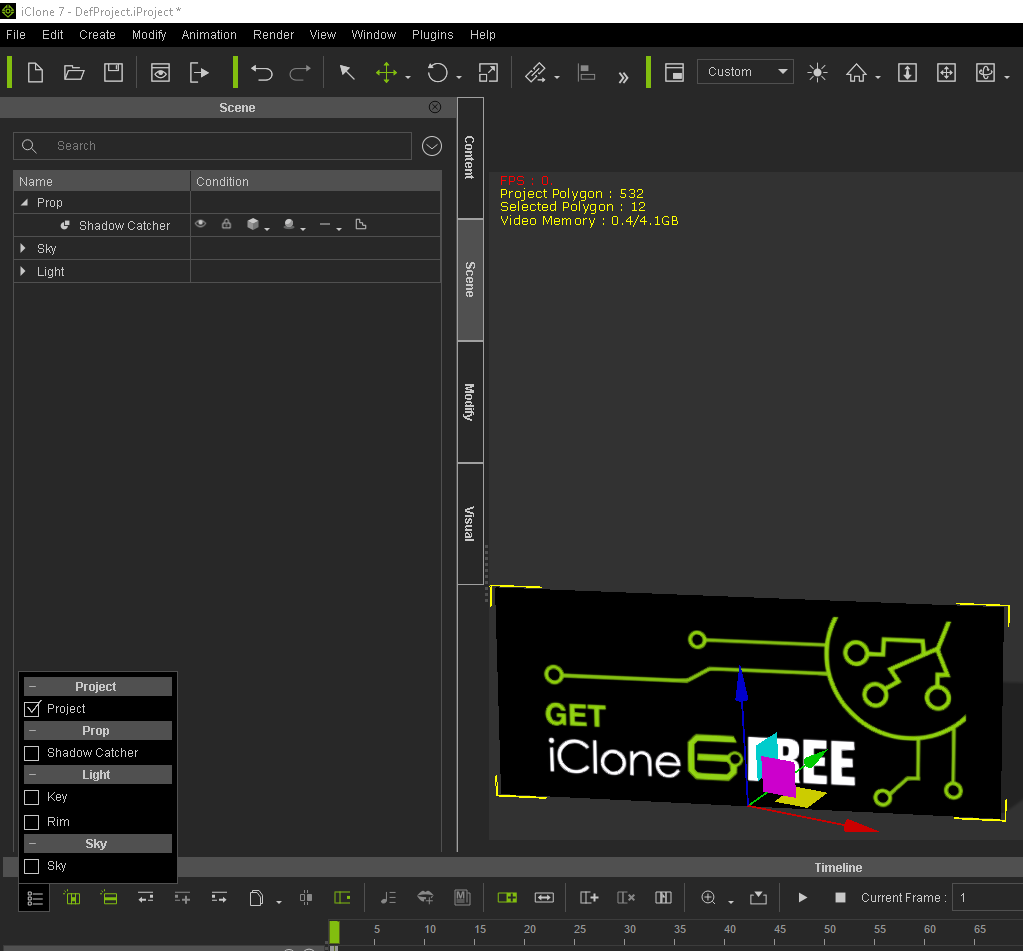 Gerry
Gerry
System: Win 10 Pro (21H2), Asus X99-E WS, CPU i7-5930K -3,5 GHz, 32 GB DDR4 2666-16 RAM, NVidia GTX 1080 Ti GPU - 11 GB VRAM(Driver Studio-536.99), Samsung 850 Pro 512 GB SSD, 6 TB HD storage.
|
|
|
|
Rockoloco666
|
Rockoloco666
Posted 9 Years Ago
|
|
Group: Banned Members
Last Active: 6 Years Ago
Posts: 762,
Visits: 2.0K
|
could someone confirm if pick target DOF works? on my system it assumes everything is super close to the camera, it doesn't matter where you click.
|
|
|
|
|
Rampa
|
|
|
Group: Forum Members
Last Active: 2 Months Ago
Posts: 8.2K,
Visits: 62.6K
|
Cannot drag-n-drop iMaterial onto heightmap terrain regions anymore. Not really sure if this is different in this update, or was an issue earlier as well. Before, we could easily add materials to the regions defined in the mask by drag-n-dropping them onto the terrain in the preview window.  On a related note. Can we have the UVW shader available for any object, not just the HM terrain?
|
|
|
|
|
Kelleytoons
|
Kelleytoons
Posted 9 Years Ago
|
|
Group: Forum Members
Last Active: 2 Years Ago
Posts: 9.2K,
Visits: 22.1K
|
raxel_67 (11/18/2017)
could someone confirm if pick target DOF works? on my system it assumes everything is super close to the camera, it doesn't matter where you click.Works fine for me (even with transparent materials).
Alienware Aurora R16, Win 11, i9-149000KF, 3.20GHz CPU, 64GB RAM, RTX 4090 (24GB), Samsung 870 Pro 8TB, Gen3 MVNe M-2 SSD, 4TBx2, 39" Alienware Widescreen Monitor
Mike "ex-genius" Kelley
|
|
|
|
|
Colonel_Klink
|
Colonel_Klink
Posted 9 Years Ago
|
|
Group: Forum Members
Last Active: 4 days ago
Posts: 1.1K,
Visits: 7.7K
|
wires (11/18/2017)
Colonel_Klink (11/18/2017)
Trying unsuccessfully to edit characters in CC2 using "Edit in Character Creator" from within iClone.
It appears that CC is not getting the complete message as the icon on the task bar flashes but CC doesn't load the model.
It worked fine through iClone 7.02.
Bob, Have you updated CC, and 3DXchange, after updating iClone? Everything is working as expected on my system. Hi Gerry Apparently the radiation I had earlier in the year not only destroyed my throat cancer, but must of zapped part of my brain as well :) I forgot the rule 'Update iClone, then update CC as well' :D Cheers Bob
* * * * * * * * * * * * * * * * * *
See all my content in one place

Facebook Page: CWK3D Game and Film Content
Cancer Survivor - Retired Teacher - Geriatric Icloner still learning
Hardware: ZX80; Operating System- ZX80 Basic; CPU - ZX80 @ 3.25 MHz; Memory - 1KB; Hard Drive - N/A; Storage - Cassette; Monitor: Any old CRT TV
|
|
|
|
|
animagic
|
animagic
Posted 9 Years Ago
|
|
Group: Forum Members
Last Active: Last Month
Posts: 15.8K,
Visits: 31.4K
|
The problem with hair becoming transparent in front of particles is still there, unfortunately:  I reported this in FT 3373, but since this is really a big visual issue without workarounds, I'm re-reporting it. Unless it's just me...:unsure:
|
|
|
|
|
danlcort7
|
danlcort7
Posted 9 Years Ago
|
|
Group: Forum Members
Last Active: 8 Years Ago
Posts: 26,
Visits: 201
|
teacher thanks for answer me but the issue is about the prop 3D BLOCKS SUBSTANCE MEDIA MATERIAL SUBSTANCE POWER 200 ARCHITECTURE & STREET BRICKS_001 When I drag to prop to change the material , it doesnt work . in version IClone 6.54 pro and IClone 7.01 works al right but in this version update 7.1 it doest work right in my system. why ? I dont know Can you help me ? best regard 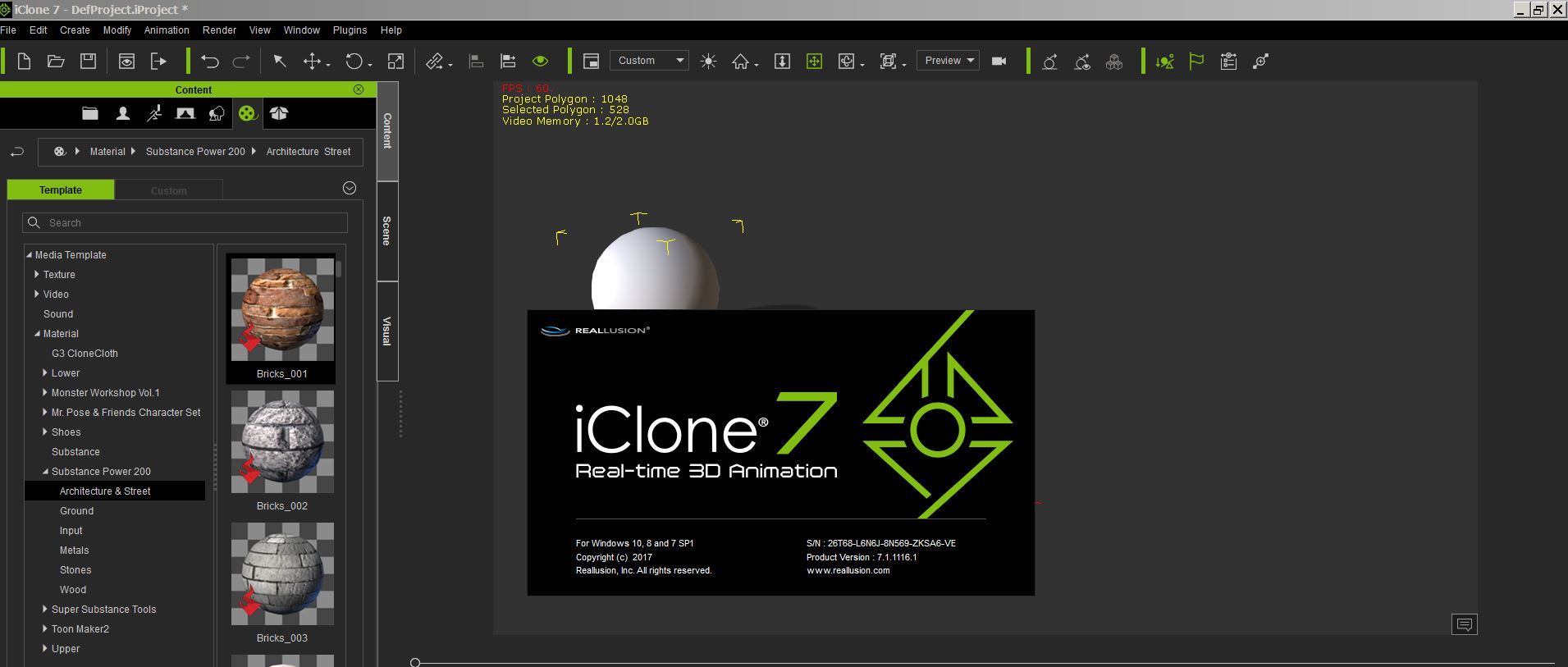  Daniel
|
|
|
|
|
rogyru
|
rogyru
Posted 9 Years Ago
|
|
Group: Forum Members
Last Active: 2 Years Ago
Posts: 497,
Visits: 1.3K
|
Try to Click on the material for mohawk hair and click the alpha threshold box and the hair will show just alter the slider for the alpha setting animagic (11/18/2017)
The problem with hair becoming transparent in front of particles is still there, unfortunately: I reported this in FT 3373, but since this is really a big visual issue without workarounds, I'm re-reporting it. Unless it's just me...:unsure:
|
|
|
|